1. Bubuka
This manual provides comprehensive instructions for the setup, operation, maintenance, and troubleshooting of your Cherry STREAM DESKTOP RECHARGE Keyboard and Mouse Combo. Please read this manual carefully before using the product to ensure proper functionality and longevity.
The Cherry STREAM DESKTOP RECHARGE is a wireless keyboard and mouse set designed for productivity, featuring rechargeable batteries, AES-128 encryption for secure data transmission, and CHERRY's SX scissor technology for a precise and quiet typing experience.
2. Eusi Paket
- Cherry STREAM DESKTOP RECHARGE Keyboard
- Cherry STREAM DESKTOP RECHARGE Mouse
- Panarima nirkabel USB
- Kabel Ngecas USB-C
- GP ReCyko+ Rechargeable NiMH Batteries (pre-installed or included separately)
- Manual Pamaké ieu
3. Setélan
Follow these steps to set up your Cherry STREAM DESKTOP RECHARGE combo:
- Buka bungkusan komponén: Sacara saksama miceun sadaya barang tina bungkusan.
- Install/Check Batteries: Ensure the GP ReCyko+ rechargeable NiMH batteries are correctly installed in both the keyboard and mouse. The battery compartments are typically located on the underside of each device.
- Charge Devices (Initial): Connect the USB-C charging cable to the keyboard and mouse, and then to a powered USB port (e.g., computer, USB wall adapter). Allow the devices to charge fully before first use. The status LEDs on the keyboard will indicate charging status.
- Connect USB Wireless Receiver: Colokkeun panarima nirkabel USB leutik kana port USB anu sayogi dina komputer anjeun.
- Daya Hurung: Turn on the keyboard and mouse using their respective power switches (usually located on the underside). The devices should automatically connect to the receiver.
- Fungsi Uji: Verify that both the keyboard and mouse are responsive. If not, refer to the Troubleshooting section.
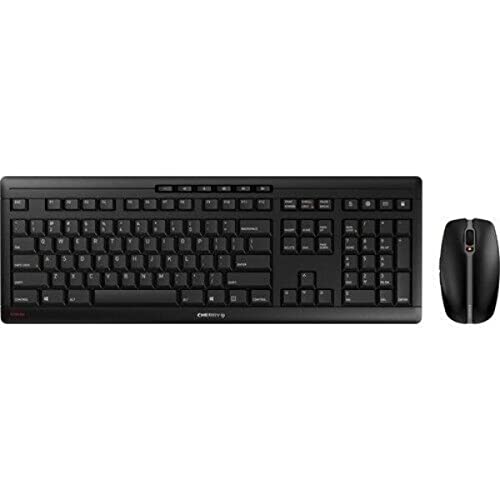
Image: The Cherry STREAM DESKTOP RECHARGE Keyboard and Mouse Combo, showing the full-sized black keyboard and the ergonomic black mouse.
4. Operasi
4.1 Fitur kibor
- SX Scissor Technology: Provides a precise and quiet keystroke for comfortable typing.
- LED Status: Integrated LEDs in keys (e.g., Caps Lock, Num Lock, Scroll Lock) indicate their active status.
- Tombol Fungsi: Dedicated multimedia and function keys provide quick access to common tasks.
- AES-128 Encryption: All keystrokes are encrypted with 128-bit CCM encryption before transmission for enhanced security.
4.2 Fitur Mouse
- 6-Key Design: Includes left, right, scroll wheel, and additional programmable buttons.
- Quiet Buttons: Designed for minimal click noise.
- Saklar DPI: Adjust the mouse resolution (speed) in 3 steps to suit your preference. The DPI switch is typically located near the scroll wheel.
- AES-128 Encryption: Mouse movements are also encrypted with 128-bit CCM encryption for secure data transmission.
4.3 CHERRY KEYS Software (Optional)
For maximum flexibility, you can download and install the optional CHERRY KEYS software from the official Cherry website. This application allows you to configure and customize the keyboard and mouse functions according to your individual needs, including remapping keys and buttons.
5. Pangropéa
5.1 beberesih
- kibor: Make kaen nu lemes, teu aya lint rada dampened with water or a mild cleaning solution. Avoid excessive moisture. Do not spray cleaners directly onto the keyboard.
- Beurit: Ngusap beungeut ku lemes, garing atawa rada damp cloth. Clean the optical sensor area on the underside periodically to ensure smooth tracking.
- Umum: Disconnect the devices from power and turn them off before cleaning.
5.2 Battery Charging and Replacement
- Ngecas: Connect the USB-C cable to the charging port on the keyboard and mouse, and the other end to a USB power source. You can continue to use the devices while they are charging.
- Jenis Batré: The set uses standard NiMH rechargeable batteries, which can be easily replaced if their performance degrades over time. Unlike devices with permanently installed lithium cells, this design allows for user replacement.
- ngagantian: If battery life significantly decreases, replace the NiMH batteries with new, high-quality rechargeable NiMH batteries of the same type and capacity.
6. Cara ngungkulan
If you encounter issues with your Cherry STREAM DESKTOP RECHARGE combo, try the following solutions:
- Teu aya Koneksi/Alat Teu Responsif:
- Ensure the USB wireless receiver is securely plugged into a working USB port on your computer.
- Check that both the keyboard and mouse are powered on.
- Verify that the batteries are charged. Connect the charging cable to see if the devices respond.
- Coba colokkeun panarima USB kana port USB anu béda.
- Pindahkeun kibor sareng beurit langkung caket kana panarima USB pikeun nyingkahan masalah jangkauan.
- Balikan deui komputer anjeun.
- Laggy/Intermittent Performance:
- Ensure there are no large metal objects or other wireless devices (e.g., Wi-Fi routers, cordless phones) too close to the receiver that might cause interference.
- Check battery levels; low batteries can affect performance.
- Masalah nyukcruk beurit:
- Ngabersihan sensor optik dina underside beurit.
- Anggo beurit dina permukaan anu bersih, henteu reflektif atanapi alas beurit.
- Adjust the DPI setting using the DPI switch on the mouse.
- Masalah ngecas:
- Ensure the USB-C cable is fully inserted into both the device and the power source.
- Coba port USB atawa adaptor kakuatan béda.
- Verify the batteries are correctly installed and are not damaged.
7. Spésifikasi
| Fitur | Katerangan |
|---|---|
| Modél | JD-8560US-2 |
| merek | buah Cherry |
| Téhnologi konektipitas | USB Wireless (2.4 GHz) |
| Téhnologi Kibor | SX Scissor Technology |
| Énkripsi | AES-128 (Advanced Encryption Standard) |
| Tombol Beurit | 6-key with quiet buttons |
| Mouse DPI adjustment | 3-step DPI switch |
| Batré | Rechargeable NiMH (replaceable) |
| Port ngecas | USB-C |
| Alat nu cocog | Komputer Pribadi |
| Produsén | CHERRY DESKTOP |
| Tanggal Sadia munggaran | 20 Oktober 2021 |
8. Garansi jeung Rojongan
Cherry products are manufactured to high-quality standards. For information regarding warranty coverage, technical support, or service, please refer to the official Cherry website or contact your local Cherry distributor.
Keep your proof of purchase for warranty claims. For the latest drivers and software, including the CHERRY KEYS application, visit the official Cherry support page.
Pabrikan: CHERRY DESKTOP


