
Bubuka
Thank you for choosing the Audizio SB85 Soundbar with Subwoofer. This manual provides essential information for the safe and correct operation of your new audio system. Please read it thoroughly before use and retain it for future reference. The SB85 is designed to enhance your television's audio, providing a rich, immersive sound experience for movies, games, and music, complete with a dedicated subwoofer for powerful bass.
Parentah Kasalametan
- Baca sakabeh parentah taliti samemeh operasi alat.
- Keep the unit away from water, moisture, and heat sources.
- Ulah meungpeuk sagala bukaan ventilasi.
- Paké ngan kantétan / asesoris dieusian ku produsén.
- Cabut colokan alat nalika badai kilat atanapi nalika henteu dianggo kanggo waktos anu lami.
- Rujuk sadayana jasa ka tanaga jasa anu mumpuni.
- Do not expose the battery (if applicable) to excessive heat such as sunshine, fire, or the like.
Eusi pakét
Pastikeun sadaya item aya dina kotak:
- Audizio SB85 Soundbar
- Subwoofer kabel
- Kadali jauh
- Optical Cable (Toslink)
- Kabel AUX
- Adaptor kakuatan
- Manual pamaké
Produk Leuwihview
The Audizio SB85 system consists of a soundbar and a separate wired subwoofer, designed to deliver a powerful and clear audio experience.
Fitur Soundbar
- Integrated 150W speaker system with 4 speakers (2x 2cm range, 2x 2cm tweeter).
- Front LED display for status indication.
- Control buttons on the side panel.
- Multiple input options: HDMI (ARC), USB, Line In (AUX), Coaxial, Optical.
- Bluetooth 5.0 pikeun streaming audio nirkabel.

Image: Close-up of the Audizio SB85 Soundbar's control panel and its remote control, highlighting Bluetooth 5.0 and ease of use.

Gambar: internal view of the Audizio SB85 Soundbar's full-range speaker, emphasizing its 150W speaker system for an immersive audio experience.
Fitur Subwoofer
- 5.25-inch wired subwoofer for enhanced bass response.

Image: Close-up of the Audizio SB85 wired subwoofer, designed to amplify bass frequencies.
Disetél
1. Panempatan
Place the soundbar centrally below your television. The subwoofer can be placed on the floor near the soundbar, ideally in a corner for optimal bass reflection, but ensure it is not obstructed.

Image: Audizio SB85 Soundbar and Subwoofer setup in a living room, demonstrating room-filling sound and clean design.

Image: Audizio SB85 Soundbar placed below a television, illustrating its universal compatibility with any TV.
2. Nyambungkeun ka Daya
Connect the power adapter to the DC IN port on the soundbar and then plug it into a wall outlet (230 Vac/50 Hz).
3. Nyambungkeun Subwoofer
Connect the wired subwoofer to the dedicated subwoofer output port on the soundbar.
4. Nyambungkeun ka Sumber Audio
The SB85 offers several connection options:
- HDMI (ARC): For the best audio quality and control, connect an HDMI cable from the HDMI (ARC) port on the soundbar to the HDMI ARC port on your TV. This allows the TV to send audio to the soundbar and often enables TV remote control of the soundbar's volume.
- Optik (Toslink): Connect the included optical cable from the OPTICAL port on the soundbar to the Optical Digital Audio Out port on your TV or other audio source.
- Line In (AUX): Use the included AUX cable to connect the LINE IN port on the soundbar to the headphone jack or audio output of your device (e.g., smartphone, MP3 player).
- Koaksial: Connect a coaxial cable (not included) from the COAXIAL port on the soundbar to the Coaxial Digital Audio Out port on your TV or other audio source.
- USB: Insert a USB flash drive into the USB port for MP3 playback.
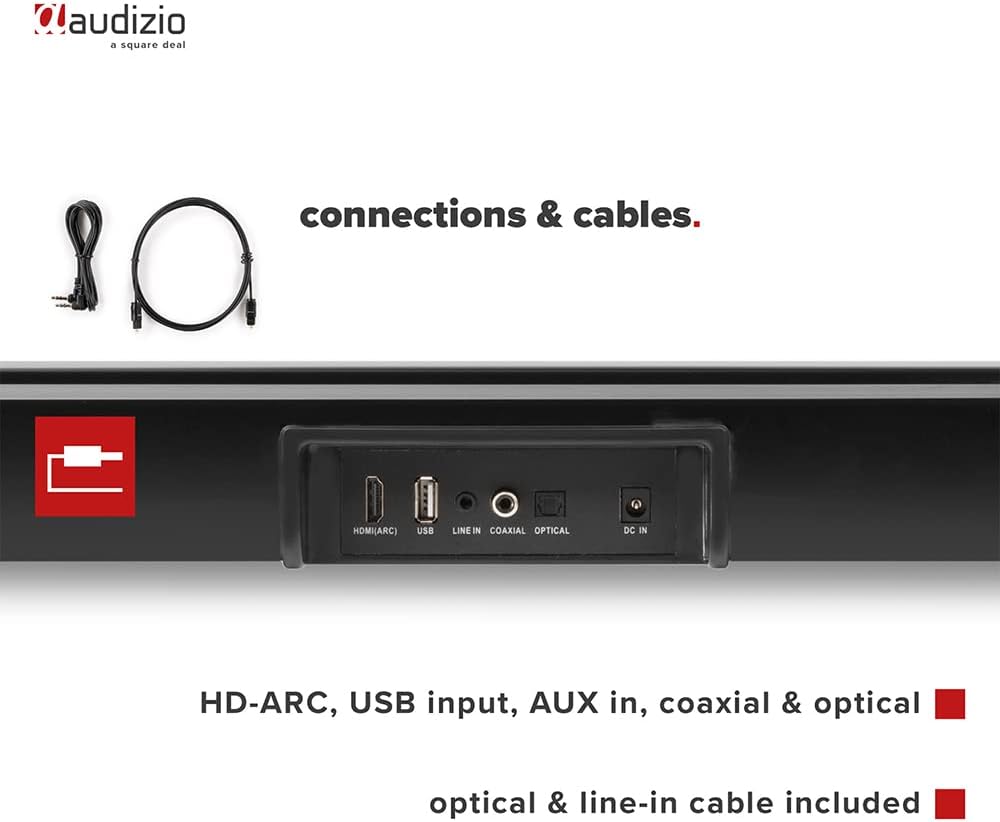
Gambar: Tukangeun view of the Audizio SB85 Soundbar showing various connection ports: HDMI (ARC), USB, Line In, Coaxial, and Optical. Includes optical and line-in cables.
Parentah Operasi
1. Daya Hurung / Pareum
Pencét tombol Daya dina bar sora atanapi kadali jauh pikeun ngaktipkeun atanapi mareuman unit.
2. Pamilihan Sumber Input
Press the 'MODE' button on the soundbar or the remote control repeatedly to cycle through the available input sources: HDMI (ARC), Optical, Coaxial, AUX, USB, and Bluetooth. The selected input will be shown on the front LED display.
3. Volume Control
Use the 'VOL+' and 'VOL-' buttons on the soundbar or the remote control to adjust the volume. The 'MUTE' button on the remote control will temporarily silence the audio.
4. Papasangan Bluetooth
- Switch the soundbar to Bluetooth mode using the 'MODE' button. The LED display will show 'BT'.
- Dina smartphone atanapi tablet anjeun, aktipkeun Bluetooth sareng milarian alat anu sayogi.
- Select 'Audizio SB85' from the list of devices.
- Once paired, the soundbar will indicate a successful connection, and you can stream audio wirelessly.
5. USB Playback
Selapkeun USB flash drive nu ngandung audio MP3 files into the USB port. The soundbar will automatically switch to USB mode and begin playing the music. Use the remote control to navigate tracks (play/pause, next/previous).
6. Fungsi Jauh Jauh
The remote control provides full functionality for the soundbar, including power, mode selection, volume, mute, and playback controls for USB and Bluetooth modes.
Pangropéa
beberesih
Wipe the soundbar and subwoofer surfaces with a soft, dry cloth. Do not use abrasive cleaners, waxes, or solvents as they may damage the finish. Ensure the device is unplugged before cleaning.
Panyimpenan
Upami nyimpen unit kanggo waktos anu lami, cabut tina stop kontak teras simpen di tempat anu tiis sareng garing, jauh tina sinar panonpoé langsung sareng suhu anu ekstrim.
Pamérésan masalah
| Masalah | Mungkin Cukang lantaranana | Solusi |
|---|---|---|
| Taya kakuatan | kabel kakuatan teu disambungkeun; stop kontak listrik lepat | Pariksa sambungan kabel kakuatan; Coba outlet béda. |
| Taya sora | Incorrect input selected; Volume too low; Mute activated; Cable connection loose | Select correct input source; Increase volume; Deactivate mute; Check all audio cable connections. |
| Bluetooth teu nyambung | Soundbar not in Bluetooth mode; Device too far; Device already connected to another unit | Switch soundbar to BT mode; Move device closer; Disconnect from other devices and try again. |
| Kadali jauh teu jalan | Batré béak; Halangan antara jarak jauh sareng soundbar | Ganti batré; Leupaskeun sagala halangan. |
spésifikasi
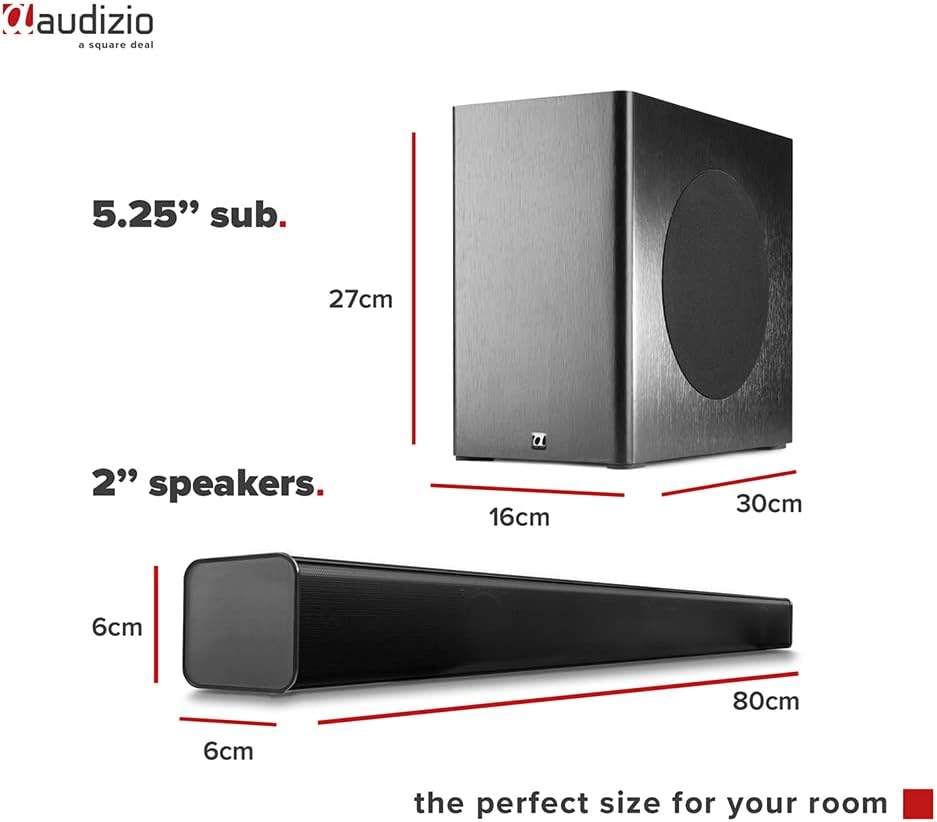
Image: Diagram showing the dimensions of the Audizio SB85 Soundbar and its subwoofer.
- Kaluaran kakuatan: 150W (Maks)
- Konfigurasi Speaker: 4 speakers (2x 2cm range, 2x 2cm tweeter)
- Ukuran Subwoofer: 5.25 inci
- Rentang Frékuénsi: 50 Hz - 16,000 Hz
- Max SPL: 125 dB
- Konektipitas: Bluetooth 5.0, HDMI (ARC), USB, Line In (AUX), Coaxial, Optical
- Mode Kaluaran Audio: Stereo
- Alat anu cocog: MP3 Player, Smartphone, TV
- Sumber Daya: 230 Vac/50 Hz (via electric cable)
- Soundbar Dimensions (L x W x H): 80 x 6 x 6 cm
- Subwoofer Dimensions (L x W x H): 16 x 30 x 27 cm
- Total beurat: 3.9 kg
- Jumlah modél: 100.292
Garansi sareng Rojongan
Kanggo inpormasi garansi atanapi dukungan téknis, mangga tingal dokuméntasi anu disayogikeun nalika mésér atanapi hubungi pangecér anjeun. Simpen bukti pameseran anjeun pikeun klaim garansi naon waé.