
1. Bubuka
Thank you for choosing the Andoer W200RGB LED Video Light. This manual provides detailed instructions for the proper setup, operation, and maintenance of your device. Please read this manual thoroughly before use to ensure optimal performance and longevity of the product. Keep this manual for future reference.
2. Produk Langkungview
2.1 Eusi pakét
Saatos muka bungkusan, mangga pariksa yén sadaya barang anu didaptarkeun di handap aya sareng dina kaayaan anu saé:
- Andoer W200RGB LED Video Light
- Kabel Ngecas USB Tipe-C
- Mini Tripod
- Tali pigeulang
- User Manual (English and Chinese)

Image: Contents of the Andoer W200RGB LED Video Light package, showing the light, USB cable, mini tripod, and wrist strap.
2.2 Fitur konci
- Desain kompak sareng portabel: Rod-shaped design, 20cm in length, lightweight for easy transport.
- Caang luhur: Equipped with 184 high-quality LED beads (69 white, 69 yellow, 46 RGB) with 7W output and CRI 95+.
- RGB Colored Light Mode: 360° adjustable HUE and 0%-100% adjustable brightness for diverse colorful lighting effects.
- CCT Cold & Warm Light Mode: Wide adjustable color temperature range from 2500K to 9000K.
- 20 Special Lighting Effects: Includes ambulance, fireworks, TV, candle, party, strobe, RGB strobe, red flash, green flash, blue flash, slow HSI, fast HSI, and more.
- Batré anu tiasa dieusi deui: Integrated 3.7V 3000mAh lithium battery for extended working time, rechargeable via Type-C port.
- Balik Magnét: Built-in magnets at both ends allow for easy attachment to magnetic surfaces.
2.3 Kontrol jeung tampilan
The Andoer W200RGB features intuitive controls and an LCD screen for easy operation.

Image: The control panel of the Andoer W200RGB LED Video Light, showing the power button, mode button, adjustment buttons, and LCD screen.
- Tombol Daya: Press and hold to turn the light on or off. Short press to switch between modes.
- Tombol Mode (M): Short press to cycle through CCT, HSI (RGB), and Scene modes.
- Up/Down Buttons (▲/▼): Adjust parameters such as brightness, color temperature, HUE, or saturation depending on the selected mode.
- Layar LCD: Displays current settings including mode, brightness, color temperature, HUE, and battery level.
- Port Ngecas Tipe-C: Located at one end for charging the internal battery.
3. Setélan
3.1 Ngecas Batré
The Andoer W200RGB LED Video Light comes with a built-in rechargeable lithium battery. Before first use, it is recommended to fully charge the device.
- Connect the supplied USB Type-C cable to the charging port on the light.
- Sambungkeun tungtung kabel USB anu sanés ka adaptor kakuatan USB standar (teu kalebet) atanapi port USB komputer.
- The LCD screen will indicate the charging status. A full charge typically takes a few hours.

Image: The Andoer W200RGB LED Video Light highlighting its internal 3.7V 3000mAh battery and Type-C charging capability.
3.2 Attaching the Mini Tripod
The included mini tripod can be attached to the 1/4-inch screw hole at the bottom of the light for stable placement.
- Locate the 1/4-inch screw hole on the bottom of the LED light.
- Screw the mini tripod securely into the screw hole.
- Adjust the tripod legs for desired height and stability.
4. Parentah Operasi
4.1 Daya Hurung/Pareuman
- To turn on the light, press and hold the Power button (labeled with a circle and vertical line) for a few seconds.
- To turn off the light, press and hold the Power button again for a few seconds.
4.2 Ngalihkeun Modeu
After powering on, short press the Mode button (M) to cycle through the available lighting modes:
- CCT Mode (Color Correlated Temperature): For adjusting white light from warm to cool.
- Modeu HSI (Hue, Saturasi, Intensitas): For adjusting RGB colored light.
- Modeu Adegan: For selecting special lighting effects.
4.3 CCT Mode Operation
In CCT mode, you can adjust the color temperature and brightness.
- Use the Up/Down buttons (▲/▼) to adjust the brightness from 0% to 100%.
- Short press the Power button to switch to color temperature adjustment. Use the Up/Down buttons (▲/▼) to adjust the color temperature from 2500K (warm) to 9000K (cool).

Image: Visual representation of brightness adjustments (0%, 50%, 100%) and color temperature settings (6000K, 5000K, 2800K) in CCT mode.
4.4 HSI Mode (RGB) Operation
In HSI mode, you can adjust the HUE (color), saturation, and brightness.
- Use the Up/Down buttons (▲/▼) to adjust the HUE (360° color spectrum).
- Short press the Power button to switch to saturation adjustment. Use the Up/Down buttons (▲/▼) to adjust saturation.
- Short press the Power button again to switch to brightness adjustment. Use the Up/Down buttons (▲/▼) to adjust brightness from 0% to 100%.
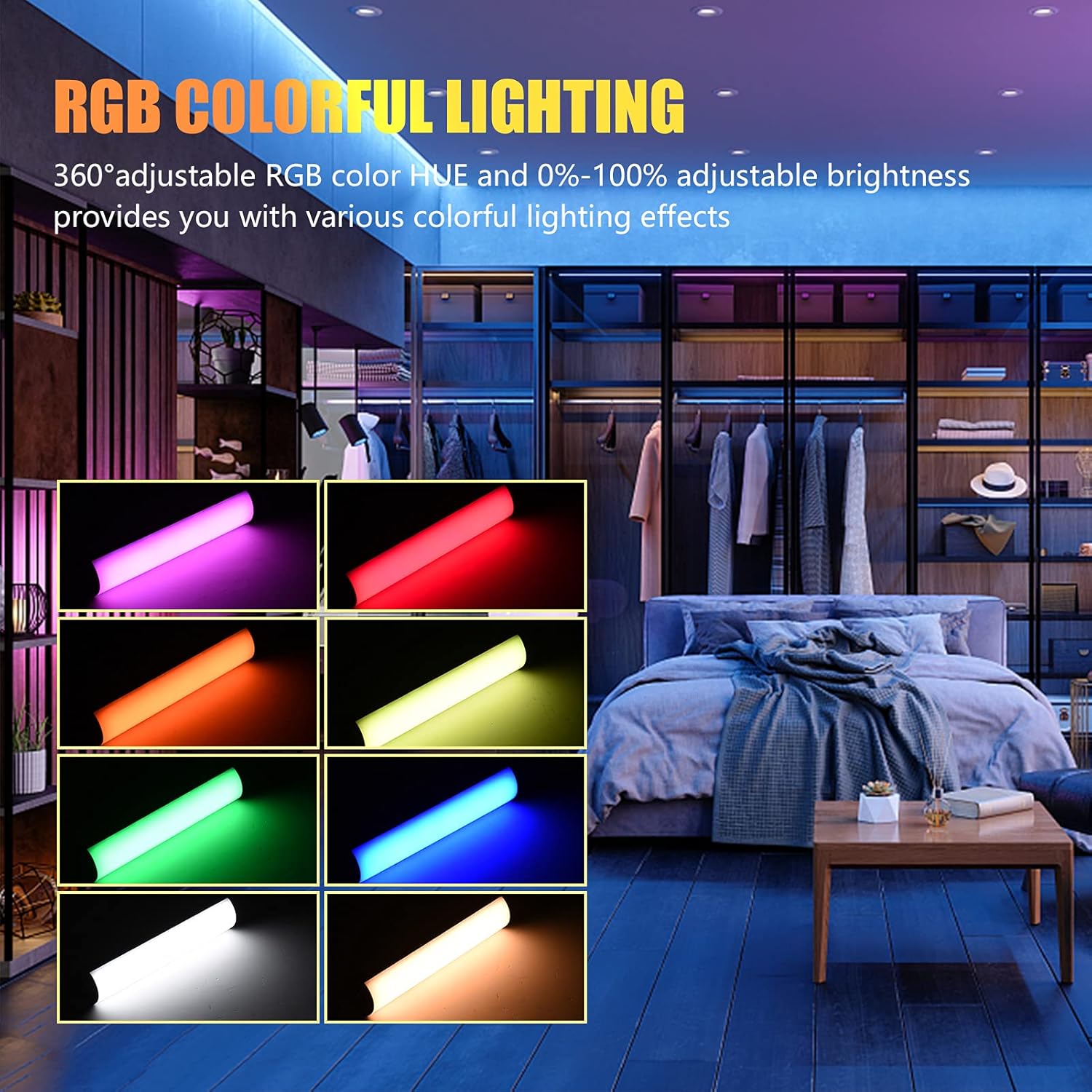
Image: The Andoer W200RGB LED Video Light demonstrating its RGB colorful lighting capabilities, showing different hues and brightness levels.

Image: Several Andoer W200RGB LED Video Lights illuminated in various solid RGB colors, showcasing the rod-shaped design.
4.5 Scene Mode Operation (Special Effects)
In Scene mode, you can select from 20 pre-programmed special lighting effects.
- Use the Up/Down buttons (▲/▼) to cycle through the 20 special effects.
- Some effects may have adjustable parameters (e.g., speed or intensity), which can be adjusted by short pressing the Power button and then using the Up/Down buttons.

Image: A visual guide to the 20 dynamic scene light effects, such as police car, ambulance, fireworks, TV, candle, party, strobe, and various color flashes.
4.6 Using the Magnetic Back
The Andoer W200RGB LED Video Light features built-in magnets at both ends, allowing it to be easily attached to metallic surfaces for flexible lighting setups.
- Simply place either end of the light onto a suitable magnetic surface.
- Ensure the surface is stable and can support the weight of the light.

Image: The Andoer W200RGB LED Video Light highlighting its magnetic ends, demonstrating how it can be attached to metal surfaces.
4.7 Practical Applications

Image: A comparison of scenes before and after using the Andoer W200RGB LED Video Light, illustrating its effectiveness in enhancing illumination for various activities.
5. Pangropéa
5.1 beberesih
- Pastikeun alat dipareuman sareng dicabut tina sumber daya naon waé sateuacan dibersihkeun.
- Use a soft, dry cloth to wipe the surface of the light.
- Keur kokotor bandel, rada dampen lawon jeung cai. Hindarkeun ngagunakeun bahan kimia kasar, pangleyur, atanapi pembersih abrasive.
- Do not allow water or liquids to enter the device.
5.2 Panyimpenan
- Nyimpen lampu di tempat anu tiis sareng garing jauh tina sinar panonpoé langsung sareng suhu anu ekstrim.
- Upami nyimpen kanggo waktos anu panjang, ngeusi batre sakitar 50% unggal tilu bulan kanggo ngajaga kasehatan batre.
5.3 Perawatan Batré
- Hindarkeun sering-sering ngeusi batre.
- Ulah ngalaan batréna ka suhu luhur atawa tuts na.
- If the battery shows signs of swelling or leakage, discontinue use immediately and dispose of it properly according to local regulations.
6. Cara ngungkulan
If you encounter any issues with your Andoer W200RGB LED Video Light, please refer to the following common problems and solutions:
- Lampu teu hurung:
- Ensure the battery is charged. Connect the light to a power source using the USB Type-C cable.
- Pencét terus tahan tombol Daya salami sababaraha detik pikeun mastikeun éta sanés ngan ukur mencét sakeudeung.
- Light flickers or output is unstable:
- Check the battery level; low battery can cause unstable performance. Recharge if necessary.
- Ensure the light is not exposed to extreme temperatures.
- Cannot change modes or adjust parameters:
- Ensure you are pressing the correct buttons (Mode button for mode changes, Power button to cycle through adjustable parameters within a mode, Up/Down buttons for value adjustment).
- Balikan deui alat ku cara mareuman sareng hurungkeun deui.
- Batré teu ngecas:
- Pastikeun kabel USB Tipe-C parantos nyambung kalayan pageuh kana lampu sareng sumber daya.
- Coba kabel USB atanapi adaptor daya anu béda pikeun nyingkahan asesoris anu rusak.
- Pastikeun sumber listrikna tiasa dianggo.
Lamun masalah persists sanggeus nyobian solusi ieu, mangga ngahubungan rojongan customer pikeun pitulung salajengna.
7. Spésifikasi
| Fitur | Spésifikasi |
|---|---|
| merek | Andoer |
| Modél | W200RGB |
| Manik LED | 69pcs White + 69pcs Yellow + 46pcs RGB |
| Suhu Warna | 2500K-9000K |
| CRI (Indéks Rendering Warna) | 95+ |
| Daya Kaluaran Max | 7W |
| Fluks Luminous | 800Lux / 0.3m |
| Sudut Beam | 120° |
| Jenis Batré | Diwangun-di 3.7V 3000mAh Batré Litium |
| Port ngecas | USB Tipe-C |
| Ukuran barang | 20 x 4 x 3.5 cm (7.9 x 1.6 x 1.4 inci) |
| Item Beurat | 11.3 ons (kira-kira 320g) |
| Tripod (folded length) | 7.5cm (use height 4.5cm) |
| Nomer modél (ASIN) | QEX6686347803069PL (B09F8RLMSY) |
8. Émbaran Kasalametan
Awas:
Upami anjeun mendakan produk ieu ruksak, cacad, atanapi nunjukkeun kinerja anu teu normal, mangga langsung eureunkeun panggunaanana sareng hubungi kami.
Always handle the device with care. Do not disassemble or modify the product. Keep out of reach of children.
9. Garansi jeung Rojongan
Andoer products are designed for reliability and performance. This product is covered by a standard manufacturer's warranty against defects in materials and workmanship. For specific warranty terms and conditions, please refer to the documentation provided at the time of purchase or contact your retailer.
For technical support, troubleshooting assistance, or warranty claims, please contact Andoer customer service through the retailer's platform or the official Andoer websitus. Mangga siapkeun modél produk sareng inpormasi pameseran anjeun nalika ngahubungi dukungan.
Nganjang ka Andoer Store on Amazon pikeun inpo nu leuwih lengkep jeung produk.