Bubuka
The Logitech POP Mouse is a compact, wireless mouse designed for enhanced productivity and personal expression. Featuring SilentTouch Technology for quiet clicks, a customizable top button for emojis or shortcuts, and a SmartWheel that shifts between precision and speed scrolling, it offers a versatile user experience. This mouse supports multi-device connectivity via Bluetooth, allowing seamless switching between up to three devices. It is built with durability in mind, offering up to 24 months of battery life and auto-sleep power-saving features.
Naon dina Box
- Beurit Logitech POP
- 1 x Batré AA (parantos dipasang)
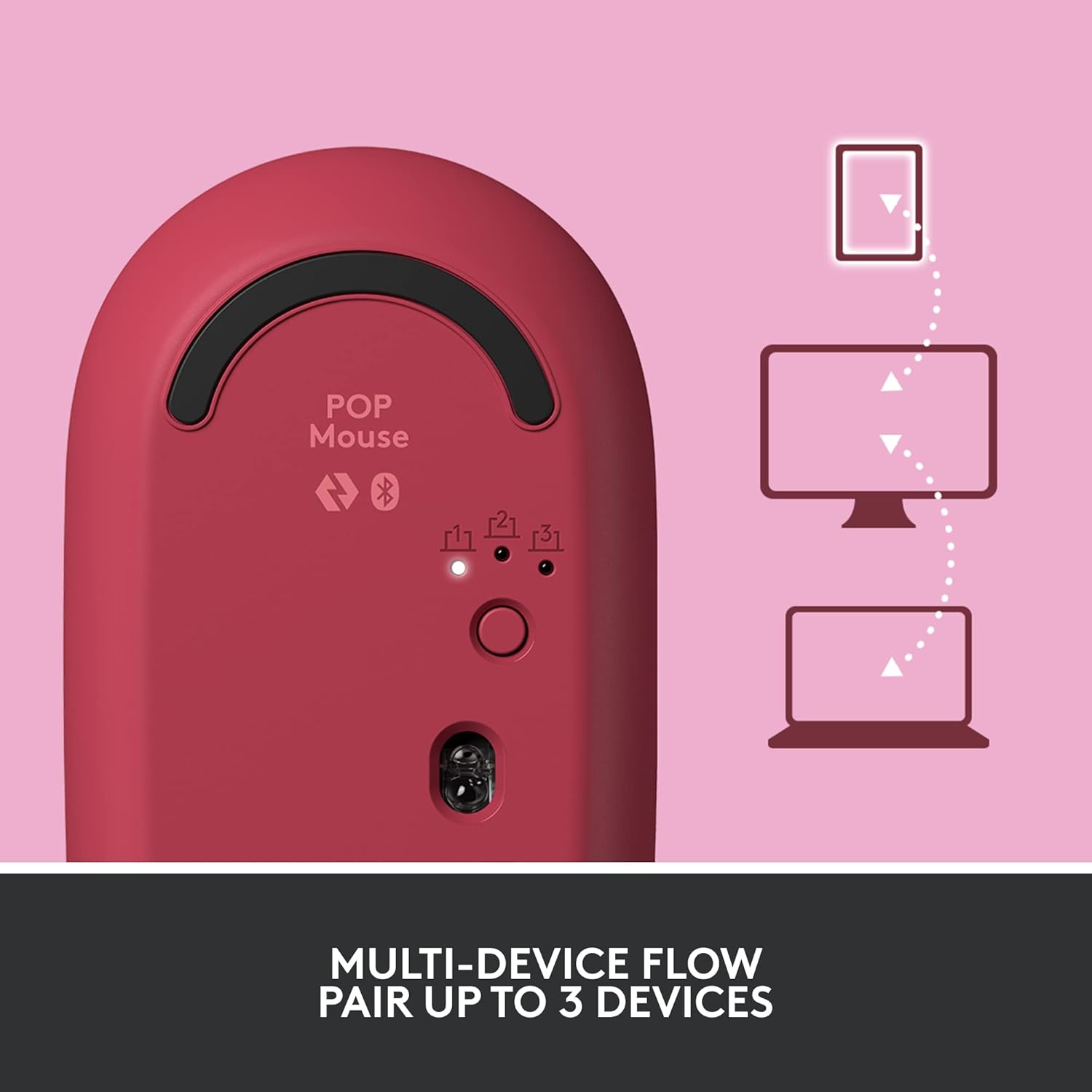
Image: The Logitech POP Mouse and an included AA battery, as typically found in the product packaging.
Disetél
1. Pamasangan batré
- Panggihan kompartemen batré dina underside beurit.
- Gently slide the top cover of the mouse backward to remove it.
- Pasangkeun batré AA anu kalebet, pastikeun polaritasna leres (+/-).
- Pasang deui panutup luhur ku cara ngajajarkeun teras geser ka hareup dugi ka ngaklik kana tempatna.
2. Daya Hurungkeun
- Flip the mouse over. Locate the On/Off switch on the bottom of the mouse.
- Slide the switch to the 'On' position (usually indicated by green color).
3. Ngapasangkeun Alat (Bluetooth)
- On the bottom of the mouse, press and hold the Easy-Switch button (labeled with 1, 2, or 3) for 3 seconds until the LED light starts blinking rapidly. This indicates pairing mode.
- On your computer, tablet, or phone, open your Bluetooth settings.
- Select "Logitech POP Mouse" from the list of available devices.
- Follow any on-screen prompts to complete the pairing process. The LED light on the mouse will turn solid for 5 seconds when connected.
4. Ngaganti Multi-Alat
- The POP Mouse can be paired with up to three devices. To switch between paired devices, simply press the Easy-Switch button on the bottom of the mouse. The corresponding LED (1, 2, or 3) will light up to indicate the active device.
Image: The Logitech POP Mouse can seamlessly connect and switch between up to three different devices, such as a tablet, desktop computer, and laptop.
Ngoperasikeun Mouse
1. Fungsi Dasar
- Klik Kénca: Seleksi sareng interaksi primér.
- Klik katuhu: Aksés ménu kontekstual.
- Gulung kabayang: Ngagulung sacara vertikal ngaliwatan dokumén sareng web kaca.
2. SmartWheel Technology
- The SmartWheel automatically shifts between high-precision scrolling for detailed work and super-fast scrolling for quickly navigating long documents or web kaca.

Image: The SmartWheel on the Logitech POP Mouse dynamically adjusts its scrolling mode for precision or speed.
3. Téhnologi SilentTouch
- Enjoy a quiet working environment with SilentTouch Technology, which significantly reduces click noise without compromising tactile feedback.

Image: SilentTouch Technology ensures a quiet and comfortable user experience.
Kustomisasi
1. Customizable Top Button
- The top button, located below the scroll wheel, is customizable. By default, it opens an emoji menu for quick access to your favorite emojis.

Image: The customizable top button allows for quick access to an emoji menu on your screen.
2. Logi Options+ App
- Unduh Pilihan Logi + Aplikasi (Windows and macOS only) to personalize your POP Mouse.
- You can reassign the top button to perform various shortcuts, such as Snip Screen, Mic Mute, Voice-to-Text, or any other function you desire.
- The app also allows you to adjust pointer speed, scroll speed, and enable Flow for cross-computer control.
Pangropéa
- beberesih: Ngagunakeun lemes, damp cloth to clean the exterior of the mouse. Avoid harsh chemicals or abrasive materials.
- Ngagantian batré: Replace the AA battery when the low battery indicator light appears.
- Panyimpenan: When not in use for extended periods, turn off the mouse using the On/Off switch to conserve battery life.
Pamérésan masalah
- Mouse teu nyambung: Ensure the mouse is powered on and within range of your device. Check your device's Bluetooth settings to confirm it's enabled and the mouse is paired. Try re-pairing the mouse.
- Gerakan anu laun atanapi teu teratur: Replace the battery if it's low. Ensure there are no obstructions between the mouse and your device. Avoid using the mouse on highly reflective or uneven surfaces.
- Custom button not working: Verify that the Logi Options+ App is installed and running on your computer. Check the button assignments within the app.
spésifikasi
| merek | Logitech |
| Nomer modél | 910-006545 |
| Téhnologi konektipitas | Bluetooth 5.1 |
| Range nirkabel | 32.81 ft (10 m) |
| Téknologi Sénsor | Pelacak Optik Presisi Tinggi Logitech |
| Jumlah Kancing | 4 (Left/Right click, Scroll wheel click, Top button) |
| Tombol customizable | Yes (Top button, via Logi Options+ App) |
| Jenis Batré | 1 x batré AA |
| Kahirupan batré | Nepi ka 24 bulan (bisa rupa-rupa gumantung kana panggunaan) |
| Kasaluyuan System Operasi | Windows 10 atanapi anu langkung énggal, macOS 10.15 atanapi anu langkung énggal, iPadOS, Chrome OS, Android |
| Item Beurat | 2.89 ons |
| Ukuran produk (L x W x H) | 4.3 x 2.6 x 1.7 inci |
| Bahan | Plastic parts include certified post-consumer recycled plastic (Heartbreaker Rose: 29%) |
Garansi sareng Rojongan
Kanggo inpormasi garansi sareng dukungan téknis, mangga buka dukungan resmi Logitech. website or refer to the warranty card included with your product. You can find detailed FAQs, troubleshooting guides, and contact options for customer service.
- Dukungan Online: Nganjang support.logi.com
- Pendaptaran Produk: Ngadaptarkeun produk anjeun pikeun nampi apdet sareng dukungan.


