1. Bubuka
This manual provides essential instructions for the safe and efficient operation of your Crosley Cruiser Portable Bluetooth Turntable. Please read this manual thoroughly before use and retain it for future reference.
The Crosley Cruiser is a portable, belt-driven turntable designed to play 33 1/3, 45, and 78 RPM records. It features built-in stereo speakers, Bluetooth receiver functionality for streaming music to the turntable, and Bluetooth transmitter functionality to stream your records to external Bluetooth speakers or headphones. Additional features include an auxiliary input, headphone jack, RCA audio out, and adjustable pitch control.
2. Eusi Paket
- Crosley Cruiser Portable Bluetooth Turntable (Model CR8005F-WS4)
- Adaptor kakuatan
- 45 RPM Adaptor
- Instruksi Manual
3. Produk Langkungview
Familiarize yourself with the components of your turntable:
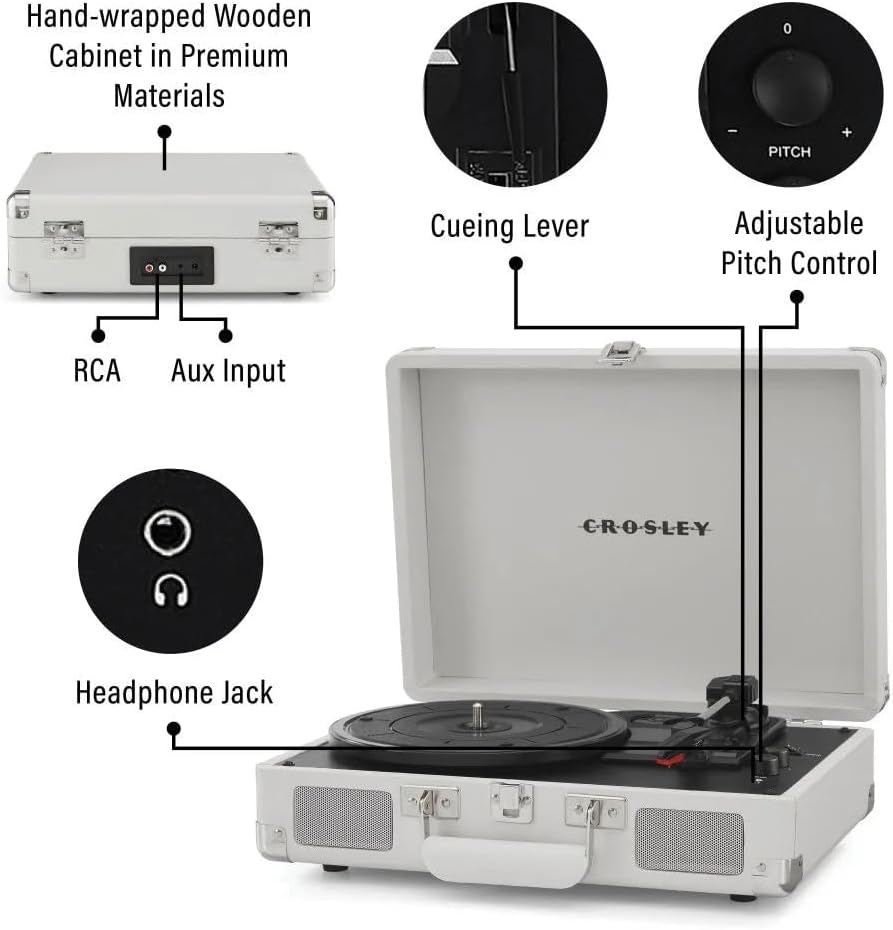
Gambar 1: Leuwihview of the Crosley Cruiser Portable Bluetooth Turntable, highlighting key features such as RCA and Aux Input ports, the cueing lever, adjustable pitch control, and the headphone jack.
- Piring Turntable: Tempat rékaman disimpen.
- Tonearm: Nyekel stylus (jarum).
- Stylus: Maca alur dina rékaman éta.
- Lever Panyekel: Lifts and lowers the tonearm.
- Pamilih laju: Nyaluyukeun kecepatan puter (33 1/3, 45, 78 RPM).
- Kontrol pitch: Fine-tunes playback speed.
- Function Switch (Phono/Bluetooth/Aux): Milih sumber input.
- Volume Control/Power Knob: Ngahurungkeun/mareuman unit sareng nyaluyukeun volume.
- Jack headphone: Pikeun déngékeun pribadi.
- Input bantu: Sambungkeun alat audio éksternal.
- Kaluaran Audio RCA: Nyambung kana éksternal amplifier / speaker.
- Speaker Diwangun-di: Pikeun muterkeun audio sacara langsung.
4. Setélan
4.1 Ngabongkar sareng Nempatkeun
- Kaluarkeun turntable tina bungkusna kalayan ati-ati.
- Simpen unit dina permukaan anu datar sareng stabil, jauh tina sinar panonpoé langsung, sumber panas, atanapi geteran anu kaleuleuwihi.
- Remove any protective materials from the turntable platter and tonearm.
4.2 Sambungan Daya
- Connect the power adapter to the DC input jack on the back of the turntable.
- Colokkeun adaptor kakuatan kana stop kontak témbok standar.
4.3 Setelan Tonearm Awal
- Leupaskeun konci tonearm.
- Ensure the stylus protector is removed from the needle before playing a record.
5. Parentah Operasi
5.1 Maén Rékor
- Buka tutup puteran.
- Teundeun catetan dina piring turntable. Upami maén single 45 RPM, nganggo adaptor 45 RPM anu kalebet.
- Pilih laju anu pas (33 1/3, 45, atanapi 78 RPM) nganggo saklar pamilih laju.
- Puterkeun kenop Volume/Daya searah jarum jam pikeun ngahurungkeun alat.
- Set the Function Switch to "PHONO".
- Angkat tonearm ngagunakeun uas cueing.
- Position the tonearm over the desired starting point of the record.
- Turunkeun tonearm sacara lalaunan kana piringan hitam nganggo tuas isyarat. Piringan hitam bakal mimiti diputer.
- Saluyukeun polumeu ka tingkat anu dipikahoyong.
- To stop playback, lift the tonearm using the cueing lever and return it to the tonearm rest. Secure the tonearm lock.

Gambar 2: The Crosley Cruiser Turntable in operation, with a record spinning on the platter and the tonearm engaged.
5.2 Bluetooth Receiver Mode (Streaming to Turntable)
- Puterkeun kenop Volume/Daya searah jarum jam pikeun ngahurungkeun alat.
- Setel Saklar Fungsi ka "Bluetooth". Lampu indikator Bluetooth bakal kedip-kedip.
- Enable Bluetooth on your external device (e.g., smartphone, tablet) and search for "Crosley Cruiser".
- Select "Crosley Cruiser" to pair. Once paired, the indicator light will stop flashing and remain solid.
- Anjeun ayeuna tiasa ngalirkeun audio tina alat anjeun ka spiker internal turntable.
5.3 Bluetooth Transmitter Mode (Streaming Records to External Speakers/Headphones)
- Pastikeun spiker Bluetooth éksternal atanapi headphone anjeun aya dina modeu papasangan.
- Set the Function Switch to "PHONO".
- Start playing a record as described in Section 5.1.
- Press and hold the Bluetooth pairing button (if available, otherwise the unit may automatically search). The turntable will search for nearby Bluetooth devices.
- Once connected, the audio from the record will stream to your external Bluetooth device.
5.4 Input Bantu
- Connect an external audio device (e.g., MP3 player) to the AUX IN jack using a 3.5mm audio cable.
- Setel Saklar Fungsi ka "AUX".
- Play audio from your external device. The sound will play through the turntable's speakers.
5.5 Kaluaran headphone
- Colokkeun headphone 3.5mm kana colokan headphone pikeun ngadangukeun sacara pribadi. Spiker internal bakal dibisukeun.
5.6 Pitch Control
- Use the Pitch Control knob to slightly increase or decrease the playback speed of a record, allowing for fine-tuning.
6. Pangropéa
6.1 Ngabersihan Turntable
- Ngusap bagian luar unit nganggo kaén anu lembut sareng garing. Ulah make cleaners abrasive atawa pangleyur.
- Keep the stylus clean. Use a soft brush (not included) to gently brush the stylus from back to front.
- Regularly clean your records to prevent dust buildup, which can affect sound quality and stylus life.
6.2 Panggantian Stylus
The stylus is a consumable part and will wear out over time. A worn stylus can damage records and degrade sound quality. Replace the stylus after approximately 200-300 hours of playback. Refer to the Crosley website or your retailer for replacement stylus information.
7. Cara ngungkulan
| Masalah | Mungkin Cukang lantaranana | Solusi |
|---|---|---|
| Taya kakuatan | adaptor kakuatan teu disambungkeun; outlet teu aktip. | Ensure power adapter is securely connected and plugged into a working outlet. Check if the Volume/Power knob is turned on. |
| Teu aya sora ti panyatur | Volume too low; Function Switch incorrect; headphones plugged in. | Increase volume. Set Function Switch to PHONO or Bluetooth/AUX. Unplug headphones. |
| Record skips or repeats | Record is dirty or damaged; stylus is worn or dirty; turntable not level. | Clean the record. Clean or replace the stylus. Ensure the turntable is on a flat, stable surface. |
| Masalah papasangan Bluetooth | Device too far; incorrect mode; device already paired. | Ensure devices are within range. Set turntable to Bluetooth mode (receiver) or ensure external device is in pairing mode (transmitter). Forget previous pairings on your device. |
8. Spésifikasi
- model: CR8005F-WS4
- merek: Crosley
- Ukuran produk: 10.51 x 14.02 x 4.65 inci
- Beurat barang: 5.48 pon (2.49 Kilogram)
- Laju: 33 1/3, 45, 78 RPM
- Konektipitas: Bluetooth (Receiver & Transmitter), Auxiliary Input, Headphone Jack, RCA Audio Out
- Fitur husus: Portabel
- Bahan: Kai
- Komponén Kaasup: 1 x Crosley Cruiser Portable Bluetooth Turntable, White Sands
9. Garansi jeung Rojongan
Kanggo inpormasi garansi sareng dukungan téknis, mangga tingal ka Crosley resmi websitus atanapi ngahubungan pangecér Anjeun. Simpen bukti pameseran anjeun pikeun klaim garansi.
Pikeun pitulung salajengna, buka di Crosley Store on Amazon.


