1. Bubuka
This manual provides detailed instructions for the installation, operation, and maintenance of the Marshall Electronics CV630-NDIW 30x UHD30 NDI PTZ Camera. The CV630-NDIW is a professional-grade PTZ camera designed for capturing high-quality Ultra-HD video with flexible pan, tilt, and zoom capabilities. It integrates NDI|HX technology for efficient IP-based video workflows and offers simultaneous HDMI and 3G-SDI outputs.
Please read this manual thoroughly before operating the camera to ensure proper usage and to maximize its performance and longevity.
2. Produk Langkungview
2.1 Fitur konci
- UHD Video Capture: Records up to 3840x2160p at 30fps with an 8-megapixel 1/2.5” sensor.
- 30X Optical Zoom: Provides a versatile zoom range from 4.6mm to 135mm, offering a nearly 70-degree angle-of-view at its widest.
- NDI|HX Integration: Supports low latency, high quality, frame-accurate video and audio for IP workflows.
- Sababaraha Kaluaran: Simultaneous HDMI and 3G-SDI outputs.
- Smooth PTZ Movements: Equipped with synchronous pan, tilt, and zoom motors for silent and precise operation.
- Konektipitas: Wired connectivity with Wi-Fi protocol support.
2.2 Komponén kaméra

Gambar 1: Hareup jeung Sisi View
This image displays the front and side of the Marshall CV630-NDIW PTZ Camera. Key visible components include the main lens assembly, the pan/tilt mechanism, and the camera base. The NDI|HX logo is visible on the front, indicating its network capabilities. The overall design is a compact dome form factor, suitable for various mounting environments.
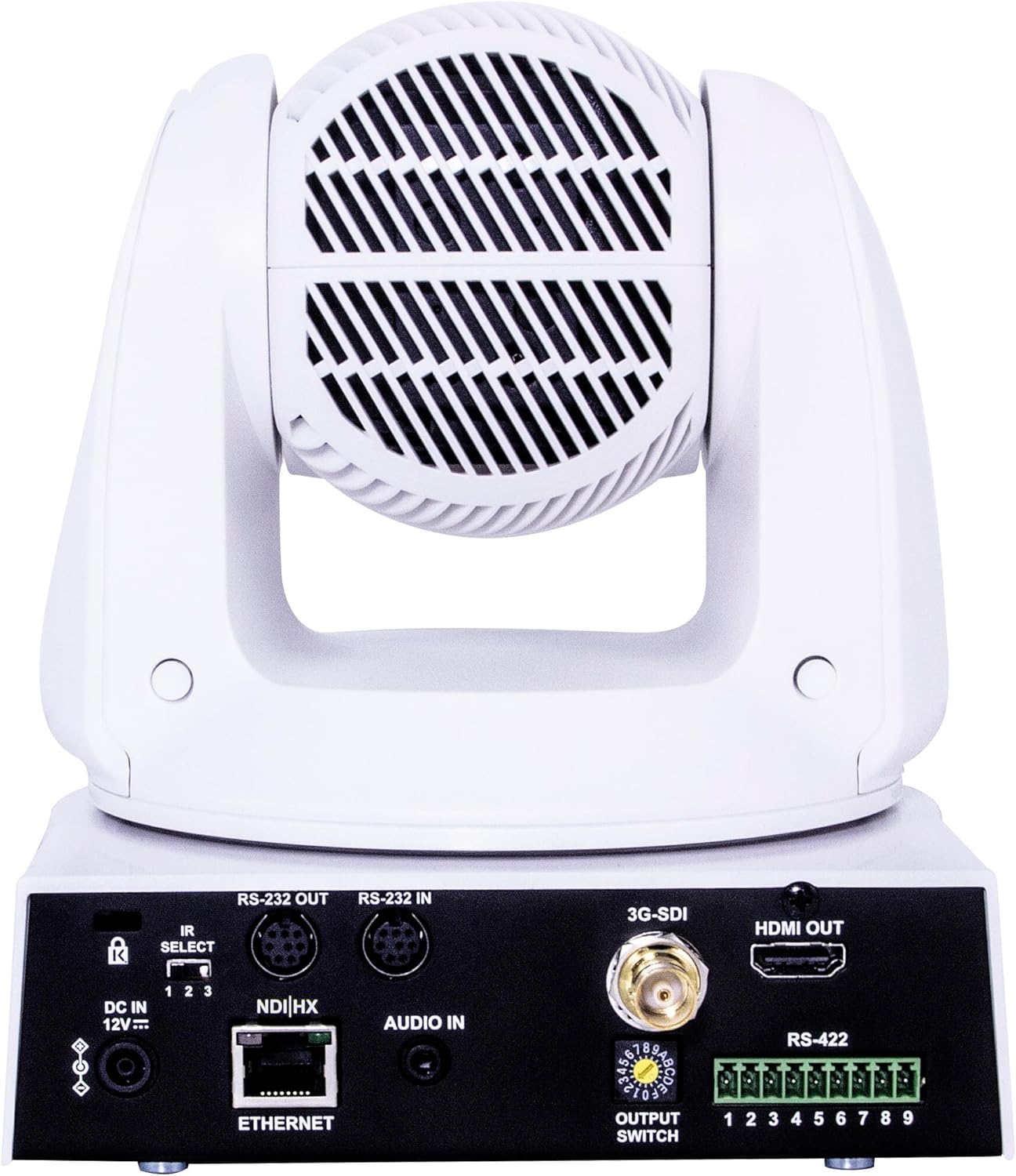
Figure 2: Rear Panel Connectivity
This image shows the rear panel of the Marshall CV630-NDIW PTZ Camera, highlighting its various input and output ports. From left to right, these include the DC 12V power input, IR Select switch, RS-232 OUT and RS-232 IN ports, NDI|HX Ethernet port, AUDIO IN, 3G-SDI output, HDMI OUT, RS-422 terminal block, and an OUTPUT SWITCH. These ports facilitate power, control, network, and video/audio connections.
3. Setélan
3.1 Ngabongkar bungkusan
Carefully remove the camera and all accessories from the packaging. Verify that all components are present according to the packing list. Retain the original packaging for future transport or storage.
3.2 Pamasangan
The CV630-NDIW camera is designed for wall mount installation. Ensure the mounting surface is sturdy enough to support the camera's weight (approximately 2 pounds). Use appropriate mounting hardware (not included) and follow local safety regulations. Ensure the camera has a clear line of sight to the desired capture area and sufficient space for pan and tilt movements.
3.3 Sambungan
- kakuatan: Connect the provided AC/DC power adapter to the DC 12V input port on the rear panel (refer to Figure 2). Plug the adapter into a suitable power outlet.
- Kaluaran Video:
- For HDMI output, connect an HDMI cable from the HDMI OUT port to your display or video switcher.
- For 3G-SDI output, connect an SDI cable from the 3G-SDI port to your SDI-compatible device.
- Network (NDI|HX): Connect an Ethernet cable from the NDI|HX Ethernet port to your network switch or router. This enables NDI|HX video streaming and IP control.
- Input Audio: If external audio is required, connect an audio source to the AUDIO IN port.
- Kontrol:
- For RS-232 control, connect a serial cable to the RS-232 IN port from your control device. The RS-232 OUT port can be used for daisy-chaining.
- For RS-422 control, connect to the RS-422 terminal block as per your controller's instructions.
3.4 Daya Hurung/Pareuman
After all connections are made, ensure the power adapter is securely connected. The camera will power on automatically. To power off, disconnect the power adapter from the camera or the power outlet.
4. Parentah Operasi
4.1 Kontrol PTZ Dasar
The CV630-NDIW camera supports pan, tilt, and zoom (PTZ) functions. These can be controlled via IP (NDI|HX), RS-232, or RS-422 using compatible controllers such as Nexia or Skylink systems. Refer to your specific controller's manual for detailed operation.
- Roti: Rotates the camera horizontally.
- Dengdekkeun: Moves the camera vertically.
- Zum: Adjusts the focal length of the lens. The camera features a 30x optical zoom for precise framing.
4.2 Video Output and Resolution
The camera outputs video in Ultra-HD (3840x2160p) at 30 frames per second (fps) and also supports various HD resolutions (e.g., 1080p, 720p). The output resolution can typically be configured through the camera's web antarmuka atanapi parangkat lunak kontrol.
4.3 NDI|HX Integration
The NDI|HX feature allows the camera to transmit high-quality, low-latency video and audio over a standard IP network. Once connected to your network, the camera should be discoverable by NDI-compatible software and hardware. Refer to NewTek's NDI documentation for integrating NDI|HX devices into your production workflow.
5. Pangropéa
5.1 beberesih
- Lensa: Use a soft, lint-free cloth specifically designed for optical lenses. If necessary, use a small amount of lens cleaning fluid. Avoid abrasive materials.
- Awak kaméra: Ngusap awak kaméra nganggo kaén anu lembut sareng garing. Pikeun kokotor nekad, a rada damp cloth can be used, ensuring no moisture enters the camera. Do not use strong detergents or solvents.
5.2 Apdet firmware
Periodically check the Marshall Electronics website for available firmware updates. Firmware updates can provide new features, performance improvements, and bug fixes. Follow the instructions provided with the firmware update package carefully to avoid damaging the camera.
6. Cara ngungkulan
This section addresses common issues you might encounter with the CV630-NDIW camera. If the problem persists, contact Marshall Electronics technical support.
- Henteu aya kakuatan:
- Pastikeun adaptor kakuatan disambungkeun aman ka duanana kaméra jeung stop kontak kakuatan jalan.
- Pastikeun stop kontak listrik fungsina.
- Taya Kaluaran Video:
- Check all video cables (HDMI, 3G-SDI, Ethernet for NDI|HX) for secure connections.
- Confirm the display or receiving device is correctly configured for the input source.
- Ensure the camera's output settings match the capabilities of the receiving device.
- PTZ Control Issues:
- Verify the control cables (RS-232, RS-422, Ethernet) are properly connected.
- Check the communication settings (baud rate, protocol) on both the camera and the controller.
- Ensure the controller is compatible with the camera's control protocols (Nexia, Skylink, etc.).
- NDI|HX Not Detected:
- Confirm the Ethernet cable is connected and the network is active.
- Ensure your network allows NDI traffic and there are no firewall restrictions.
- Verify your NDI receiving software is up-to-date.
- Deteksi gerak: The camera supports motion-only alerts. Ensure this feature is configured correctly in the camera's settings if you intend to use it.
7. Spésifikasi
| Fitur | Spésifikasi |
|---|---|
| Modél | CV630-NDIW |
| merek | Marshall |
| Resolusi Masih Éféktif | 8 MP |
| Resolusi Capture Video | UHD 3840x2160p (30fps), 1080p, 720p |
| Laju pigura | 30 fps |
| Zoom optik | 30x |
| Tipe Zum | Zoom optik |
| Téhnologi konektipitas | Dikabel |
| Protokol konektipitas | Wi-Fi (for certain control/monitoring features), NDI|HX |
| Téknologi Komunikasi Nirkabel | Wifi |
| Tipe Controller | Nexia, Skylink (compatible) |
| Tipe Pamasangan | Tembok Gunung |
| Faktor Bentuk | Kubah |
| Sumber Daya | AC/DC |
| Fitur husus | Motion Sensor (for alerts) |
| Téhnologi Lampu Lemah | Beurang/Peuting |
| Tipe Siaga | Gerak Ngan |
| Tipe Mémori Flash | Micro SD (for potential local storage/firmware) |
| Batré Diperlukeun? | No |
| Item Beurat | 2 pon |
| Peunteun Protection Internasional | IP67 |
| UPC | 801813226515 |
| ASIN | B09DDB8T1T |
| Tanggal Kahiji Sadia | 18 Agustus 2021 |
8. Garansi jeung Rojongan
For information regarding the product warranty, please refer to the warranty card included with your purchase or visit the official Marshall Electronics website. For technical support, troubleshooting assistance beyond this manual, or service inquiries, please contact Marshall Electronics customer support directly. Contact details can typically be found on the manufacturer's websitus.


