Bubuka
This manual provides instructions for the ALLIMITY N2QAYC000046 Replacement Remote Control. This remote is designed to operate various Panasonic Home Theater Audio Systems, including models such as SC-HTB15, SU-HTB15, SC-HTB15EG, SC-HTB15EB, SC-HTB15GN, SU-HTB15EB-K, and SC-HTB520. Please read this manual thoroughly before using the remote control to ensure proper operation and longevity.
Disetél
1. Pamasangan batré
The remote control requires 1 AAA battery (not included) for operation.
- Teangan tempat panutup kompartemen batré dina tonggong kadali jauh.
- Geser panutup ka handap atawa pencét kancing (upami aya) pikeun muka kompartemen.
- Pasangkeun 1 batré AAA, pastikeun terminal positif (+) sareng négatif (-) saluyu sareng tanda di jero kompartemenna.
- Ganti panutup kompartemen batré ku cara ngageser deui kana tempatna nepi ka klik aman.
2. Pamakéan awal
This remote control operates using infrared (IR) technology. No programming is typically required. Once batteries are installed, the remote is ready for use with compatible Panasonic Home Theater Audio Systems.
Parentah Operasi
To operate your home theater system, point the remote control directly towards the infrared sensor on your Panasonic unit. Ensure there are no obstacles blocking the line of sight between the remote and the unit.
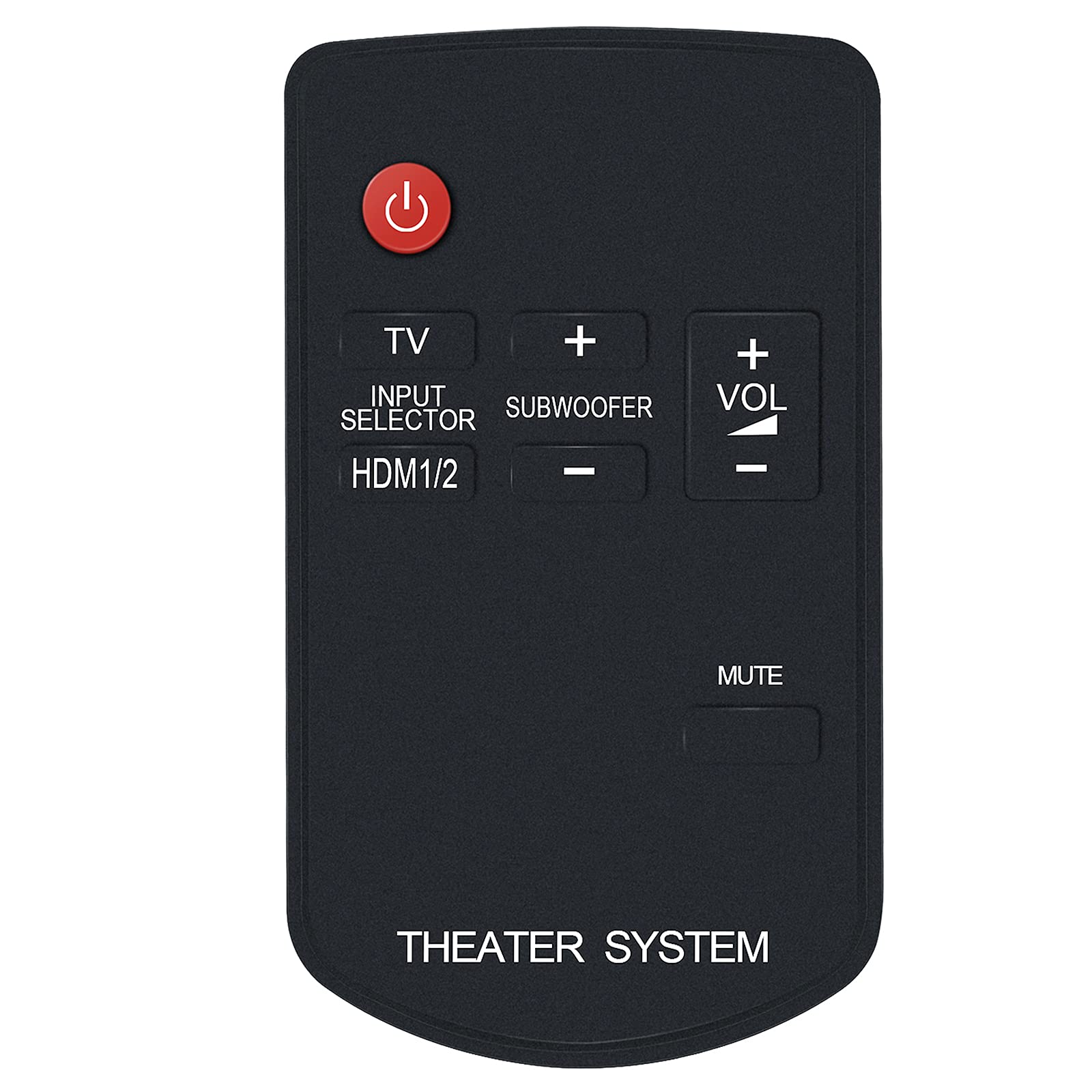
Gambar 1: Hareupeun view of the N2QAYC000046 Remote Control. This image displays the layout of the buttons, including the red power button at the top, TV, Input Selector, HDMI1/2, Subwoofer controls, Volume up/down, and Mute. The bottom of the remote is labeled "THEATER SYSTEM".
Fungsi Tombol:
- Power Button (Red Circle): Turns the home theater system on or off.
- TV: Switches the input to the TV.
- INPUT SELECTOR / HDMI1/2: Cycles through available input sources, including HDMI 1 and HDMI 2.
- SUBWOOFER (+/-): Saluyukeun tingkat polumeu subwoofer.
- VOL (+/-): Increases or decreases the main volume level.
- Bisu: Ngajempékeun atanapi nganonaktipkeun kaluaran audio.
Pangropéa
1. Ngagantian batré
Replace the battery when the remote control's response becomes sluggish or stops working. Follow the battery installation steps outlined in the "Setup" section.
2. beberesih
To clean the remote control, wipe it with a soft, dry cloth. Do not use liquid cleaners, abrasive pads, or chemical solvents, as these can damage the remote's surface or internal components.
3. Panyimpenan
Store the remote control in a cool, dry place away from direct sunlight and extreme temperatures. If the remote will not be used for an extended period, it is recommended to remove the battery to prevent leakage.
Pamérésan masalah
- Kadali jauh henteu ngaréspon:
- Pariksa naha batréna dipasang kalayan leres sareng polaritas anu leres.
- Ganti batréna ku nu anyar.
- Ensure there are no obstructions between the remote control and the home theater system's IR sensor.
- Make sure you are pointing the remote directly at the system's sensor.
- Specific functions are not working:
- Verify that your Panasonic Home Theater Audio System model is listed as compatible in the "Introduction" section.
- Some functions may be specific to certain system models.
- Remote received does not work with your TV model:
- This remote is specifically designed for Panasonic Home Theater Audio Systems. If you are attempting to control a TV and it is not responding, ensure your TV is compatible or that the remote has a dedicated TV control function (like the 'TV' button) that is properly configured for your TV model. If issues persist, contact customer support.
spésifikasi
| Nomer modél | N2QAYC000046 |
| merek | KAKATAAN |
| Alat nu cocog | Panasonic Home Theater Audio Systems (e.g., SC-HTB15, SU-HTB15, SC-HTB15EG, SC-HTB15EB, SC-HTB15GN, SU-HTB15EB-K, SC-HTB520) |
| Téhnologi nirkabel | Infrabeureum (IR) |
| Sumber Daya | 1 x Batré AAA (teu kalebet) |
| Dimensi produk | 4 x 2 x 0.6 inci (kira-kira) |
| Item Beurat | 0.704 ons (kira-kira) |
| Warna | Hideung |
| Fitur husus | Desain ergonomis |
Rojongan Palanggan
If you encounter any issues with your ALLIMITY N2QAYC000046 Replacement Remote Control that are not resolved by the troubleshooting steps, or if your specific model is not listed, please contact the seller or manufacturer's customer service for assistance. Provide your product model number and a detailed description of the issue for prompt support.
The manufacturer is committed to resolving any issues you may experience with the product.
