Bubuka
The GN ReSound ONE Premium Charger Case is an advanced charging solution designed specifically for GN ReSound rechargeable hearing aids. This compact and portable case allows you to conveniently recharge your hearing aids, ensuring they are always ready for use. It features a robust design and can store multiple full charges, providing extended power on the go.
Naon dina Box
Mangga parios eusi pakét pikeun mastikeun yén sadaya barang aya:
- 1x GN ReSound ONE Premium Charging Case
- 1x USB Charger Cable
- 1x Power Supply Plug (Adapter)
- 1x Cleaning Kit (including brush and cloth)
- 1x Manual Pamaké (dokumén ieu)
Produk Leuwihview
Familiarize yourself with the components of your ReSound ONE Premium Charger Case.

Gambar 1: Top view of the open charger case, highlighting the two hearing aid compartments and the five LED battery indicator lights in the center.
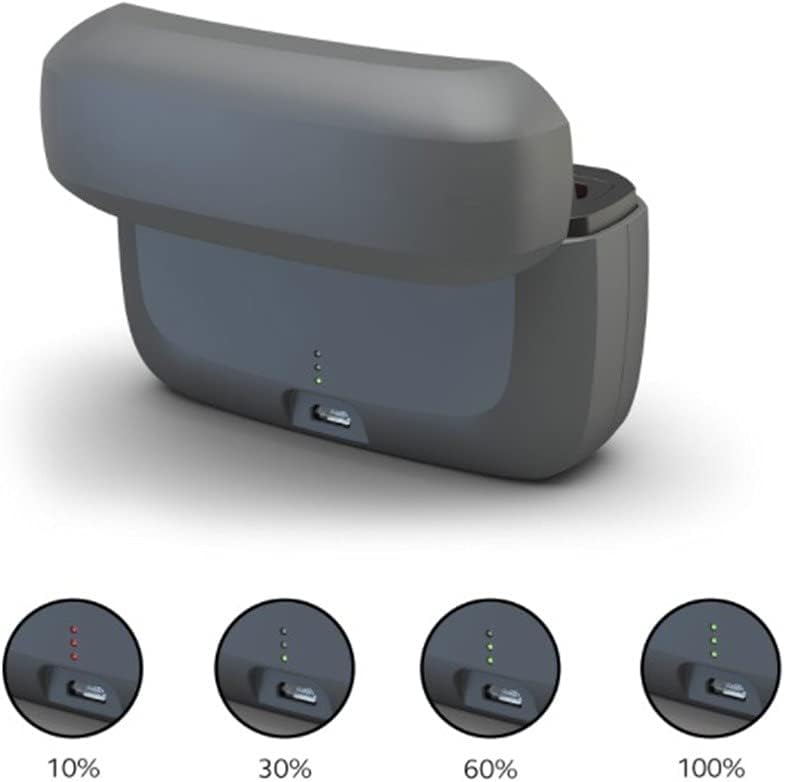
Gambar 2: Sisi view of the charger case with the lid open, illustrating the USB charging port and the LED indicators displaying various charge levels (10%, 30%, 60%, 100%).

Figure 3: The compact charger case and two ReSound ONE hearing aids shown in a travel-friendly context, emphasizing portability.
Disetél
Before first use, ensure the charger case is fully charged.
- Ngecas awal: Connect the provided USB charger cable to the charging port on the back of the case. Plug the power supply plug into a standard 110V wall outlet. The LED indicator lights on the case will illuminate to show the current charge level. All five lights will be green when fully charged.
- Nempatkeun Alat Bantu Dédéngéan: Open the lid of the charger case. Gently place your ReSound ONE hearing aids into their respective charging compartments. Ensure they are seated correctly.
- Ngecas otomatis: Once the hearing aids are correctly placed, they will automatically begin charging. The indicator lights on the case will show the charging status.
Parentah Operasi
Using your ReSound ONE Premium Charger Case is straightforward:
- Daily Charging: For optimal performance, place your hearing aids in the charger case every night. A full charge typically takes a few hours.
- Daya portabel: The charger case holds enough power for up to three full charges of your hearing aids, making it ideal for travel or when you don't have access to a power outlet.
- Mariksa Status Biaya: The five LED lights on the case indicate the remaining battery life of the charger case itself. Each light represents approximately 20% of the charge. When charging hearing aids, the lights will also indicate their charging progress.
- Ngecas Aman: The case is designed with safety features to prevent overcharging, protecting your hearing aids and extending their battery life.
Pangropéa
Proper maintenance ensures the longevity and optimal performance of your charger case:
- beberesih: Use the provided cleaning cloth to wipe the exterior of the charger case. For the charging contacts inside, use the small brush to gently remove any dust or debris. Do not use liquid cleaners directly on the charging contacts.
- Panyimpenan: Simpen wadah carjer di tempat anu tiis, garing, jauh tina sinar panonpoé langsung sareng suhu anu ekstrim.
- Hindarkeun Uap: Keep the charger case away from water and excessive humidity. If it gets wet, disconnect it from power immediately and allow it to dry completely before use.
Pamérésan masalah
If you encounter issues with your charger case, try the following solutions:
| Masalah | Mungkin Cukang lantaranana | Solusi |
|---|---|---|
| Hearing aids not charging. | Hearing aids not properly seated; dirty charging contacts; charger case battery empty. | Ensure hearing aids are correctly placed. Clean charging contacts with the provided brush. Recharge the charger case. |
| LED indicator lights not working. | Charger case battery empty; faulty cable/adapter. | Charge the case. Try a different USB cable or power adapter. |
| Case not holding charge. | Battery degradation (after long use); extreme temperatures. | Ensure charging in a moderate temperature environment. If issues persist, contact customer support. |
If the problem persists after trying these steps, please contact ReSound customer support.
spésifikasi
| Fitur | Rincian |
|---|---|
| merek | ReSound |
| Modél | ONE Premium Charger Case |
| Warna | Hideung |
| Item Beurat | 10.5 ons (0.298 kg) |
| Ukuran Paket | 5.83 x 5.59 x 2.32 inci |
| Masukan Voltage | 240 volt |
| Kaluaran Voltage | 240 volt |
| Kasaluyuan | All ReSound ONE hearing aids |
Garansi sareng Rojongan
The GN ReSound ONE Premium Charger Case comes with a manufacturer's warranty. Please refer to the warranty card included in your packaging or visit the official ReSound websitus pikeun istilah jeung kaayaan jaminan lengkep.
For technical support, troubleshooting assistance, or to inquire about replacement parts, please contact ReSound customer service through their official websitus atanapi inpormasi kontak anu disayogikeun dina dokuméntasi produk anjeun.
Anjeun tiasa mendakan langkung seueur inpormasi sareng sumber dukungan di: www.resound.com


