1. Bubuka
Thank you for choosing the Jebao MOW Smart Wave Maker. This device is designed to create natural wave patterns in your saltwater aquarium, promoting a healthy environment for your aquatic life. This manual provides essential information for the safe and efficient operation of your MOW-5 wave maker. Please read it thoroughly before installation and use.
2. Émbaran Kasalametan penting
- Salawasna pegatkeun sambungan catu daya saméméh ngalakukeun sagala pangropéa atawa beberesih.
- This product is designed for indoor use in aquariums only. Do not use it for any other purpose.
- Ensure your hands are dry before handling the power adapter or controller.
- Entong jalankeun pompa upami kabel listrik atanapi colokan rusak.
- Keep the controller and power adapter away from water to prevent electrical shock.
- The pump is submersible (IPX8 rated), but the controller and power adapter are not.
- Ensure the pump is fully submerged in water during operation to prevent overheating.
- This device operates on DC 24V. Use only the provided power adapter.
3. Eusi Paket
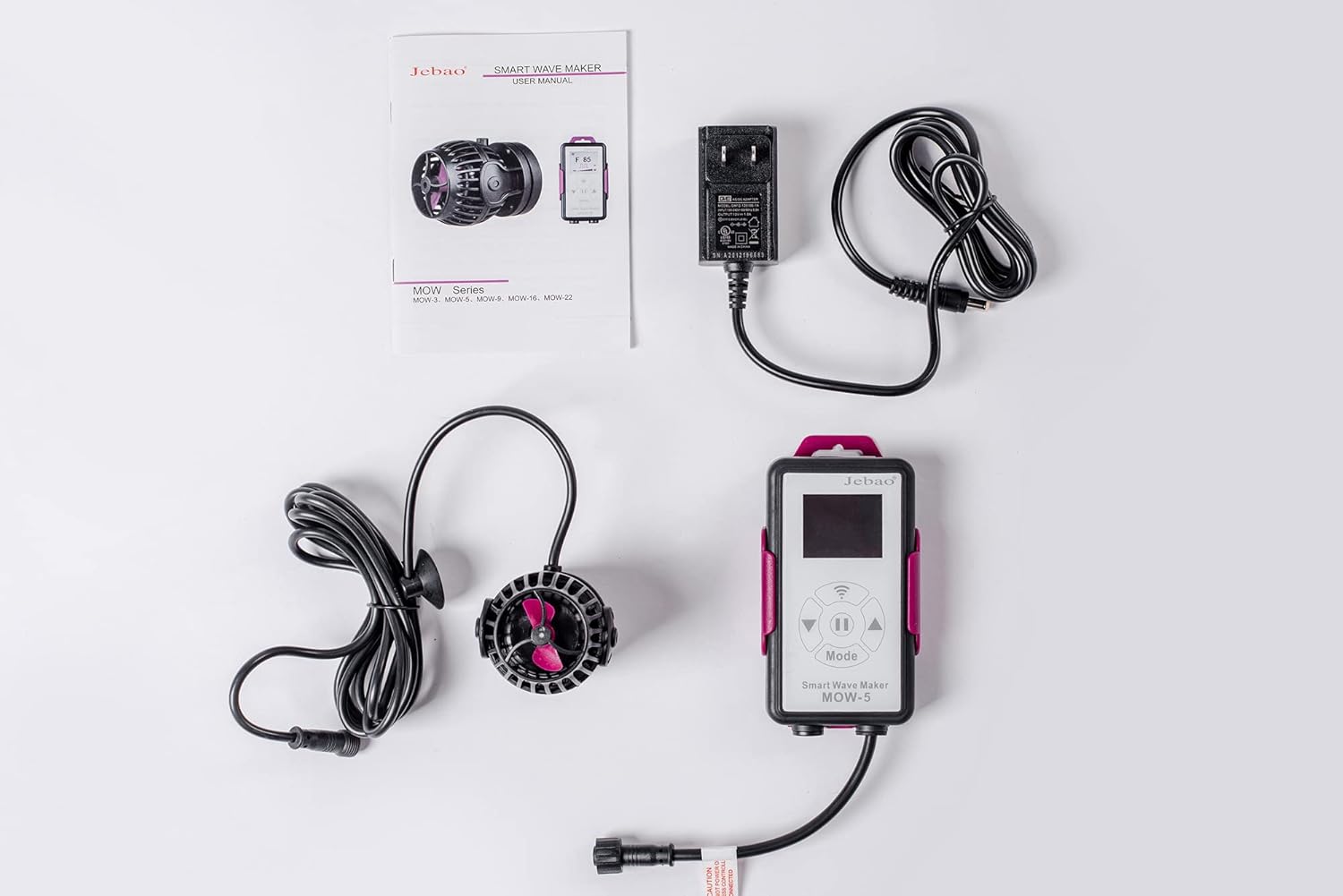
Pastikeun yén sadaya komponén di handap ieu kalebet dina pakét anjeun:
- Jebao MOW-5 Wave Maker Unit
- LCD Display Controller
- Adaptor Daya (DC 24V)
- Manual pangguna (dokumén ieu)

4. Setup jeung Instalasi
- Positioning the Wave Maker:
Place the wave maker unit inside your aquarium, ensuring it is fully submerged. The magnetic base allows for flexible positioning on the aquarium glass. Position it to achieve optimal water flow and wave patterns without disturbing substrate or corals.

Gambar 4.1: Hareupeun view of the MOW-5 wave maker, illustrating its compact design and propeller. 
Gambar 4.2: Sisi profile of the MOW-5 wave maker, highlighting its magnetic base for secure attachment. The unit features a 3D rotation angle, allowing you to adjust the output water direction for customized flow.
- Nyambungkeun Controller:
Connect the wave maker unit's cable to the designated port on the LCD Display Controller. Ensure the connection is secure.
- Sambungan Daya:
Connect the power adapter to the LCD Display Controller, then plug the power adapter into a standard 100V 60Hz US electrical outlet. The LCD display should illuminate.
- Mimitian ngamimitian:
Upon initial power-up, the pump will run briefly to indicate it is receiving power. You can then proceed to select your desired operating mode.
5. Modeu Operasi
The Jebao MOW-5 offers several operating modes to simulate various natural water movements. Use the buttons on the LCD Display Controller to cycle through and select modes.
- W1: Classic Wave Mode
In this mode, you can adjust the wave patterns using the up/down buttons. This allows for synchronized or alternating wave generation among multiple pumps if connected.
- W2: Sine Wave Mode
One or more pumps can operate simultaneously in this mode. The flow rate changes smoothly between 30-100%, mimicking a sine curve for gentle, natural flow variations.
- Else: Random Wave Mode
This mode provides a random variation in pump power, creating unpredictable and natural water movement without a set pattern. Suitable for simulating ocean currents.
- H: Constant Wave Mode
In Constant Wave Mode, the pump maintains a steady, continuous flow. The flow rate can be adjusted to a desired constant level.
- C: Shift to Flow Mode
This mode requires two pumps to operate. They alternate between working and stopping (P1 works, P2 stops; then P2 works, P1 stops), creating a shifting flow pattern.
- Modeu eupan
Press the dedicated feed button on the controller to activate this mode. The pump will stop working for 10 minutes, allowing fish to feed without being disturbed by strong currents. The pump will resume its previous mode automatically after 10 minutes.
6. Wi-Fi Control and App Connection
The Jebao MOW-5 can be controlled via Wi-Fi using the Jebao App on your smartphone (iOS and Android compatible).
- Unduh Aplikasi:
Milarian pikeun "Jebao" in the Apple App Store or Google Play Store and download the official Jebao application.
- Nyambung ka Wi-Fi 2.4GHz:
Ensure your smartphone is connected to a 2.4GHz Wi-Fi network. The Jebao MOW-5 is compatible only with 2.4GHz networks, not 5GHz.
- Prosés papasangan:
Follow the in-app instructions to add your device. This typically involves putting the controller into a pairing mode (often by a long press of a specific button on the controller) and then connecting through the app. Be patient during this process, as connectivity can sometimes require multiple attempts.
- Fitur Aplikasi:
Once connected, the app allows for advanced control and scheduling of the wave maker's modes and intensity, offering greater flexibility than the manual controller.
7. Pangropéa
Regular maintenance ensures optimal performance and longevity of your Jebao MOW-5 wave maker.
- Frékuénsi beberesih:
It is recommended to clean the wave maker unit every 2-4 weeks, or more frequently if you observe reduced flow or increased noise.
- Disassembly jeung beberesih:
- Disconnect the power supply to the wave maker.
- Carefully remove the wave maker unit from the aquarium.
- Disassemble the protective cage and impeller assembly. Refer to the product diagram for guidance.
- Clean all components, especially the impeller and its shaft, using a soft brush and warm water. Remove any algae, debris, or calcium buildup. A mild vinegar solution can be used for stubborn calcium deposits, followed by thorough rinsing.
- Pariksa kabel listrik pikeun tanda-tanda karusakan.
- Reassemble the unit, ensuring all parts are correctly seated.
- Perawatan Controller:
Keep the LCD Display Controller clean and dry. Wipe it with a soft, dry cloth. Do not immerse it in water.
8. Cara ngungkulan
If you encounter issues with your Jebao MOW-5, refer to the following common problems and solutions:
| Masalah | Mungkin Cukang lantaranana | Solusi |
|---|---|---|
| Pump not operating or weak flow. |
|
|
| "ERROR 01" code on display. | Indicates a pump malfunction or blockage. | Disconnect power, thoroughly clean the pump and impeller. Reconnect power. If the error persists, contact customer support. |
| Difficulty connecting to Wi-Fi/App. |
|
|
| Controller buttons unresponsive or display issues. |
|
|
9. Spésifikasi
| Fitur | Rincian |
|---|---|
| Modél | MOW-5 |
| Masukan Voltage | DC 24V |
| Konsumsi Daya | 12-watt |
| Laju Ngalir | 500L (132gal) to 5000L (1320gal) |
| Dianjurkeun Ukuran tank | 30-50 galon |
| Ukuran (Pompa) | 2" Dia x 3"L (approx. 5cm Dia x 7.6cm L) |
| Bahan | Plastic or Polyvinyl chloride |
| Jenis Cai | Suitable for both marine and fresh water |
| Fitur | Wi-Fi (iOS + Android) + Manual Controller, LCD Display, SINE wave technology, 3D rotation angle, No exposed copper element. |
| Peunteun IP | IPX8 (Pump unit) |

10. Garansi jeung Rojongan
Jebao products are manufactured to high-quality standards. For warranty information, technical support, or service inquiries, please contact your retailer or the official Jebao customer service. Please retain your proof of purchase for warranty claims.
For further assistance, visit the official Jebao websitus atanapi ngahubungan saluran rojongan customer maranéhanana.


