1. Bubuka
This manual provides essential instructions for setting up, operating, maintaining, and troubleshooting your realme DIZO Star 300 feature phone. Please read this manual carefully to ensure proper use and to maximize the lifespan of your device.
2. Produk Langkungview
The DIZO Star 300 is a basic mobile phone designed for essential communication and entertainment. It features a compact design, a long-lasting battery, and several useful functions.
Fitur konci:
- 1.8 inci Témbongkeun
- Batré 2550 mAh
- 32 MB RAM
- Expandable Memory up to 64 GB
- Human Interface Input: Keypad
- VGA Rear Camera
- FM Radio & MP3 Player
- Diwangun-di obor
- Large Storage for Contacts and Messages
produk Views:
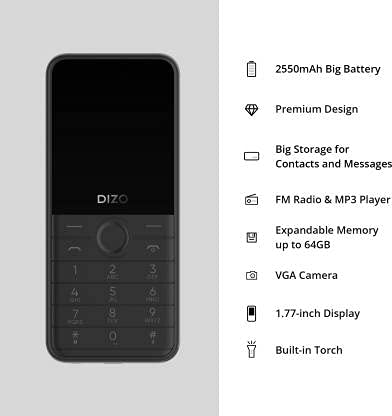
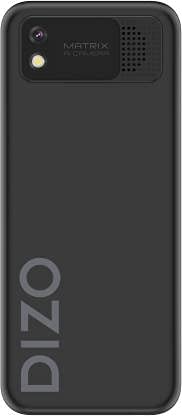

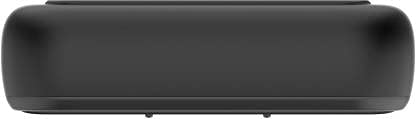
Video produk:
DIZO Star 300 Overview
video ieu nyadiakeun leuwih umumview of the DIZO Star 300 phone, highlighting its design and key features such as the 1.8-inch display, 2550 mAh battery, 32 MB RAM, and multimedia capabilities.
DIZO Star 300 User Interaction
This video demonstrates basic user interaction with the DIZO Star 300, including navigating menus and using the keypad.
3. Setélan
3.1 Masang Kartu SIM sareng Kartu Memori
- Cabut panutup tukang telepon sacara saksama.
- If the battery is installed, remove it by gently lifting it from the designated slot.
- Insert your SIM card(s) into the SIM card slot(s) with the gold contacts facing down. Ensure they are securely seated.
- If using an external memory card (up to 64GB), insert it into the microSD card slot.
- Pasangkeun batréna, sejajarkeun kontakna kalayan leres.
- Pasang deui panutup tukang nepi ka ngaklik kana tempatna.
3.2 Ngecas Batré
- Connect the charger to the charging port on your phone.
- Colokkeun carjer ka colokan listrik.
- Indikator batré dina layar bakal némbongkeun status ngecas.
- Saatos dicas pinuh, cabut carjer tina telepon sareng stop kontak.
3.3 Powering on / Pareum
- Pikeun ngahurungkeun: Pencét terus tahan tombol Daya/Tutup Telepon dugi ka layar hurung.
- To power off: Press and hold the Power/End Call button until the power-off options appear, then select 'Power off'.
4. Parentah Operasi
4.1 Napigasi Dasar
- Use the navigation keys (up, down, left, right) to move through menus.
- Press the center key (OK/Select) to confirm a selection.
- Press the 'Back' or 'Clear' key to return to the previous screen or delete characters.
4.2 Nelepon jeung Narima Telepon
- To make a call: Enter the phone number using the keypad and press the Call button (green receiver icon).
- To answer a call: Press the Call button when the phone rings.
- To end a call: Press the End Call button (red receiver icon).
4.3 Olahtalatah
- Navigate to the 'Messaging' menu.
- Pilih 'Tulis pesen' pikeun nyieun SMS anyar.
- Asupkeun nomer panarima atawa pilih ti kontak.
- Ketik pesen anjeun nganggo keypad.
- Pencét 'Kirim' pikeun ngirim pesen.
Radio FM 4.4 sareng Pamuter MP3
- To use FM Radio: Connect earphones (acting as an antenna) and navigate to the 'FM Radio' application.
- To use MP3 Player: Ensure you have MP3 files stored on your memory card. Navigate to the 'MP3 Player' application to browse and play your music.
4.5 Ngagunakeun kaméra
- Navigate to the 'Camera' application.
- Pigura shot anjeun ngagunakeun tampilan.
- Press the center key to capture a photo.
4.6 Obor Terpasang
- The torch function can typically be activated or deactivated through the phone's menu or by a long press on a specific key (refer to on-screen prompts).
5. Pangropéa
- beberesih: Anggo lawon anu lemes sareng garing pikeun ngabersihkeun permukaan telepon. Hindarkeun nganggo pembersih cair atanapi bahan anu kasar.
- Perawatan batré: Do not expose the battery to extreme temperatures. Avoid overcharging or completely draining the battery frequently to prolong its life.
- Panyimpenan: Simpen telepon di tempat anu tiis, garing, sareng jauh tina sinar panonpoé langsung sareng kalembaban upami henteu dianggo salami lami.
- Apdet parangkat lunak: Periodically check for any available software updates to ensure optimal performance and security.
6. Cara ngungkulan
If you encounter issues with your DIZO Star 300, refer to the following common solutions:
- Telepon teu hurung: Ensure the battery is charged and correctly inserted. Try connecting the charger to see if it powers on.
- Henteu aya sinyal jaringan: Check if the SIM card is properly inserted. Ensure you are in an area with network coverage.
- Batré teu ngecas: Verify the charger is working and properly connected to both the phone and the power outlet. Check for any damage to the charging cable or port.
- Keypad teu ngaréspon: Restart the phone. If the issue persists, contact customer support.
- Masalah sora: Check volume settings. Ensure the speaker is not obstructed.
For issues not covered here, please contact DIZO customer support.
7. Spésifikasi
| Fitur | Rincian |
|---|---|
| Ngaran modél | Béntang 300 |
| merek | realme |
| Produsén | DIZO |
| Warna | Hideung |
| Ukuran layar | 1.8 inci |
| Kapasitas batré | 2550 mAh |
| Ram | 32 MB |
| Mémori anu tiasa dilegakeun | Nepi ka 64 GB |
| Input Antarmuka Manusa | Papan tombol |
| Kaméra | VGA Rear Camera |
| Fitur | FM Radio, MP3 Player, Built-in Torch |
| Item Beurat | 220 g |
| ASIN | B099MXZ3MM |
| Tanggal Kahiji Sadia | 16 Juli 2021 |
8. Garansi jeung Rojongan
The realme DIZO Star 300 is manufactured by DIZO. For warranty information, service, or technical support, please refer to the warranty card included with your product or visit the official DIZO or realme support websitus. Simpen resi pameseran anjeun salaku bukti pameseran pikeun klaim garansi.


