Bubuka
Thank you for choosing the CORN HB001 Bluetooth Wireless Headphones. This manual provides essential information for setting up, operating, and maintaining your headphones. Please read it carefully before use to ensure optimal performance and longevity of your device. Keep this manual for future reference.
Produk Leuwihview
The CORN HB001 headphones offer a comfortable on-ear design with wireless Bluetooth connectivity, allowing you to enjoy high-quality audio without the constraints of cables. They also feature a 3.5mm audio jack for wired connection when wireless is not preferred or battery is low.
Komponén Headphone
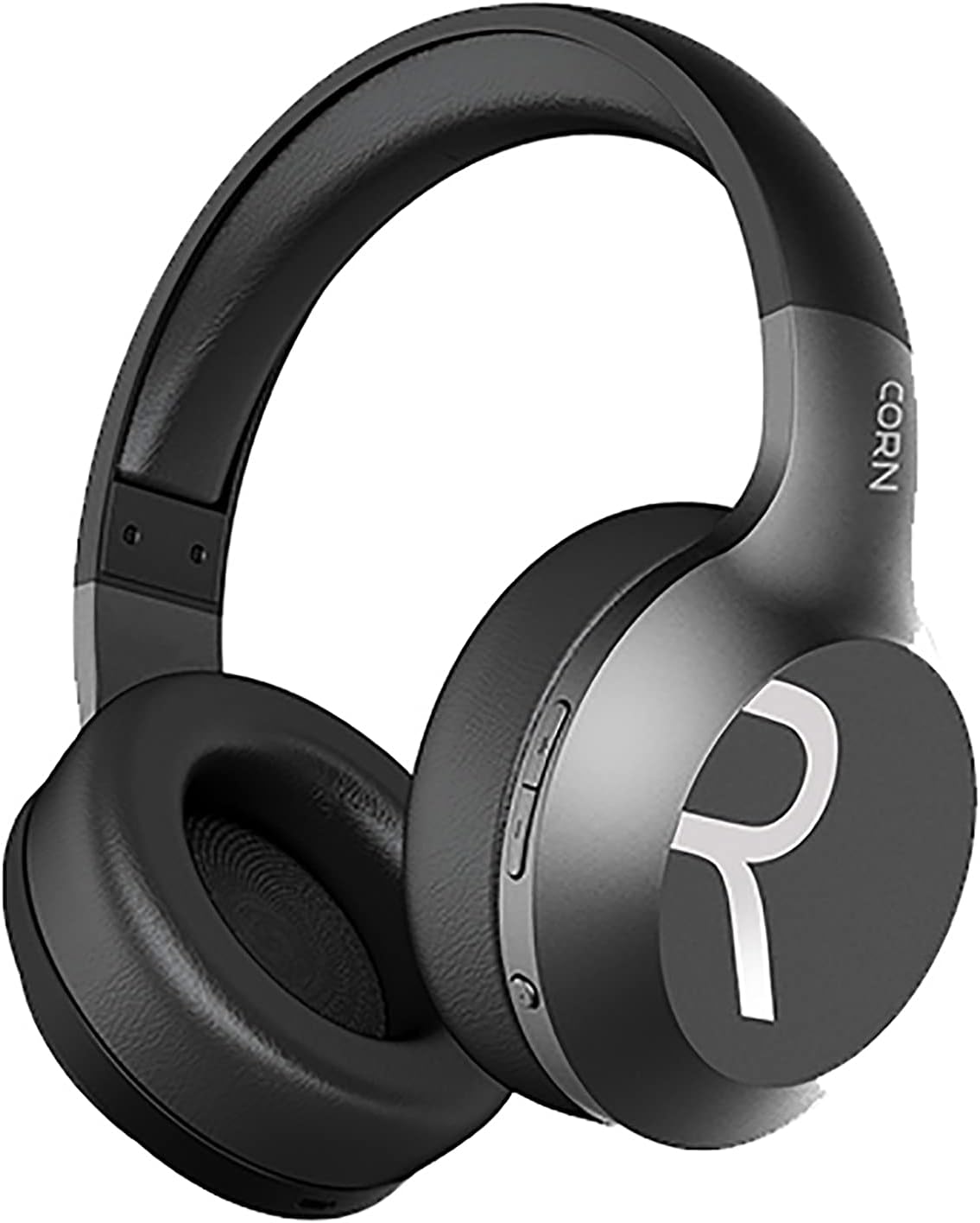
Gambar 1: Gemblengna view of the CORN HB001 Bluetooth Wireless Headphones. The image displays the black on-ear headphones with adjustable headband and earcups, featuring the 'CORN' brand logo on the side.
Ngadalikeun Layout

Gambar 2: Close-up of the control buttons located on the right earcup. These typically include volume up/down and a multi-function button for power, play/pause, and call management.
Familiarize yourself with the buttons and ports on your headphones. Typically, you will find a power/multi-function button, volume controls, a charging port (e.g., USB-C), and a 3.5mm audio jack.
Disetél
1. Ngecas Headphone
Before first use, fully charge your headphones. Connect the charging cable (usually USB) to the charging port on the headphones and the other end to a USB power source (e.g., computer, wall adapter). The LED indicator will typically show red during charging and turn off or blue when fully charged.
- Waktu Ngecas: Kurang leuwih 2 jam.
- Kapasitas batré: 300 mAh.
2. Papasangan Bluetooth
Pikeun nyambungkeun headphone anjeun sacara nirkabel ka alat:
- Pastikeun headphone dicas sareng dipareuman.
- Pencét terus tahan tombol Daya/Multi-fungsi salila kira-kira 5-7 detik nepi ka indikator LED kedip-kedip biru jeung beureum silih genti, nunjukkeun modeu papasangan.
- Dina alat anjeun (smartphone, tablet, komputer), aktipkeun Bluetooth sareng milarian alat anyar.
- Select "CORN HB001" from the list of available devices.
- Once connected, the LED indicator will usually flash blue slowly or turn solid blue.
- Headphone bakal otomatis nyobian nyambung deui ka alat anu dipasangkeun terakhir nalika diaktipkeun.
Parentah Operasi
Daya Hurung/Pareuman
- Daya Hurung: Press and hold the Power/Multi-function button for about 3 seconds until the LED indicator lights up blue.
- Pareum listrik: Press and hold the Power/Multi-function button for about 3-5 seconds until the LED indicator turns red and then off.
Puterkeun Musik
- Puter / Reureuh: Pencét tombol Daya/Multi-fungsi sakali.
- Volume Up: Pencét tombol '+'.
- Volume Turun: Pencét tombol '-'.
- Lagu salajengna: Pencét jeung tahan tombol '+'.
- Lagu Sateuacanna: Pencét jeung tahan tombol '-'.
Manajemén Telepon
- Ngajawab / mungkas Telepon: Pencét tombol Daya/Multi-fungsi sakali.
- Nolak Telepon: Press and hold the Power/Multi-function button for about 2 seconds.
- Telepon deui Nomer Panungtungan: Pencét dua kali tombol Daya/Multi-fungsi.
Wired Mode (3.5mm Audio Jack)
You can use the headphones in wired mode even if the battery is depleted. Simply connect one end of a 3.5mm audio cable (not always included) to the headphone's 3.5mm jack and the other end to your audio source. In wired mode, Bluetooth functions are disabled, and controls on the headphones may not function.
Pangropéa
Pangropéa anu leres mastikeun umur panjang headphone anjeun.
- beberesih: Use a soft, dry cloth to wipe the headphones. Do not use abrasive cleaners or solvents. For ear cushions, gently wipe with a damp lawon sarta ngidinan ka hawa garing sagemblengna.
- Panyimpenan: Store the headphones in a cool, dry place away from direct sunlight and extreme temperatures. If your headphones are foldable, fold them carefully to prevent damage.
- Paparan cai: Headphone ieu henteu tahan cai. Hindarkeun kakeunaan cai, kalembaban, atanapi hujan.
Pamérésan masalah
Upami anjeun mendakan masalah, cobian solusi ieu:
| Masalah | Solusi |
|---|---|
| Headphone moal hurung | Ensure the headphones are fully charged. Press and hold the Power button for a few seconds. |
| Teu tiasa dipasangkeun sareng alat | Ensure headphones are in pairing mode (flashing blue/red). Turn off and on Bluetooth on your device. Forget previous pairings and try again. Ensure headphones are within 10m range. |
| Taya sora | Check volume levels on both headphones and your device. Ensure headphones are properly paired. Try wired connection if available. |
| Kualitas sora goréng | Move closer to your device to reduce interference. Ensure no physical obstructions between headphones and device. |
spésifikasi
| Fitur | Rincian |
|---|---|
| Ngaran modél | HB001 |
| Ngaran Brand | JAGONG |
| Téhnologi konektipitas | Nirkabel, Bluetooth |
| Vérsi nirkabel | V5.0 |
| Jarak Operasi | 10 méter |
| Ukuran Supir Speaker | Φ40 mm |
| Impedansi spiker | 32Ω |
| Kakuatan Speaker | 15mW |
| Kapasitas batré | 300 mAh |
| Waktu Ngecas | Kurang leuwih 2 jam |
| Waktos Gawé | Kurang leuwih 8 jam |
| Faktor Bentuk Headphone | Dina Ceuli |
| Jack headphone | 3.5mm Jack (for wired use) |
| Komponén Kaasup | Bantal Ceuli |
| Age Range Pedaran | Dewasa |
| Bahan | palastik |
| Warna | Hideung |
Garansi sareng Rojongan
For warranty information or technical support, please refer to the documentation included with your purchase or contact the manufacturer directly through their official websitus atanapi saluran layanan palanggan. Simpen bukti pameseran anjeun kanggo klaim garansi.


