1. Bubuka
This manual provides detailed instructions for the installation, operation, and maintenance of your Sifely Keyless-Entry Fingerprint Smart Door Lock. Please read this manual thoroughly before installation and use to ensure proper function and safety. This smart lock offers multiple access methods, including advanced fingerprint recognition, passcodes, key fobs, smartphone control, and traditional physical keys, providing enhanced security and convenience for your home or rental property.
2. Fitur Produk
- Advanced 3D Fingerprint Recognition: Unlock your door in less than 0.3 seconds with highly secure fingerprint access.
- Sababaraha Métode Muka konci: Supports Fingerprint, Passcode, Wireless Key Fob, Card, Smartphone App, and Physical Key.
- Pamasangan Gampang: Designed for quick installation with a Phillips screwdriver, requiring no extra drilling for standard doors.
- Remote Control & WiFi Access (with Gateway): When paired with the optional Sifely WiFi Gateway (sold separately), you can lock/unlock remotely, set codes, and view real-time access logs from anywhere.
- Comprehensive Locks Management: Manage all your locks seamlessly through the dedicated smartphone app and web portal.
- Hirup batré anu panjang: Up to 1-year battery life with 4 AA batteries (not included).
- Gagang anu tiasa dibalikkeun: Compatible with both left- and right-handed doors.

Gambar 2.1: Leuwihview of Sifely Smart Lock features including fingerprint, app control, passcode, key fob, physical key, and easy installation.

Figure 2.2: The Sifely smartphone application allows for full control and management of your smart lock.

Figure 2.3: Connect your Sifely lock to property management systems for automated passcode generation and sharing.
3. Eusi Paket
Upon opening your Sifely Smart Door Lock package, please verify that all the following components are included:
- Lempeng Pamasangan
- Gasket karét
- Lempeng raray
- Lempeng Balik
- Majelis baud
- 2 x Konci Fisik
- 2 x Key Cards
- Necessary Screws and Installation Hardware
4. Pitunjuk Instalasi
The Sifely Smart Door Lock is designed for easy installation, typically requiring only a Phillips screwdriver. No additional drilling is needed for most standard doors. Ensure your door meets the following specifications for optimal fit:
- Ketebalan Panto: 1 3/8" ~ 2 1/4" (35mm - 55mm)
- Diaméterna liang: 2 1/8" (54mm)
- Bore Hole Backset: 2 3/8" or 2 3/4" (60mm or 70mm)
Catetan penting: Locks may interfere with existing screen doors or storm doors. Please refer to the detailed installation instructions provided in the package for step-by-step guidance, including adjusting the handle direction if necessary.

Figure 4.1: Door specifications for Sifely Smart Lock compatibility.
5. Parentah Operasi
Your Sifely Smart Door Lock offers various convenient ways to access your property:
- Buka konci sidik: Place your registered finger on the biometric sensor for quick and secure access. The lock will unlock in under 0.3 seconds.
- Éntri Kodeu Sandi: Tap the keypad to activate it, then enter your programmed passcode followed by the '#' key.
- Key Fob/Card Access: Simply tap the provided key fob or card against the designated area on the lock to unlock.
- Kontrol Aplikasi Smartphone: Use the Sifely app on your smartphone to remotely lock or unlock the door (requires optional WiFi Gateway for remote access).
- Konci fisik: In case of battery depletion or other issues, use the provided physical keys for manual override. The keyhole is discreetly located.
The lock features an auto-lock function, which can be configured via the app to automatically secure the door after a set period, ensuring peace of mind.

Figure 5.1: The Sifely Smart Lock offers multiple convenient access methods.

Figure 5.2: Remotely generate and share temporary passcodes for visitors or service providers.
6. Pangropéa
To ensure the longevity and optimal performance of your Sifely Smart Door Lock, follow these maintenance guidelines:
- Ngagantian batré: The lock operates on 4 AA batteries and offers up to 1-year of battery life. The app will provide low battery alerts. Replace all four batteries simultaneously when prompted.
- External Backup Power: In case batteries die before replacement, a micro-USB port is available for temporary external power (power bank not included) to gain access.
- beberesih: Wipe the keypad and fingerprint sensor regularly with a soft, dry cloth to remove dust and smudges. Avoid using abrasive cleaners or solvents.
- Pembaruan firmware: Periodically check the Sifely app for available firmware updates to ensure your lock has the latest features and security enhancements.
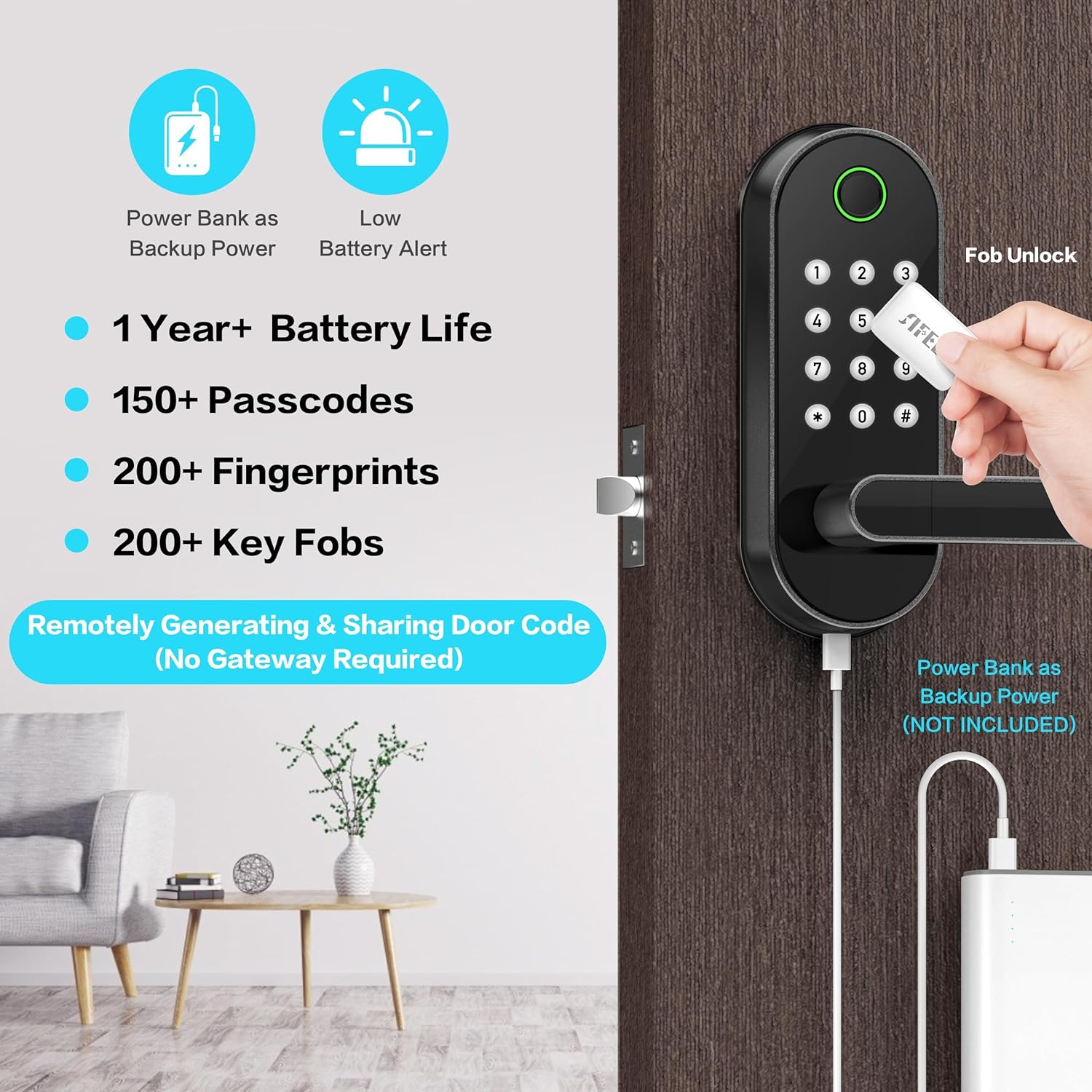
Figure 6.1: Information on battery life and external backup power for the Sifely Smart Lock.
7. Cara ngungkulan
If you encounter issues with your Sifely Smart Door Lock, consider the following common solutions:
- Sidik ramo Teu Dipikawanoh: Ensure your finger is clean and dry. Try re-registering your fingerprint in the app.
- Keypad Teu Ngarespon: Check battery levels. If low, replace batteries or use external backup power. Ensure the keypad is clean.
- Konci Teu Ngabales: Check battery levels. Perform a soft reset if available (refer to the app or full manual for reset procedures).
- Masalah Konektipitas Aplikasi: Ensure Bluetooth is enabled on your phone. If using WiFi Gateway, check its connection and power.
- Konci Fisik Teu Gawé: Pastikeun konci parantos dipasangkeun sapinuhna sareng diputer kalayan leres.
For persistent issues, consult the comprehensive troubleshooting section within the Sifely app or contact Sifely customer support.
8. Spésifikasi
| Fitur | Rincian |
|---|---|
| merek | Sifely |
| Ngaran modél | Sifely S Model |
| Tipe Konci | Biometrik, Deadbolt, Konci Kombinasi, Keypad |
| Fitur husus | Fingerprint, Keyless Entry, Passcode, Wireless Key Fob, Card, Smartphone, Remote Control, WiFi Access |
| Bahan | Séng |
| Warna | Hideung |
| Ukuran barang (L x W x H) | 1.2 x 3 x 7 inci |
| Item Beurat | 3.6 pon |
| Sumber Daya | 4 batré AA (teu kaasup) |
| Protokol konektipitas | Bluetooth, Wi-Fi (kalayan Gateway opsional) |
| Komponén Kaasup | Mounting Plate, Rubber Gasket, Face Plate, Back Plate, Bolt Assembly, 2X Keys, 2X Key Cards |
9. Garansi jeung Rojongan
Sifely is a small business committed to providing advanced and reliable smart access technology. While specific warranty details are not provided in this manual, please refer to the product packaging or the Sifely official websitus kanggo inpormasi garansi anu lengkep.
For technical support, troubleshooting assistance, or any inquiries regarding your Sifely Smart Door Lock, please utilize the support features within the Sifely smartphone application or visit the official Sifely websitus pikeun inpo kontak.


