1. Produk Langkungview
The Waveshare CM4-IO-BASE-BOX-B is a mini-computer solution designed for the Raspberry Pi Compute Module 4 (CM4), which is not included. It integrates the Waveshare CM4-IO-BASE-B (Full Version) board within a durable metal case, complete with a cooling fan for optimal heat dissipation. This product facilitates the creation of a compact and versatile Raspberry Pi CM4 mini PC.
Key features include rich peripheral connectors such as CSI/DSI/RTC/FAN/HDMI/USB/RJ45 Gigabit Ethernet, Micro SD Card Slot, and M.2 Slot. The metal case provides precise cut-outs for all connectors and supports wall mounting.

Figure 1: Waveshare CM4-IO-BASE-BOX-B complete kit components, including the CM4-IO-BASE-B board, metal case, cooling fan, power adapter, screwdriver, and screw pack.
2. Eusi Paket
- CM4-IO-BASE-B board x1
- Metal case (top and bottom) x1
- Fan-4010-PWM-5V x1
- 5V 3A USB-C power adapter x1
- Obeng x1
- Screws pack x1
3. Setup jeung Instalasi
3.1 Assembling the CM4-IO-BASE-BOX-B
To assemble your mini-computer, carefully integrate the Raspberry Pi Compute Module 4 (not included) onto the CM4-IO-BASE-B board. Then, install the board into the provided metal case, ensuring the cooling fan is properly connected and positioned for effective airflow.

Figure 2: Raspberry Pi Compute Module 4 installed on the Waveshare Mini IO Board, showing the 40PIN GPIO Header and the Compute Module 4. CM4 and antenna are not included.
3.2 Important Precautions
- This model supports only a 5V fan. Confirm fan voltage saméméh nyambungkeun.
- The DSI Display Port connects to the DSI0 interface of the CM4; it does not use the DSI1 display interface.
- The Type-C interface can be used for power supply or as a USB SLAVE interface for flashing images.
- When using the Type-C interface to flash images, do not connect other devices to ensure normal CM4 power supply.
- A 5V 2A power supply is required for the CM4. Insufficient power may cause automatic shutdowns or frequency reduction.
- When using the M.2 interface, use only the matching screws. Using screws of other lengths may damage the CM4 core.
- The module lacks protection circuits; avoid short-circuiting the power supply.
- USB 2.0 is closed by default. To enable it, add
dtoverlay=dwc2,dr_mode=hostkaconfig.txt. Lamunotg_mode=1is present, comment it out by adding a#at the beginning of the line. - HDMI1 uses a flat cable output. An HDMI adapter may be required.
- This expansion board does not support Power over Ethernet (PoE) function.
4. Parentah Operasi
4.1 Connector Overview
The CM4-IO-BASE-B board offers a comprehensive set of connectors for various applications. Familiarize yourself with the layout for proper connection of peripherals.
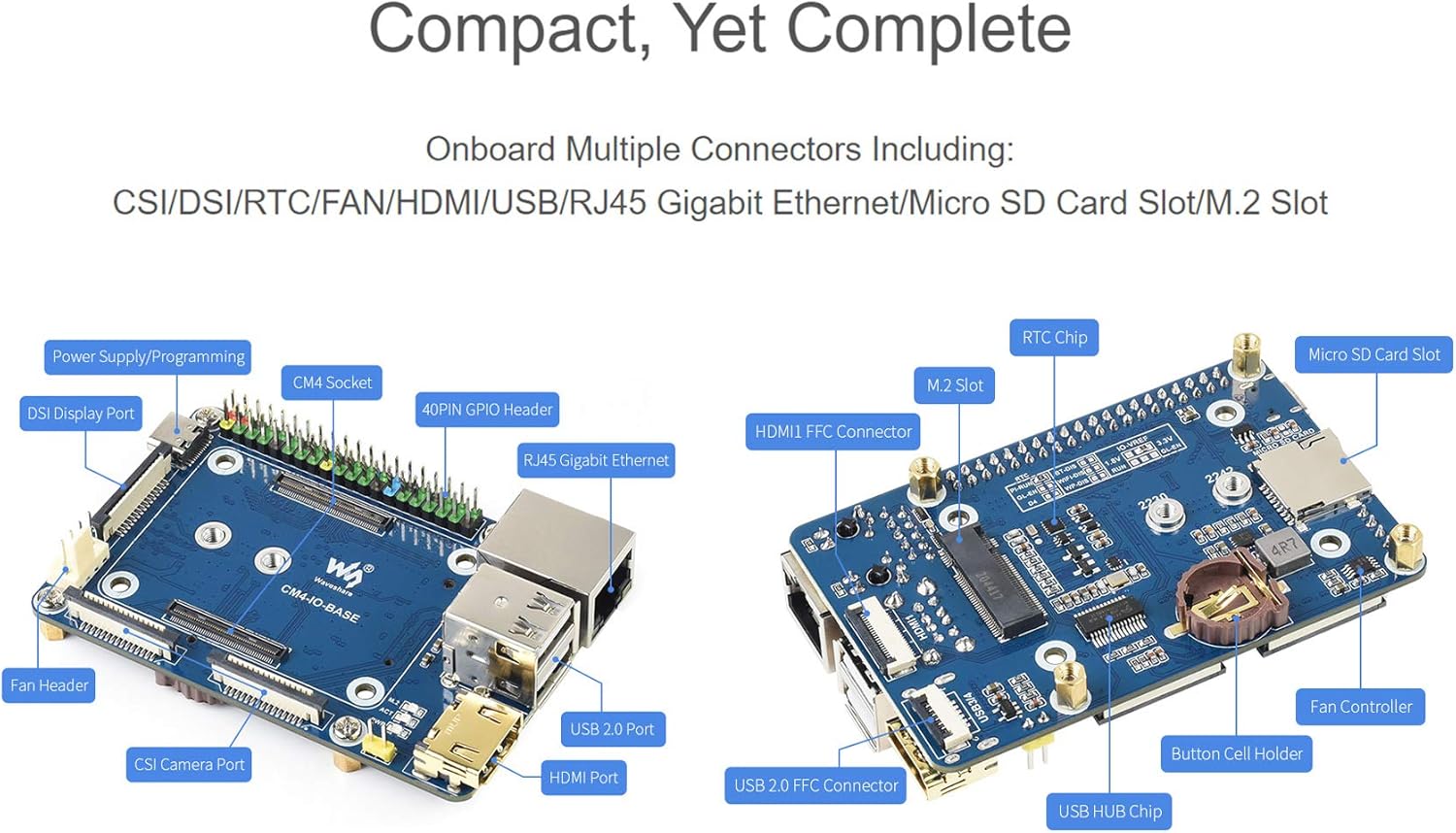
Gambar 3: Detil view of the Waveshare CM4-IO-BASE-B board, highlighting the CM4 Socket, 40PIN GPIO Header, RJ45 Gigabit Ethernet, USB 2.0 Port, HDMI Port, DSI Display Port, Fan Header, CSI Camera Port, Power Supply/Programming (Type-C), M.2 Slot, RTC Chip, Micro SD Card Slot, Fan Controller, Button Cell Holder, USB HUB Chip, HDMI1 FFC Connector, and USB 2.0 FFC Connector.
4.2 External Port Access
The metal case is designed with precise cut-outs to ensure easy access to all necessary ports and connectors on the CM4-IO-BASE-B board.

Figure 4: External view of the CM4-IO-BASE-BOX-B case, showing labeled ports including DSI Display Port, ANT (Antenna), Type-C (Power Input/Programming), TF Card Slot, CSI Camera Ports (CAM0, CAM1), USB 2.0 Connectors (USB1/2, USB3/4), HDMI0 Connector, HDMI1 FFC Port, RJ45 Gigabit Ethernet, and 40PIN GPIO FFC Port.
4.3 Sistim cooling
The integrated cooling fan, combined with the case's airflow vents, provides efficient heat dissipation for the Raspberry Pi Compute Module 4, ensuring stable operation.

Figure 5: The CM4-IO-BASE-BOX-B with its cooling fan, alongside examples of its application in binocular vision Raspberry Pi projects and other industrial contexts.
5. Cara ngungkulan
- USB 2.0 Ports Not Working: By default, USB 2.0 is disabled on the CM4 to save power. To enable, edit the
config.txtfile (typically located in the boot partition of your OS) and add the linedtoverlay=dwc2,dr_mode=host. Lamunotg_mode=1is present, comment it out by adding a#at the beginning of the line. - Automatic Shutdowns or Frequency Reduction: Ensure you are using a stable 5V 2A power supply for the CM4. Insufficient power can lead to system instability.
- SD Card Not Functioning (with eMMC CM4): If your Compute Module 4 has eMMC storage, the Micro SD card slot on the IO board will not function as a boot device. You must flash the operating system directly to the eMMC. Ensure the boot switch is in the correct position for eMMC boot.
- M.2 Drive Installation Issues: Always use the provided matching screws when installing an M.2 drive. Incorrect screw lengths can cause damage to the CM4 module.
6. Spésifikasi
| Fitur | Rincian |
|---|---|
| Ngaran modél | CM4-IO-BASE-B |
| CPU Socket | 217-pin high-density connector (for Raspberry Pi Compute Module 4) |
| Prosesor cocog | Broadcom BCM2711A1, Raspberry Pi Compute Module 4 |
| Téhnologi Mémori RAM | LPDDR4 |
| Mémori Jam Speed | 2133 MHz |
| Jinis Panyambung Daya Utama | USB-C (5V 2A recommended) |
| Panganteur Kartu grafik | terpadu |
| Konektipitas | CSI, DSI, RTC, FAN, HDMI, USB, RJ45 Gigabit Ethernet, Micro SD Card Slot, M.2 Slot |
| Rojongan kipas | 5V PWM Fan (Fan-4010-PWM-5V included) |
| Ukuran (Kira-kira.) | 7.17 x 5.43 x 1.73 inci (Dibungkus) |
| Beurat (Kira-kira.) | 15.2 ons (Barang) |

Figure 6: The CM4-IO-BASE-BOX-B case demonstrating wall mount support and detailed outline dimensions in millimeters.
7. Rojongan jeung Kontak
For development resources, technical support, or any issues encountered with your Waveshare CM4-IO-BASE-BOX-B, please contact Waveshare customer support. Detailed documentation and resources are available to assist you.


