Bubuka
This manual provides detailed instructions for the installation, operation, and maintenance of the GEYA GRT8-A1 Delay On Single Function Time Relay. Please read thoroughly before use to ensure safe and correct operation.
Fitur produk
- Kinerja luhur: Delay can be set directly via the panel knob for convenient and intuitive adjustment.
- Modeu fungsi: Features two optional modes: A (Delay ON) or B (Delay OFF).
- Prinsip Operasi: Function is controlled by supply voltage or time scale control input. Time scale ranges from 0.1s to 10 days, divided into 10 ranges (0.1-1s, 1-10s, 6-60s, 1-10min, 6-60min, 1-10hr, 0.1-1day, 1-10day, only ON, only OFF).
- Lega Voltage Rojongan: Compatible with AC/DC12-240V or AC230V.
- Kontak Kaluaran: Available with 1SPDT (1NO1NC) or 2SPDT (2NO2NC) output contacts. Relay status is indicated by an LED.
- Desain kompak: 1-MODULE, DIN rail mounting. Ultra-small size, only 18mm width, designed for 35mm rail mounting.
Instalasi jeung Dimensi
The GRT8-A1 relay is designed for easy installation on a standard DIN rail. Its compact dimensions ensure it fits efficiently into electrical panels.

Modeu Fungsi
The GRT8-A1 series offers two primary function modes: Delay ON (A) and Delay OFF (B), selectable via the front panel.
A - Delay ON
In Delay ON mode, the relay initiates a timed delay upon power-up. After the set delay period, the output contact closes, activating the connected load. The load remains active until power is removed.

B - Delay OFF
In Delay OFF mode, the connected load is immediately activated upon power-up. After the set delay period, the output contact opens, deactivating the load. This mode is suitable for applications where a device needs to run for a specific duration after being switched on.
Diagram Wiring
Proper wiring is crucial for safe and correct operation. Refer to the diagrams below for connection details. Always ensure power is disconnected before performing any wiring.

Relay Wiring Example (Delay ON)
Mantan ieuample demonstrates wiring for a Delay ON function to control a lamp using the GRT8-A1 AC230V model. Connect the Live (L) and Neutral (N) lines to the relay's power input (A1, A2). The trigger can be connected to the S terminal. The lamp is connected to the output contacts (15, 18) to receive power after the delay.

Wiring Demonstration Video
Video 1: This video demonstrates the wiring process for the GEYA GRT8-A1 time relay, showing how to connect power, load, and trigger for proper function. It also covers function demonstration and time setting.
Setélan Waktos
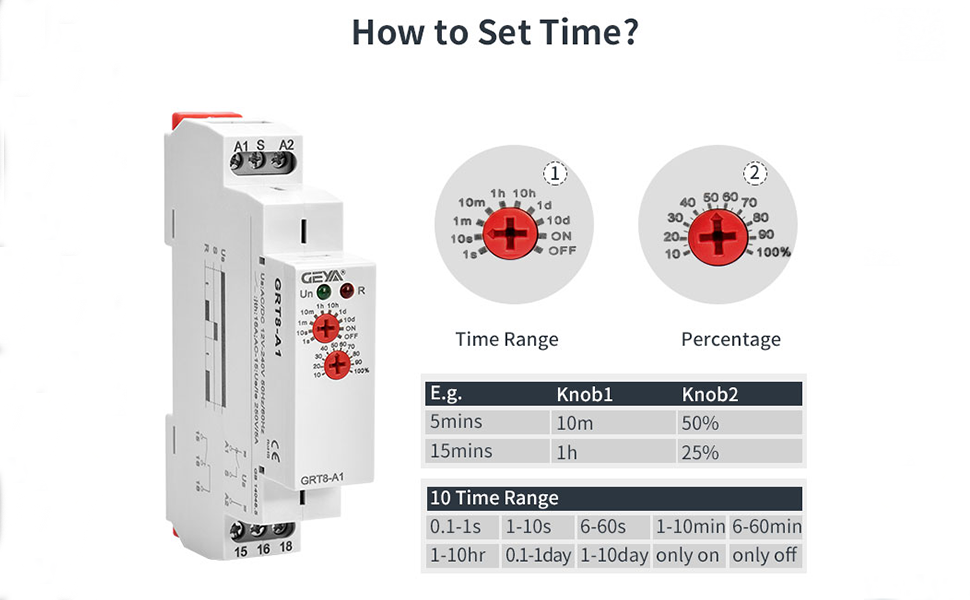
The delay time is set using two rotary knobs on the front panel of the relay. These knobs allow for precise adjustment of the delay period.

Prosedur Setting
- The upper knob (Knob 1) selects the time range. Options include 0.1-1s, 1-10s, 6-60s, 1-10min, 6-60min, 1-10hr, 0.1-1day, 1-10day, only ON, and only OFF.
- The lower knob (Knob 2) sets the percentage of the selected time range, adjustable from 10% to 100%.
Example: To set a 5-second delay, first rotate the upper knob to the "10s" range. Then, adjust the lower knob to "50%". This calculates to 50% of 10 seconds, which is 5 seconds.
Time Setting Demonstration Video
Video 2: This video introduces how to use the GEYA GRT8-A1 time relay, including setting the delay time and demonstrating its operation with a load.
Spésifikasi teknis
Below are the detailed technical specifications for the GEYA GRT8-A1 Delay On Single Function Time Relay.

| Spésifikasi | Nilai |
|---|---|
| Tipe Kontak | Biasana Buka, Biasana Tutup |
| Peunteun ayeuna | 16 Amps |
| Tipe Pamasangan | DIN Rail Gunung |
| Modeu Operasi | Otomatis |
| Coil Voltage | 12 Volt (DC) |
| Kontak Peunteun Ayeuna | 16 Amps |
| Maksimum Ngalihkeun Ayeuna | 16 Amps |
| Maksimum Ngalihkeun Voltage | 240 volt |
| Jumlah Terminal | 2 |
| Spesifikasi Met | Din |
Pamérésan masalah
- Relay not activating: Check power supply connections (A1, A2). Ensure the voltage is within the specified range (AC/DC12-240V or AC230V). Verify time settings are correctly configured and the delay period has elapsed.
- Beban teu robah: Inspect output contact wiring (15, 16, 18). Confirm the load is correctly connected to the appropriate normally open (NO) or normally closed (NC) terminals. Check the load's power requirements against the relay's maximum switching current (16 Amps).
- Incorrect delay time: Re-verify the settings on both time range and percentage knobs. Ensure the screwdriver is properly seated when adjusting to avoid damage.
- Indikator LED: Green LED (Un) indicates power supply. Red LED (R) indicates relay output status. If the green LED is off, check the power supply. If the red LED does not change state as expected, review wiring and time settings.
Garansi sareng Rojongan
For warranty information, technical assistance, or further inquiries, please contact GEYA customer support through their official channels or refer to the product packaging. Keep your purchase receipt for warranty claims.


