1. Bubuka
Thank you for choosing the DOQAUS Indoor Thermometer and Humidity Gauge. This device provides accurate and fast readings of indoor temperature and humidity, helping you maintain a comfortable and healthy environment in your home, office, greenhouse, or other spaces. This manual will guide you through the setup, operation, and maintenance of your new device.

Image 1: Three DOQAUS Indoor Thermometers displaying temperature and humidity.
2. Eusi Paket
Mangga parios pakét pikeun mastikeun yén sadaya barang aya:
- 3 x DOQAUS Indoor Thermometer and Humidity Gauge
- 3 x CR2032 Batteries (pre-installed or included separately)
- 1 x Manual Pamaké
3. Fitur Produk
The DOQAUS Indoor Thermometer and Humidity Gauge offers several key features:
- High Accuracy and Fast Refresh: Provides temperature accuracy of ±1°F and humidity accuracy of ±3%~5% RH, with readings updated every 5 seconds.
- Indikator kanyamanan hawa: Displays dry, comfort, or wet conditions using emoticons and text, offering a quick visual reference of the environment.
- Jelas LCD Display: A 2.3-inch LCD screen with large digits ensures easy readability from various angles.
- Pilihan Unit Suhu: Gampang pindah antara Celsius (°C) sareng Fahrenheit (°F).
- Desain kompak: Its pocket-sized and lightweight design allows for versatile placement without occupying much space.
- Sababaraha Pilihan Pasang: Features a tabletop stand, magnetic back, and wall hanging hole for flexible placement.

Image 2: Visual representation of the thermometer's key features.

Image 3: Display size comparison, illustrating the large digits for enhanced readability.
4. Setélan
Follow these steps to set up your DOQAUS Indoor Thermometer:
- Pamasangan batré: The device typically comes with a CR2032 battery pre-installed. If not, or if the display is blank, gently open the battery compartment cover on the back of the device. Insert one CR2032 battery with the positive (+) side facing up. Close the cover securely.
- Daya Hurung: The device will automatically power on once the battery is correctly installed. The current temperature and humidity will be displayed on the LCD screen.

Image 4: Back of the device, illustrating the battery compartment and C/F switch.
5. Operasi
Operating your thermometer is straightforward:
- Maca Tampilan: The top large number indicates the current temperature, and the bottom large number shows the current relative humidity (RH%).
- Indikator kanyamanan: Below the temperature reading, an emoticon and text will indicate the air comfort level:
- garing: Kalembaban <40%
- kanyamanan: 40% ≤ Kalembaban ≤ 60%
- baseuh: Kalembaban > 60%
- Ngalihkeun Unit Suhu: Di tukang alat, milarian tombol °C/°F. Pencét tombol ieu pikeun ngalih antara tampilan suhu Celsius sareng Fahrenheit.
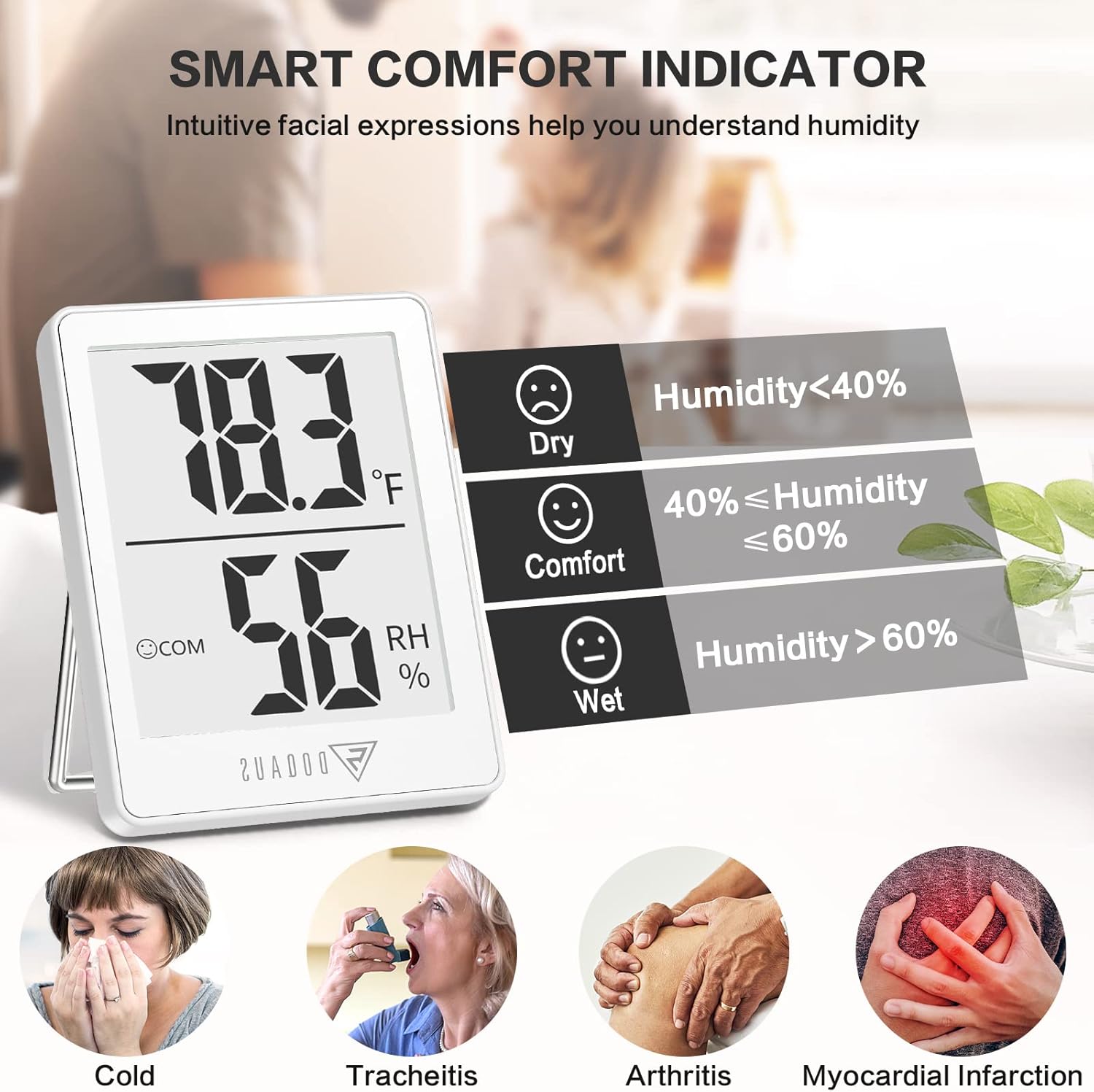
Image 5: Explanation of the Smart Comfort Indicator.
6. Pilihan Pamasangan
The DOQAUS thermometer offers three convenient ways to place it:
- Nangtung méja: Pull out the integrated stand on the back of the device to place it upright on any flat surface, such as a desk, shelf, or nightstand.
- gantung témbok: Use the hanging hole on the back of the device to mount it on a nail or hook on a wall.
- Balik Magnét: The device features a magnetic back, allowing it to be attached to metallic surfaces like refrigerators or magnetic boards.

Image 6: Illustrations of tabletop stand, wall mount, and magnetic back mounting options.
7. Spésifikasi
| Spésifikasi | Rincian |
|---|---|
| merek | DOQAUS |
| Nomer modél | DQDQHM001AW3-USA4 |
| Dimensi produk | 1.8" W x 2.3" H |
| Item Beurat | 0.11 Kilogram (3.84 ons) |
| Jenis Batré | 1 x CR2032 (kaasup) |
| Tipe Pamasangan | Ngagantung liang, Tabletop Stand, Magnet Ngalampirkeun |
| Rentang Kalembaban Operasi | 10% nepi ka 99% RH |
| Peunteun Suhu luhur | 122 Derajat Fahrenheit (50°C) |
| Akurasi Suhu | ±1°F (0.5°C) for 10°C~40°C; ±1.5°F (0.8°C) outside this range |
| Akurasi asor | ±3% RH for 40%~80% RH; ±5% RH outside this range |

Image 7: Illustration of temperature and humidity accuracy testing.
8. Pangropéa
To ensure the longevity and accurate performance of your device:
- beberesih: Ngusap alat ku kaén anu lemes sareng garing. Ulah make cleaners abrasive atawa neuleumkeun alat dina cai.
- Ngagantian batré: When the display becomes dim or stops working, it's time to replace the CR2032 battery. Follow the battery installation steps in Section 4. Batteries typically last 3-6 months depending on usage and environmental conditions.
- Panyimpenan: If storing the device for an extended period, remove the battery to prevent leakage. Store in a cool, dry place away from direct sunlight.
9. Cara ngungkulan
If you encounter issues with your DOQAUS thermometer, refer to the following common solutions:
- Henteu aya tampilan atanapi taram tampilan:
- Check if the battery is installed correctly with the positive (+) side facing up.
- Ganti batré CR2032 ku nu anyar.
- Bacaan teu akurat:
- Ensure the device is placed in a stable environment, away from direct sunlight, heat sources, or strong drafts that could affect readings.
- Allow the device to stabilize for at least 30 minutes after initial setup or relocation to a new environment.
- Avoid placing the device near vents, windows, or doors where temperature and humidity can fluctuate rapidly.
- °C/°F Button Not Responding:
- Ensure the battery is not low. Replace if necessary.
- Pencét tombol pageuh.
10. Garansi jeung Rojongan
DOQAUS is committed to providing high-quality products. While specific warranty details are not provided in this manual, please retain your proof of purchase. For any product inquiries, technical support, or warranty claims, please contact DOQAUS customer service through the retailer where you purchased the product or visit the official DOQAUS websitus pikeun inpo kontak.
Kami ngahargaan eupan balik anjeun sareng siap ngabantosan anjeun upami aya patarosan atanapi masalah.


