1. Bubuka
The DIGITEN WTC200 is a wireless temperature controller designed to automatically manage heating or cooling devices based on a preset target temperature. This device consists of a remote control unit and a plug-in receiver socket, offering convenience and precise temperature regulation for various applications.
It is suitable for use in environments such as greenhouses, mushroom houses, reptile breeding setups, pet feeding areas, wine cellars, cigar storage, home brewing, seed germination, fermentation, baby rooms, attics, and garages. It can control appliances like attic fans, swamp coolers, evaporative coolers, space heaters, wall panel heaters, electric fireplace heaters, and heat pads.

Image 1.1: The DIGITEN WTC200 Wireless Temperature Controller, featuring the remote control and the plug-in receiver unit.
2. Komponén produk
The DIGITEN WTC200 package includes the following main components:
- Wireless Remote Controller: This unit features an LCD display and control buttons for setting and monitoring temperatures.
- Receiver Socket: A plug-in unit that connects to your heating or cooling appliance and communicates wirelessly with the remote controller.
- Suhu usik: A highly accurate sensor that detects ambient temperature, connected to the receiver socket.
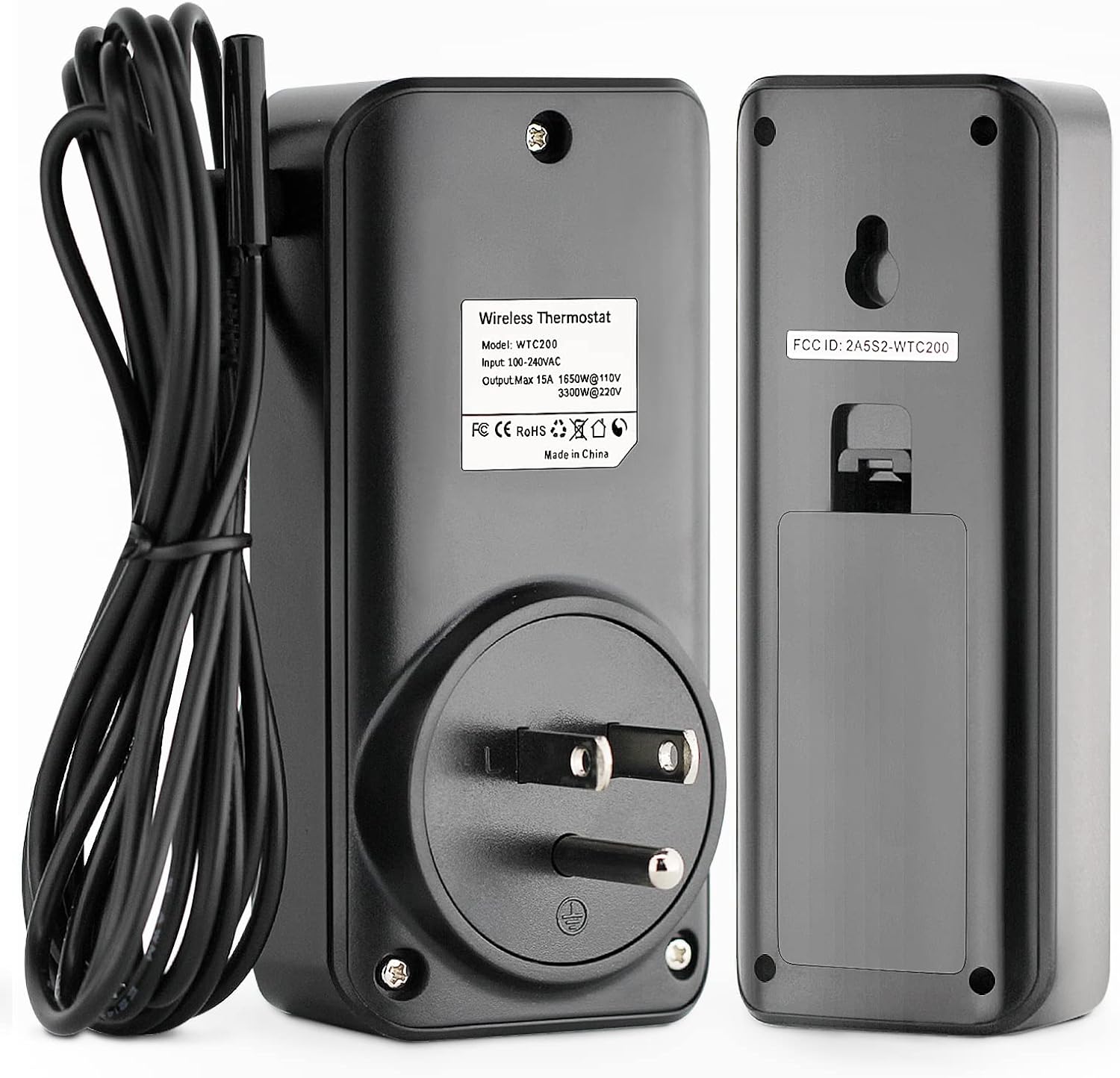
Gambar 2.1: Tukangeun view of the receiver and remote, illustrating the temperature probe connection point on the receiver.
3. Parentah Setup
- Pasang Batré dina Jauh: The remote control requires batteries (not included). Open the battery compartment on the back of the remote and insert the required batteries, observing correct polarity.
- Sambungkeun Probe Suhu: Plug the temperature probe into the designated port on the receiver socket. Ensure a secure connection.
- Colokkeun Panarima: Insert the receiver socket into a standard electrical outlet.
- Sambungkeun Alat: Plug your heating or cooling appliance into the outlet on the receiver socket.
- Daya Hurung: Press the power button on the remote control to turn on the device. The remote and receiver should automatically pair.

Image 3.1: The included temperature probe, which connects to the receiver unit for accurate temperature readings.
4. Parentah Operasi
The remote control allows for easy adjustment of settings. The LCD display provides clear temperature readings and operational status.

Image 4.1: The remote control unit, displaying current temperature and control buttons.
4.1 Nyetel Suhu
- Pencét éta SET button on the remote. The target temperature display will flash.
- Ngagunakeun éta Up jeung Turun arrow buttons to adjust the desired target temperature.
- Pencét SET again to confirm the setting, or wait a few seconds for it to automatically save.
4.2 Switching Cooling/Heating Mode
The WTC200 supports both cooling and heating modes. The mode determines whether the connected appliance turns on when the temperature is above or below the set point.
- Pikeun pindah modeu, pencét tombol M button. The display will indicate the current mode (e.g., a snowflake icon for cooling, a flame icon for heating).

Image 4.2: The remote control displaying icons for cooling and heating modes, indicating the active operational setting.
4.3 Ngalihkeun Unit Suhu (°C/°F)
The display can be switched between Celsius (°C) and Fahrenheit (°F).
- Refer to the full user manual for specific button combinations to toggle between temperature units. This is typically done by holding a specific button (e.g., 'M' or 'SET') for a few seconds.
4.4 Setting High/Low Temperature Alarms
The device features high and low temperature alarms to alert you if the temperature exceeds or falls below a specified range.
- Consult the detailed user manual for instructions on how to set and activate these alarm thresholds.

Image 4.3: Remote display indicating a low temperature alarm setting.

Image 4.4: Remote display indicating a high temperature alarm setting.
5. Fitur konci
- Kadali Jauh Nirkabel: Offers convenient control from a distance, with a communication range of 50-100 meters in open areas.
- Layar LCD kalayan Lampu Latar: Provides clear temperature readings and settings, easily visible even in low-light conditions.
- Cooling & Heating Modes: Supports both heating and cooling applications, automatically switching connected devices on or off to maintain the desired temperature.
- Sensor Akurasi Luhur: Equipped with a precise temperature sensor for reliable ambient temperature detection.
- Alarm Suhu: Features configurable high and low temperature alarms to notify users of extreme temperature conditions.
- Fungsi mémori: All settings are saved automatically, even in the event of a power failure.
- Hemat énergi: By precisely controlling appliances based on target temperatures, the thermostat helps reduce energy consumption.

Image 5.1: Visual representation of the DIGITEN WTC200's core functionalities.

Image 5.2: Illustration of the wireless control capability, allowing monitoring and control from various locations within a 50-100m range.
6. Aplikasi
The DIGITEN WTC200 Wireless Temperature Controller is versatile and can be used in a wide range of settings requiring precise temperature management:
- Kontrol Lingkungan: Greenhouses, mushroom houses, baby rooms, attics, garages.
- Animal Care: Reptile breeding, pet feeding.
- Specialized Storage: Wine cellars, cigar storage.
- Hobby & Production: Home brewing, seed germination, fermentation.
- Kontrol Alat: Space heaters, wall panel heaters, electric fireplace heaters, heat pads, attic fans, swamp coolers, evaporative coolers.

Gambar 6.1: Examples of diverse applications for the wireless temperature controller.
7. Pangropéa
To ensure optimal performance and longevity of your DIGITEN WTC200 Wireless Temperature Controller, follow these general maintenance guidelines:
- beberesih: Periodically wipe the remote control and receiver socket with a soft, dry cloth. Avoid using abrasive cleaners or solvents.
- Ngagantian batré: Replace the batteries in the remote control when the low battery indicator appears on the display. Use high-quality alkaline batteries for best performance.
- Perawatan Probe: Ensure the temperature probe is kept clean and free from obstructions. Avoid bending or damaging the probe cable.
- Panyimpenan: If storing the device for an extended period, remove the batteries from the remote control to prevent leakage. Store in a cool, dry place.
8. Cara ngungkulan
If you encounter issues with your DIGITEN WTC200, consider the following troubleshooting steps:
- No Display on Remote: Pariksa naha batréna leres dipasang sareng gaduh muatan anu cekap. Ganti batré upami diperlukeun.
- Panampi Teu Ngawaler: Ensure the receiver is securely plugged into a working electrical outlet. Verify that the remote control is within the effective communication range (50-100m in open areas) and there are no significant obstructions.
- Appliance Not Turning On/Off: Confirm that the appliance is correctly plugged into the receiver socket and is functioning independently. Check the set temperature and mode (cooling/heating) on the remote to ensure they align with the desired operation.
- Pembacaan Suhu anu teu akurat: Ensure the temperature probe is properly connected to the receiver and is placed in a location that accurately reflects the ambient temperature you wish to control. Avoid placing the probe near heat sources or drafts.
- Setélan Henteu Simpen: The device has a memory function. If settings are not retained, ensure the remote's batteries are not critically low, although the receiver typically holds settings.
Pikeun masalah anu terus-terusan, tingali manual pangguna anu lengkep atanapi hubungi dukungan palanggan.
9. Spésifikasi
| Fitur | Spésifikasi |
|---|---|
| merek | DIGITEN |
| Nomer modél | WTC200 |
| Tipe Controller | Jauh |
| Téhnologi konektipitas | Nirkabel |
| Sumber Daya | Listrik |
| Voltage | 120 Volt (AC) |
| Wattage | 1300 watt |
| Amperage Kamampuh | 12 Amps |
| Tipe tampilan | LCD Digital |
| Lampu tukang | Sumuhun |
| Komponén Kaasup | Suhu Probe |
| Batré Diperlukeun | Yes (for remote, not included) |
| Item Beurat | 8.1 ons |
| Ukuran Paket | 4.76 x 4.13 x 2.36 inci |
10. Garansi jeung Rojongan
DIGITEN provides a one-year warranty term for any product issues. For support or warranty claims, please refer to the contact information provided with your product packaging or visit the official DIGITEN websitus.


