1. Bubuka
This manual provides comprehensive instructions for the K-Rain MiniPro K-Key Adjustment Tool (P59995). This specialized tool is designed for precise adjustments of K-Rain Mini Pro and Pro Plus Rotor Sprinklers, ensuring optimal performance and water distribution for your irrigation system.
2. Produk Langkungview
The K-Rain MiniPro K-Key Adjustment Tool is essential for maintaining and customizing your K-Rain rotor sprinklers. The package includes two K-Rain MiniPro K-Keys and a bonus LED keychain light.

Figure 1: K-Rain MiniPro K-Key Adjustment Tools and included LED keychain light.
3. Sprinkler Components and Keyhole Identification
Before making adjustments, familiarize yourself with the key components of your K-Rain Mini Pro or Pro Plus Rotor Sprinkler and the corresponding keyhole for the adjustment tool.
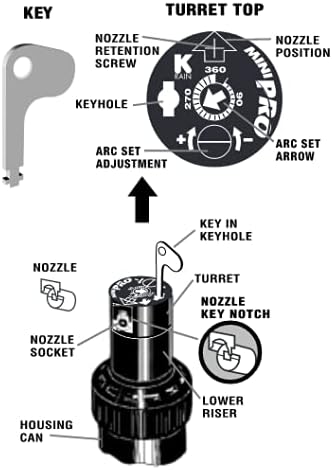
Figure 2: Diagram of K-Rain MiniPro Sprinkler components and K-Key insertion points.
4. Parentah Operasi
The K-Key allows for several critical adjustments to your K-Rain rotor sprinklers. Always ensure the sprinkler is operating when making arc adjustments to observe the spray pattern.
4.1. Removing the Nozzle Retention Screw
To remove the nozzle, locate the nozzle retention screw on the turret top (refer to Figure 2). Insert the K-Key into the screw head and turn counter-clockwise to loosen and remove the screw.
4.2. Pulling Up the Riser
To access the nozzle or internal components, the riser needs to be pulled up. Insert the K-Key into the keyhole (refer to Figure 2) and turn it a quarter turn. While holding the K-Key, gently pull upwards to extend the riser.
4.3. Removing and Installing the Nozzle
Once the riser is pulled up and the nozzle retention screw is removed, the nozzle can be carefully extracted. To install a new nozzle, align it with the nozzle socket and gently push it into place. Secure it by re-inserting and tightening the nozzle retention screw with the K-Key.
4.4. Orienting the Left Start Position
The left start position defines where the sprinkler begins its rotation. To set this:
- Rotate the top of the sprinkler turret completely to the right until it clicks.
- Then, rotate the turret completely to the left until it clicks again. This is the current left start position.
- With the riser pulled up (as described in 4.2), hold the lower part of the riser and turn only the lower half of the riser to the left until the nozzle arrow points to your desired left start position.
- Slowly and carefully lower the riser back into the sprinkler body.
4.5. Changing the Arc (Spray Pattern)
The arc adjustment controls the range of motion for the sprinkler's spray. The K-Rain MiniPro and Pro Plus sprinklers typically allow for arc adjustments from 40° to 360°.
- Insert the K-Key into the arc set adjustment slot (refer to Figure 2).
- While holding the top of the nozzle turret with your fingers, turn the K-Key clockwise to increase the arc or counter-clockwise to decrease the arc.
- Observe the spray pattern while the sprinkler is operating to achieve the desired arc.
4.6. Adjusting Spray Distance
To increase or decrease the spray distance, locate the distance screw on the turret top (refer to Figure 2). Insert the K-Key into the silver distance screw and turn it right (clockwise) to increase distance or left (counter-clockwise) to decrease distance.
Video 1: Demonstration of using the P59995 adjustment key for K-Rain Mini Pro and Pro Plus Rotor Sprinklers.
Video 2: Leuwihview of the K-Rain ProPlus Rotor Sprinkler, which can be adjusted using the K-Key tool.
Video 3: Instructions for setting the K-Rain K2 RCW 5" Pop-Up Rotary Sprinkler, demonstrating similar adjustment principles applicable with the K-Key tool.
5. Spésifikasi
| Fitur | Rincian |
|---|---|
| merek | K-Rain (Packaged by BUILT TO LAST!) |
| Nomer modél | P59995 |
| Bahan | palastik |
| Warna | Multiwarna |
| Ukuran barang (L x W x H) | 1 x 2.5 x 0.1 inci |
| Item Beurat | 0.634 ons |
| Jumlah Item | 2 (K-Keys) |
| UPC | 785939821857 |
6. Pangropéa
The K-Rain MiniPro K-Key Adjustment Tool requires minimal maintenance. Keep the tool clean and dry after use to prevent corrosion and ensure longevity. Store in a safe place to avoid loss.
7. Cara ngungkulan
If you encounter difficulty using the K-Key, ensure you are inserting it into the correct slots as indicated in Figure 2. For issues related to the sprinkler's operation, consult the specific instruction manual for your K-Rain Mini Pro or Pro Plus Rotor Sprinkler model.
8. Garansi jeung Rojongan
For warranty information or further product support, please refer to the manufacturer's official websitus atanapi hubungi penjual langsung. Simpen resi pameseran anjeun kanggo klaim garansi.


