Bubuka
The Geemarc CL8360 is an amplified mobile phone designed for ease of use, particularly for seniors. It features enhanced volume, large buttons, and an emergency SOS function to ensure reliable communication.

Image: The Geemarc CL8360 amplified mobile phone, highlighting its key features.
Fitur konci:
- Amplified Volume: Up to +35dB with Boost function for clear calls.
- Alat Bantu Dédéngéan Cocog: Designed for use with hearing aids in T-position.
- Tombol badag: Facilitates easy dialing and navigation.
- Tombol SOS: For emergency calls and messages to pre-set contacts.
- Kaméra: Integrated camera for capturing photos.
- Konektipitas Bluetooth: Pikeun nyambungkeun ka asesoris nirkabel.
- Senter: Built-in torch for convenience.

Image: An individual using the Geemarc CL8360 phone, demonstrating its hearing aid compatibility.
Guide Setup
1. Masang Kartu SIM sareng Batré
Before using your phone, you must install a SIM card and the battery.
- Cabut panutup tukang telepon.
- Insert your SIM card into the designated slot, ensuring correct orientation.
- Lebetkeun batréna, saluyukeun kontakna.
- Ganti panutup tukang kalayan aman.
2. Ngecas Telepon
It is recommended to fully charge the phone before first use.
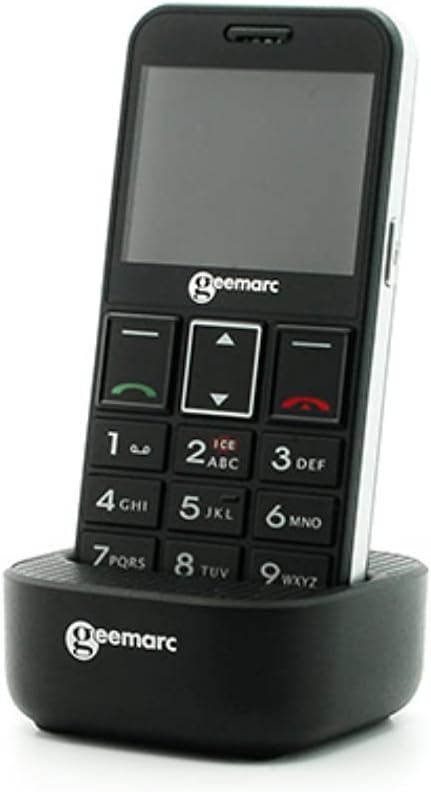
Image: The Geemarc CL8360 phone placed in its charging dock.
- Connect the charging cable to the charging dock.
- Colokkeun adaptor ka colokan listrik.
- Place the phone firmly into the charging dock. The charging indicator on the phone will illuminate.
- Allow the phone to charge until the battery icon shows full.
3. Powering on / Pareum
- To power on: Press and hold the Power/End Call button (red button) until the screen lights up.
- To power off: Press and hold the Power/End Call button until the power off option appears, then confirm.
Parentah Operasi
Nelepon jeung Narima Telepon
- Pikeun nelepon: Dial the number using the large keypad buttons and press the Call button (green button).
- Pikeun ngajawab telepon: Pencét tombol Telepon (tombol héjo) nalika telepon disada.
- Pikeun ngeureunkeun telepon: Press the Power/End Call button (red button).
Using the SOS Button
The SOS button is located on the back of the phone and is designed for emergencies.

Image: A hand pressing the red SOS button located on the back of the phone.
- Setting up SOS contacts: Access the SOS settings in the phone's menu to add emergency contact numbers. You can also record an emergency voice message or text.
- Aktipkeun SOS: In an emergency, press and hold the SOS button for a few seconds. The phone will automatically call and send an emergency message to your pre-set contacts.
Phonebook and Photo Contacts
Store your important contacts in the phonebook for quick access. The phone supports photo contacts for visual identification.

Image: The phone display showing "Mémoires photo" (Photo Memories) with contact images.
- Navigate to the "Contacts" or "Phonebook" menu.
- Add new contacts with names and numbers.
- Assign photos to contacts for easier recognition.
Talatah
Ngirim sareng nampi pesen téks (SMS).

Image: The phone in its charging dock, with the screen showing the "Messages" menu and an envelope icon.
- Access the "Messages" menu to compose new messages or read received ones.
- Use the keypad to type your message.
Camera and Flashlight
- Kaméra: Access the camera function from the main menu to take photos.
- Senter: Activate the built-in flashlight from the quick access menu or settings for illumination.
Konektipitas Bluetooth
Sambungkeun telepon anjeun ka alat Bluetooth anu sanés sapertos headset atanapi car kit.
- Buka menu "Setélan" teras pilih "Bluetooth".
- Turn Bluetooth on and search for available devices.
- Select the device you wish to pair with and follow the on-screen prompts.
Pangropéa
Ngabersihkeun Telepon Anjeun
- Use a soft, dry cloth to clean the phone's surface.
- Avoid using liquid cleaners or abrasive materials, as they may damage the device.
Perawatan batré
- Ulah ngalaan batré ka suhu ekstrim.
- Hindarkeun sering-sering ngecas batré pikeun manjangkeun umurna.
- If the phone will not be used for an extended period, charge it partially and store it in a cool, dry place.
Pamérésan masalah
If you encounter issues with your Geemarc CL8360, refer to the following common problems and solutions:
| Masalah | Solusi anu mungkin |
|---|---|
| Telepon teu hurung | Ensure the battery is correctly installed and fully charged. Press and hold the Power button for several seconds. |
| Teu tiasa nelepon atanapi nampi telepon | Check if the SIM card is properly inserted and activated. Verify network signal strength. Contact your service provider if necessary. |
| Kualitas panggero goréng | Move to an area with better network coverage. Ensure the volume is adjusted correctly, and the Boost function is enabled if needed. |
| Tombol SOS teu jalan | Verify that emergency contacts are correctly set up in the SOS settings. Ensure the phone has network coverage. |
| Batré gancang boros | Reduce screen brightness, close unused applications, and disable Bluetooth when not in use. Ensure the battery is not old or damaged. |
Lamun masalah persists sanggeus nyobian solusi ieu, mangga ngahubungan rojongan customer.
spésifikasi
| Fitur | Rincian |
|---|---|
| merek | Geemarc |
| Ngaran modél | CL8360 |
| Warna | Hideung |
| Pamawa nirkabel | Henteu dikonci |
| Téhnologi konektipitas | Bluetooth |
| Input Antarmuka Manusa | Kancing |
| Amplified Volume | Up to +35dB with Boost function |
| Kasaluyuan bantuan dédéngéan | Yes (T-position) |
| ASIN | B095KRKCX7 |
| Tanggal Sadia munggaran | 21 Méi 2021 |
Émbaran jaminan
The Geemarc CL8360 mobile phone comes with a garansi 2 taun from the date of purchase. If you encounter any product issues within this period, a repair or replacement will be offered. Please retain your proof of purchase for warranty claims.
Rojongan Palanggan
For further assistance, technical support, or warranty claims, please contact your retailer or the Geemarc customer service department. Refer to the contact information provided with your product packaging or visit the official Geemarc websitus.


