1. Bubuka
Thank you for choosing the PROXTEND X502 Full HD Webcam. This manual provides detailed instructions to help you set up, operate, and maintain your webcam for optimal performance. The X502 is designed to deliver clear 1080p video at 30 frames per second, featuring an omni-directional microphone and automatic low light correction for various lighting conditions.
2. Eusi Paket
Punten parios yén sadaya barang aya dina pakét anjeun:
- PROXTEND X502 HD lengkep Webcam (PX-CAM007)
- Integrated Universal Mounting Clip
- Manual pangguna (dokumén ieu)
3. Setélan
Follow these steps to set up your PROXTEND X502 Webkaméra:
- Pamasangan Webkaméra:
The webcam features an integrated universal mounting clip. You can place the webkaméra di luhur monitor komputer, layar laptop, atanapi permukaan anu datar. Atur klip pikeun nahan pageuh webcam in position. The webcam also supports mini tripod mounting (tripod not included).
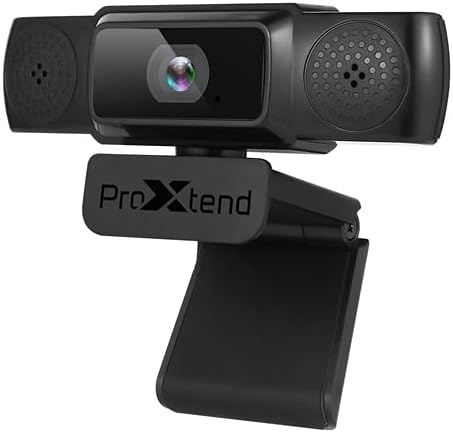
Image: The PROXTEND X502 Full HD Webcam shown with its universal mounting clip, suitable for monitors or flat surfaces.
- Nyambungkeun ka Komputer anjeun:
Colokkeun kabel USB tina webkana port USB anu sayogi dina komputer anjeun. webcam is plug-and-play, meaning your operating system should automatically detect and install the necessary drivers. No additional software installation is typically required.
- Driver Installation Verification:
After connecting, allow a few moments for your computer to recognize the device. You can verify successful installation in your operating system's Device Manager (Windows) or System Information (macOS) under 'Cameras' or 'Imaging Devices'.
4. Parentah Operasi
Sakali dina webcam is set up, you can begin using it with various applications:
- Milih nu Webkaméra:
Open your preferred video conferencing, streaming, or recording application (e.g., Zoom, Microsoft Teams, Skype, OBS Studio). Navigate to the application's video and audio settings. Select "PROXTEND X502" as your camera and microphone input device.

Gambar: Hareupeun view of the PROXTEND X502 Full HD Webcam, highlighting the lens and integrated microphones.
- Kualitas Video:
The webcam automatically adjusts for optimal image quality, including auto-focus and auto low light correction. Ensure adequate lighting for the best video performance. The 1920x1080p resolution at 30fps provides clear and smooth video.
- Kualitas Audio:
The integrated omni-directional microphone captures sound from all directions. Position yourself appropriately to ensure your voice is clearly picked up. Most applications allow you to adjust microphone input levels in their audio settings.
5. Fitur
Key features of the PROXTEND X502 Full HD Webcam include:
- Sensor gambar CMOS 1 / 2.7 "
- 2 megapiksel
- Resolution: 1920x1080 at 30 frames per second
- Mikrofon arah Omni
- Klip Pamasangan Universal
- Mini Tripod Support
- Koréksi lampu handap otomatis
6. Spésifikasi
Detailed technical specifications for the PROXTEND X502 Full HD Webkaméra:

Image: A visual representation of the PROXTEND X502 Full HD Webcam's key features and technical specifications.
| Fitur | Spésifikasi |
|---|---|
| Sénsor Gambar | 1/2.7" CMOS Image Sensor |
| Megapiksel | 2 MP |
| Resolusi Max | 1920x1080 |
| Resolusi Video | 1920x1080 |
| Max FPS | 30 fps |
| Pormat Dékode Video | H.264/MJPG |
| Modeu Paparan | Otomatis |
| Kasaimbangan Bodas | Otomatis |
| Keuntungan | Otomatis |
| Kompensasi Lampu Rendah | Otomatis |
| Viewdina Angle | 77° |
| Jarak Fokus | 10 cm nepi ka takterhingga |
| Tipe Fokus | Otomatis |
| Mikropon | Omni-arah |
| Audio Sampling Laju | 1 Saluran 16bit 16K 32K 44.1K 48K |
| Format Audio | PCM, UAC 1.0 cocog |
| Panganteur | USB 2.0 |
| Panjang kabel | 1.5 m |
| OS cocog | Windows XP, Windows 7 (32bit/64bit), Windows 8, Windows 10, Android V5.0 or higher OS, MAC OS 10.6 or higher |
| Dimensi produk | 12.7 x 7.62 x 5.08 cm |
| Beurat produk | 453.59 g |
7. Cara ngungkulan
If you encounter issues with your PROXTEND X502 Webcam, try the following solutions:
- Teu aya gambar/video:
- Pastikeun kabel USB disambungkeun aman ka duanana webcam jeung komputer Anjeun.
- Coba port USB anu béda dina komputer anjeun.
- Balikan deui komputer anjeun.
- Check your application's settings to ensure the PROXTEND X502 is selected as the video input.
- Verify that no other application is currently using the webkaméra.
- Taya Audio/Mikropon Teu Gawé:
- Ensure the PROXTEND X502 is selected as the microphone input in your application's audio settings.
- Pariksa setélan sora komputer anjeun pikeun mastikeun mikropon diaktipkeun sareng henteu di-mute.
- Saluyukeun tingkat input mikropon dina setélan sistem atanapi aplikasi anjeun.
- Kualitas pidéo goréng:
- Ensure sufficient lighting in your environment.
- Ngabersihan webcam lens gently with a soft, lint-free cloth.
- Check your internet connection speed if streaming, as bandwidth can affect video quality.
8. Pangropéa
Pikeun mastikeun umur panjang sareng kinerja optimal anjeun webkaméra:
- beberesih: Anteng ngusap webcam lens with a soft, dry, lint-free cloth. Avoid using harsh chemicals or abrasive materials.
- Panyimpenan: Nalika henteu dianggo, simpen webdi tempat anu bersih sareng garing, jauh tina suhu ekstrim sareng sinar panonpoé langsung.
- Penanganan: Nyingkahan leupaskeun webcam or subjecting it to strong impacts.
9. Garansi jeung Rojongan
The PROXTEND X502 Full HD Webcam comes with a garansi 7 taun, ensuring peace of mind regarding your purchase. For warranty claims, technical support, or any inquiries not covered in this manual, please refer to the contact information provided with your product packaging or visit the official PROXTEND websitus.
10. Émbaran minuhan
This device complies with relevant regulatory standards for electronic equipment. For detailed compliance information, please refer to the product packaging or the official PROXTEND websitus.


