Bubuka
This manual provides detailed instructions for the setup, operation, maintenance, and troubleshooting of your CJ Tech Wireless 2.4-GHz Multi Media Touch Keyboard with Touchpad. Please read this manual thoroughly before using the device to ensure proper functionality and to avoid damage.
The CJ Tech Wireless 2.4-GHz Multi Media Touch Keyboard is a versatile input device designed for seamless control of various smart devices. It features a 2.4 GHz wireless connection, a high-sensitive touchpad, and backlit keys for enhanced usability in diverse environments. Its internal rechargeable lithium-ion battery ensures extended usage time.
Eusi Kotak
- 1x Wireless Remote (Keyboard with Touchpad)
- 1x 300 mAh Lithium Battery (pre-installed or separate)
- 1 x Kabel Ngecas (USB)
- 1x Nano Receiver (USB dongle)
- 1x Manual Pamaké (dokumén ieu)
Produk Leuwihview

Gambar 1: Hareupeun view of the CJ Tech Wireless Keyboard with its blue backlit keys illuminated, showcasing the full QWERTY layout, touchpad, and multimedia control buttons.
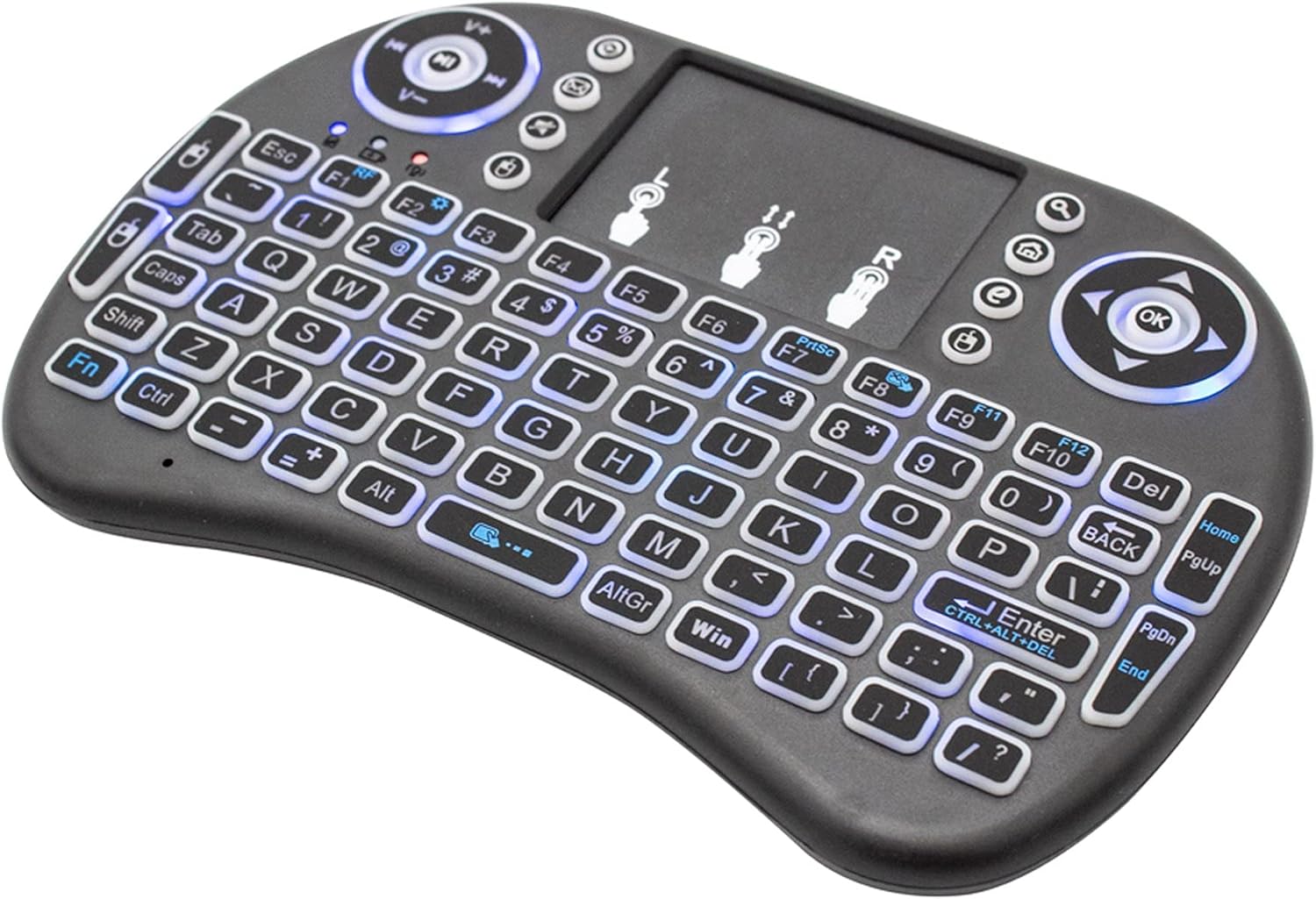
Gambar 2: Angled view of the CJ Tech Wireless Keyboard, showing the compact design and key layout without the backlighting active.

Gambar 3: Tukangeun view of the CJ Tech Wireless Keyboard, highlighting the charging port and power switch location.
Disetél
1. Ngecas kibor
Before first use, fully charge the keyboard. Connect the provided USB charging cable to the keyboard's charging port (refer to Figure 3) and the other end to a USB power source (e.g., computer USB port, USB wall adapter). The charging indicator light will illuminate during charging and turn off when fully charged. A full charge provides up to 24 hours of usage.
2. Nyambungkeun Nano Receiver
- Locate the USB Nano Receiver, typically stored in a compartment on the keyboard itself or within the packaging.
- Insert the Nano Receiver into an available USB port on your target device (Smart TV, PC, Laptop, Gaming Console, Android box, etc.).
- The device should automatically recognize the receiver and install necessary drivers. No manual driver installation is usually required.
3. Powering On the Keyboard
Slide the power switch on the keyboard (refer to Figure 3) to the "ON" position. The keyboard will automatically connect to the Nano Receiver within a few seconds. The connection indicator light may flash briefly and then remain solid or turn off, indicating a successful connection.
Parentah Operasi
Fungsi kibor
The keyboard features a full QWERTY layout for typing. Press keys as you would on a standard keyboard.
Operasi touchpad
- Ketok Jari Tunggal: Fungsina salaku klik kénca.
- Ketok Dua Jari: Fungsina sapertos klik katuhu.
- Two Finger Drag (Vertical/Horizontal): Scrolls content up/down or left/right.
- Tarik Hiji Jari: Moves the cursor on the screen.
Kadali lampu tukang
The keyboard features backlit keys for use in low-light conditions. Look for a dedicated backlight key or a function key combination (e.g., Fn + F2) to toggle the backlight on/off or adjust brightness/color (if applicable). Refer to the key labels on your specific model.
Konci Multimedia
Dedicated multimedia keys are located on the keyboard for quick access to functions like volume control, play/pause, next/previous track, and home/search functions. These are typically located around the edges of the keyboard or as secondary functions on the F-keys (accessed with the Fn konci).
Pangropéa
- beberesih: Anggo lawon anu lemes sareng garing pikeun ngabersihkeun permukaan kibor. Pikeun kokotor anu bandel, usap sakedikamp lawon anu dieusi sabun hampang tiasa dianggo, pikeun mastikeun teu aya cairan anu asup kana alat. Entong nganggo bahan kimia anu keras atanapi pembersih anu abrasif.
- Panyimpenan: When not in use for extended periods, turn off the keyboard to conserve battery life. Store in a cool, dry place away from direct sunlight and extreme temperatures.
- Perawatan batré: Pikeun manjangkeun umur batré, ulah sering ngosongkeun batréna. Cas kibor sacara rutin, sanajan teu dianggo terus-terusan.
Pamérésan masalah
| Masalah | Mungkin Cukang lantaranana | Solusi |
|---|---|---|
| Keyboard teu ngabales | Low battery; Nano Receiver not properly connected; Keyboard not powered on; Out of range. | Charge the keyboard; Ensure Nano Receiver is fully inserted into a working USB port; Turn on the keyboard; Move closer to the device (within 10 meters). |
| Cursor erratic or unresponsive | Dirty touchpad; Interference; Low battery. | Clean the touchpad surface; Move away from other wireless devices; Charge the keyboard. |
| Lampu tukang teu jalan | Lampu tukang dipareuman; batré lemah. | Press the backlight toggle key or Fn + F2; Charge the keyboard. |
| Masalah sambungan | Interference; USB port issue; Receiver not paired. | Try a different USB port; Restart the host device; Re-pair the keyboard and receiver (if applicable, consult specific pairing instructions if provided with the device, though typically plug-and-play). |
spésifikasi
| Fitur | Rincian |
|---|---|
| Sambungan nirkabel | 2.4 GHz RF |
| Jenis Batré | Diwangun-di 300 mAh Batré Litium |
| Kasaluyuan System Operasi | Windows 2000 / XP / 7 / Vista / 8 / 10, Android 4.0 or Up |
| Alat nu cocog | PC, Smart TV, Laptop, Gaming Console, Android Box |
| Ngirimkeun Range | Nepi ka 10 méter (33 suku) |
| Ngirimkeun Daya | +5db Max |
| Voltage | 3.3 V |
| Fitur husus | Backlit keys, High-sensitive touchpad |
| Diménsi | Kira-kira 17.1 x 10.6 x 2.7 cm |
| Beurat | Kira-kira 140 g |
| Warna | Hideung |
Garansi sareng Rojongan
For warranty information and technical support, please refer to the contact details provided on the product packaging or the official CJ TECH websitus. Simpen resi pameseran anjeun salaku bukti pameseran pikeun klaim garansi.
Catetan: Spésifikasi produk sareng fitur tiasa robih tanpa aya bewara sateuacana.


