Bubuka
This manual provides instructions for the Brydge 12.9 MAX+ Wireless Keyboard with Trackpad, designed for the iPad Pro 12.9-inch. It covers setup, operation, maintenance, and troubleshooting to ensure optimal use of your device. The Brydge 12.9 MAX+ transforms your iPad Pro into a versatile laptop-like experience with a multi-touch trackpad and backlit keys.
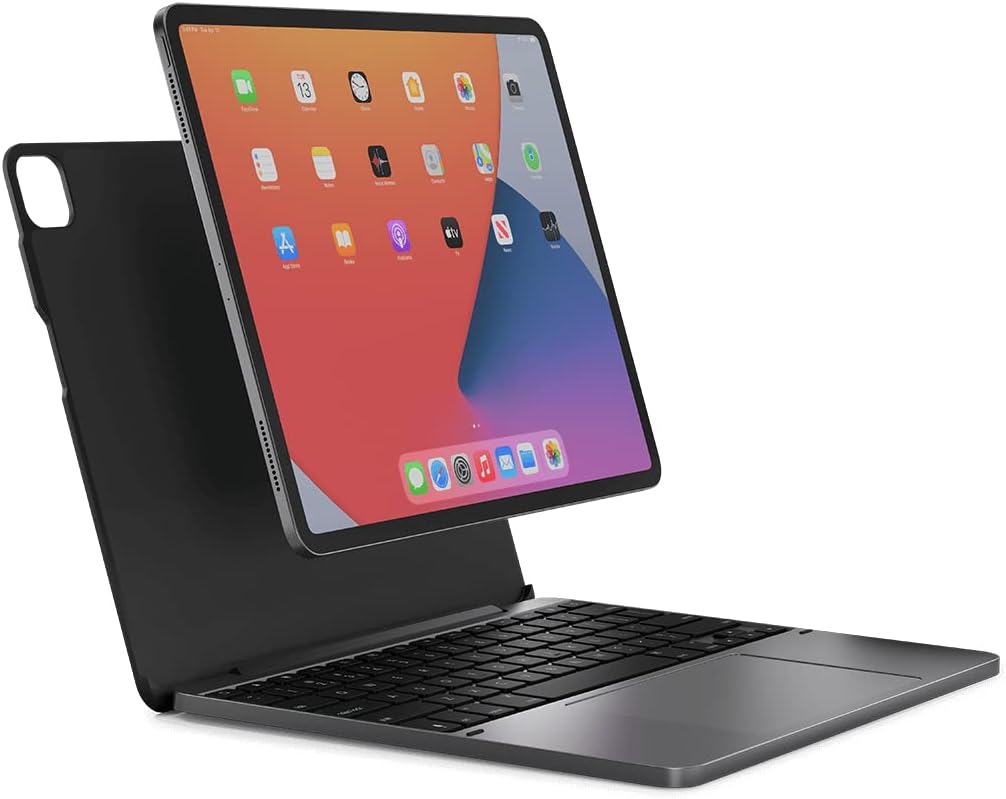
Image: The Brydge 12.9 MAX+ keyboard with an iPad Pro 12.9-inch securely attached, displaying the iPadOS home screen. The keyboard is open, presenting a laptop-like setup.
Disetél
1. Ngapasangkeun iPad Pro Anjeun
The Brydge 12.9 MAX+ features a SnapFit Case for secure attachment. Align your iPad Pro with the case and gently press it into place. The magnetic design ensures a firm connection while allowing for easy removal when needed.

Image: A hand gently guiding an iPad Pro into the Brydge keyboard case, demonstrating the attachment process.
2. Ngecas kibor
Before initial use, fully charge the keyboard. Connect the provided USB-C charging cable to the keyboard's charging port and to a power source. A full charge provides up to 3 months of battery life, depending on usage.
3. Papasangan Bluetooth
- Ensure your Brydge keyboard is charged.
- Hurungkeun keyboard nganggo tombol daya.
- Dina iPad anjeun, buka Setélan > Bluetooth sareng pastikeun Bluetooth diaktipkeun.
- The keyboard will appear in the 'Other Devices' list as 'Brydge 12.9 MAX+'. Tap to connect.
- A pairing request may appear on your iPad. Confirm the connection.
The Brydge 12.9 MAX+ utilizes Bluetooth 5.0 with Instant-On Connectivity, allowing for quick reconnection to your iPad after initial pairing.

Image: A visual comparison showing two iPad setups, one with a Smart Connector keyboard and another with the Brydge Bluetooth keyboard, highlighting the seamless connectivity of both.
Parentah Operasi
Fungsi keyboard
- Tombol Backlit: The keyboard features adjustable backlighting. Use the dedicated backlight key (often found in the function row) to cycle through brightness levels or turn off the backlight.
- Function Row: The top row of keys provides quick access to iPadOS functions such as screen brightness, volume control, media playback, and search.

Gambar: A close-up view of the Brydge keyboard, showcasing the key layout and the integrated trackpad.
Panggunaan Trackpad
The large multi-touch trackpad supports various iPadOS gestures for navigation and interaction. Refer to your iPad's iPadOS settings for a complete list of supported gestures.
- Ketok Jari Tunggal: Pilih barang.
- Gulung Dua Jari: Scroll through content.
- Ciwit pikeun ngazum: Ngazum gede atawa leutik eusi.
- Gesek Tilu Ramo: Switch between open applications or access the App Switcher.

Image: A user's hand operating the multi-touch trackpad on the Brydge keyboard, demonstrating precise control for iPadOS navigation.
Bisa diatur Viewdina Angles
The keyboard allows for up to 135° of screen rotation, enabling comfortable viewing and typing in various environments, whether on a desk or your lap.

Image: A person using the Brydge keyboard with an iPad Pro while seated on a bench, illustrating the portability and adjustable viewing angles for comfortable use in various settings.
Pangropéa
beberesih
To clean your Brydge keyboard, use a soft, lint-free cloth. For stubborn marks, slightly dampen the cloth with water or a mild, non-abrasive cleaner. Avoid excessive moisture and harsh chemicals. Ensure the keyboard is powered off before cleaning.
Perawatan batré
To maximize battery life, avoid fully discharging the keyboard frequently. Charge the keyboard regularly, especially if it will be stored for an extended period. The keyboard can be charged while in use.
Pamérésan masalah
- Kibor Teu Nyambung:
- Pastikeun kibor tos dieusi sareng diaktipkeun.
- Pariksa Bluetooth diaktipkeun dina iPad Anjeun.
- Forget the device in iPad Bluetooth settings and re-pair.
- Restart both the iPad and the keyboard.
- Trackpad Lag or Freezing:
- This can sometimes be resolved by turning the keyboard off and on.
- Pastikeun iPadOS anjeun diénggalan kana vérsi pangénggalna.
- Check for any available firmware updates for the Brydge keyboard via the Brydge Connect app (if applicable).
- Masalah Engsel:
- Avoid excessive force when opening or closing the keyboard.
- Do not 'overclose' the case without the iPad inside, as this can stress the hinges.
- If hinges become loose or show signs of cracking, contact Brydge customer support for assistance.
- Pembaruan firmware:
- Periodically check for firmware updates through the official Brydge website or a dedicated Brydge app, if available. Updates can improve performance and address known issues.
spésifikasi
| Nomer modél | BRY6032 |
| Alat nu cocog | iPad Pro 12.9 inci |
| Téhnologi konektipitas | Bluetooth 5.0 (Instant-On) |
| Katerangan kibor | Wireless, Backlit |
| Fitur husus | Multi-Touch Trackpad, Magnetic SnapFit Case, Adjustable Backlit Keys, 135° Viewdina Angle |
| Bahan | Acrylonitrile Butadiena Styrene |
| Dimensi produk | 11.19 x 8.75 x 0.63 inci (28.42 x 22.22 x 1.6 cm) |
| Item Beurat | 2.19 pon (0.99 kg) |
| Kahirupan batré | Up to 3 months (variable with backlight usage) |
Garansi sareng Rojongan
For warranty information, technical support, or to inquire about replacement parts, please visit the official Brydge websitus atanapi ngahubungan layanan palanggan maranéhanana langsung. Simpen bukti pameseran anjeun pikeun klaim garansi.


