Produk Leuwihview
The TERIOS Wireless Pro Controller is designed for full compatibility with Nintendo Switch and Switch Lite gaming consoles. It features an innovative turbo function, motion control, and adjustable vibration intensity for an enhanced gaming experience. This premium joypad offers customizable button programming and a quick re-sync feature for seamless gameplay.

Gambar: Hareupeun view of the TERIOS Wireless Pro Controller in dark black.
Eusi pakét
- 1 x TERIOS Wireless Pro Controller
- 1 x Kabel Ngecas USB (Tipe-C)
- 1 x Manual Pamaké (dokumén ieu)
Layout Controller
Familiarize yourself with the buttons and ports on your TERIOS Pro Controller.

Gambar: Luhur jeung handap views of the controller with labels for each button and port, including Left Stick, D-Pad, Turbo, Screenshot, Menu, Plus/Minus buttons, Function Buttons, Right Stick, R1/R2, L1/L2, M1/M2, and charge port.
- Tongkat kénca: For directional movement.
- D-Pad: Directional pad for precise input.
- Tombol Turbo (T): Activates and deactivates turbo function.
- Tombol Potret Layar: Ngarekam cuplikan layar nalika maén.
- Home Button (H): Powers on the controller and returns to the console's home screen.
- +/- Tombol: Menu navigation and in-game functions.
- Tombol A/B/X/Y: Tombol aksi baku.
- Tongkat katuhu: For camera control or other directional input.
- Tombol L1/R1: Kancing taktak.
- Tombol L2/R2: Tombol pemicu.
- Tombol M1/M2: Tombol mundur anu tiasa diprogram.
- Port muatan: Port USB Tipe-C pikeun ngecas.
- Indikator LED: Shows connection status and charging status.
Disetél
Connecting to Nintendo Switch/Switch Lite
- Lengkah 1: Hurungkeun konsol Nintendo Switch anjeun.
- Lengkah 2: On the console, navigate to Setélan Sistim > Modeu pesawat > Controller Connection (Bluetooth), and ensure it is set to ‘On’.
- Lengkah 3: Pindah ka Controllers setting on your console and select Robah Pakem / Orde.
- Lengkah 4: Pencét jeung tahan tombol “H” (Home) button on your TERIOS controller until the LED lights begin to flash. Once successfully paired, the player LED(s) corresponding to the controller number will remain lit.
The controller features a One Button Instantly Resync Feature, allowing you to easily wake up your console by pressing the Home button once it has been previously paired.

Image: Illustration of the controller's Home button and its wireless connection capability to the Nintendo Switch.
Ngecas Controller
Connect the supplied USB Type-C cable to the controller's charge port and the other end to a USB power source (e.g., console, wall adapter). The LED indicator will light up during charging. Once fully charged, the LED will turn off.
Video: Demonstrates how to charge the TERIOS Controller (Model T23). Shows connecting the USB-C cable and the LED indicator behavior during charging (LED on) and when fully charged (LED off).
A full charge typically takes 2-3 hours, providing up to 15 hours of usage time and up to 30 days of standby time.

Image: Visual representation of the controller's charging features, highlighting its Type-C port, 2-3 hour charge time, and 800mAh battery capacity.
Parentah Operasi
Fungsi Turbo
The turbo function allows for rapid, repeated input of a button press. This is particularly useful for arcade games and shooter games.
- To activate turbo: Hold the Tombol turbo (T) and then press the desired action button (e.g., A, B, X, Y). Release the Turbo button. Now, holding the assigned action button will simulate rapid presses.
- To deactivate turbo: Press the Tombol turbo (T) and the assigned action button once more.

Image: Diagram showing the Turbo button and adjustable turbo speeds (5, 12, 20 times/second).
Changing Turbo Speed
- Pikeun ningkatkeun kecepatan: Pencét Tombol turbo (T) + push the Right Analog Stick up. The speed will cycle through 5 times/second → 12 times/second → 20 times/second.
- Pikeun ngurangan kecepatan: Pencét Tombol turbo (T) + push the Right Analog Stick down. The speed will cycle through 20 times/second → 12 times/second → 5 times/second.
Adjustment Inténsitas Geter
The controller offers 4 levels of vibration intensity to customize your gaming feedback.
- To increase intensity: Press the Tombol turbo (T) + push the Left Analog Stick up. Intensity will cycle through 0% → 30% → 70% → 100%.
- To decrease intensity: Press the Tombol turbo (T) + push the Left Analog Stick down. Intensity will cycle through 100% → 70% → 30% → 0%.

Image: Visual representation of the controller's adjustable vibration feature, showing four levels of intensity (0%, 40%, 70%, 100%).
Kontrol gerak
The controller features a built-in precise 6-axis gyro linear motion sensor, enabling accurate and timely steering and motion sensing in compatible games. Shake the gamepad to control game characters where supported.

Image: Depiction of the controller's motion control capabilities, with blue lines emanating from the controller to symbolize movement and responsiveness.

Gambar: Deukeut view of an analog stick on the controller, illustrating its 360-degree range of motion.
Tombol Programming
The TERIOS wireless gaming controller offers a fully customizable individual button programming experience. This allows for single key, triggered in sequence, and triggered simultaneously modes. You can also disable buttons, change the stick orientation, and swap thumb sticks to suit your play style.
Gambar: Deukeut view of the L1/R1 and L2/R2 shoulder and trigger buttons on the controller.
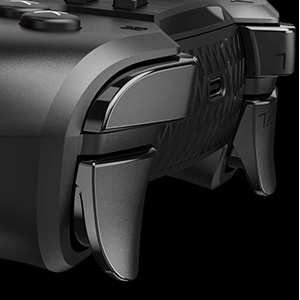
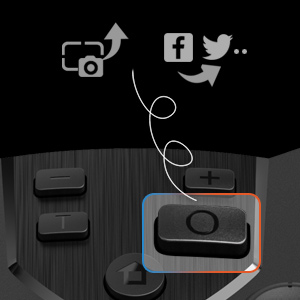
Image: Close-up of the screenshot button on the controller, indicating its function to capture and potentially share game moments.
Pangropéa
- beberesih: Paké kaen lemes, garing pikeun ngabersihan controller. Ulah make bahan kimia kasar atawa bahan abrasive.
- Panyimpenan: Nyimpen controller dina tiis, tempat garing jauh ti sinar panonpoé langsung jeung hawa ekstrim.
- Perawatan batré: To prolong battery life, avoid fully discharging the controller frequently. Charge it regularly, especially if it will be stored for an extended period.
- Perawatan kabel: Handle the charging cable carefully. Do not bend or twist it excessively.
Pamérésan masalah
Controller Henteu Nyambungkeun / Nyapasangkeun
- Ensure Bluetooth is enabled on your Nintendo Switch console (System Setting > Airplane Mode > Controller Connection (Bluetooth) > On).
- Make sure the controller is sufficiently charged.
- Try re-pairing the controller by following the "Connecting to Nintendo Switch/Switch Lite" steps.
- If the issue persists, restart both the controller and the Nintendo Switch console.
Kontroler Teu Ngecas
- Verify that the USB Type-C cable is securely connected to both the controller and the power source.
- Coba maké port USB atawa adaptor kakuatan béda.
- Pastikeun kabel ngecas teu ruksak.
- Check the LED indicator on the controller; it should light up when charging. If it does not, the controller or cable may be faulty.
Tombol atawa Joysticks Unresponsive
- Ensure the controller is properly connected to the console.
- Pariksa aya halangan fisik atanapi kokotor di sakitar tombol atanapi joystick.
- Perform a controller calibration through the Nintendo Switch system settings if joystick drift or incorrect input is observed.
spésifikasi
| Fitur | Rincian |
|---|---|
| merek | TERIOS |
| Modél | T23 (Wireless Pro Controller) |
| Téhnologi konektipitas | Nirkabel |
| Alat nu cocog | Nintendo Switch, Nintendo Switch Lite, IOS, PC |
| Tipe Controller | Gamepad |
| Warna | Hideung Poék |
| Item Beurat | 10.2 ons |
| Ukuran Paket | 6.77 x 4.8 x 2.72 inci |
| Sumber Daya | Batré Powered |
| Batré | 1 batré Litium Ion (kaasup) |
| Kapasitas batré | 800 mah |
| Waktu Ngecas | 2-3 jam |
| Waktos Pamakéan | Nepi ka 15 jam |
| Waktu sayaga | Nepi ka 30 dinten |
| Sénsor gerak | Built-in 6-axis gyro linear motion sensor |
Garansi sareng Rojongan
For any questions, concerns, or technical support regarding your TERIOS Wireless Pro Controller, please contact TERIOS customer service. Refer to the product packaging or the official TERIOS websitus pikeun inpo kontak paling up-to-date.

Gambar: Tukangeun view of the controller, displaying a "TECHNICAL SUPPORT" label and a QR code for assistance.


