1. Bubuka
This manual provides essential instructions for the safe and efficient operation of your Sharp R204WA Solo Microwave Oven. Please read this manual thoroughly before using the appliance and retain it for future reference. This microwave oven is designed for domestic use to heat, cook, and defrost food items.
2. Parentah Kasalametan penting
Nalika nganggo alat-alat listrik, pancegahan kaamanan dasar kedah diturutan pikeun ngirangan résiko kahuruan, kejutan listrik, sareng tatu pikeun jalma.
- Ulah nyobian ngajalankeun oven ieu kalawan panto muka sabab ieu bisa ngakibatkeun paparan ngabahayakeun kana énergi gelombang mikro.
- Ulah nempatkeun sagala objék antara beungeut hareup oven jeung panto atawa ngidinan taneuh atawa résidu cleaner akumulasi dina surfaces sealing.
- Ulah ngajalankeun oven lamun geus ruksak. Ieu hususna penting yén panto oven nutup leres tur teu aya karuksakan kana: (1) panto (ngagulung), (2) hinges na latches (pegat atawa loosened), (3) segel panto na surfaces sealing.
- Oven teu kedah disaluyukeun atanapi repaired ku saha iwal tanaga jasa mumpuni leres.
- Cairan atanapi tuangeun sanés henteu kedah dipanaskeun dina wadah anu disegel sabab éta tiasa ngabeledug.
- Ukur nganggo parabot anu cocog pikeun dianggo dina oven microwave.
- Nalika memanaskeun tuangeun dina wadah plastik atanapi kertas, perhatikeun oven kusabab kamungkinan hurung.
- Upami aya haseup, pareum atanapi cabut colokan alat sareng jaga panto ditutup pikeun mareuman seuneu.
- Ulah overcook dahareun.
- Do not use the cavity for storage purposes. Do not store items such as bread, cookies, etc., inside the oven.
- Cabut kawat pulas-tali tina kertas atawa kantong plastik saméméh nempatkeun kantong dina oven.
- Eusi botol susu jeung kendi dahareun orok kudu diaduk atawa shaken jeung hawa dipariksa saméméh konsumsi, guna nyegah kaduruk.
3. Produk Langkungview
3.1 éksternal View

Gambar 1: Hareupeun view of the Sharp R204WA Solo Microwave Oven, showing the door, control panel, and brand logo.
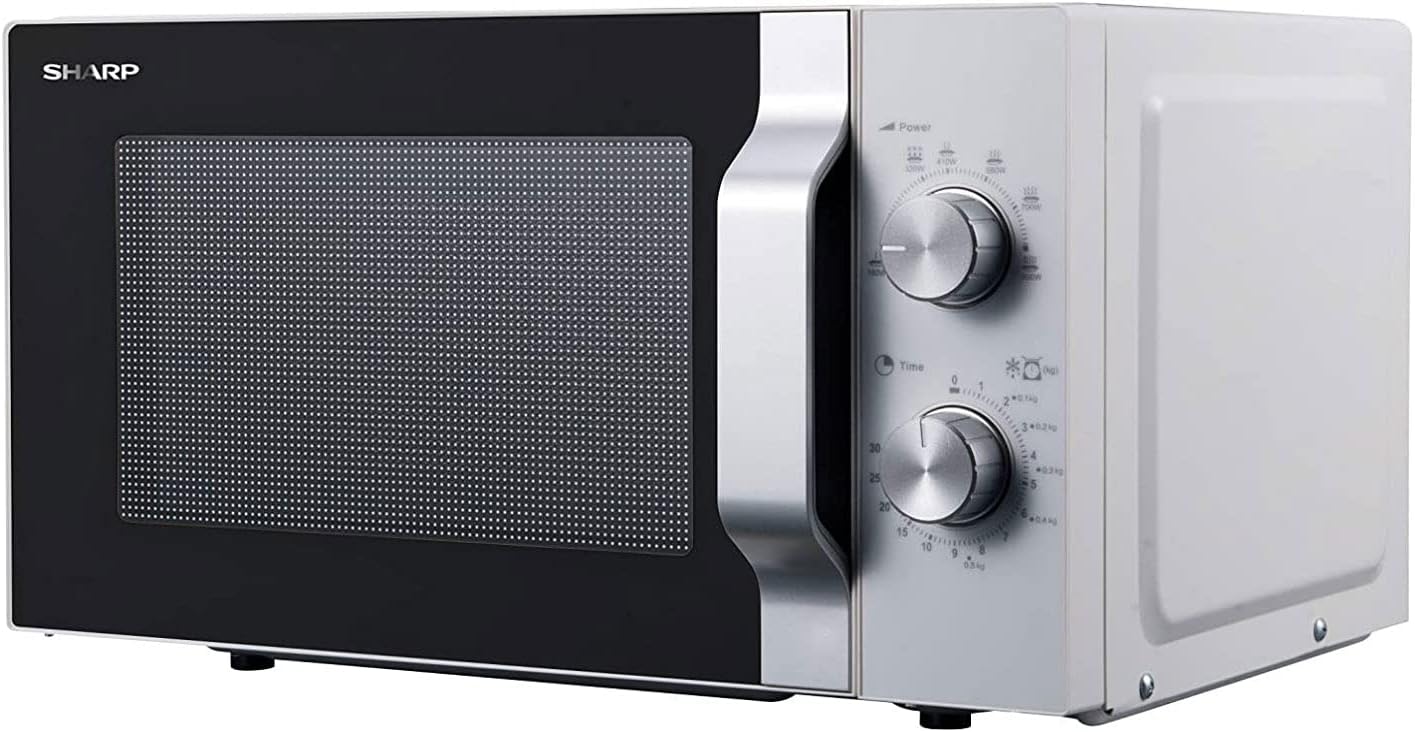
Gambar 2: Angled view of the microwave, highlighting the control dials on the right side.
3.2 Komponén internal

Figure 3: The microwave oven with its door open, revealing the interior cavity and the glass turntable.

Figure 4: Close-up of the removable glass turntable, designed to rotate food for even heating.

Figure 5: The turntable support ring with wheels, which allows the glass turntable to rotate smoothly.
3.3 Panel kontrol
The control panel features two mechanical dials:
- Pencét Daya: Used to select the desired microwave power level. Settings typically range from low to high, including defrost options.
- Dial waktos: Used to set the cooking or defrosting duration, up to 30 minutes.
4. Setélan
4.1 Ngabongkar bungkusan
- Sacara saksama piceun oven microwave sareng sadaya bahan bungkusan tina karton.
- Check the oven for any damage, such as dents on the casing or a misaligned door. Do not operate if damaged.
- Remove any protective film from the cabinet surface and the control panel.
- Ngabersihan interior oven nganggo iklanamp lawon.
4.2 Nempatkeun
- Teundeun oven dina datar, permukaan stabil nu bisa nahan beurat na jeung bahan kadaharan heaviest kamungkinan masak di jerona.
- Pastikeun ventilasina cekap. Pastikeun jarak sahenteuna 20 cm (8 inci) di luhur oven, 10 cm (4 inci) di tukang, sareng 5 cm (2 inci) di dua sisi.
- Ulah meungpeuk sagala bukaan ventilasi.
- Jauhkeun oven tina sumber panas sareng médan magnét anu kuat.
4.3 Sambungan Listrik
- Pastikeun voltage dituduhkeun dina labél rating cocog catu daya rumah tangga anjeun.
- Plug the power cord into a properly grounded wall outlet. Do not use extension cords or adapters.
5. Parentah Operasi
5.1 Operasi Microwave Dasar
- Simpen katuangan dina wadah anu aman pikeun microwave dina méja putar kaca di jero oven.
- Tutup panto oven aman.
- Hurungkeun Dial kakuatan to select the desired power level (e.g., 800W for full power).
- Hurungkeun Dial waktos to set the cooking duration. The oven will start automatically once the timer is set.
- Oven bakal eureun sareng sinyal bakal disada nalika waktos anu disetel parantos kalangkung.
- Carefully remove the food from the oven. Use oven mitts as the container and food may be hot.
5.2 Tingkat kakuatan
The Power Dial allows you to select different microwave power outputs for various cooking needs:
- Luhur (800W): Pikeun gancang masak jeung reheating.
- Sedeng-Luhur: For denser foods or to prevent overcooking.
- Sedeng: For gentle cooking, simmering, or baking.
- rendah: For delicate foods, softening butter, or keeping food warm.
- Defrost: Specific settings for defrosting food by weight or time.
5.3 Defrosting
To defrost food, place the frozen item on the turntable. Select the appropriate defrost setting on the Power Dial, then set the desired defrosting time using the Time Dial. Refer to food packaging for recommended defrosting times.
6. Perawatan sareng Pangropéa
6.1 Ngabersihan Oven Interior
- Sanggeus unggal pamakéan, usap interior jeung adamp lawon pikeun ngaleungitkeun splatters dahareun.
- Pikeun noda anu bandel, anggo deterjen hampang atanapi pembersih anu aman pikeun microwave. Entong nganggo pembersih anu kasar atanapi bantalan penggosok.
- The glass turntable and turntable support ring can be removed and washed in warm soapy water or in a dishwasher. Ensure they are dry before placing them back in the oven.
6.2 Ngabersihan Oven Exterior
- Ngusap permukaan luar kalayan lemes, damp lawon.
- Ulah ngantep cai netes kana bukaan ventilasi.
- Clean the door and door seals regularly to ensure proper closure and operation.
7. Cara ngungkulan
| Masalah | Mungkin Cukang lantaranana | Solusi |
|---|---|---|
| Oven henteu ngamimitian | Kabel listrik henteu dipasang; Panto teu ditutup leres; Fuse ditiup atawa circuit breaker tripped. | Pastikeun kabel listrik dicolokkeun sacara aman; Tutup panto pageuh; Pariksa sekering rumah tangga / circuit breaker. |
| Dahareun teu pemanasan | Daya anu disetel teuing leutik; Waktos masak pondok teuing; Kadaharan teu cocog pikeun microwave. | Naékkeun tingkat daya atanapi waktos masak; Pastikeun kadaharan aman pikeun microwave. |
| Meja puteran henteu diputer | Turntable not properly placed; Turntable support ring dirty or damaged. | Ensure turntable is correctly seated; Clean or replace turntable support ring. |
| Sparking jero oven | Metal in oven; Food splatters on cavity walls. | Cabut sagala objék logam; Ngabersihan interior oven tuntas. |
8. Spésifikasi
| Fitur | Spésifikasi |
|---|---|
| merek | Seukeut |
| Nomer modél | R204WA |
| Kapasitas | 20 liter |
| Kaluaran kakuatan gelombang mikro | 800 Watt |
| Tipe Pamasangan | Countertop |
| Tipe Kontrol | Mechanical Dials |
| Setélan Timer Maksimum | 30 Menit |
| Voltage | 230 volt |
| Ukuran (L x W x H) | 36 x 45.2 x 26.2 cm |
| Beurat | 12 kg |
| Bahan interior | Beusi sténless |
| Bahan Exterior | Kaca, Logam |
| Warna | Bodas |
9. Garansi jeung Rojongan
For warranty information or technical support, please refer to the warranty card included with your product or contact Sharp customer service. Keep your proof of purchase for any warranty claims.