1. Parentah Kasalametan penting
Before using this product, please read this user manual carefully and save it for future reference. Failure to follow these instructions may result in electric shock, fire, or serious injury.
- Alat ieu henteu dimaksudkeun pikeun dianggo ku jalma (kalebet murangkalih) anu ngirangan kamampuan fisik, indrawi atanapi mental, atanapi kirang pangalaman sareng pangaweruh, kecuali aranjeunna dipasihan pangawasan atanapi petunjuk ngeunaan panggunaan alat ku jalma anu tanggung jawab kana kasalametanana.
- Ulah make vacuum cleaner di luar atawa dina surfaces baseuh.
- Ulah ngantep barudak ulin jeung alat ieu. Pangawasan anu raket diperyogikeun nalika dianggo ku atanapi caket sareng barudak.
- Entong nyandak bahan anu gampang kaduruk atanapi kaduruk, sapertos béngsin, atanapi dianggo di daérah anu aya.
- Ulah nyokot naon bae anu kaduruk atawa ngaroko, kayaning roko, korek api, atawa lebu panas.
- Ulah make tanpa kantong lebu jeung/atawa saringan di tempat.
- Turn off the appliance before making any adjustments, changing accessories, or storing the vacuum cleaner.
- Anggo ngan sakumaha anu dijelaskeun dina manual ieu. Paké ngan kantétan dianjurkeun produsén urang.
- Ulah nanganan carjer atawa alat ku leungeun baseuh.
2. Produk Langkungview
The Roborock H7 is a cordless stick vacuum cleaner designed for versatile and efficient cleaning. It features a lightweight design, powerful suction, and a long-lasting battery.
2.1 Komponén Kaasup
The following components are typically included with your Roborock H7 vacuum cleaner:
- H7 iteuk vakum
- Sikat Multi-Permukaan
- Lebu Kantong Holder
- Kantong lebu (x2)
- Baton (Extension Wand)
- Docking Station
- Sikat lebu
- Motorized Mini-Brush
- Sasayogian tanaga
- Tabung Flex
- Alat celah
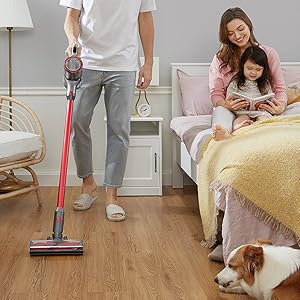
Image: All components included in the Roborock H7 package.
3. Setup jeung Majelis
3.1 Ngarakit Vakum
- Attach the extension wand (baton) to the main vacuum body until it clicks into place.
- Connect the desired cleaning head (e.g., Multi-Surface Brush) to the other end of the extension wand.
- For handheld use, attach accessories directly to the main vacuum body.
3.2 Masang Stasion Docking
The wall-mountable docking station provides convenient storage and charging. Ensure it is installed on a stable wall surface.

Image: Roborock H7 mounted on its wall docking station.
The MagBase system allows accessories to be magnetically attached to the docking station or other magnetic surfaces for easy access.

Image: Flexible MagBase accessories storage.
4. Ngecas jeung Batré
The Roborock H7 is powered by a Lithium-Ion battery, offering extended cleaning time.
4.1 Ngecas vakum
- Connect the power supply to the docking station and plug it into a wall outlet.
- Place the vacuum cleaner onto the docking station. The OLED screen will indicate charging status.
- A full charge from empty takes approximately 2.5 hours.
4.2 Batré Runtime
The vacuum offers varying runtimes depending on the selected cleaning mode:
- Modeu Eco: Nepi ka 90 menit
- Modeu standar: Nepi ka 45 menit
- Mode Max: Nepi ka 8 menit
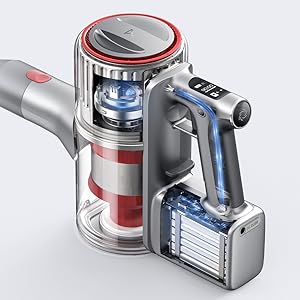
Image: Battery runtime and recharge time details.
5. Parentah Operasi
5.1 Ngahurungkeun / Pareum sareng Modeu Nyeuseup
The vacuum cleaner features 160 AW constant suction power for effective cleaning across various surfaces.
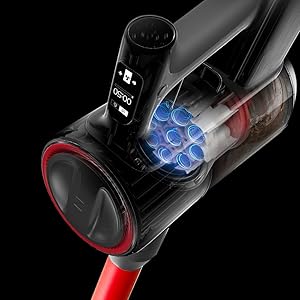
Image: Roborock H7 demonstrating its suction power.
- Pencét tombol daya pikeun ngaktipkeun atanapi mareuman vakum.
- Use the mode selection button to cycle through the three cleaning modes: Eco, Standard, and Max.
- The OLED screen displays the current mode and remaining battery life.
5.2 OLED Screen Information
The integrated OLED screen provides real-time updates on the vacuum's status, including:
- Persen batré sésanatage and estimated runtime.
- Current cleaning mode.
- Maintenance alerts (e.g., filter cleaning reminder).
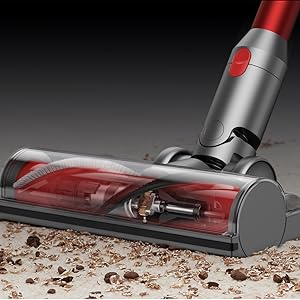
Image: OLED screen displaying operational information.
5.3 Ngagunakeun Rupa-rupa Lampiran
The Roborock H7 comes with several attachments for different cleaning needs:
- Sikat Multi-Permukaan: Ideal for carpets and hard floors.
- Sikat Mini Bermotor: Effective for pet hair and upholstery.
- Alat celah: Pikeun spasi sempit jeung sudut.
- Dusting Sikat: Pikeun surfaces hipu jeung dusting.
- Flex Tube: Provides extended reach and flexibility for awkward areas.
Image: Roborock H7 in various cleaning scenarios with different attachments.
6. Pangropéa
Regular maintenance ensures optimal performance and extends the lifespan of your Roborock H7 vacuum cleaner.
6.1 Ngosongkeun tong sampah
Empty the dustbin after each use or when the MAX line is reached. The H7 supports both bagless operation and disposable dust bags for convenience.
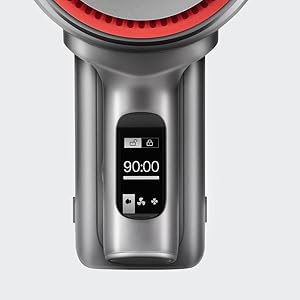
Image: Emptying the 560ml dust bag.
- Pastikeun vakum dipareuman.
- Pencét tombol ngaleupaskeun tong sampah sareng cabut tong sampah.
- Buka tutup tong sampah sareng eusina kosong kana tempat sampah.
- If using a dust bag, remove the full bag and replace it with a new one.
- Reattach the dustbin to the vacuum until it clicks securely.
6.2 Ngabersihan Saringan
Lima-stage HEPA air filtration system helps maintain clean air. Filters should be cleaned regularly.

Image: Five-stage HEPA air filtration system.
- Remove the dustbin and then carefully remove the filters.
- Ketok saringan sacara lembut pikeun ngaleungitkeun lebu anu leupas.
- Rinse the filters under running water. Ensure they are completely dry before reinserting (allow 24 hours).
- Replace filters if they are damaged or heavily soiled.
6.3 Ngabersihkeun Hulu Sikat
Periodically check the brush head for tangled hair or debris and clean as needed.
- Turn off the vacuum and detach the cleaning head.
- Use scissors or a cleaning tool to cut and remove any tangled hair or fibers from the brush roll.
- Pastikeun gulungan sikat tiasa muter sacara bébas sateuacan dipasang deui.
7. Cara ngungkulan
Tingali kana bagian ieu pikeun masalah umum sareng solusina.
| Masalah | Mungkin Cukang lantaranana | Solusi |
|---|---|---|
| Vakum henteu hurung. | Batré béak. | Cas alat panyedot debu sacara pinuh. |
| kakuatan nyeuseup low. | Dustbin is full; Filters are clogged; Brush head is obstructed. | Empty dustbin; Clean or replace filters; Clear brush head of debris. |
| Brush head stops rotating. | Obstruction in the brush roll. | Turn off the vacuum and remove any tangled hair or debris from the brush roll. |
| OLED screen displays an error code. | Masalah internal husus. | Tingal kodeu kasalahan husus dina manual lengkep atanapi kontak rojongan customer. |
8. Spésifikasi
| Fitur | Rincian |
|---|---|
| merek | roborock |
| Modél | H7 |
| Fitur husus | Cordless, HEPA Filtration, Lightweight |
| Jenis Filter | Saringan HEPA |
| Wattage | 160 watt |
| Waktu Ngecas | 2.5 Jam |
| Dianjurkeun Mangpaat | Deep Clean Carpets, Indoor Use |
| Faktor Bentuk | iteuk |
| Dimensi produk | 11.2 "L x 4.4" W x 9.1" H |
| Jenis Batré | Litium-Ion |
| Tingkat Noise | 74 desibel |
| Daya Tahan Batré (Maks) | 90 menit (Modeu Éko) |
| Item Beurat | 3.1 pon |
| Jumlah speeds / tingkat kakuatan | 3 |
9. Video Produk Resmi
Watch these official videos for visual guidance on using and maintaining your Roborock H7.
Video: Detailed overview and demonstration of the Roborock H7's features and operation (4:18 duration).
Video: In-depth guide to the Roborock H7, including assembly and usage tips (6:15 duration).
Video: Comprehensive demonstration of the Roborock H7's capabilities and maintenance (7:57 duration).
Video: User guide for the Roborock H7, covering various aspects of its use (5:01 duration).
10. Garansi jeung Rojongan
The Roborock H7 Cordless Stick Vacuum Cleaner comes with a manufacturer's warranty. Please refer to the warranty card included in your product packaging for specific terms and conditions.
For technical support, troubleshooting assistance, or to inquire about replacement parts, please contact Roborock customer service through their official websitus atanapi inpormasi kontak anu disayogikeun dina dokuméntasi produk anjeun.


