Bubuka
The VONETS VBG1200 is a versatile industrial-grade mini dual-band WiFi device designed to function as a WiFi bridge, router, or range extender. It supports both 2.4GHz and 5GHz bands, offering AC1200 speeds (300Mbps on 2.4GHz and 900Mbps on 5GHz). This device provides flexible networking solutions, enabling conversion between wired and wireless connections, and is suitable for various applications including DVRs, IP cameras, and other IoT devices.
Fitur konci
- Dual Band AC1200 WiFi: Supports 2.4GHz (300Mbps) and 5GHz (900Mbps) for high-speed wireless connectivity.
- Sababaraha Modeu Operasi: Functions as a Router, WiFi Smart Bridge/Repeater, or AP.
- Konéktipitas Fleksibel: Achieves WiFi to Wired or Wired to WiFi functionality (Ethernet to WiFi or WiFi to Ethernet).
- Desain Industri: Features a compact size, fixed hook, and industrial DC connector, suitable for robust environments.
- Lega Voltage Power Input: Powered by DC5V-15V with two-stage overvol otomatistage panyalindungan.
- Automatic Hotspot Reconnection: Supports automatic reconnection to WiFi hotspots with memory for up to 100 hotspots.
- Signal Strength Detection (SSA): Includes SSA function for signal strength reporting and motion detection.
- Sensitipitas ditingkatkeun: Diwangun-di Low Noise Amplifier (LNA) and Power Amplifier (PA) for improved signal reception and coverage.
Eusi pakét
Saatos muka bungkusan, mangga pariksa yén sadaya barang aya sareng dina kaayaan anu saé:
- VONETS VBG1200 Device
- Manual Pitunjuk (dokumén ieu)
- Ethernet Cable (RJ45 male, 10/100Mbps)
- Kabel Daya USB/DC
- Fixed Hook and Fixing Kit
- Konektor DC Industri
- External Antennas (2 x 2.4GHz 3dBi, 2 x 5GHz 3dBi)
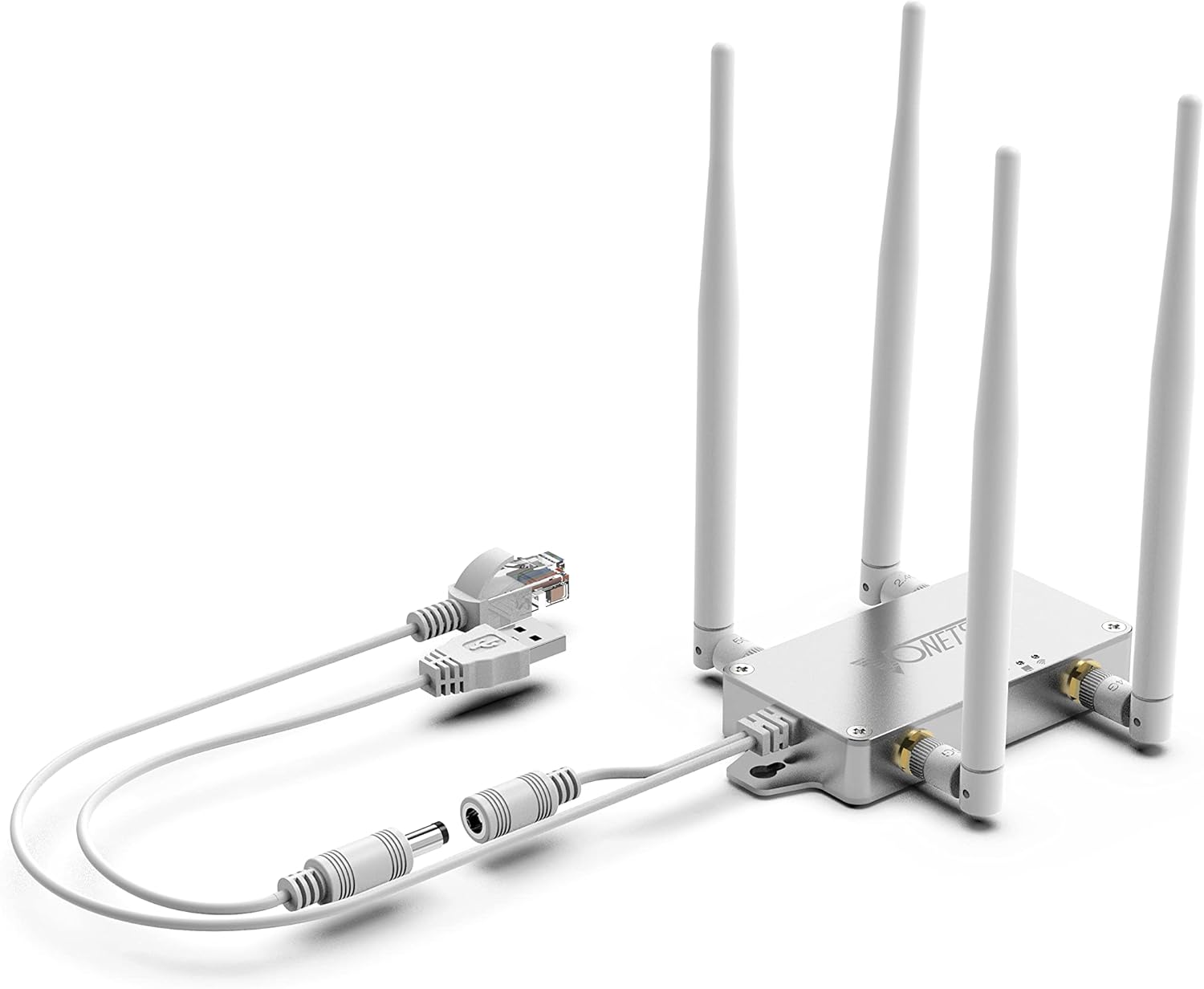
Image: The VONETS VBG1200 device showing its main unit, four antennas, and the connected Ethernet and USB/DC power cables.
Produk Leuwihview
The VBG1200 features a compact design with external antennas for optimal signal performance. It includes an RJ45 Ethernet port and a USB/DC power input for flexible power options.

Image: The VBG1200 device shown mounted vertically with a DIN rail attachment, highlighting its industrial application and mounting options.

Gambar: A luhur-handap view of the VBG1200, illustrating the antenna connections (5G and 2.4G) and the LED indicators for power, WiFi, and Ethernet status.
The device is equipped with LED indicators for power, WiFi activity, and Ethernet connection status, providing quick visual feedback on its operational state.
Guide Setup
Follow these steps to set up your VONETS VBG1200 device:
- Sambungkeun Antenna: Screw the four external antennas onto their respective connectors on the VBG1200 unit. Ensure they are securely fastened.
- Sambungan Daya: Connect the USB/DC power cable to the device. You can power the device using a USB port (e.g., from a computer or USB power adapter) or a DC power source (5V-15V) using the provided industrial DC connector if applicable. Note: Do not use both USB and DC power simultaneously.
- Sambungan Ethernet (Opsional): If using the device as a WiFi to Ethernet bridge or in router mode, connect one end of the Ethernet cable to the RJ45 port on the VBG1200 and the other end to your wired device (e.g., PC, DVR, IP camera) or your modem/router.
- Konfigurasi awal:
- Power on the VBG1200. Wait for the power LED to stabilize.
- On your computer or mobile device, search for available WiFi networks. You should find a network named "VONETS_XXXXXX" (where XXXXXX is part of the device's MAC address).
- Connect to this network. The default password is usually printed on the device or in the quick start guide.
- Buka a web browser and navigate to the device's default IP address (commonly http://192.168.254.254).
- Log in using the default username and password (refer to the quick start guide for credentials).
- Follow the on-screen wizard to configure the device according to your desired operating mode (Bridge, Router, or Repeater).

Image: The VBG1200 device with its power and Ethernet cables connected, illustrating a typical setup configuration.
Modeu Operasi
The VONETS VBG1200 supports multiple operating modes to suit various networking needs:
1. WiFi Smart Bridge / Repeater Mode
In this mode, the VBG1200 can convert a WiFi signal into a wired signal (WiFi to Ethernet) or extend an existing WiFi network (Repeater). It supports transparent transmission at both IP and MAC layers.
- WiFi to Wired: Connects to an existing WiFi network and provides internet access to a wired device via its Ethernet port. Ideal for devices like network printers, DVRs, or IP cameras that lack WiFi capabilities.
- Repeater: Extends the coverage of an existing WiFi network, eliminating dead zones and improving signal strength in areas with weak reception.

Image: Diagram illustrating the WiFi Bridge application, where the VBG1200 connects a wired computer to a wireless network.

Image: Diagram illustrating the WiFi Repeater application, showing the VBG1200 extending WiFi coverage within a building.
2. Modeu Router
In Router mode, the VBG1200 acts as a wireless router, providing internet access to multiple devices via WiFi or its Ethernet port. This mode is suitable for scenarios requiring dial-up internet access or cross-network segment applications.

Image: Diagram illustrating the WiFi Router application, where the VBG1200 provides internet access to multiple devices from a wired source.
3. Modeu AP
When connected to a network cable, the VBG1200 can function as an Access Point (AP), converting a wired network connection into a wireless one. This is a plug-and-play solution for adding wireless capabilities to a wired network.

Image: Diagram illustrating the AP application, where the VBG1200 creates a wireless network from a wired connection.
spésifikasi
| Fitur | Rincian |
|---|---|
| Nomer modél | VBG1200 |
| Tanpa kabel | 802.11ac/a/b/g/n |
| Pita frékuénsi | 2.4GHz and 5GHz (Dual-Band) |
| Laju Mindahkeun Data | Up to 1200Mbps (300Mbps 2.4GHz + 900Mbps 5GHz) |
| Port Ethernet | 1 x 10/100Mbps RJ45 Male |
| Input kakuatan | DC5V-15V (Typical 5V/2A), USB or DC power cable |
| anteneu | 2 x 2.4GHz 3dBi, 2 x 5GHz 3dBi External Antennas |
| Dimensi produk | 3.31 x 1.77 x 0.59 inci |
| Item Beurat | 4.6 ons |
| Suhu Operasi | Refer to product documentation for specific range (typically 0°C to 55°C) |
| Fitur husus | WiFi to Ethernet, Ethernet to WiFi bridge, SSA signal detection, motion detection, memory hotspot matching |
Pangropéa
To ensure optimal performance and longevity of your VONETS VBG1200, consider the following maintenance tips:
- panempatan: Place the device in a well-ventilated area to prevent overheating. Avoid direct sunlight or enclosed spaces.
- beberesih: Lap alat ieu lalaunan nganggo lawon anu lemes sareng garing. Ulah nganggo pembersih cair atanapi aerosol.
- Pembaruan firmware: périodik pariksa produsén urang website for firmware updates. Keeping the firmware updated can improve performance, add new features, and fix bugs.
- Siklus kakuatan: If the device experiences connectivity issues, try power cycling it (unplug from power, wait 10 seconds, then plug back in).
- Orientasi anteneu: Adjust the antennas for optimal signal reception and transmission.
Pamérésan masalah
If you encounter issues with your VONETS VBG1200, refer to the following common problems and solutions:
| Masalah | Solusi anu mungkin |
|---|---|
| Alat henteu hurung. | Ensure the power cable is securely connected and the power source (USB port or DC adapter) is functional. Verify the power input voltage aya dina rentang 5V-15V. |
| Cannot connect to the device's WiFi network. | Check if the device is powered on. Ensure you are selecting the correct WiFi network (VONETS_XXXXXX). Verify the WiFi password. Try resetting the device to factory defaults using the reset button (a small hole on the back, usually requires a paperclip). |
| Teu bisa ngakses ka web configuration page (192.168.254.254). | Ensure your computer is connected to the VBG1200's WiFi network. Temporarily disable any VPN or firewall software on your computer. Try a different web browser. Confirm the IP address is typed correctly. |
| Poor WiFi signal or slow speeds. | Adjust antenna orientation. Relocate the VBG1200 closer to your main router or the devices it serves. Minimize interference from other electronic devices. Ensure the device is not overheating. Check for firmware updates. |
| Ethernet connection not working. | Verify the Ethernet cable is properly connected at both ends. Check the Ethernet LED indicator on the VBG1200. Ensure the connected wired device is functioning correctly. Confirm the VBG1200 is configured in the appropriate mode (Bridge or Router) for Ethernet output. |
| Device randomly disconnects. | Check for stable power supply. Ensure the device is not overheating. Update firmware. If using Repeater mode, ensure the signal from the main router is strong and stable. |
If the problem persists after trying these solutions, please contact Vonets customer support for further assistance.
Garansi sareng Rojongan
Vonets products typically come with a limited warranty. Please refer to the warranty card included with your product or visit the official Vonets websitus pikeun istilah jeung kaayaan jaminan lengkep.
For technical support, troubleshooting assistance, or warranty claims, you can contact Vonets customer support through their official channels. Contact information is usually available on their websitus atanapi dina bungkusan produk.
Pabrikan: Shenzhen HouTian Network Communication Technology Co., Ltd.
Websitus: www.vonets.com (Mangga parios inpormasi kontak anu pangénggalna)