Bubuka
This manual provides comprehensive instructions for the installation, operation, and maintenance of your AeroCool Miragebk ATX PC Case. The Miragebk features an ARGB LED strip on the front panel, a hinged tempered glass side panel, and a 12 cm ARGB fan, designed for optimal component visibility and cooling performance.
Eusi pakét
- AeroCool Miragebk ATX PC Case
- Accessory kit (screws, standoffs, cable ties)
- Manual pangguna (dokumén ieu)
Émbaran Kasalametan
Please read and understand all safety instructions before installing or operating this product. Failure to do so may result in injury or damage to the product.
- Salawasna pegatkeun sambungan catu daya ti stop kontak témbok saméméh ngajalankeun sagala instalasi atawa perawatan.
- Ulah neundeun wadahna dina sinar panonpoé langsung atanapi caket sumber panas.
- Keep the case away from water and excessive humidity.
- Handle the tempered glass panel with care to prevent breakage.
- Pastikeun grounding anu leres pikeun nyegah bahaya listrik.
Setup sareng Instalasi
Follow these steps to set up your AeroCool Miragebk PC case and install components.
1. Nyiapkeun Kasus
- Teundeun wadahna dina permukaan datar anu stabil.
- Carefully open the hinged tempered glass side panel. This panel provides full access to the interior.
- Remove any protective films from the glass and other surfaces.

Gambar 1: Hareupeun view of the AeroCool Miragebk PC case, showcasing the ARGB LED strip and tempered glass panel.
2. Pamasangan motherboard
- Pasang tameng I/O kana bukaan pungkur wadahna.
- Align your ATX, Micro ATX, or Mini ITX motherboard with the standoffs inside the case.
- Secure the motherboard using the provided screws.
3. Instalasi Power Supply
- Install the power supply unit (PSU) into the dedicated compartment at the bottom of the case.
- Amankeun PSU nganggo sekrup ti tukangeun casing.
4. Storage Drive Installation (HDDs/SSDs)
The case supports up to 7 HDDs and SSDs.
- Locate the drive bays or mounting points.
- Mount your 2.5" SSDs or 3.5" HDDs using the appropriate screws.
5. Pamasangan Kartu Grafika (GPU).
Kasus ngadukung kartu grafik dugi ka 356mm panjangna.
- Cabut panutup slot ékspansi anu diperyogikeun di bagian tukang wadahna.
- Selapkeun kartu grafis anjeun kana slot PCIe dina motherboard.
- Ngamankeun kartu grafik kalawan screws.
6. Cooling System Installation (Fans/Liquid Cooling)
The case supports up to 8 fans and liquid cooling on the front, top, and rear.
- Install additional fans as needed for optimal airflow.
- For liquid cooling, mount radiators to the designated areas (front, top, or rear).
- The case includes one 12 cm ARGB fan.
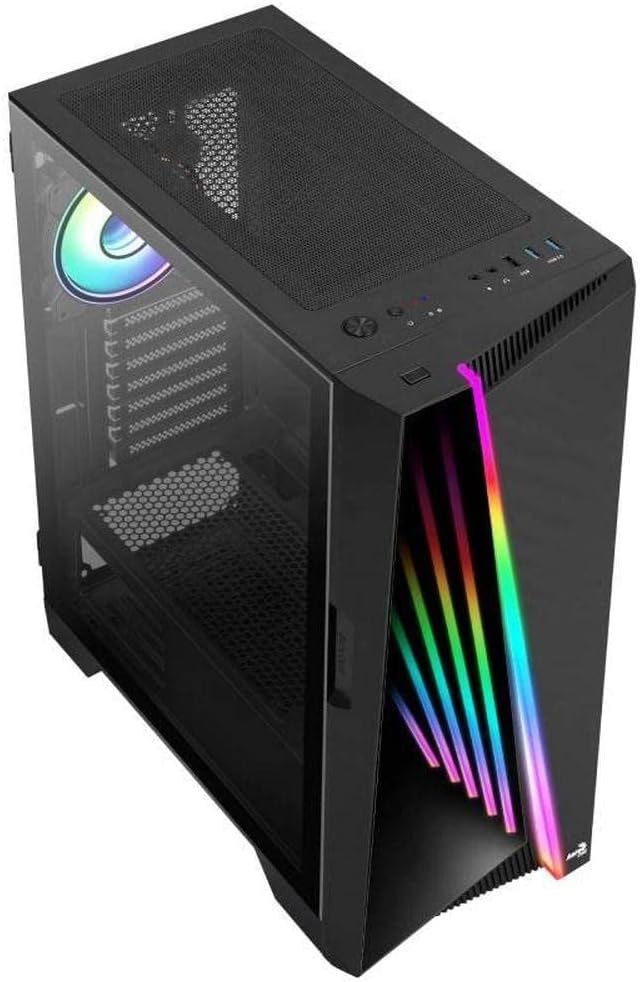
Gambar 2: Angled view of the AeroCool Miragebk PC case, highlighting the top mesh for ventilation and the front panel design.
7. Manajemén kabel
Utilize the cable routing cutouts and tie-down points behind the motherboard tray to manage cables for improved airflow and aesthetics.
8. Nutup Pasualan
Once all components are installed and cables are managed, close the tempered glass side panel and secure it.
Parentah Operasi
Panel Hareup I / O
The top panel of the AeroCool Miragebk provides convenient access to essential ports and controls:
- Tombol Daya: Turns the PC on/off.
- Tombol Reset: Restarts the PC.
- Tombol Kontrol LED: Cycles through ARGB lighting modes or syncs with the motherboard.
- Port USB 3.0 (x2): Pikeun mindahkeun data-speed tinggi.
- Port USB 2.0 (x1): Pikeun alat USB standar.
- HD Audio & Microphone Jacks: Pikeun input audio sareng kaluaran.
Kontrol Lampu ARGB
The ARGB lighting on the front panel and included fan can be controlled in two ways:
- Tombol Kontrol LED: Press the dedicated LED button on the top panel to cycle through various pre-set ARGB lighting effects.
- Singkronisasi motherboard: Connect the ARGB lighting to a compatible 3-pin +5V ARGB header on your motherboard. This allows software control of 16.8 million colors and synchronization with other ARGB components. The Mirage control hub supports up to 6 ARGB fans and 2 additional 3-pin ARGB accessories.
Pangropéa
Pangropéa rutin ngabantosan ngajamin kinerja optimal sareng umur panjang kasus PC anjeun.
- Saringan debu: Cabut sareng bersihan saringan lebu (upami aya) sacara berkala pikeun ngajaga aliran hawa anu saé sareng nyegah ngumpulna lebu di jero wadahna.
- Bersihan Luar: Ngusap permukaan luar kalayan lemes, damp lawon. Hindarkeun pembersih abrasive atanapi pangleyur.
- Beberesih interior: Use compressed air to remove dust from internal components and fans. Ensure the PC is powered off and unplugged before cleaning.
- Kaca Tempered: Bersihkeun panel kaca tempered nganggo lawon microfiber sareng pembersih kaca anu dirancang khusus pikeun éléktronika.
Pamérésan masalah
If you encounter issues with your AeroCool Miragebk case, refer to the following common solutions:
- PC Teu Diaktipkeun:
- Pastikeun catu daya disambungkeun kalayan leres kana stop kontak témbok sareng dihurungkeun.
- Verify all internal power cables (24-pin ATX, CPU, GPU) are securely connected.
- Check that the front panel power switch cable is correctly connected to the motherboard.
- Pencahayaan ARGB Teu Gawé:
- Confirm the ARGB cables are correctly connected to the motherboard's 3-pin +5V ARGB header or the internal control hub.
- If using motherboard sync, ensure the motherboard's ARGB software is installed and configured correctly.
- Try pressing the LED control button on the top panel to see if pre-set modes function.
- Aliran Udara Goréng/Panas Kalangkung:
- Check if all installed fans are spinning correctly.
- Clean any dust filters and internal components.
- Ensure proper fan orientation (intake/exhaust) for optimal airflow.
spésifikasi
| Fitur | Rincian |
|---|---|
| merek | AeroCool |
| Ngaran modél | MIRAGEBK |
| Jenis Kasus | Tower (Semitower) |
| Motherboard kasaluyuan | ATX, Mikro ATX, Mini ITX |
| Bahan | Kaca Tempered |
| Warna | Hideung |
| Item Beurat | 12.98 pon |
| Ukuran produk (L x W x H) | 19.65 x 8.5 x 16.46 inci |
| Jumlah USB 3.0 palabuhan | 2 |
| Jumlah USB 2.0 palabuhan | 1 |
| Power Supply ningkatna Tipe | Gunung handap |
| Métode Cooling | Hawa |
| Fan Size (Included) | 12 Centimeters (ARGB) |
| Max CPU Cooler Jangkungna | 162 mm |
| Max GPU Panjangna | 356 mm |
| Drive Bays | 7 (HDDs and SSDs) |
Garansi sareng Rojongan
For warranty information or technical support, please refer to the official AeroCool websitus atanapi ngahubungan departemén layanan palanggan maranéhna. Simpen bukti pameseran anjeun pikeun klaim garansi.


