1. Bubuka
This manual provides comprehensive instructions for the installation, operation, and maintenance of your PANOEAGLE DS-7608NI-I2/8P 8-Channel 4K Network Video Recorder (NVR). Please read this manual thoroughly before using the product to ensure proper setup and functionality. Retain this manual for future reference.
The PANOEAGLE DS-7608NI-I2/8P is an embedded Plug and Play 4K NVR designed for robust 24/7 surveillance recording. It supports up to 8 cameras simultaneously, offering high-resolution recording up to 12MP and utilizing H.264+/H.264/H.265 video compression for efficient storage. Its Power over Ethernet (PoE) capability simplifies camera installation by providing both power and data through a single cable.
2. Produk Langkungview
Familiarize yourself with the components and interfaces of your NVR.
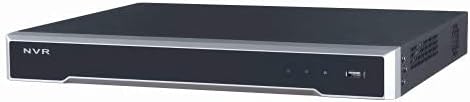
Gambar 2.1: Panel hareup View
This image displays the front panel of the NVR, featuring the 'NVR' branding, status indicators, and a USB port for peripheral connections.

Gambar 2.2: Panel Rear View
This image shows the rear panel of the NVR, highlighting the power input, cooling fan, 8 PoE ports, network port, USB ports, audio input/output, VGA, and HDMI video outputs, and alarm/control terminals.

Figure 2.3: Angled Rear View
An angled perspective of the NVR's rear panel, providing a clearer view of the various connectivity options and ventilation.
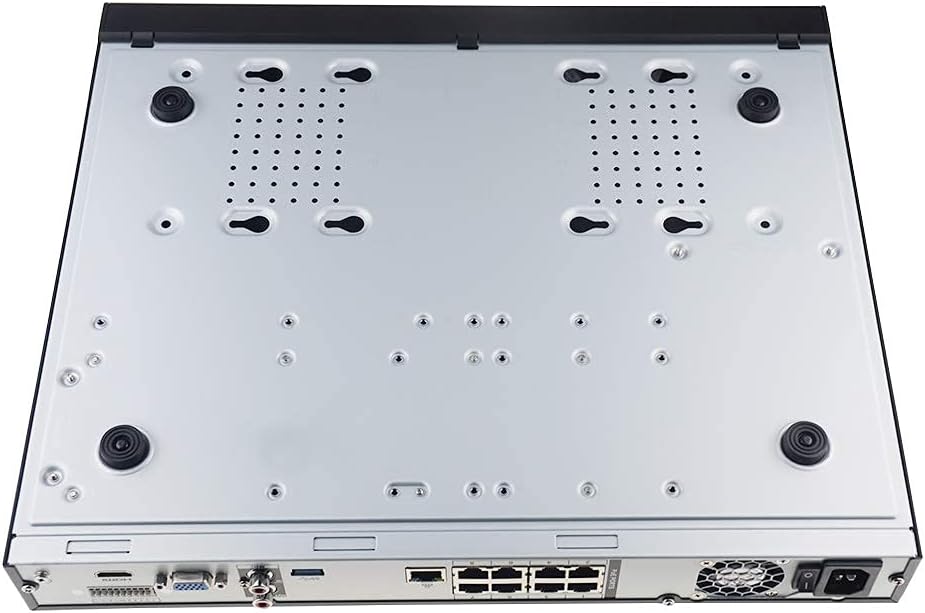
Figure 2.4: Bottom Panel View
This image displays the bottom of the NVR, showing mounting points and ventilation holes, along with rubber feet for stable placement.
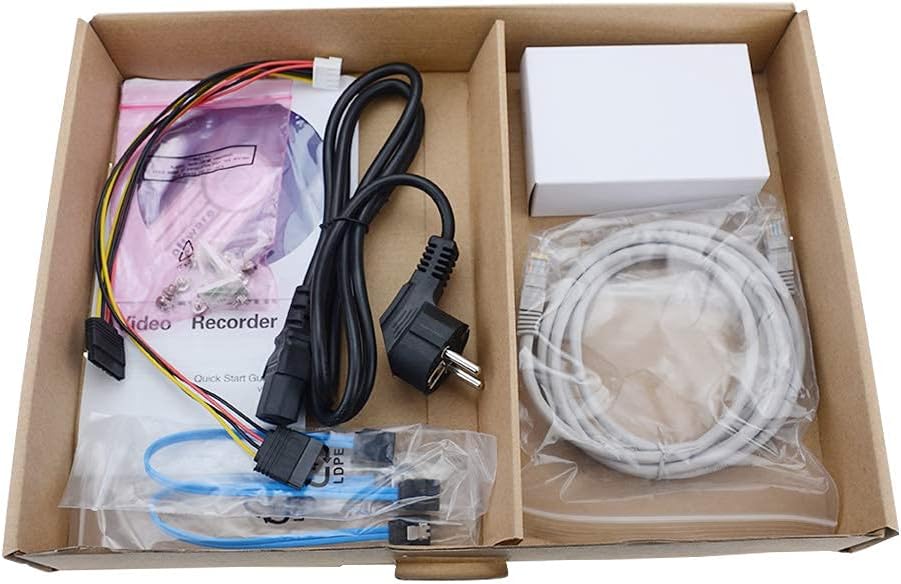
Gambar 2.5: Eusi pakét
A view of the accessories included with the NVR, typically comprising a power cable, network cable, USB mouse, SATA cables for hard drive installation, and a quick start guide.
3. Fitur konci
- Rekaman 8-Kanal: Supports simultaneous recording from up to 8 IP cameras.
- Dukungan Resolusi 4K: Capable of recording and displaying video resolutions up to 12MP.
- PoE Easy Setup: Integrated Power over Ethernet (PoE) ports for direct connection and power supply to IP cameras via a single Ethernet cable.
- Kompresi Video Lanjutan: Utilizes H.264+/H.264/H.265 codecs for efficient storage and bandwidth usage.
- Ngarekam 24/7: Designed for continuous, reliable surveillance monitoring.
- Kaluaran HDMI: High-definition video output for connecting to monitors or TVs.
- Dukungan SATA: Features 2 SATA interfaces for internal hard drive installation (HDDs not included).
4. Setup Guide
4.1. Pamasangan Hard Drive (Opsional)
Upami NVR anjeun henteu dilengkepan hard drive anu tos dipasang, turutan léngkah-léngkah ieu:
- Pareuman NVR sareng cabut sadaya kabel.
- Cabut sareng cabut panutup luhur rangka NVR.
- Connect the SATA data cable and power cable from the NVR to the hard drive.
- Pasangkeun hard drive kana rangka NVR nganggo sekrup anu disayogikeun.
- Ganti panutup luhur sareng amankeun ku sekrup.
4.2. Sambungan Awal
- Sambungkeun Monitor: Sambungkeun monitor ka port kaluaran HDMI atanapi VGA NVR.
- Sambungkeun Beurit: Colokkeun beurit USB kana salah sahiji port USB NVR.
- Nyambung kana Jaringan: Connect the NVR's LAN port to your router or network switch using an Ethernet cable.
- Sambungkeun Kaméra IP: Connect your PoE IP cameras to the NVR's PoE ports using Ethernet cables. The NVR will provide power and data to the cameras.
- Daya Hurung: Connect the power adapter to the NVR and then plug it into a power outlet. The NVR will power on automatically.
4.3. Konfigurasi awal
Saatos boot munggaran, NVR bakal nungtun anjeun ngalangkungan wizard setelan awal. Ieu biasana kalebet:
- Nyetél kecap akses administrator.
- Configuring network settings (DHCP is usually default).
- Initializing the hard drive (if newly installed).
- Searching for and adding connected IP cameras.
- Nyetel tanggal sareng waktos.
Turutan parentah dina layar pikeun ngarengsekeun setelan.
5. Parentah Operasi
5.1. Hirup View
After logging in, the NVR will typically display the live view tina sadaya kaméra anu nyambung. Anjeun tiasa ngalih antara kaméra tunggal view, grid multi-kaméra view, and customize display layouts.
5.2. Ngarekam
- Rékam Kontinyu: Records 24/7. Configure schedules in the NVR's menu.
- Ngarekam Deteksi Gerak: Records only when motion is detected. Sensitivity and detection zones can be adjusted.
- Rekaman Dijadwalkeun: Atur waktos khusus pikeun ngarékam.
Access recording settings via the NVR's main menu, usually under "Record" or "Storage" settings.
5.3. Puterkeun deui
Pikeun ulangview dirékam footage:
- Tina ménu utama, pilih "Playback".
- Pilih kaméra (s) jeung titimangsa / rentang waktos Anjeun hoyong ulangview.
- Use the timeline to navigate through recorded events. Options for fast-forward, rewind, and pause are available.
5.4. Jauh Aksés
The NVR supports remote viewing via a mobile app or web browser. Refer to the NVR's network settings for details on enabling P2P (peer-to-peer) or port forwarding for remote access. Download the official PANOEAGLE mobile application from your device's app store.
6. Pangropéa
- Ngabersihan rutin: Keep the NVR free from dust. Use a soft, dry cloth for exterior cleaning. Ensure ventilation openings are clear.
- Pembaruan firmware: Periodically check the PANOEAGLE official website for firmware updates. Updates can improve performance, add features, and enhance security. Follow update instructions carefully.
- Kaséhatan Hard Drive: Monitor the health of your hard drive(s) through the NVR's system information. Replace failing drives promptly to avoid data loss.
- Kaamanan kecap akses: Regularly change your administrator password and use strong, unique passwords.
7. Cara ngungkulan
| Masalah | Mungkin Cukang lantaranana | Solusi |
|---|---|---|
| Taya kaluaran video dina monitor. | Sambungan kabelna kendor, sumber input dina monitor salah, NVR teu hurung. | Pariksa sambungan kabel HDMI/VGA. Pastikeun monitor disetel ka input anu leres. Pariksa daya NVR. |
| Kaméra henteu ditingalikeun sacara langsung view. | Camera not powered, network issue, camera not added to NVR, incorrect IP address. | Check camera power and Ethernet cables. Ensure cameras are connected to PoE ports. Use NVR's camera management to search and add cameras. Verify camera IP addresses. |
| Teu aya rekaman atanapi foo leungittage. | Hard drive not installed/initialized, recording schedule not configured, hard drive full, hard drive failure. | Install and initialize HDD. Configure recording schedules. Check HDD status and capacity. Replace faulty HDD. |
| Teu tiasa ngaksés NVR jarak jauh. | Network configuration issues, P2P disabled, incorrect app settings, firewall blocking. | Ensure NVR has internet access. Enable P2P service. Verify app settings and NVR's network configuration. Check router firewall settings. |
8. Spésifikasi
| Fitur | Rincian |
|---|---|
| Modél | DS-7608NI-I2/8P |
| merek | PANOEAGLE (Compatible with Hi-k USA systems) |
| Jumlah Saluran | 8 |
| Resolusi Max | Nepi ka 12MP |
| Komprési Video | H.264+/H.264/H.265 |
| Kaluaran Video | HDMI, VGA |
| Input Audio | RCA |
| Antarbeungeut SATA | 2 (for HDD) |
| Téhnologi konektipitas | HDMI, Ethernet (PoE) |
| Tanggal Kahiji Sadia | 28 Juli 2021 |
9. Garansi jeung Rojongan
For warranty information, please refer to the warranty card included with your product or visit the official PANOEAGLE website. Technical support may be available through the manufacturer's websitus atanapi ku cara ngahubungi bagian layanan palangganna.
Always ensure you are using official channels for support and firmware downloads to maintain product integrity and security.


