1. Bubuka
The SUNLU S1 Plus Filament Dryer Box is designed to dry 3D printer filaments, removing moisture to improve print quality and prevent common printing issues. It also functions as a storage box to keep filaments dry during printing. This manual provides essential information for the safe and effective use of your filament dryer.
2. Émbaran Kasalametan
Mangga baca sadaya pitunjuk kaamanan sateuacan ngoperasikeun alat ieu. Upami henteu nuturkeun pitunjuk ieu tiasa nyababkeun sengatan listrik, kahuruan, atanapi tatu parah.
- Ulah ngalaan alat ka cai atawa beueus.
- Ensure the power adapter is securely connected to a suitable power outlet.
- Ulah meungpeuk bukaan ventilasi.
- Jauhkeun tina jangkauan barudak.
- Cabut colokan alat lamun teu dipake atawa saméméh beberesih.
- Ulah nyobian ngabongkar atawa ngalereskeun alat sorangan. Kontak personil mumpuni pikeun layanan.
3. Produk Langkungview
3.1. komponén
The SUNLU S1 Plus Filament Dryer Box package typically includes the following items:
- SUNLU S1 Plus Filament Dryer Box
- Adaptor kakuatan
- Manual pamaké

Figure 1: Package Contents. The image displays the SUNLU S1 Plus Filament Dryer Box, its power adapter, and the included user manual, illustrating all items typically found in the product packaging.
3.2. Fitur
- Improved Built-in Fan: Features a circulation fan for 360-degree uniform heating, ensuring faster and more effective moisture removal from the filament.
- Rapid Heating & Constant Temperature: The dryer quickly reaches the set temperature and maintains it consistently. Internal rotating rollers ensure uniform heating and effective drying of the filament.
- Antarmuka anu ramah-pamaké: Simple operation with a 2-inch LCD screen and two control buttons for temperature and time settings.
- Sababaraha Setélan: Adjustable temperature range from 35°C to 55°C and operating time from 0 to 6 hours, allowing customization based on filament material.
- Kasaluyuan lega: Compatible with 3D printer filaments of 1.75mm, 2.85mm, and 3.00mm diameters.
- Desain Praktis: Features a transparent lid for easy filament monitoring and a maximum capacity of 210 × 89 mm.

Figure 2: 360-degree Hot-air Circulation. This diagram illustrates how the built-in fan circulates hot air uniformly within the dryer box, ensuring efficient drying of the filament.
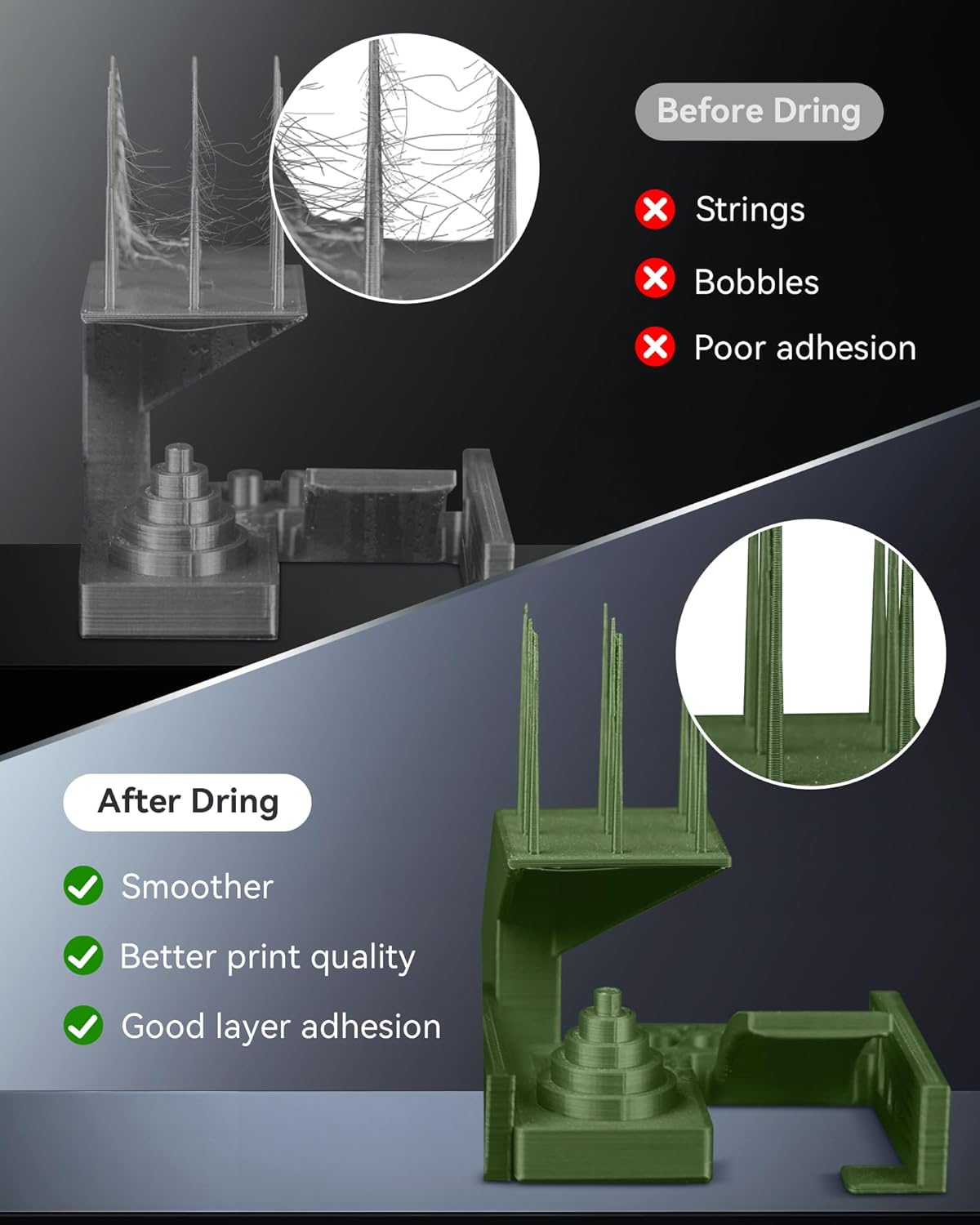
Figure 3: Function Diagram. This image highlights the 2-inch LCD screen and the two control buttons (left and right) on the SUNLU filament dryer, indicating their roles in operation.

Figure 4: Filament Compatibility. This image demonstrates the dryer's compatibility with various filament spool sizes and diameters, specifically 1.75mm, 2.85mm, and 3.00mm.
4. Setélan
Follow these steps to set up your SUNLU S1 Plus Filament Dryer Box:
- Ngabongkar: Sacara saksama miceun sadaya komponén tina bungkusan.
- Sambungkeun Kakuatan: Plug the power adapter into the dryer box and then into a wall outlet.
- Load Filament: Open the lid and place your filament spool inside the dryer box. Ensure the filament can rotate freely on the internal rollers.
- Tutup Tutup: Aman tutup tutup transparan.
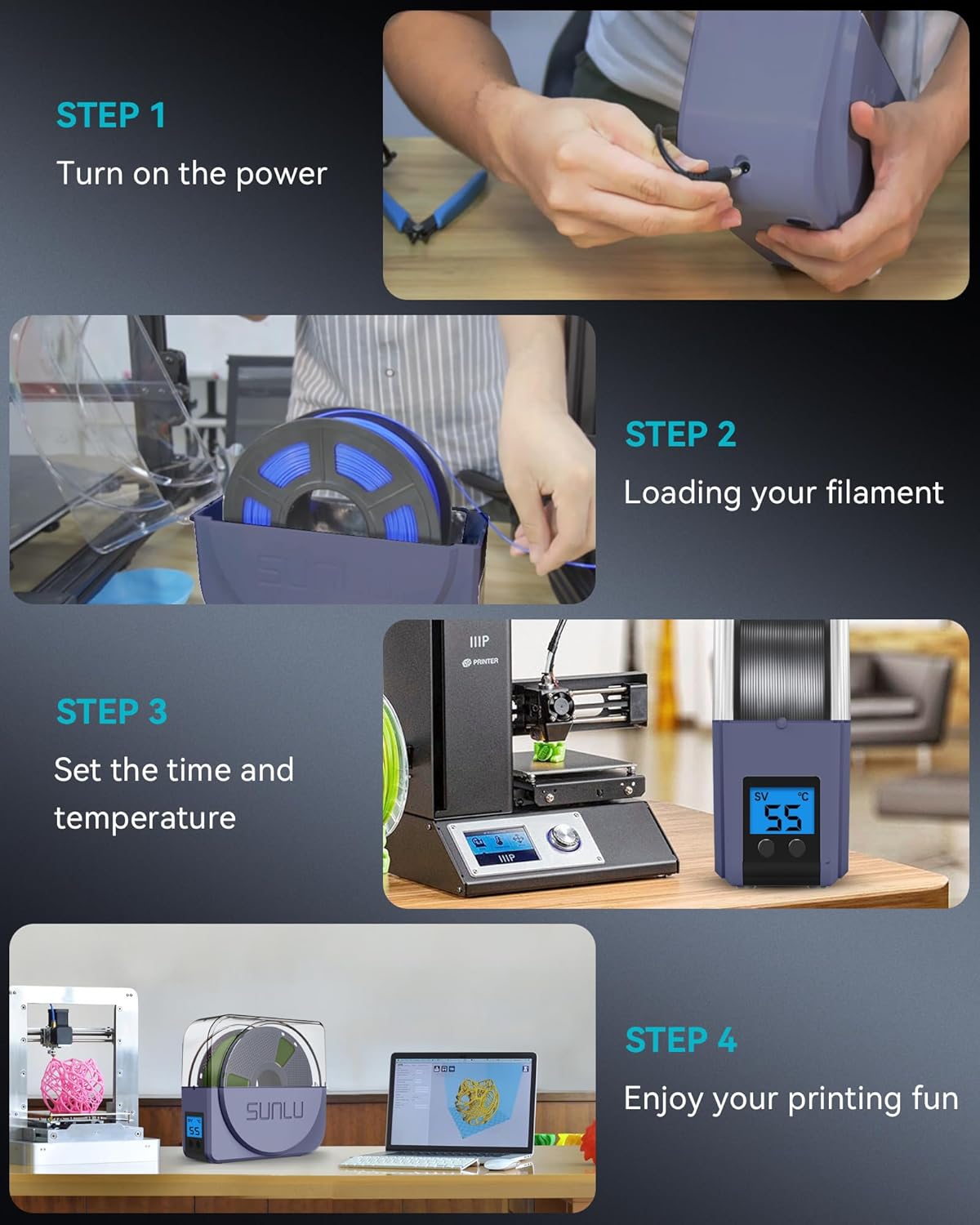
Figure 5: Quick Setup Guide. This visual guide outlines the four simple steps to prepare the dryer for use: connecting power, loading filament, setting parameters, and beginning your print.
5. Parentah Operasi
Operating the SUNLU S1 Plus Filament Dryer Box is straightforward:
- Daya Hurung: Press either the left or right button to turn on the device. The LCD screen will illuminate.
- Setel Suhu: Use the buttons to adjust the desired drying temperature. The temperature range is 35°C to 55°C. Refer to the recommended drying temperatures below for optimal results.
- Setel waktos: Use the buttons to set the drying duration. The time can be adjusted from 0 to 6 hours. The device will automatically shut off after the set time.
- Mimitian garing: Once temperature and time are set, the drying process will begin automatically.
5.1. Recommended Drying Temperatures and Times
The optimal drying settings vary depending on the filament type:

Figure 6: Recommended Drying Temperatures. This chart provides suggested temperature ranges for drying common 3D printer filament types like PLA, PETG/TPU, and ABS/PA/ASA.
| Filament Material | Suhu Pengeringan | Waktos Pangeringan |
|---|---|---|
| PLA | 45-50°C | 3-6 jam |
| PETG / TPU | 48-52°C | 3-6 jam |
| ABS / PA / ASA | 50-55°C | 3-6 jam |
6. Pangropéa
To ensure the longevity and optimal performance of your SUNLU S1 Plus Filament Dryer Box, follow these maintenance guidelines:
- beberesih: Disconnect the power adapter before cleaning. Use a soft, dry cloth to wipe the exterior of the device. Do not use abrasive cleaners or solvents.
- Panyimpenan: When not in use for extended periods, store the dryer in a cool, dry place away from direct sunlight and excessive moisture.
- Pamariksaan: Periodically check the power adapter and cable for any signs of damage. If damage is found, discontinue use and replace the adapter.
7. Cara ngungkulan
If you encounter issues with your 3D prints, moisture in your filament might be the cause. The SUNLU S1 Plus Filament Dryer Box can help resolve common moisture-related printing problems.
7.1. Common Moisture-Related Print Issues
- Senar: Fine strands of plastic appearing between printed parts.
- Bubbles/Blobs: Irregular bumps or imperfections on the print surface.
- Adhesion goréng: Layers not sticking together properly, leading to weak or delaminated prints.
- Sumbatan: Filament expanding due to moisture and blocking the printer nozzle.

Figure 7: Print Quality Improvement. This image demonstrates the significant improvement in 3D print quality after drying filament, showcasing smoother surfaces and enhanced layer adhesion compared to prints made with moist filament.
7.2. Ngungkulan Umum
- Alat teu hurung: Ensure the power adapter is correctly plugged into both the device and a working power outlet.
- Filament Not Drying Effectively: Verify that the correct temperature and time settings are selected for your specific filament type. Ensure the lid is properly closed.
- Sora anu teu biasa: While the device operates with low noise, any unusual sounds should prompt you to unplug the device and inspect for obstructions or damage.
8. Spésifikasi
| Fitur | Spésifikasi |
|---|---|
| Nomer modél | filadryer S1 |
| Diménsi | 28 x 25.7 x 10.5 cm |
| Beurat | 1 Kilogram |
| Bahan | THERMOPLASTIC_FILAMENT (housing) |
| Warna | S1 Plus Blue Gray |
| Kamampuh maksimum | Ø210 × 89 mm (H) |
| Compatible Filament Diameters | 1.75 mm / 2.85 mm / 3.00 mm |
| Suhu Setting Range | 35°C - 55°C |
| Maksimum Gawé Ayeuna | 1.8A |
| Daya Gawé Maksimum | 48W |
| Gawé Noise | <10dB |
| Negara asal | Cina |
| Tanggal Sadia munggaran | 20 Maret 2021 |
9. Garansi jeung Rojongan
For information regarding product warranty and return policies, please refer to the purchase platform's specific terms and conditions. Typically, products can be returned within 30 days of receipt if you change your mind. For defective or damaged products, specific return policies apply.
For technical support or further assistance, please contact SUNLU customer service through their official websitus atanapi platform dimana produk ieu dibeuli.


