
Bubuka
This manual provides detailed instructions for the setup, operation, and maintenance of your DOGNESS 9L Automatic Dog Feeder. Please read this manual thoroughly before using the device to ensure proper function and longevity.

The DOGNESS 9L Smart Pet Feeder, designed for automated pet feeding.
Fitur produk
- Jadwal Dahar Fleksibel: Program up to 4 meals per day with customizable portion sizes.
- Large Capacity Hopper: 9-liter capacity for dry food, suitable for extended feeding periods. Accommodates kibble sizes between 0.2 and 0.6 inches to prevent jamming.
- Pasokan Daya Ganda: Operates with both AC power and backup batteries (not included) to maintain feeding schedules during power outages.
- Setup Gancang sareng Gampang: User-friendly LCD screen for straightforward programming of meal times and amounts.
- Speaker Diwangun-di: Record a personalized voice message to alert your pet at meal times.

The 9-liter capacity hopper ensures ample food storage for your pet.
Eusi pakét
- DOGNESS 9L Automatic Dog Feeder Unit
- Kabel USB
- Adaptor kakuatan
- Manual pamaké
Disetél
1. Power Supply
Connect the USB cable to the feeder and the power adapter, then plug the adapter into a standard electrical outlet. For backup power, install 3 D-cell batteries (not included) into the battery compartment located at the bottom of the unit. The feeder will automatically switch to battery power during an outage.
2. Ngeusian Hopper Kadaharan
Open the lid on top of the feeder. Pour dry pet food into the hopper. Ensure kibble size is between 0.2 and 0.6 inches to prevent dispensing issues. Close the lid securely.
3. Initial Settings (Time)
Use the LCD screen and control buttons to set the current time. Refer to the 'Operating Instructions' section for detailed button functions.

The minimalist button design and LCD screen for easy programming.
Parentah Operasi
1. Meal Scheduling and Portion Control
- Press the 'SET' button to enter programming mode.
- Use the 'UP' and 'DOWN' arrows to navigate through meal settings (M1, M2, M3, M4).
- For each meal, set the desired feeding time using the 'HOUR' and 'MINUTE' buttons.
- Adjust the portion size using the 'PORTION' button. Each unit typically corresponds to a specific amount of kibble. Refer to the product specifications for exact measurements.
- Press 'SET' again to confirm and move to the next setting or exit programming mode.
2. Rekaman Sora
- Press and hold the 'REC' button. The feeder will indicate it is ready to record.
- Speak your personalized message clearly into the microphone.
- Release the 'REC' button to save the recording. The message will play three times at each scheduled feeding time.
- Press the 'PLAY' button to listen to your recorded message.

The built-in speaker allows for personalized voice messages to alert pets at meal times.
3. Manual Dahar
To dispense food manually, press the 'MANUAL' button. Each press will dispense one portion of food.
Pangropéa
- beberesih: The food hopper and feeding bowl are removable for cleaning. Hand wash these components with mild soap and water. Ensure all parts are completely dry before reassembling.
- Perawatan Umum: Ngusap unit utama sareng iklanamp lawon. Ulah neuleumkeun unit utama dina cai.
- Kibble Management: Regularly check the food hopper for freshness and to ensure no debris is obstructing the dispensing mechanism.
Pamérésan masalah
- Food Not Dispensing:
- Check if the food hopper is empty.
- Ensure kibble size is within the recommended range (0.2 to 0.6 inches). Larger kibble can cause jamming.
- Inspect the dispensing mechanism for any obstructions or blockages.
- Feeder Not Powering On:
- Verify the power adapter is securely plugged into both the feeder and the electrical outlet.
- If using battery power, check if the batteries are correctly installed and have sufficient charge.
- Incorrect Meal Times/Portions:
- Re-enter the programming mode and verify all settings for meal times and portion sizes.
- Ensure the current time on the feeder is set accurately.
spésifikasi
| Fitur | Rincian |
|---|---|
| merek | ANJING |
| Nomer modél | 16602 |
| Item Beurat | 5.49 pon |
| Ukuran produk (L x W x H) | 9.65 x 10.63 x 18.9 inci |
| Kamampuh Hopper | 9 liter |
| Kasaluyuan Ukuran Kibble | 0.2 nepi ka 0.6 inci |
| Sasayogian tanaga | AC Adapter, D-cell Batteries (backup, not included) |
| Parentah perawatan | Cuci Tangan Ngan (bagian anu tiasa dicabut) |
| Spésiés sasaran | Ucing, Anjing |
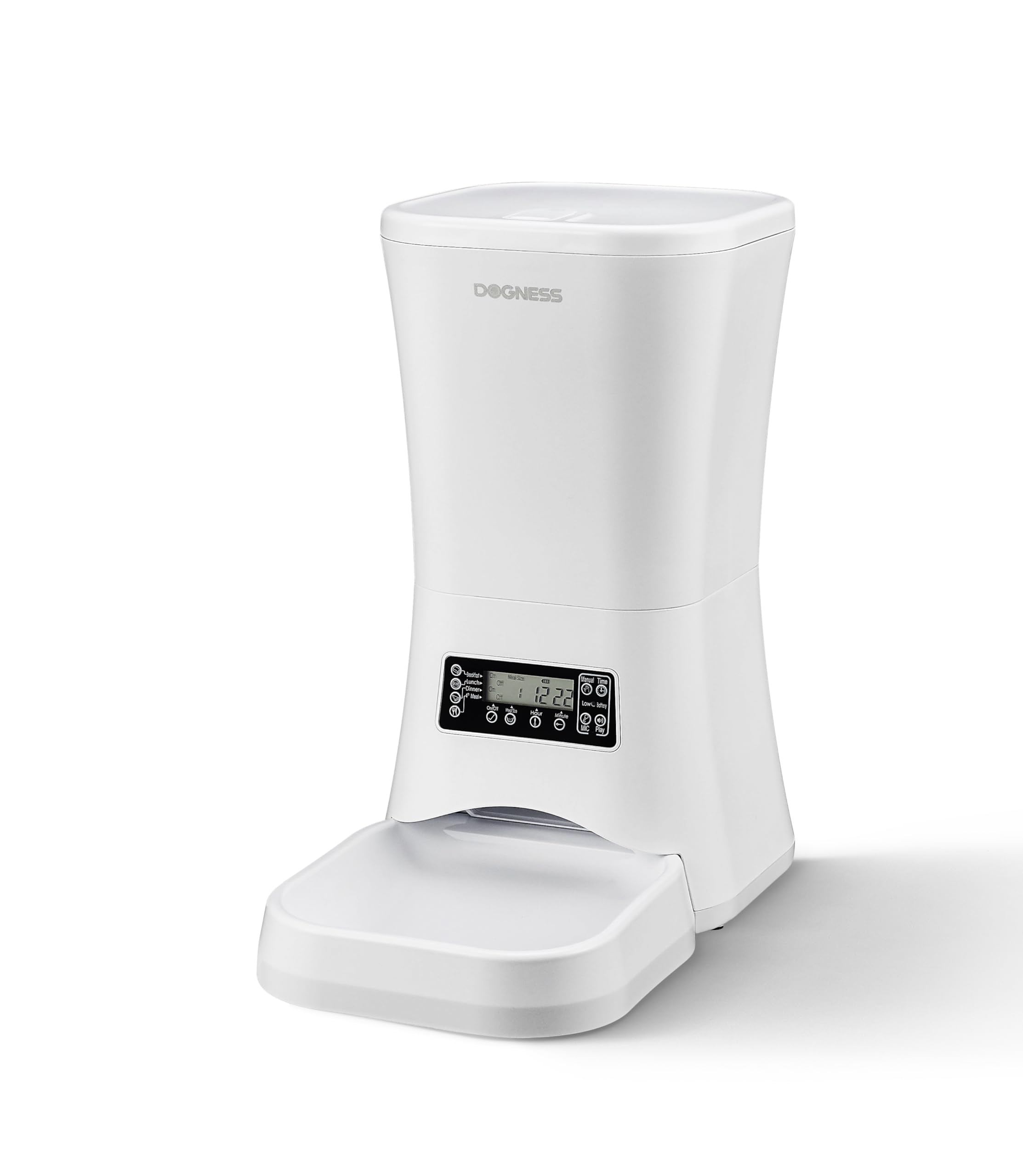
Product dimensions for the DOGNESS 9L Automatic Pet Feeder.
Garansi sareng Rojongan
For warranty information or technical support, please refer to the contact details provided on the product packaging or visit the official DOGNESS websitus. Simpen resi pameseran anjeun pikeun klaim jaminan.