1. Bubuka
This manual provides instructions for the Sharp Digital Alarm Clock, Model SPC547AJAMZ. This device features an easy-to-read LED display, a high-speed USB charging port, and essential alarm functions. Please read this manual thoroughly before use to ensure proper operation and to maximize the product's lifespan.

Figure 1: Sharp Digital Alarm Clock (Model SPC547AJAMZ) front view.
2. Fitur Produk
The Sharp Digital Alarm Clock offers the following key features:
- Tampilan anu gampang dibaca: Large, clear green LED digits for visibility from a distance.
- High-Speed USB Charging Port: A 2 AMP USB port for rapid charging of compatible devices such as smartphones and tablets.
- Volume Alarm adjustable: Select between high and low alarm volume settings.
- Operasi basajan: Intuitive button controls for setting time and alarm.
- Cadangan batré: Ngajaga setélan waktos sareng alarm nalika mareuman dayatages (requires 2 AAA batteries, not included). The display will be blank during battery backup mode, but the internal clock will continue to run, and the alarm will sound at the set time.

Figure 2: Alarm clock with a smartphone connected to the USB charging port.
3. Eusi Paket
Pastikeun yén sadaya item aya dina bungkusan:
- Sharp Digital Alarm Clock (Model SPC547AJAMZ)
- Adaptor Daya AC
- Manual pangguna (dokumén ieu)
Note: 2 AAA batteries for backup are not included and must be purchased separately.
4. Émbaran Kasalametan
Mangga perhatikeun pancegahan kaamanan di handap ieu:
- Ulah ngantepkeun unit ieu ka cai atanapi kalembaban anu kaleuleuwihi.
- Hindarkeun nempatkeun unit caket sumber panas atanapi dina sinar panonpoé langsung.
- Anggo ngan ukur adaptor daya AC anu disayogikeun.
- Entong nyobian ngabongkar atanapi ngarobih unit.
- Jauhkeun tina jangkauan barudak.
- Pastikeun ventilasi anu leres di sabudeureun unit.
5. Setélan
5.1 Sambungan Daya
- Plug the AC power adapter into the DC IN jack located on the back of the alarm clock.
- Colokkeun tungtung adaptor daya AC anu sanésna kana stop kontak témbok standar (120V AC, 60Hz).
- The display will illuminate, and the clock will be ready for time setting.
5.2 Pamasangan Cadangan Batré
Pikeun mastikeun setélan waktos sareng alarm dijaga salami pareum listriktage:
- Tangtukeun lokasi kompartemen batré dina handapeun unit.
- Buka panutup kompartemen batré.
- Insert two (2) new AAA batteries, observing the correct polarity (+ and -) as indicated inside the compartment.
- Tutup panutup kompartemen batré aman.
Note: Batteries are for backup only. The clock display will not be lit during a power outage when operating on battery backup, but the internal clock will continue to run, and the alarm will sound at the set time.
6. Parentah Operasi
Familiarize yourself with the control buttons located on the top of the unit:
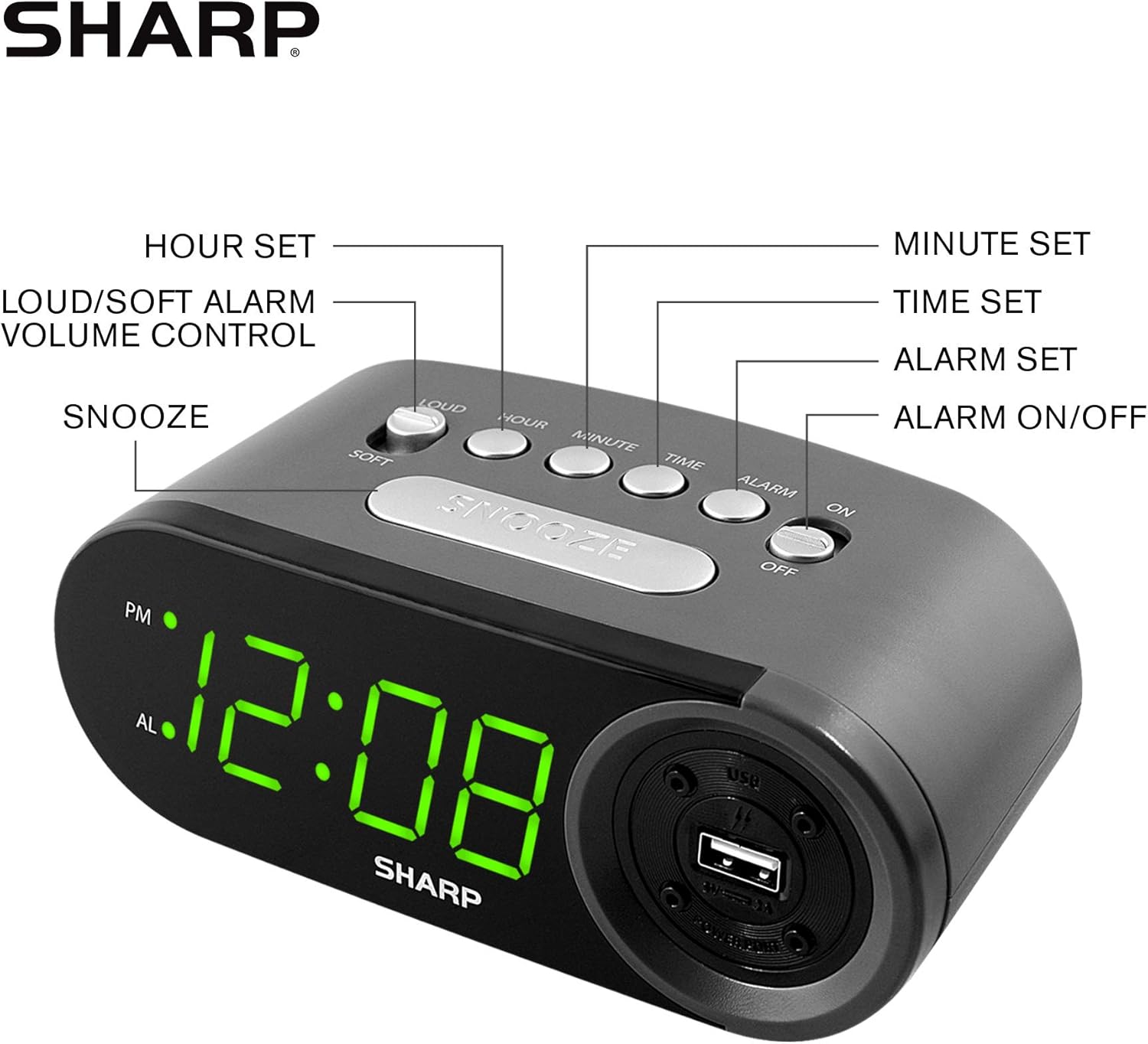
Figure 3: Top panel controls and their functions.
6.1 Nyetél Waktos Ayeuna
- Pencét jeung tahan tombol WAKTU tombol nepi ka layar mimiti kedip-kedip.
- Pencét éta JAM button repeatedly to set the hour. Observe the PM indicator for afternoon hours.
- Pencét éta MENIT button repeatedly to set the minutes.
- Saatos waktos anu dipikahoyong disetel, pencét tombol WAKTU tombol deui pikeun ngonfirmasi tur kaluar mode setelan waktos.
6.2 Nyetél Waktos Alarm
- Pencét jeung tahan tombol alarem button until the alarm time display begins to flash. The "AL" indicator will also flash.
- Pencét éta JAM button repeatedly to set the alarm hour. Observe the PM indicator.
- Pencét éta MENIT tombol alarm sababaraha kali pikeun nyetel menit alarm.
- Saatos waktos alarm anu dipikahoyong disetel, pencét tombol alarem tombol deui pikeun ngonfirmasi tur kaluar modeu setelan alarem.
6.3 Ngaktipkeun/Nonaktipkeun Alarm
- Pikeun ngahurungkeun alarm ON, geser ka ALARM Hurungkeun / Pareum switch to the "ON" position. The "AL" indicator will appear on the display.
- Pikeun ngahurungkeun alarm Pareum, geser ka ALARM Hurungkeun / Pareum switch to the "OFF" position. The "AL" indicator will disappear.
6.4 Fungsi Tunda
Lamun alarm disada, pencét badag SNOOZE tombol. Alarm bakal eureun samentawis teras disada deui saatos sakitar 9 menit.
6.5 Ngeureunkeun Alarm
To stop the alarm completely after it sounds (without using snooze), slide the ALARM Hurungkeun / Pareum switch to the "OFF" position. The alarm will reset for the next day if the switch is moved back to "ON".
6.6 Nyaluyukeun Volume Alarm
Pencét éta LOUD/SOFT button to toggle between high and low alarm volume settings.
6.7 Ngagunakeun Port Pangecas USB
anu 2 AMP USB charging port is located on the right side of the unit.
- Connect your device's USB charging cable (not included) to the USB port on the alarm clock.
- Connect the other end of the cable to your smartphone, tablet, or other compatible USB-powered device.
- Ensure the alarm clock is connected to AC power for the USB port to function.
Note: Charging speed may vary depending on your device and cable.
7. Pangropéa
To keep your alarm clock in optimal condition:
- beberesih: Ngusap unit ku kaén anu lembut sareng garing. Ulah make cleaners abrasive atawa pangleyur.
- Ngagantian batré: Replace AAA backup batteries annually or when the battery low indicator (if present) appears, to ensure reliable backup functionality.
- Panyimpenan: Upami nyimpen unit kanggo waktos anu lami, cabut batré cadangan pikeun nyegah bocor.
8. Cara ngungkulan
| Masalah | Mungkin Cukang lantaranana | Solusi |
|---|---|---|
| Pintonan jam kosong. | Teu aya daya AC; daya kaluartage; unit unplugged. | Ensure AC adapter is securely plugged into the unit and a working wall outlet. Check for power outages. |
| Alarm teu disada. | Alarm is not activated; alarm time is incorrect; volume is too low. | Slide ALARM ON/OFF switch to "ON". Verify alarm time is set correctly. Adjust alarm volume using the LOUD/SOFT button. |
| Port ngecas USB teu tiasa dianggo. | Clock not connected to AC power; device not compatible; faulty cable. | Ensure the clock is plugged into AC power. Try a different USB cable or device to confirm compatibility. |
| Setélan waktos / Alarm leungit sanggeus kakuatan outage. | Batré cadangan maot atanapi henteu dipasang. | Install two fresh AAA batteries in the battery compartment, ensuring correct polarity. |
9. Spésifikasi
- merek: Seukeut
- model: SPC547AJAMZ
- Jenis tampilan: LED Digital (Héjo)
- Sumber Daya: Listrik Kabel (AC 120V, 60Hz)
- Cadangan batré: 2 x batré AAA (teu kaasup)
- Palabuhan Ngecas USB: 2 AMP (5V)
- Ukuran produk: Kira-kira 6.2" W x 2.3" H x 3.25" D
- Beurat barang: Kira-kira 9.6 ons
- Bahan: palastik
- UPC: 049353006000

Gambar 4: Dimensi produk.
10. Jaminan & Dukungan
10.1 Émbaran jaminan
This Sharp product is covered by a limited manufacturer's warranty. For specific warranty terms and conditions, please refer to the warranty card included with your purchase or visit the official Sharp websitus. Simpen resi pameseran anjeun salaku bukti pameseran.
10.2 Rojongan Palanggan
If you have any questions, require assistance, or need to report an issue with your Sharp Digital Alarm Clock, please contact Sharp customer support. Contact details can typically be found on the official Sharp websitus atanapi dina bungkusan produk.
Kanggo inpo nu leuwih lengkep, buka di Sharp Store dina Amazon.


