Bubuka
The Verizon Wireless Qi Fast Charging Pad provides a convenient and efficient way to wirelessly charge your compatible devices. Designed for speed and reliability, this charging pad is optimized to deliver fast charging to a wide range of Qi-enabled smartphones, including models from Apple, Samsung, and Google. Its compact design and user-friendly features make it an ideal charging solution for home or office use.
Naon dina Box
- 1 x Verizon Wireless Qi Fast Charging Pad
- 1 x Kabel USB
- 1 x Manual Pamaké (dokumén ieu)
Fitur
- Ngecas gancang: Optimized for rapid charging of compatible Qi-enabled devices.
- Indikator Ngecas LED: Provides visual confirmation of charging status.
- Silicone Grip Surface: Helps prevent devices from slipping during charging.
- Kasaluyuan Kasus: Capable of charging through most phone cases.
- patuh kaamanan: Halogen-free and complies with Restriction of Hazardous Substances (RoHS).
- Disertipikasi: Made for Google and Qi-certified for reliable performance.
Produk Leuwihview
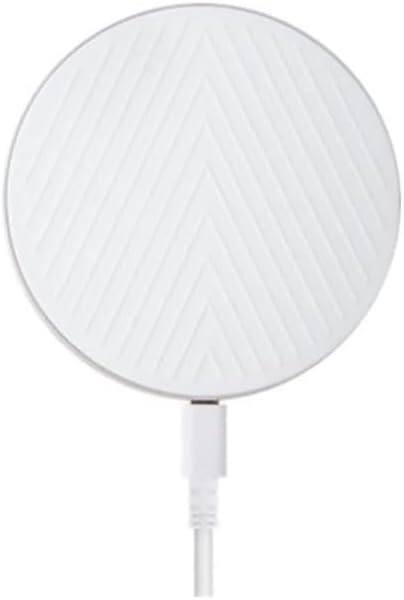
Gambar 1: Top view of the Verizon Wireless Qi Fast Charging Pad. This image displays the circular white charging pad with a distinctive chevron pattern on its surface, and a white USB cable extending from its side.

Gambar 2: Sisi view of the Verizon Wireless Qi Fast Charging Pad. This image highlights the slim, circular profile of the charging pad, revealing its minimalist design and the subtle charging port on its edge.
spésifikasi
| Atribut | Nilai |
|---|---|
| Dimensi produk | 3 x 2 x 4 inci |
| Item Beurat | 7.8 ons |
| Nomer modél | WC10WGGL |
| merek | Verizon |
| Téhnologi konektipitas | Nirkabel |
| Tipe Panyambung | Nirkabel |
| Alat nu cocog | Qi-enabled Smartphones (Apple, Samsung, Google) |
| Model Telepon cocog | iPhone 8 or later, Samsung Galaxy S6 or later, Google Pixel 3/3 XL or later |
| Komponén Kaasup | 1 Wireless Ngecas Pad |
| Fitur husus | Charging Indicator, Fast Charging |
| Warna | Bodas |
| Masukan Voltage | 9 volt |
| Tipe Pamasangan | Tabletop Gunung |
Disetél
- Ngabongkar: Carefully remove the charging pad and its cable from the packaging.
- Sambungkeun Kakuatan: Plug the USB cable from the charging pad into a compatible USB wall adapter (not included) or a powered USB port. Ensure the power source provides sufficient output for fast charging (e.g., a Quick Charge 2.0/3.0 or Power Delivery adapter).
- panempatan: Place the charging pad on a flat, stable surface, away from direct sunlight, heat sources, and liquids.
- Daya Hurung: Once connected to power, the LED indicator on the charging pad may briefly illuminate to confirm it is ready.
Parentah Operasi
- Tempat Alat: Center your Qi-enabled smartphone on the surface of the charging pad. The silicone grip surface will help keep your device in place.
- Konfirmasi ngecas: The LED indicator on the charging pad will illuminate (e.g., turn solid blue or green) to indicate that your device is charging. Your phone's screen should also show a charging icon or notification.
- Penempatan optimal: If charging does not begin immediately, slightly adjust the position of your phone on the pad until the charging indicator activates.
- Charging Through Cases: The pad is designed to charge through most phone cases. However, very thick cases, cases with metal, or cases containing magnets may interfere with charging and might need to be removed.
- Ngecas Lengkep: Once your device is fully charged, the charging pad may stop charging or the LED indicator may change color (refer to your phone's display for exact charge status).
Pangropéa
- beberesih: Disconnect the charging pad from power before cleaning. Use a soft, dry, lint-free cloth to wipe the surface. Do not use abrasive cleaners, solvents, or chemical sprays.
- Panyimpenan: When not in use, store the charging pad in a cool, dry place, away from extreme temperatures and humidity.
- Nanganan kalayan ati-ati: Avoid dropping the charging pad or subjecting it to strong impacts, as this may damage internal components.
Pamérésan masalah
| Masalah | Solusi |
|---|---|
| Alat teu ngecas. |
|
| Ngecas lalaunan. |
|
| LED indicator is off or blinking. |
|
Émbaran Kasalametan
- Ulah ngabongkar, ngaropéa, atawa ngalereskeun alat.
- Keep the charging pad away from water, moisture, and extreme temperatures.
- Avoid placing metallic objects (e.g., coins, keys, credit cards) on the charging pad, as this can cause overheating or damage.
- Do not use the charging pad in environments with high humidity or near flammable materials.
- This product is halogen-free and complies with the Restriction of Hazardous Substances (RoHS).
Garansi sareng Rojongan
For warranty information or technical support, please refer to the official Verizon Wireless websitus atanapi ngahubungan layanan palanggan maranéhna. Simpen resi pameseran anjeun salaku bukti pameseran pikeun klaim garansi.
Verizon Customer Support: https://www.verizon.com/support/


