1. Parentah Kasalametan penting
Baca sagala parentah taliti saméméh ngagunakeun alat. Simpen manual ieu pikeun rujukan ka hareup.
- Kasalametan listrik: Pastikeun voltage indicated on the appliance matches your local power supply before connecting. Do not operate with a damaged cord or plug.
- panempatan: Place the dehumidifier on a stable, level surface. Maintain adequate clearance around the unit for proper airflow (at least 20 cm from walls or furniture). Do not block air inlets or outlets.
- Penanganan cai: Always empty the water tank before moving the unit. Do not drink the collected water.
- Refrigerant Gas (R290): This appliance contains R290 refrigerant gas. R290 is a flammable gas. Handle with care and ensure the appliance is not damaged during transport or installation. Do not attempt to service the unit yourself if you suspect a refrigerant leak.
- Barudak jeung Pets: Jauhkeun alat ieu tina jangkauan barudak sareng piaraan. Awasi barudak pikeun mastikeun aranjeunna henteu ulin sareng alat ieu.
- beberesih: Pegatkeun sambungan catu daya sateuacan beberesih atanapi ngalaksanakeun pangropéa naon waé.
2. Produk Langkungview
2.1 Komponén
- Panél kontrol
- Inlet Udara (tukang)
- Air Outlet (top/front)
- Water Collection Tank (front/bottom)
- Removable Air Filter (side/rear)
- Casters for easy movement
2.2 Panel kontrol

Gambar: Top view tina panel kontrol.
The control panel features a digital display and touch-sensitive buttons for various functions:
- Tombol Daya: Ngahurungkeun atanapi mareuman unit.
- Tampilan kalembaban: Shows the current ambient humidity level and the set target humidity.
- Tombol Setelan Kalembaban: Adjust the desired humidity level.
- Tombol Laju Kipas: Selects fan speed (if available).
- Tombol Timer: Nyetél timer 24 jam pikeun operasi otomatis.
- Indikator pinuh cai: Nyaangan nalika tangki cai pinuh, micu pareum otomatis.
3. Setélan
3.1 Ngabongkar bungkusan
Carefully remove the dehumidifier from its packaging. Retain the packaging materials for future storage or transport. Check for any signs of damage. If the unit appears damaged, do not operate it and contact customer support.
3.2 Nempatkeun
For optimal performance, place the dehumidifier in a central location within the room. Ensure the room size does not exceed 25 square meters for effective dehumidification.
- Place the unit on a firm, level surface to prevent vibrations and ensure proper water collection.
- Allow at least 20 cm of space around the air inlet and outlet to ensure unrestricted airflow.
- Hindarkeun nempatkeun unit caket sumber panas atanapi dina sinar panonpoé langsung.
3.3 Sambungan Daya
Plug the power cord into a grounded electrical outlet. Ensure the outlet meets the power requirements of the dehumidifier (210W, 240V).
4. Parentah Operasi
4.1 Daya Hurung/Pareuman
Press the Power button on the control panel to turn the dehumidifier on or off. The unit will start operating in its default mode or resume previous settings.
4.2 Nyetel Tingkat Kalembaban anu Dihoyongkeun
The dehumidifier features a humidity sensor that detects the ambient humidity. Use the humidity setting buttons to adjust your desired humidity level. The unit will operate until this level is reached, then cycle on and off to maintain it. Recommended humidity levels are typically between 40% and 60%.
4.3 Ngagunakeun Fungsi Pangatur Waktu
Press the Timer button to set the 24-hour timer. This allows you to program the unit to turn on or off automatically after a set number of hours, providing flexible operation.
4.4 Manajemén tank cai
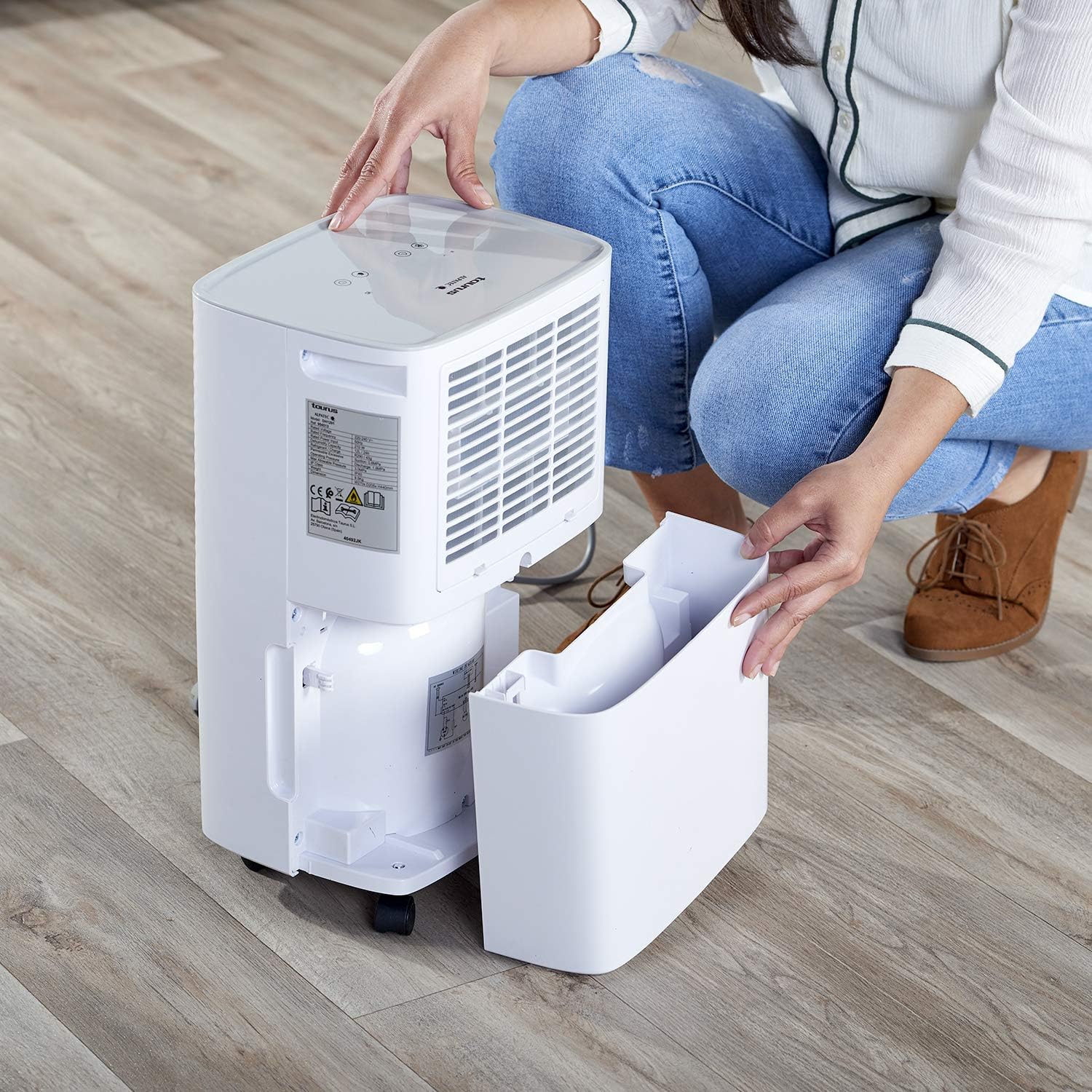
Image: Removing the water collection tank.
- Indikator pinuh cai: The dehumidifier has a 2.5-liter water tank. When the tank is full, the Water Full Indicator light will illuminate, and the unit will automatically shut off to prevent overflow.
- Ngosongkeun tank: Carefully pull out the water tank from the front of the unit. Dispose of the collected water. Reinsert the empty tank firmly until it clicks into place. The unit will resume operation.
- Drainase kontinyu: For continuous operation without needing to empty the tank, connect a drainage hose (not included) to the continuous drainage outlet (usually located at the back or side of the unit). Ensure the hose is sloped downwards to allow gravity drainage into a suitable receptacle.
5. Pangropéa
5.1 Ngabersihan Saringan Udara

Image: Removing the air filter for cleaning.
Regular cleaning of the air filter is essential for efficient operation.
- Pareuman dehumidifier sareng cabut colokan tina stop kontak listrik.
- Locate the air filter cover (typically on the side or rear of the unit) and remove it.
- Carefully pull out the air filter.
- Ngumbah saringan ku cai haneut, sabun atanapi vakum pikeun ngaleungitkeun lebu sareng lebu.
- Bilas tuntas sareng antepkeun saringan dugi ka garing sadayana sateuacan dipasang deui.
- Place the dry filter back into its slot and secure the cover.
5.2 Ngabersihan Unit Exterior
Ngusap bagian luar tina dehumidifier ku lemes, damp lawon. Ulah make cleaners abrasive, pangleyur, atawa bahan kimia kasar, sabab ieu bisa ngaruksak beungeut cai.
5.3 Automatic Defrost Control
The dehumidifier is equipped with an automatic defrost function. If frost builds up on the evaporator coils, the unit will temporarily stop dehumidifying and run the fan to melt the frost. This is a normal operation and ensures efficient performance in cooler environments.
6. Cara ngungkulan
Sateuacan ngahubungan layanan palanggan, ulangview masalah umum sareng solusi ieu:
| Masalah | Mungkin Cukang lantaranana | Solusi |
|---|---|---|
| Unit teu hurung | No power supply; Power cord not plugged in; Water tank full or not correctly inserted. | Pariksa sambungan kakuatan; Kosongkeun sareng selapkeun deui bak cai kalayan leres. |
| Taya dehumidification atawa efisiensi low | Air filter clogged; Room temperature too low; Air inlet/outlet blocked; Desired humidity level already reached. | Clean the air filter; Ensure room temperature is above 5°C; Clear obstructions; Lower the desired humidity setting. |
| Water Full Indicator is on, but tank is not full | Water tank not correctly positioned; Float switch malfunction. | Remove and reinsert the water tank firmly; If problem persists, contact support. |
| Noise mahiwal salila operasi | Unitna teu dina permukaan anu rata; Masalah komponén internal. | Ensure unit is on a flat, stable surface; If noise is excessive or persistent, discontinue use and contact support. |
7. Spésifikasi
7.1 Data Téknis
| Fitur | Rincian |
|---|---|
| merek | Kaurus |
| Nomer modél | 954513000 (PLEASANT) |
| Warna | Bodas |
| Ukuran (L x W x H) | 34.5 x 20 x 10 cm |
| Beurat | 9.5 kg |
| Kapasitas Tangki Cai | 2.5 liter |
| Kapasitas Dehumidification | Up to 12 liters/24 hours |
| Kakuatan | 210 Watt |
| Voltage | 240V |
| Bahan | palastik |
| Kelas Énergi | A nepi ka G |
| Disarankeun Lantai Area | Nepi ka 25 méter pasagi |
| Fitur husus | Humidity level detector, 24h timer, R290 refrigerant gas, Easy maintenance, Washable filters, Automatic defrost |
8. Garansi jeung Rojongan
This product is covered by a manufacturer's warranty. Please refer to the warranty card included with your purchase or contact your retailer for specific warranty terms and conditions. For technical support, spare parts, or service inquiries, please contact the Taurus customer service department or your local distributor. Information regarding spare parts availability is not provided in this manual.