1. Produk Langkungview
The Soundsation MH-75BT headphones offer a versatile and comfortable audio experience with both wireless Bluetooth and wired connectivity. They feature 40mm transducers with a 32 Ohm impedance, delivering a frequency response of 50Hz-20kHz and a sensitivity of 108dB. A distinctive feature is the integrated player for micro SD cards (up to 32GB), supporting various audio formats including MP3, WAV, WMA, AIF, M4A, and FLAC.
The soft earcups and adjustable headband ensure optimal comfort during extended listening. An integrated microphone and four control buttons allow for easy management of calls and music playback. The elegant black design and quality construction make them suitable for various uses, from home listening to daily commuting.
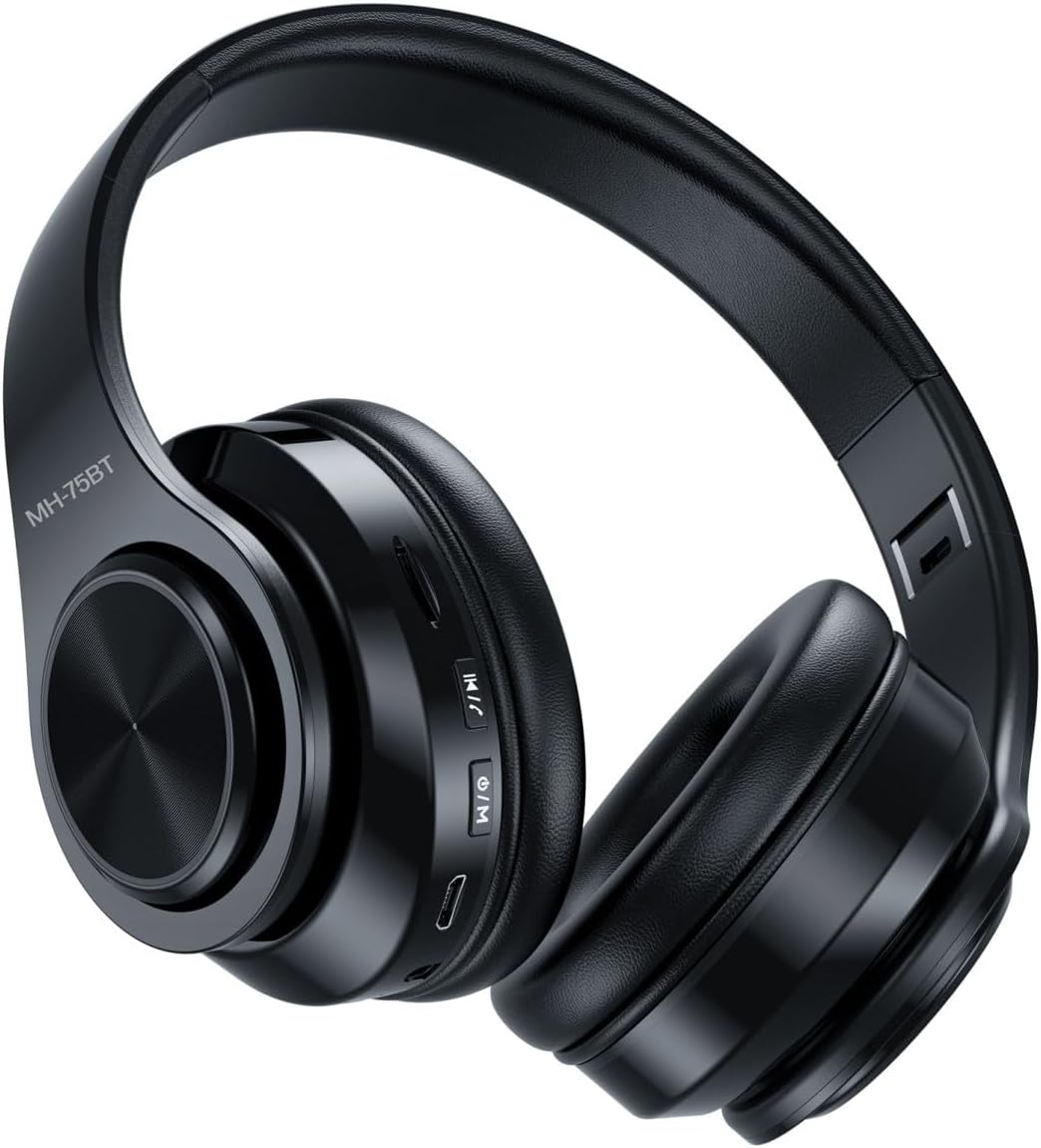
Image 1.1: Soundsation MH-75BT headphones. These over-ear headphones feature a sleek black design with visible control buttons on the right earcup and an adjustable headband for comfortable wear.
2. Naon dina Box
Saatos muka bungkusan, mangga pariksa yén sadaya komponén ieu kalebet:
- Soundsation MH-75BT Headphones
- Robust Carrying Case
- 150cm Audio Cable (3.5mm jack)
- 6.35mm Jack adaptor

Image 2.1: Contents of the package. The image displays the MH-75BT headphones alongside the detachable 3.5mm audio cable and the 6.35mm jack adapter, highlighting the wired connectivity options.

Image 2.2: Headphones stored in the carrying case. The headphones are shown folded compactly within their durable, zippered carrying case, demonstrating their portability and protection.
3. Fitur Produk
- Konektipitas serbaguna: Operates wirelessly via Bluetooth or with the included 150 cm cable, featuring a 3.5mm jack and a 6.35mm adapter.
- Audio canggih: 40mm drivers with 32 Ohm impedance and a 50Hz-20kHz frequency response for high-quality sound reproduction.
- Fungsi Smart: Integrated player for micro SD cards up to 32GB, supporting MP3, WAV, WMA, AIF, M4A, and FLAC formats.
- Kontrol terpadu: Built-in microphone and 4 buttons to manage calls, volume, and music playback from both remote devices and the SD card.
- Comfort and Portability: Adjustable design with soft earcups for maximum comfort, and a robust carrying case included for secure transport.
4. Setup Guide
4.1 Ngecas Headphone
Before first use, fully charge the headphones. Connect the supplied USB charging cable to the micro USB port on the headphones and the other end to a USB power source (e.g., computer USB port, USB wall adapter). The LED indicator will show charging status (e.g., red for charging, blue/off for fully charged).
4.2 Sambungan kabel
For a wired connection, insert the 3.5mm audio cable into the audio input jack on the headphones and the other end into your audio device's 3.5mm output. If your audio device requires a 6.35mm jack, use the included adapter.
4.3 Nyapasangkeun Bluetooth
- Pastikeun headphone dicas.
- Press and hold the Power/Mode button until the LED indicator flashes blue and red, indicating pairing mode.
- Dina alat anjeun (smartphone, tablet, komputer), aktipkeun Bluetooth sareng milarian alat anu sayogi.
- Select "MH-75BT" from the list of found devices.
- Once paired, the LED indicator will typically show a solid blue light or flash slowly.
Note: If a password is required, enter "0000".
4.4 Micro SD Card Pamakéan
The MH-75BT headphones support micro SD cards up to 32GB. Insert the micro SD card into the designated slot on the headphones with the gold contacts facing down. The headphones will automatically switch to SD card playback mode if a card with supported audio files is detected. Use the Mode button to switch between Bluetooth and SD card playback modes.
5. Parentah Operasi
The MH-75BT headphones feature four control buttons for easy operation:
- Tombol Kakuatan / Mode:
- Pencét jeung tahan pikeun mareuman/nonaktipkeun.
- Short press to switch between Bluetooth and Micro SD card modes.
- Tombol Puter/Reureuh:
- Pencét pondok pikeun muterkeun atanapi ngareureuhkeun musik.
- Short press to answer or end a phone call.
- Pencet jeung tahan pikeun nampik telepon asup.
- Volume Kaluhur / Tombol Lagu Salajengna:
- Pencét pondok pikeun ningkatkeun volume.
- Pencet sareng tahan pikeun ngalangkungan lagu salajengna.
- Volume Turunkeun / Tombol Lagu Saméméhna:
- Pencét pondok pikeun ngirangan polumeu.
- Pencét jeung tahan pikeun muka lagu saméméhna.
6. Pangropéa
- beberesih: Anggo lawon anu lembut sareng garing pikeun ngabersihan headphone. Ulah make cleaners abrasive atawa pangleyur.
- Panyimpenan: When not in use, store the headphones in the provided carrying case to protect them from dust, scratches, and impacts. Store in a cool, dry place.
- Perawatan batré: Pikeun manjangkeun umur batre, ulah miceun headphone sacara sering. Ngeusi batre aranjeunna rutin, sanajan teu di pamakéan konstan.
- Hindarkeun Uap: Headphone ieu henteu tahan cai. Hindarkeun kakeunaan cai, hujan, atanapi kalembaban anu kaleuleuwihi.
7. Cara ngungkulan
| Masalah | Mungkin Cukang lantaranana | Solusi |
|---|---|---|
| Headphone teu hurung. | batré lemah. | Ngecas headphone pinuh. |
| Taya sora tina headphone. | Volume low teuing; modeu salah; alat teu disambungkeun. | Increase volume; ensure correct mode (Bluetooth/SD card); re-pair Bluetooth or check wired connection. |
| Teu bisa masangkeun via Bluetooth. | Headphone teu dina modeu pairing; alat Bluetooth pareum; gangguan. | Ensure headphones are in pairing mode (flashing blue/red LED); enable Bluetooth on device; move closer to device; clear previous pairings. |
| kartu Micro SD teu dipikawanoh. | Card inserted incorrectly; unsupported format; card corrupted. | Re-insert card correctly; ensure files are supported formats (MP3, WAV, WMA, AIF, M4A, FLAC); try a different card. |
8. Spésifikasi
| Fitur | Rincian |
|---|---|
| Modél | MH-75BT |
| Téhnologi konektipitas | Kabel, Nirkabel (Bluetooth) |
| Téknologi Komunikasi Nirkabel | Bluetooth |
| Ukuran supir | 40 mm |
| Impedansi | 32 ohm |
| Réspon Frékuénsi | 50Hz-20kHz |
| Sensitipitas | 108dB |
| Rojongan Micro SD Card | Nepi ka 32GB |
| Format Audio Dirojong | MP3, WAV, WMA, AIF, M4A, FLAC |
| Mikropon | terpadu |
| Tipe Kontrol | Tombol Control |
| Panjang kabel | 150 cm (Tangle-resistant) |
| Jack headphone | 3.5 mm |
| Beurat | 350 gram |
| Bahan | Plastic, Faux Leather |
| Warna | Hideung |
| Tingkat Résistansi Cai | Teu tahan cai |
9. Garansi jeung Rojongan
Soundsation products are designed for reliability and performance. This product is covered by a standard manufacturer's warranty against defects in materials and workmanship. The specific terms and duration of the warranty may vary by region and local regulations.
For warranty claims, technical support, or any questions regarding your MH-75BT headphones, please contact your retailer or visit the official Soundsation website for customer service information. Please retain your proof of purchase for warranty validation.
You can find more information and contact details on the Soundsation brand store page: Soundsation Store


