1. Bubuka
Thank you for choosing the ZONKO 10" 2-in-1 4G Phone Tablet. This device combines the functionality of a tablet and a smartphone, offering versatile connectivity and entertainment options. This manual provides essential information for setting up, operating, and maintaining your new device. Please read it thoroughly before use.
2. Naon dina Box
Saatos unboxing, mangga pastikeun sadaya item di handap ieu aya:
- ZONKO 10" 2-in-1 Tablet (Model K118)
- Keyboard Bluetooth
- Wireless Mouse (with USB dongle)
- Foldable Protective Case
- Stylus Pen
- Kabel Ngecas USB-C
- Adaptor kakuatan
- Screen Protector (pre-installed) + 1 extra
- Manual pangguna (dokumén ieu)

Image: The ZONKO 10-inch tablet displayed with its full accessory kit, including the detachable keyboard, wireless mouse, stylus, protective case, and charging cables.
3. Produk Langkungview
Familiarize yourself with the physical components and ports of your ZONKO tablet.

Image: A detailed diagram illustrating the various ports and buttons on the ZONKO tablet, including SIM card slots, SD card slot, power button, volume controls, reset button, front and rear cameras, home button, and dual speakers.
Idéntifikasi komponén:
- Tombol Daya: Turns the tablet on/off or puts it to sleep.
- Volume Buttons (VOL+, VOL-): Saluyukeun polumeu audio.
- Tombol Reset: Used for force restarting the device if it becomes unresponsive.
- SIM1 / SIM2 Slots: For inserting 4G LTE SIM cards.
- Slot Kartu SD: For inserting a MicroSD card to expand storage.
- Kaméra pungkur 13MP: Kaméra utama pikeun poto sareng pidéo.
- Kaméra hareup 5MP: Pikeun nelepon video sareng selfies.
- Tombol imah: Mulih ka layar utama.
- Spéker Dual: Nyadiakeun kaluaran audio.
4. Setélan
4.1 Ngecas Tablet
Before first use, fully charge the tablet. Connect the USB-C charging cable to the tablet's charging port and the power adapter to a wall outlet. The battery indicator on the screen will show charging status.
4.2 Nyelapkeun Kartu SIM
The tablet supports dual SIM cards for 4G LTE connectivity. Locate the SIM card tray on the side of the tablet. Carefully open the tray and insert your Nano-SIM cards into the designated slots (SIM1 and SIM2). Ensure the cards are correctly oriented as shown in the diagram. Close the tray securely.
4.3 Nyelapkeun Kartu MicroSD
To expand storage, insert a MicroSD card (up to 512GB, though product details mention 256GB expansion in some images, 512GB is stated in the main description) into the SD card slot. This allows for more space for apps, photos, and videos.
4.4 Connecting Bluetooth Keyboard
- Hurungkeun kibor Bluetooth.
- Dina tablet anjeun, buka Setelan > Alat nu disambungkeun > Bluetooth sareng hurungkeun Bluetooth.
- Select the keyboard from the list of available devices and follow the on-screen pairing instructions.
4.5 Connecting Wireless Mouse
The wireless mouse connects via a USB dongle. Insert the USB dongle into the tablet's USB port. The tablet should automatically detect and connect to the mouse.
4.6 Initial Power On and Android Setup
Press and hold the Power button until the ZONKO logo appears. Follow the on-screen prompts to complete the initial Android 11 setup, including language selection, Wi-Fi connection, Google account login, and security settings.
5. Parentah Operasi
5.1 Napigasi Dasar (Android 11)
- Gesek ka luhur: Aksés laci aplikasi.
- Gesek ka handap: Access quick settings and notifications.
- Ketok: Select items or open apps.
- Pencét Panjang: Aksés ménu kontekstual atanapi pindahkeun ikon aplikasi.
5.2 4G LTE Calls and Data
With inserted SIM cards, you can make and receive phone calls and use mobile data. Access the Phone app for calls and check network status in the notification bar. Ensure your SIM cards are activated with a data plan.

Image: The ZONKO tablet displaying its capability for 4G mobile network and 2.4GHz Wi-Fi connectivity, with an example of a video call in progress, highlighting its dual functionality as a phone and tablet.
5.3 Konektipitas Wi-Fi
Pikeun nyambung ka jaringan Wi-Fi:
- Pindah ka Setelan > Jaringan & Internét > Wi-Fi.
- Hurungkeun Wi-Fi.
- Pilih jaringan anu dipikahoyong tina daptar sareng lebetkeun kecap akses upami dipenta.
5.4 Ngagunakeun Kaméra
The tablet features a 13MP rear camera and a 5MP front camera. Open the Camera app to take photos or record videos. Tap the screen to focus and press the shutter button to capture. Switch between front and rear cameras using the icon on the screen.

Image: Two separate images demonstrating the ZONKO tablet's camera capabilities: one showing a scene captured with the 13MP rear camera, and another showing a selfie taken with the 5MP front camera.
5.5 Manajemén Panyimpenan
The tablet comes with 64GB of internal storage, expandable via a MicroSD card. To manage storage, go to Setelan > Panyimpenan. Anjeun tiasa view ngagunakeun rohangan, ngosongkeun rohangan, sareng ngatur files.

Image: The ZONKO tablet screen showing various app icons, emphasizing its 4GB RAM and 64GB ROM, with a note indicating expandable storage up to 256GB and Google GMS Certification.
5.6 Gaming and Multimedia
The Octa-Core processor and Android 11 OS provide a smooth experience for gaming, watching movies, and browsing. Download apps from the Google Play Store.

Image: Three ZONKO tablets, two with attached keyboards, displaying popular 3D games like Clash Royale, Fortnite, and Minecraft, illustrating the tablet's capability for gaming thanks to its Android 11 and Octa-Core processor.
5.7 Versatile Usage Modes
The ZONKO tablet can adapt to various needs:
- Modeu tablet: For casual browsing, reading, and media consumption.
- Modeu Laptop: Attach the Bluetooth keyboard and use the wireless mouse for productivity tasks like typing documents or emails.
- Mode telepon: Utilize the dual SIM functionality for calls and mobile data on the go.
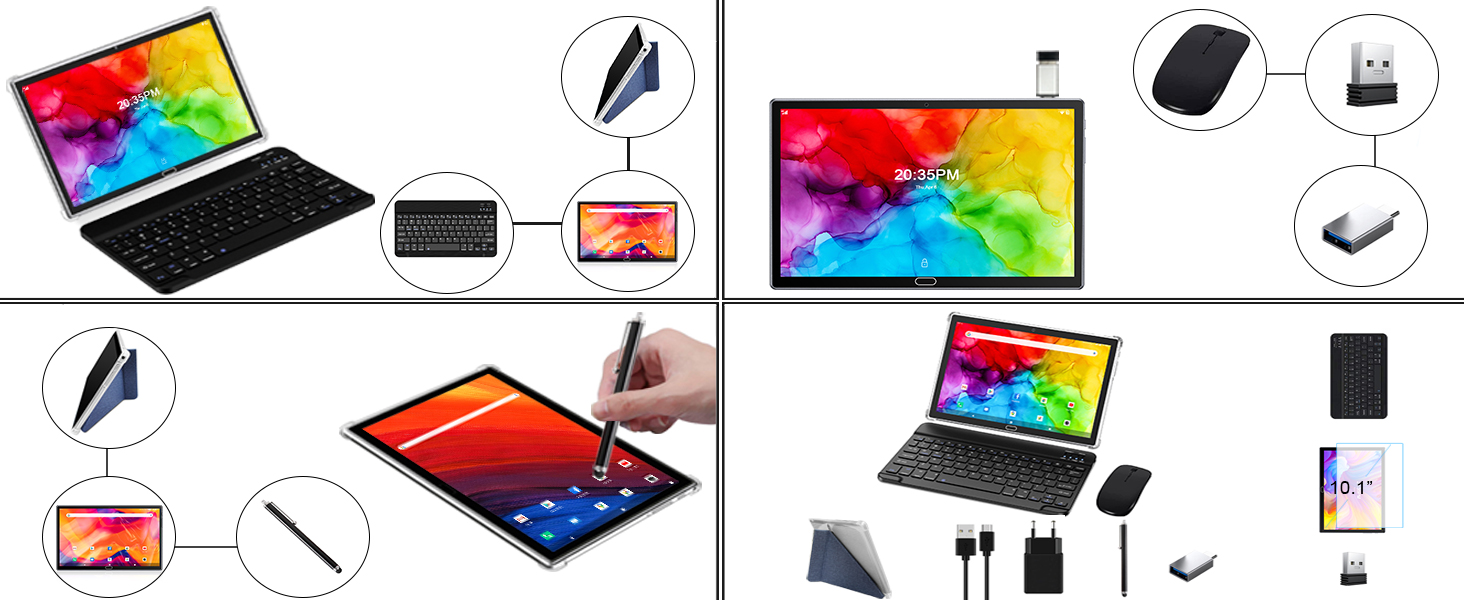
Image: A collage of four diagrams illustrating the ZONKO tablet's versatility: one showing it connected to a keyboard in laptop mode, another with a stylus, a third with a wireless mouse and charging, and a final one showing the complete kit in laptop mode.
6. Pangropéa
6.1 Ngabersihan Alat
Use a soft, lint-free cloth to clean the screen and body of the tablet. Avoid using harsh chemicals or abrasive materials that could damage the surfaces. For stubborn smudges, slightly dampen lawon kalawan cai atawa cleaner layar dirancang pikeun éléktronika.
6.2 Perawatan Batré
- Hindarkeun suhu anu ekstrim, sabab tiasa ngirangan umur batre.
- Ulah ninggalkeun tablet dieusi pinuh atawa pinuh discharged pikeun période nambahan.
- Paké ngan carjer disadiakeun atawa carjer cocog Certified.
6.3 Apdet parangkat lunak
Pariksa apdet sistem sacara périodik pikeun mastikeun tablet anjeun ngagaduhan fitur sareng patch kaamanan pangénggalna. Buka Setélan > Sistem > Apdet sistem pikeun mariksa tur masang apdet sadia.
7. Cara ngungkulan
7.1 Tablet Henteu Hurungkeun
- Pastikeun batréna geus dieusian. Sambungkeun carjer sareng antosan sababaraha menit sateuacan nyobian hurungkeun.
- Press and hold the Power button for 10-15 seconds to perform a hard reset.
7.2 Performance slow
- Tutup aplikasi latar tukang anu teu perlu.
- Clear cache data from apps (Settings > Apps & notifications > [App Name] > Storage & cache).
- Mastikeun spasi gudang bébas cukup.
7.3 Wi-Fi/4G Connectivity Issues
- Pareuman sareng hurungkeun Wi-Fi atanapi data seluler.
- Balikan deui tablet.
- Pikeun Wi-Fi, balikan deui router anjeun.
- For 4G, ensure SIM cards are correctly inserted and activated with your carrier.
7.4 Accessories Not Connecting
- Bluetooth Keyboard: Ensure the keyboard is charged and in pairing mode. Re-pair if necessary.
- Mouse nirkabel: Verify the USB dongle is securely inserted. Check mouse battery.
8. Spésifikasi
Detailed technical specifications for the ZONKO K118 Tablet:

Image: An infographic highlighting key specifications of the ZONKO tablet, including 10.1" HD Display, Android 11, Octa-core CPU, 4GB RAM, 64GB ROM, 1280x800 Resolution, Front 5.0MP / Rear 13.0MP cameras, 2.4GHz WiFi, and 6000mAh Battery.
| Fitur | Spésifikasi |
|---|---|
| Modél | K118 |
| Sistem operasi | Android 11 |
| Prosesor | Octa-Core, 1.6 GHz (MediaTek) |
| Ram | 4 GB |
| Panyimpenan internal | 64 GB |
| Panyimpenan Expandable | MicroSD nepi ka 512 GB |
| Ukuran layar | 10.1 inci |
| Resolusi layar | 1280 x 800 IPS |
| Kaméra tukang | 13 MP |
| Kaméra hareup | 5 MP |
| Konektipitas | 4G LTE (Dual SIM), Wi-Fi (802.11abg 2.4GHz), Bluetooth |
| Batré | Lithium Polymer (6000mAh, 8 hours average life) |
| Ukuran (L x W x H) | 11 x 5 x 0.1 inci |
| Beurat | 0.106 ons |
| Warna | kulawu |
9. Garansi jeung Rojongan
ZONKO products typically come with a manufacturer's warranty. Please refer to the warranty card included in your product packaging for specific terms and conditions, including warranty duration and coverage. For technical support, troubleshooting assistance, or warranty claims, please contact ZONKO customer service through the contact information provided in your product documentation or on the official ZONKO websitus.


