1. Bubuka
This manual provides instructions for the installation, operation, and maintenance of your Blaupunkt BPDV167 HD Dashcam. This device is designed to record video footage of your vehicle's surroundings, offering continuous loop recording in 720p resolution. It features a 2.4-inch LCD screen, a built-in microphone, and supports up to a 32GB Micro SD card (an 8GB card is included).
Please read this manual thoroughly before using the dashcam to ensure proper functionality and to understand all features.
2. Produk Langkungview
2.1 Fitur konci
- 2.4-inch LCD Screen for real-time viewdina jeung playback.
- Mikropon internal pikeun ngarékam audio.
- Includes an 8GB Micro SD Card; supports up to 32GB (Class 6 TF or higher recommended).
- Continuous Loop Recording ensures older files bakal ditimpa nalika kartu memori pinuh.
- 120-degree Wide-Angle Lens captures a broad view tina jalan.
- Records video at up to 720p resolution.
- G-Sensor for automatic emergency recording upon impact.
- Parking Monitor function for surveillance when the vehicle is parked.
- Infrared light for improved night vision capabilities.
- Rechargeable battery with included car charger.
- sambungan USB pikeun file transfer to external devices.
2.2 Eusi pakét
pakét ngawengku:
- Blaupunkt BPDV167 Dashcam
- Carjer mobil
- Mounting Bracket (Suction Cup)
- 8GB Micro SD Card
- Kabel USB
- Manual pangguna (dokumén ieu)
2.3 Tata Tata Alat
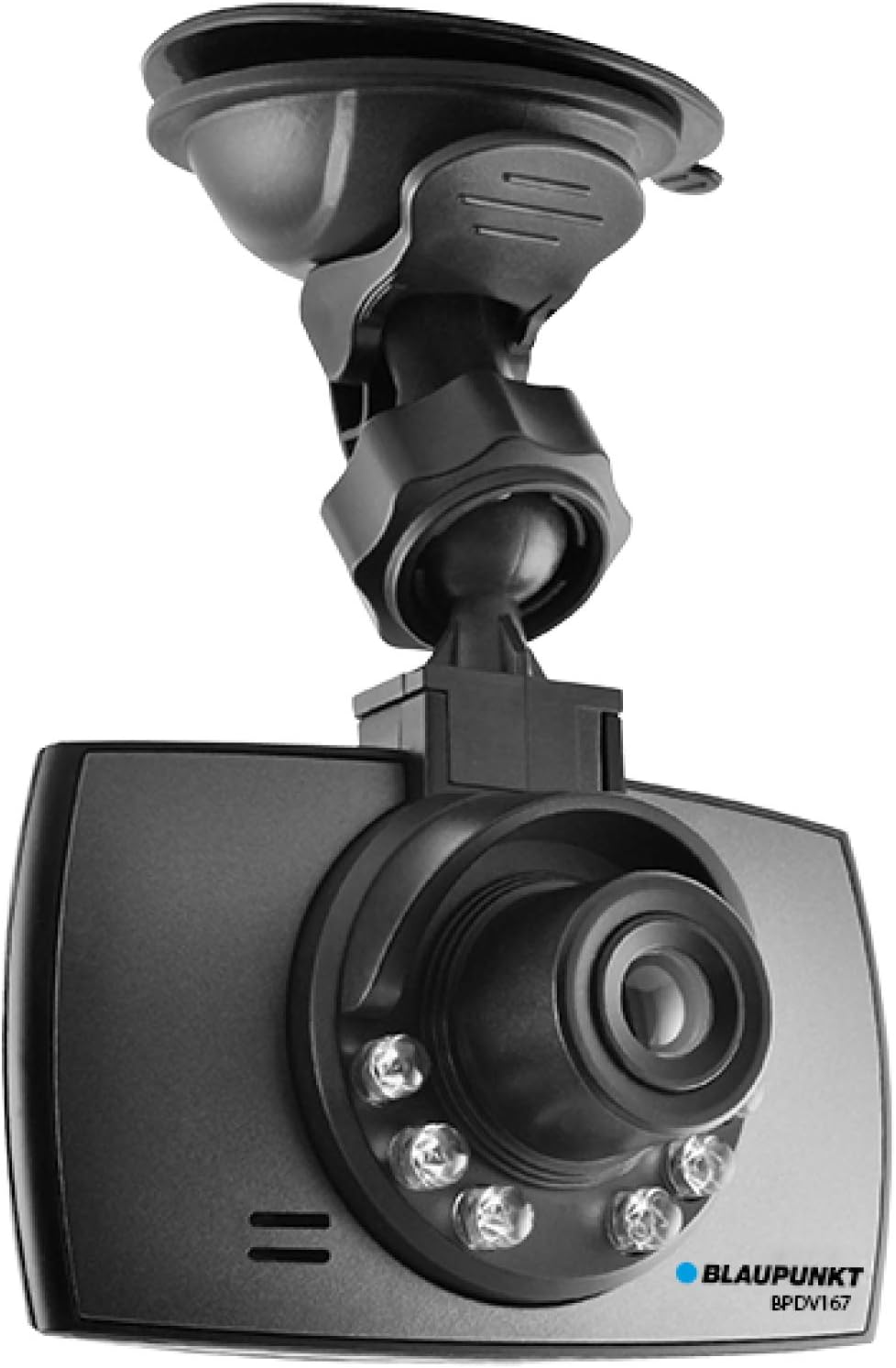
Gambar 1: Hareupeun View of Dashcam. This image shows the front of the Blaupunkt BPDV167 dashcam, featuring the camera lens, infrared lights, and the attached suction cup mount for windshield installation.

Gambar 2: Tukangeun View of Dashcam. This image displays the rear of the Blaupunkt BPDV167 dashcam, highlighting the 2.4-inch LCD screen, power button, menu button, mode button, and navigation/OK buttons on the right side.
Note: Specific button labels and port locations are detailed in the following sections.
3. Setélan
3.1 Nyelapkeun Kartu Micro SD
- Locate the Micro SD card slot on the side of the dashcam.
- Gently insert the included 8GB Micro SD card (or another compatible card up to 32GB, Class 6 TF or higher) into the slot until it clicks into place. Ensure the card is inserted with the correct orientation.
- Pikeun nyabutna, pencét kartu lalaunan ka jero dugi ka ngaklik, teras leupaskeun, sareng éta bakal ngajleng kaluar.
penting: Format the Micro SD card within the dashcam's settings menu before first use and periodically thereafter to ensure optimal performance and prevent recording errors.
3.2 Masang Dashcam
- Bersihkeun bagian dina kaca hareup mobil anjeun tempat anjeun badé masang dashcam. Pastikeun bébas tina lebu sareng gajih.
- Attach the suction cup mount to the dashcam.
- Press the suction cup firmly against the windshield and flip the lever to secure it. Position the dashcam so it has a clear view of the road and does not obstruct your driving vision.
- Adjust the angle of the camera lens to capture the desired field of view.
3.3 Sambungan Daya
- Connect the included car charger to the dashcam's power input port.
- Colokkeun tungtung carjer mobil anu sanés ka stop kontak listrik 12V kendaraan anjeun (stop kontak korek rokok).
- The dashcam will typically power on automatically when the vehicle's ignition is turned on and begin recording.
- The internal rechargeable battery allows for short-term operation without external power, useful for parking monitor mode or reviewdina footage outside the vehicle.
4. Parentah Operasi
4.1 Powering on / Pareum
- otomatis: The dashcam powers on and off automatically with your vehicle's ignition when connected to the car charger.
- Manual: Press and hold the Power button (refer to Figure 2) for a few seconds to manually turn the dashcam on or off.
4.2 Modeu ngarékam
The dashcam supports several recording modes:
- Ngarekam loop: When the dashcam is powered on, it automatically begins continuous loop recording. Video files are saved in segments (e.g., 1, 3, or 5 minutes). When the memory card is full, the oldest unlocked files anu overwritten.
- G-Sensor (Rekaman Darurat): The built-in G-Sensor detects sudden impacts or collisions. When triggered, the current video segment is automatically locked and protected from being overwritten by loop recording.
- Monitor Parkir: When enabled in the settings, the dashcam can automatically start recording if it detects motion or impact while the vehicle is parked and the dashcam is off (powered by its internal battery).
4.3 Navigasi Menu
Use the Menu button to access settings and the Up/Down/OK buttons (refer to Figure 2) to navigate and select options. Common settings include:
- Video Resolution (e.g., 720p)
- Loop Recording duration
- Sensitipitas G-Sensor
- Parking Monitor On/Off
- Setélan Tanggal/Waktu
- Mikropon Hurung / Pareum
- Format Kartu SD
4.4 Playback jeung File Mindahkeun
- Putereun Dina Alat: Switch to playback mode using the Mode button (refer to Figure 2). Use the Up/Down buttons to browse files and the OK button to play/pause.
- File Transfer via USB: Connect the dashcam to a computer using the provided USB cable. The dashcam will appear as a removable disk, allowing you to copy video files langsung ka komputer anjeun.
- Pamaca Kartu Micro SD: Alternatively, remove the Micro SD card from the dashcam and insert it into a compatible card reader connected to your computer for faster file mindahkeun.
5. Pangropéa
5.1 Cleaning the Dashcam
- Ensure the dashcam is powered off and disconnected from power before cleaning.
- Use a soft, dry cloth to wipe the body of the dashcam.
- Pikeun lensa, paké lawon beberesih lensa khusus sareng solusi pikeun nyegah goresan.
- Entong nganggo bahan kimia kasar atanapi beberesih kasar.
5.2 Manajemén Kartu Mémori
- Regularly format the Micro SD card (at least once a month) through the dashcam's menu to maintain optimal recording performance and prevent data corruption.
- Jieun cadangan pidéo penting files to a computer or external storage before formatting.
- Replace the Micro SD card if you experience frequent recording errors or file corruption, as memory cards have a limited lifespan.
6. Cara ngungkulan
| Masalah | Mungkin Cukang lantaranana | Solusi |
|---|---|---|
| Dashcam teu tiasa dihurungkeun. | No power supply; faulty car charger; depleted internal battery. | Check car charger connection and vehicle's 12V outlet. Ensure the car charger is functional. Charge the internal battery. |
| Eureun ngarékam atanapi files anu ruksak. | Memory card full; memory card error; incompatible or slow memory card. | Format the Micro SD card. Use a Class 6 TF or higher card. Replace the memory card if issues persist. |
| Kualitas pidéo goréng atanapi buram. | Protective film on lens; dirty lens; incorrect resolution setting. | Remove any protective film. Clean the camera lens. Ensure video resolution is set to 720p in settings. |
| Dashcam freezes or becomes unresponsive. | Software glitch; memory card issue. | Press and hold the Power button to force a restart. If possible, use the reset button (if available). Format or replace the Micro SD card. |
| Audio is not recording. | Microphone is turned off in settings. | Check the dashcam's settings menu to ensure the microphone is enabled. |
7. Spésifikasi
| Fitur | Rincian |
|---|---|
| Modél | BPDV167 |
| Ukuran layar | 2.4 Inci LCD |
| Resolusi Capture Video | 720 p |
| Sudut Lensa | 120-degree Wide-Angle |
| Panyimpenan | Micro SD Card (8GB included), supports up to 32GB (Class 6 TF) |
| Téhnologi konektipitas | USB |
| Fitur husus | Built-In Microphone, G-Sensor, Parking Monitor, Infrared Light, Loop Recording |
| Métode kontrol | Toél |
| Sumber Daya | Rechargeable Battery, Car Charger (12V) |
| Item Beurat | 7.4 ons |
| Ukuran Paket | 5.98 x 5.08 x 2.87 inci |
| Produsén | BLAUPUNKT |


