
GODOX AD100Pro
Godox AD100Pro Monolight Instruction Manual
Model: AD100Pro | Brand: GODOX
1. Bubuka
The Godox AD100Pro is a compact and powerful 100Ws 2.4G flash strobe designed for professional photographers. It offers advanced features such as 1/8000s High-Speed Sync (HSS), rapid 0.01-1.5s recycling time, and the capability for 360 full power flashes on a single charge of its 2600mAh lithium battery. Supporting TTL, Manual, and Multi-flash functions, this lightweight and portable monolight features an intuitive OLED panel for easy operation, making it an ideal solution for both on-location and studio photography.

Figure 1: Godox AD100Pro Monolight, a compact and powerful flash strobe.
2. Naon dina Box
Upon unpacking your Godox AD100Pro Monolight, please ensure all the following components are present:
- 1x Godox AD100 Pro Pocket Flash
- 1x Battery (2600mAh Lithium Ion)
- 1x AD-E2 Bracket
- Carjer Batré 1x
- 1x Charger cable
- 1 x Kabel USB
- 1x Portable bag
- 1x Pergear Cloth
- 1 x Manual Instruksi

Figure 2: All components included with the Godox AD100Pro Monolight.
3. Fitur Produk
The Godox AD100Pro Monolight is engineered with several key features to enhance your photography experience:
- Desain kompak sareng ringan: Weighing only 2.9 pounds and measuring 9.06 x 7.09 x 5.51 inches, it is highly portable.
- Kaluaran kuat: 100Ws flash output for versatile lighting.
- Advanced Wireless System: Integrated 2.4G wireless X system for seamless control with Godox X1, X2, or Xpro triggers.
- Singkronkeun Kacepetan Luhur (HSS): Achieve shutter speeds up to 1/8000s for freezing action and controlling ambient light.
- Daur ulang Gancang: Quick recycling time of 0.01-1.5 seconds ensures you don't miss a shot.
- Hirup batré anu panjang: The 2600mAh lithium-ion battery provides approximately 360 full power flashes.
- Sababaraha Modeu Lampu Kilat: Supports TTL (Through-The-Lens) auto flash, Manual (M), and Multi-flash (Stroboscopic) modes.
- Panel OLED: High-resolution OLED display for clear and easy navigation of settings.
- Magnetic Flash Head: Round flash head compatible with magnetic AK-R1 accessories kit (Dome Diffuser, Barndoor, Honeycomb, Gels).
- Kompatibilitas Bowens Mount: Works with the optional Godox S2 bracket to install various Bowens-mount modifiers.

Figure 3: Visual representation of key features including 100Ws, HSS, fast recycling, and TTL auto.

Figure 4: The large capacity lithium battery and various compatible accessories.
4. Setélan
4.1 Pamasangan batré
- Ensure the monolight is powered off.
- Tangtukeun tempat batréna di sisi unit.
- Insert the 2600mAh lithium-ion battery, ensuring proper orientation.
- Tutup kompartemen batré anu aman.
Video 1: This video demonstrates the physical setup of the Godox AD100Pro, including battery insertion and attachment to a light stand. It also shows the use of the AK-R1 accessories kit and the Godox S2 Bracket for attaching Bowens-mount modifiers.
4.2 Attaching to a Light Stand
The AD100Pro features two slots at the bottom for adjusting the stand screwing-in position, allowing for flexible mounting.
- Attach the AD-E2 bracket to the bottom of the monolight.
- Mount the bracket onto a compatible light stand.
- Secure the monolight by tightening the bracket's locking mechanism.

Figure 5: The AD100Pro mounted on a light stand, showcasing its compact size and adjustable mounting options.
4.3 Ngalampirkeun Asesoris
The round flash head is magnetic and compatible with the Godox AK-R1 accessories kit (sold separately), which includes a Dome Diffuser, Barndoor, Honeycomb, and Gels. For Bowens-mount modifiers, use the Godox S2 Bracket (sold separately).
5. Parentah Operasi
The Godox AD100Pro features an intuitive OLED panel and control buttons for easy operation. Refer to the control panel diagram below for button identification.

Gambar 6: Detil view of the Godox AD100Pro control panel with labeled buttons and dial.
5.1 Daya Hurung/Pareuman
- Pikeun ngaktipkeun, pencét tombol Pindah kakuatan kancing.
- Pikeun pareum, pencét jeung tahan Pindah kakuatan kancing.
- The unit features an automatic shutdown function after 30/60/90 minutes of idle operation, configurable in the Custom Menu.
5.2 Flash Modes (TTL, M, Multi)
Pencét éta MODÉ tombol pikeun ngagulung mode lampu kilat anu sayogi:
- TTL Auto Flash Mode: Otomatis nyaluyukeun kaluaran lampu kilat pikeun paparan anu leres.
- Modeu Lampu Kilat Manual (M): Allows manual control over flash power output (1/256 to 1/1). Rotate the SET Button & Control Dial pikeun nyaluyukeun.
- Modeu Multi Flash (Stroboskopik): Fires a series of rapid flashes. Adjust flash times and frequency using the SET Button & Control Dial.
5.3 Kadali nirkabel
The AD100Pro integrates with the Godox 2.4G wireless X system. To control the monolight wirelessly using a Godox X1, X2, or Xpro trigger, ensure the channel, group, and ID values on both the trigger and the AD100Pro are identical.
- Grup Setelan: Pencét pondok Tombol GR / CH to cycle through groups A-E.
- Nyetél Saluran: Pencét panjang Tombol GR / CH for 2 seconds to enter channel setting. Rotate the SET Button & Control Dial to select channels 1-32, then press SET pikeun mastikeun.
- Pangaturan ID: Access ID settings via the Custom Menu (C.Fn) to set ID from 01-99 or OFF.
Video 2: This video provides a detailed demonstration of the Godox AD100Pro's user interface, including setting flash modes (TTL, M, Multi), adjusting power output, configuring wireless control (group, channel, ID), and utilizing custom functions like modeling lamp brightness and delay flash.
5.4 Pemodelan LED Lamp
- Pencét pondok Modeling Light Button to turn the LED modeling light on or off.
- Pencét panjang Modeling Light Button to adjust the brightness level from 1 to 10.
5.5 Fungsi zum
- Pencét pondok Tombol ZOOM to cycle through 5 focal lengths (e.g., 28mm, 35mm, 50mm, 70mm, 85mm).
- Pencét panjang Tombol ZOOM to enter High-Speed Sync (HSS) mode.
5.6 Fungsi Khusus (C.Fn)
Pencét éta MENU button to access custom functions. Use the SET Button & Control Dial to navigate and adjust settings:
- BIIP: Hurungkeun/pareuman sora bip.
- PHOTOC (S1/S2): Set optical S1/S2 unit.
- STBY: Configure automatic shutdown time (30/60/90 minutes).
- TUNDA: Set delay flash function (0.1-30 seconds).
- WL (Wireless Settings): Turn wireless function on/off.
- ID: Set wireless ID (01-99 or OFF).
5.7 Test Flash and Reset
- Tes Kilat: Pencét éta Tombol UJI to fire a test flash.
- Reset Setélan: To reset all settings to factory defaults, press the MENU jeung Modeling Light Button sakaligus.
6. Spésifikasi
Below are the detailed technical specifications for the Godox AD100Pro Monolight:
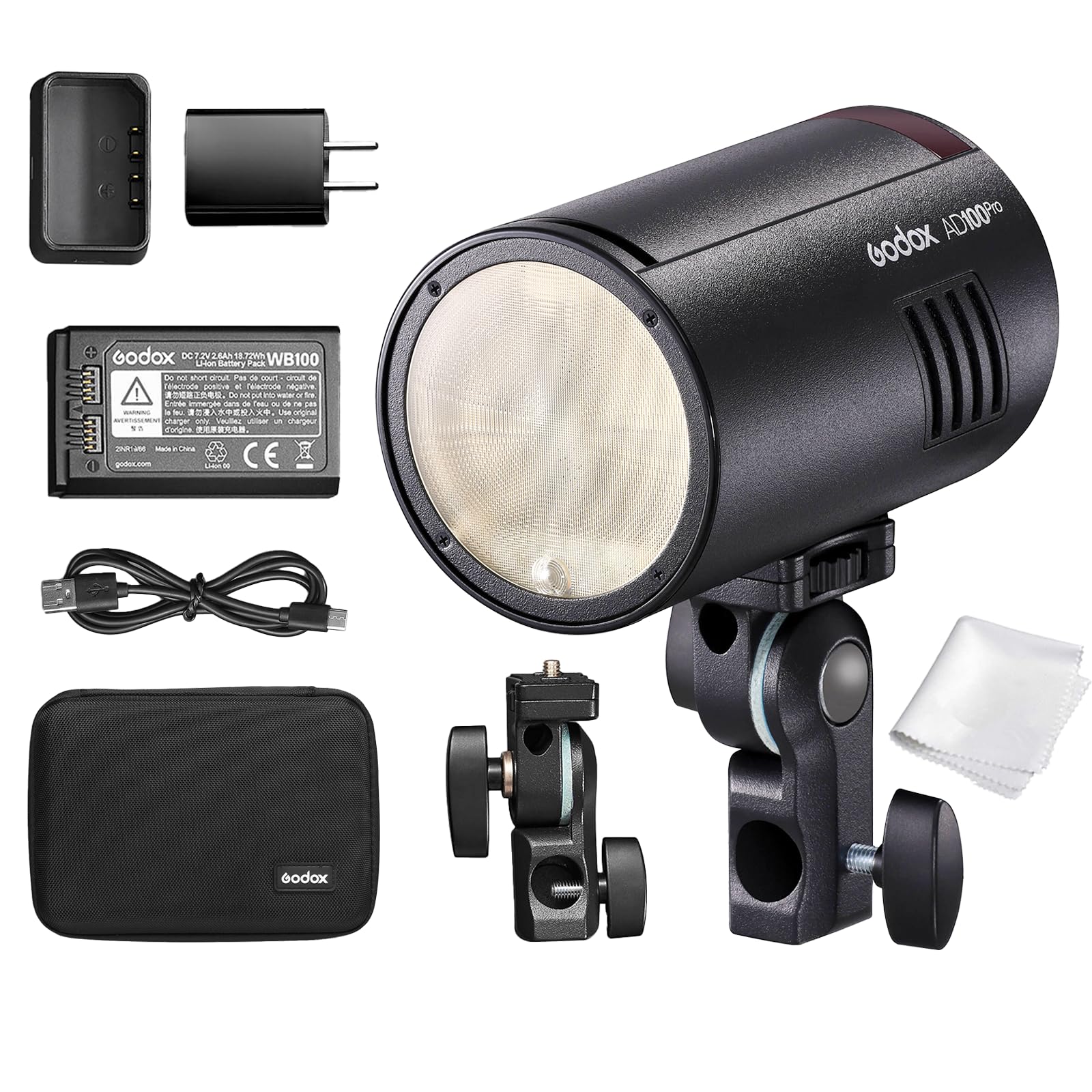
Figure 7: Comprehensive specifications for the Godox AD100Pro Monolight.
| Fitur | Spésifikasi |
|---|---|
| Modél | AD100Pro |
| Mode Unit panarima nirkabel | Radio transmission mode (compatible with Nikon & Canon & Sony & Fujifilm & Olympus & Panasonic & Pentax) |
| Modeu Flash | Wireless off: M/Multi; Receiver unit of radio transmission: TTL/M/Multi |
| Kaméra anu cocog | Nikon cameras (X1T-N, X2T-N, XProN as trigger), Canon EOS cameras (X1T-C, X2T-C, XProC as trigger), Sony cameras (X1T-S, X2T-S, XProS as trigger), Fujifilm cameras (X1T-F, X2T-F, XProF as trigger), Olympus cameras (X1T-O, X2T-O, XProO as trigger), Pentax cameras (X2T-P, XProP as trigger) |
| Kaluaran kakuatan | 9 steps: 1/256~1/1 |
| Flash Stroboscopic | Provided (Up to 90 times, 99Hz) |
| Kompensasi Flash Exposure (FEC) | Saluyukeun parameter dina kadali jauh 2.4G |
| Modeu singkronisasi | Singkronisasi gancang-gancang (nepi ka 1/8000 detik), singkronisasi tirai kahiji, sareng singkronisasi tirai kadua |
| Tunda Flash | 0.01~30 detik |
| Beeper | Sumuhun |
| Modél Lamp (LED) | 1.8W; Light brightness: 1 to 10 levels |
| Optik panarima Flash | S1/S2 |
| Flash nirkabel (transmisi 2.4G) | Receiver, Pareum |
| Grup Panarima Controllable | 5 (A, B, C, D, E) |
| Rentang transmisi (approx.) | 100m |
| Saluran | 32 (1~32) |
| ID | 01~99 |
| Sasayogian tanaga | Lithium battery pack (7.2V/2600mAh compatible with V1) |
| Full Power Flashes | Pendek. 360 |
| Daur mulang waktos | Kira-kira. 0.01-1.5s |
| Indikator batré | Sumuhun |
| Indikasi kakuatan | Pareum sacara otomatis saatos kira-kira. 30 menit operasi dianggurkeun. |
| Sync Triggering Mode | 3.5mm Sync cable, Wireless control port |
| Suhu Warna | 5800 ± 200K |
| Diménsi | 120×76×76 mm (4.72 x 2.99 x 2.99 inci) |
| Beurat bersih | 524g (kaasup batré) |

Figure 8: Dimensions and weight of the Godox AD100Pro Monolight.
7. Cara ngungkulan
If you encounter issues with your Godox AD100Pro Monolight, please refer to the following common troubleshooting steps:
- Unit teu hurung:
- Pastikeun batre tos dicas pinuh sareng diselapkeun leres.
- Check if the battery contacts are clean and free from debris.
- Flash henteu hurung:
- Verify the monolight is powered on and not in standby mode.
- Check the flash mode (TTL, M, Multi) and power settings.
- For wireless control, confirm that the trigger (X1, X2, Xpro) and monolight have matching channel, group, and ID settings.
- Ensure the camera's hot shoe connection is secure and clean.
- Test the flash using the Tombol UJI on the monolight.
- OLED display is blank or not working:
- Power cycle the unit (turn off and on).
- Pastikeun batre gaduh muatan anu cekap.
- If the issue persists, perform a factory reset (press MENU jeung Modeling Light Button sakaligus).
- Kaluaran lampu kilat anu teu konsisten:
- Check battery level; low battery can affect consistency.
- Ensure no obstructions are blocking the flash or receiver.
- Verify that the flash mode and power settings are appropriate for your shooting conditions.
If these steps do not resolve the issue, please contact Godox customer support for further assistance.
8. Pangropéa
Proper maintenance will ensure the longevity and optimal performance of your Godox AD100Pro Monolight:
- beberesih:
- Use a soft, dry cloth to clean the exterior of the monolight.
- For the OLED screen, use a microfiber cloth specifically designed for electronics.
- Hindarkeun ngagunakeun bahan kimia kasar, pangleyur, atanapi pembersih abrasive.
- Panyimpenan:
- Store the monolight in a cool, dry place away from direct sunlight and extreme temperatures.
- When storing for extended periods, remove the battery.
- Use the provided portable bag for protection during transport and storage.
- Perawatan batré:
- Charge the battery fully before first use and periodically if stored for long durations.
- Hindarkeun ngeusi batre kaleuleuwihan atanapi ngeusi batre lengkep.
- Ulah ngalaan batréna ka suhu luhur atawa tuts na.
- Penanganan Umum:
- Handle the unit with care to prevent drops or impacts.
- Avoid exposing the monolight to water or high humidity.
9. Jaminan & Dukungan
The Godox AD100Pro Monolight comes with a manufacturer's warranty. For detailed information regarding warranty coverage, terms, and conditions, please refer to the warranty card included in your product packaging or visit the official GODOX website. For technical support, service, or inquiries, please contact GODOX customer service through their official channels. Keep your purchase receipt as proof of purchase for any warranty claims.
Ask a question about this manual
Ask about setup, troubleshooting, compatibility, parts, safety, or missing instructions. Manuals+ will review the question and use this page’s manual context to help answer it.