Bubuka
This manual provides detailed instructions for the safe and effective use of your AOPUTTRIVER HP-770J Digital Automotive Multimeter. Please read this manual thoroughly before operation and retain it for future reference. This device is designed for measuring various electrical parameters in both general electrical and automotive applications.
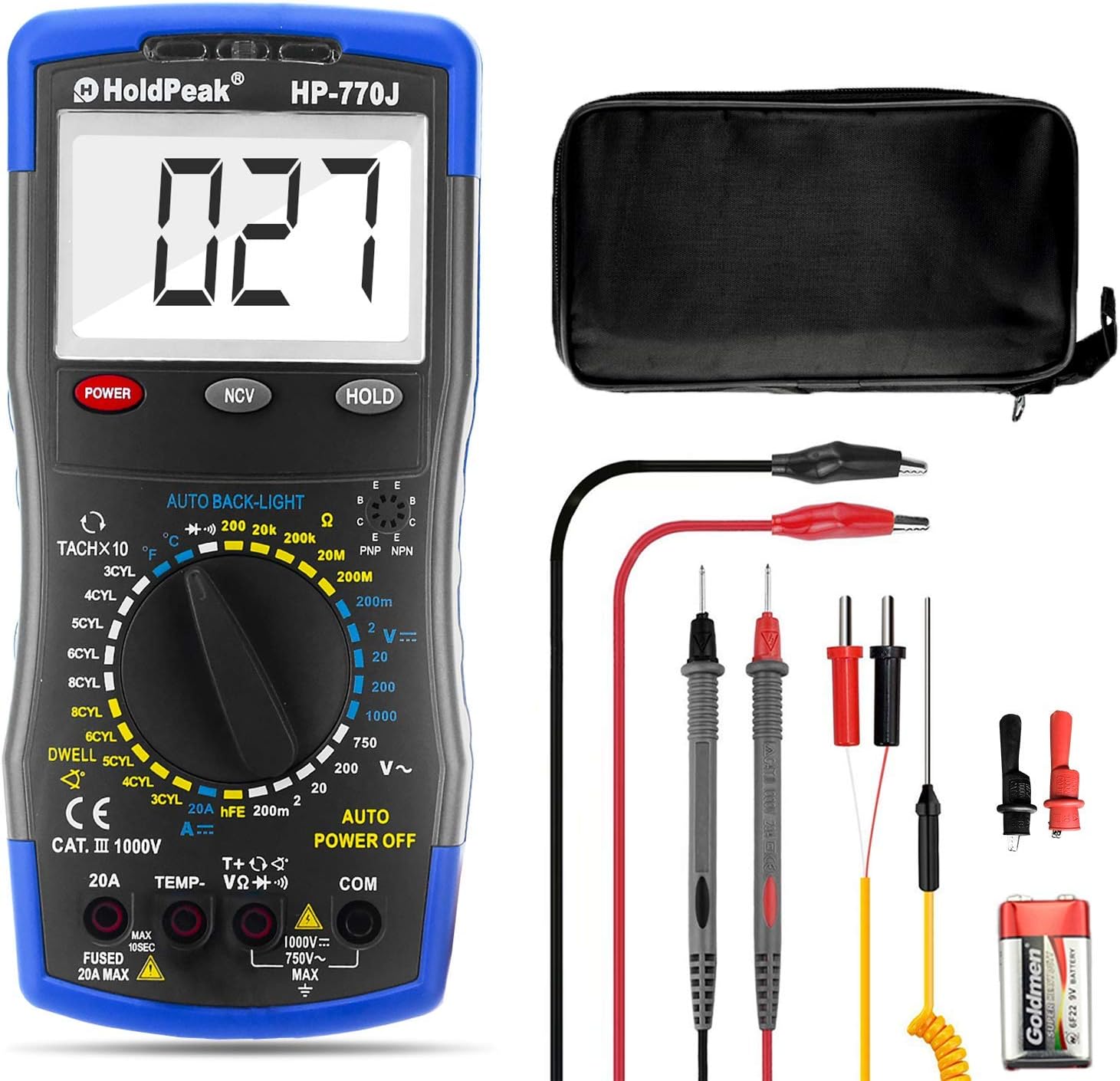
Figure 1: AOPUTTRIVER HP-770J Digital Automotive Multimeter and included accessories.
Disetél
1. Unboxing sareng Inspeksi Awal
Carefully remove all components from the packaging. Verify that all items listed in the product description are present and undamaged. The package should include the HP-770J Multimeter, test leads, a thermocouple, a 9V (6F22) battery, and a small screwdriver.

Figure 2: Detailed panel layout of the HP-770J Multimeter.
2. Pamasangan batré
The HP-770J multimeter requires a 9V (6F22) battery for operation. To install the battery:
- Tangtukeun lokasi kompartemen batré dina tonggong multimeter nu.
- Use the provided small screwdriver to open the battery cover.
- Pasangkeun batré 9V, pastikeun polaritasna (+ sareng -) bener.
- Ganti panutup batré jeung amankeun ku screw nu.
Safety Note: Always ensure the multimeter is powered off and test leads are disconnected before opening the battery compartment.
3. Nyambungkeun Test Leads
Sambungan kabel tés anu leres penting pisan pikeun pangukuran anu akurat sareng aman.
- Insert the black test lead into the "COM" (Common) jack.
- Insert the red test lead into the appropriate input jack based on the measurement type:
- Pikeun Voltage (V), Resistance (Ω), Temperature (Temp), Diode, and Continuity measurements, insert the red lead into the "VΩHz" jack.
- For Current (A) measurements up to 20A, insert the red lead into the "20A" jack.
- Ensure the test leads are tightly connected to the interface before performing any tests.

Gambar 3: Leuwihview of HP-770J functions and their corresponding icons.
Operasi
The HP-770J features a rotary switch for selecting measurement functions and buttons for additional features like NCV and Data Hold.
1. Daya Hurung / Pareum
Pencét éta POWER button to turn the multimeter on or off. The device features an Auto Power Off function to conserve battery life.
2. Uji dioda
Pikeun nguji dioda:
- Set the rotary switch to the Diode/Continuity position (Simbol dioda).
- Sambungkeun kabel tés beureum ka anoda sareng kabel tés hideung ka katoda dioda.
- Layar bakal némbongkeun voltase majutage drop. Reverse the leads to check for open circuit (OL) indicating a good diode.
3. Tés Résistansi
Pikeun ngukur résistansi:
- Set the rotary switch to the desired Ohm (Ω) range.
- Sambungkeun lead test kana komponén anu bakal diukur.
- Baca nilai lalawanan dina tampilan LCD.
4. DC Test Ayeuna
Pikeun ngukur arus DC:
- Set the rotary switch to the appropriate DC Amperage (A) range (e.g., 20A).
- Catetan Kasalametan: Ensure the red test lead is in the "20A" jack for high current measurements.
- Connect the multimeter in series with the circuit where current is to be measured.
- Baca nilai ayeuna dina tampilan LCD.
5. Jilidtage Test (AC/DC)
Pikeun ngukur voltage:
- Setel saklar puteran kana Voltase AC anu dipikahoyongtage (V~) atanapi Vol DCtage (V-) range.
- Connect the test leads in parallel across the component or circuit to be measured.
- Baca voltage nilai dina tampilan LCD.
- Pencét éta TAHAN key to freeze the displayed value.
6. Non-Kontak Voltage (NCV) Function
Fungsi NCV ngamungkinkeun pikeun ngadeteksi voltase ACtage tanpa kontak langsung.
- Pencét éta NCV kancing.
- Move the top of the multimeter close to the wire or electrical outlet.
- Lamun hirup voltage (≥90V AC rms) is detected, the NCV red and green LED lights will light up alternately, accompanied by an audible buzzer.

Figure 4: NCV function in use, showing detection of live and null wires.
7. Automotive Specific Measurements
The HP-770J is equipped for automotive diagnostics, including RPM and Dwell Angle measurements.
- Tachometer (RPM): Use the TACHX10 setting on the rotary switch to measure engine RPM.
- Dwell Angle: Select the appropriate DWELL setting (3CYL, 4CYL, 5CYL, 6CYL, 8CYL) for your engine to measure dwell angle.

Figure 5: The HP-770J performing an automobile engine test.
8. Official Product Video Guide
For a visual guide on unboxing, setup, and various measurement functions, please refer to the official product video below.
Video 1: Unboxing and Functionality Demonstration of the AOPUTTRIVER HP-770J Digital Multimeter. This video covers initial setup, connecting test leads, and demonstrations of diode, resistance, DC current, voltage, and NCV tests.
spésifikasi
| Fitur | Nilai |
|---|---|
| merek | AOPUTTRIVER |
| Modél | HP-770J |
| DC Voltage | 200mV/2V/20V/200V/1000V |
| AC Voltage | 200mV/2V/20V/200V/750V |
| DC Ayeuna | 20A |
| Résistansi | 200Ω/2KΩ/20KΩ/200KΩ/20MΩ/200MΩ |
| Suhu | -4~1800 ℉ (-20~1000 ℃) |
| Tacho (Rotate Speed) | 500~10000 rpm |
| Sudut cicing | 0-120.0°, 0-90.0°, 0-72.0°, 0-60.0°, 0-45.0° |
| Sumber Daya | 9V (6F22) Battery |
| Diménsi | 195x88x40mm (approx. 7.68 x 3.46 x 1.57 inches) |
| Beurat | 350g (kira-kira 12.35 ons) |
| Peunteun Kasalametan | 600V CAT IV 1000V CAT III |

Figure 6: Detailed specifications of the HP-770J Multimeter.
Pangropéa
Pangropéa anu leres mastikeun umur panjang sareng akurasi multimeter anjeun.
- beberesih: Ngagunakeun lemes, damp lawon pikeun ngabersihkeun bagian luar multimeter. Entong nganggo pembersih atanapi pangleyur anu abrasif.
- Panyimpenan: Store the multimeter in a cool, dry place, away from direct sunlight and extreme temperatures. If storing for extended periods, remove the battery to prevent leakage.
- Ngagantian batré: Replace the 9V battery when the low battery indicator appears on the display to ensure accurate readings. Follow the battery installation steps in the Setup section.
- Ngagantian sekering: The multimeter is protected by internal fuses. If the current measurement function stops working, the fuse may need replacement. Refer to a qualified technician for fuse replacement to ensure proper safety and functionality.
Pamérésan masalah
This section addresses common issues you might encounter with your HP-770J multimeter.
- Henteu aya masalah tampilan/daya:
- Pariksa naha batréna parantos dipasang kalayan leres sareng gaduh muatan anu cekap. Ganti upami diperyogikeun.
- Pastikeun tombol daya dipencet pageuh.
- Bacaan teu akurat:
- Verify that the test leads are properly connected to the correct input jacks for the selected function.
- Ensure the rotary switch is set to the appropriate measurement function and range.
- Pariksa tingkat batréna; batré anu lemah tiasa mangaruhan akurasi.
- Ensure the test leads are not damaged or corroded.
- Screen Turns Black in Heat:
- Some LCD displays may temporarily darken or become unreadable in extreme heat. Move the multimeter to a cooler environment and allow it to return to normal operating temperature.
- No Continuity Beep/Diode Reading:
- Ensure the multimeter is set to the correct Diode/Continuity function.
- Check the test leads for proper connection and integrity.
Garansi sareng Rojongan
AOPUTTRIVER is committed to providing quality products and customer support.
- Garansi: The product typically comes with a 1-year warranty. Please retain your purchase receipt for warranty claims.
- Bantosan Téknis: For any technical issues, questions, or support needs, please contact AOPUTTRIVER customer service. They aim to respond and solve your questions within 24 hours.
- Inpormasi kontak: Refer to your product packaging or the official AOPUTTRIVER websitus pikeun detil kontak panganyarna.
Note: Warranty terms and support availability may vary. Always refer to the official brand information for the most accurate details.


