1. Bubuka
The AOPUTTRIVER AP-770HC is a 6000-count True RMS digital multimeter designed for accurate and reliable electrical measurements. It features auto-ranging capabilities and a variety of functions including voltage, current, resistance, capacitance, frequency, temperature, and Non-Contact Voltage (NCV) detection. This manual provides essential information for the safe and proper use of your multimeter.
2. Émbaran Kasalametan
Please read all safety warnings and operating instructions carefully before using this instrument. Failure to comply with safety precautions may result in electric shock, fire, or damage to the meter.
- Always ensure the test leads are properly connected and the function switch is set to the correct range before making any measurements.
- Ulah ngukur voltage ngaleuwihan 1000V DC atawa 750V AC.
- Exercise extreme caution when working with live circuits. Avoid contact with bare wires or terminals.
- Never measure current on a circuit with voltage present without first disconnecting power and inserting the meter in series.
- Ulah dianggo méter upami katingalina ruksak atanapi upami kabel tésna rusak.
- Ganti batré sawaktos indikator batré lemah nembongan pikeun mastikeun bacaan akurat.
- Patuh kana kode kaamanan lokal sareng nasional.
3. Eusi Paket
Pastikeun yén sadaya item anu didaptarkeun di handap aya dina pakét anjeun:
- 1 x AOPUTTRIVER AP-770HC Multimeter
- 2 x Test Leads (Red and Black)
- 1 x Mawa Kantong
- 1 x 9V (6F22) Battery
- 1 x Obeng Leutik
- 1 x Panerapan Suhu
- 1 x Buku Panduan (Basa Inggris)

Image: The package contents, including the multimeter, test leads, carrying bag, battery, screwdriver, temperature probe, and user manual.
4. Produk Langkungview
4.1 Layout Panel hareup
Familiarize yourself with the various components of the multimeter's front panel:
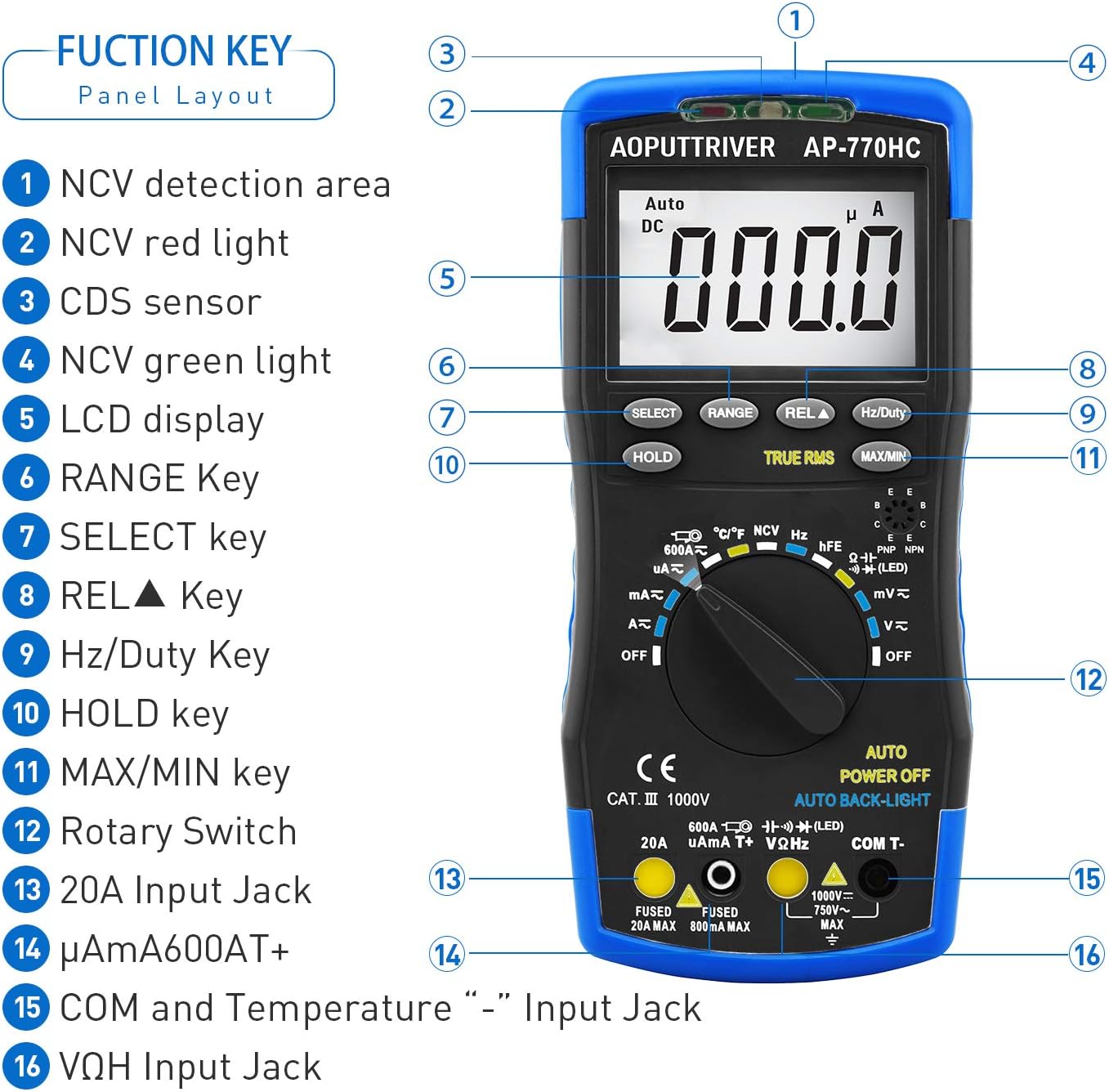
Gambar: A lengkep view of the multimeter's front panel, highlighting key functional areas and buttons.
- NCV Detection Area
- NCV Red Light Indicator
- CDS Sensor (for Auto Backlight)
- NCV Green Light Indicator
- Témbongkeun LCD
- RANGE Key
- SELECT Key
- REL▲ Key (Relative Value)
- Hz / Kawajiban Key
- Konci Tahan
- MAX/MIN Key
- Puteran Rotary
- 20A Input Jack
- μA/mA/600AT+ Input Jack
- COM and Temperature "-" Input Jack
- VΩHz Input Jack
4.2 Fitur Fisik
The AP-770HC is designed for durability and ease of use:
- Perlindungan ganda: The meter is encased in a protective rubber boot for enhanced durability against drops and impacts.
- Kickstand terpadu: A built-in stand allows the meter to be propped up for hands-free viewing, rotating 180 degrees for optimal angle.
- Mechanical Blocking System: This safety feature prevents incorrect lead insertion by physically blocking unused input jacks based on the rotary switch position.
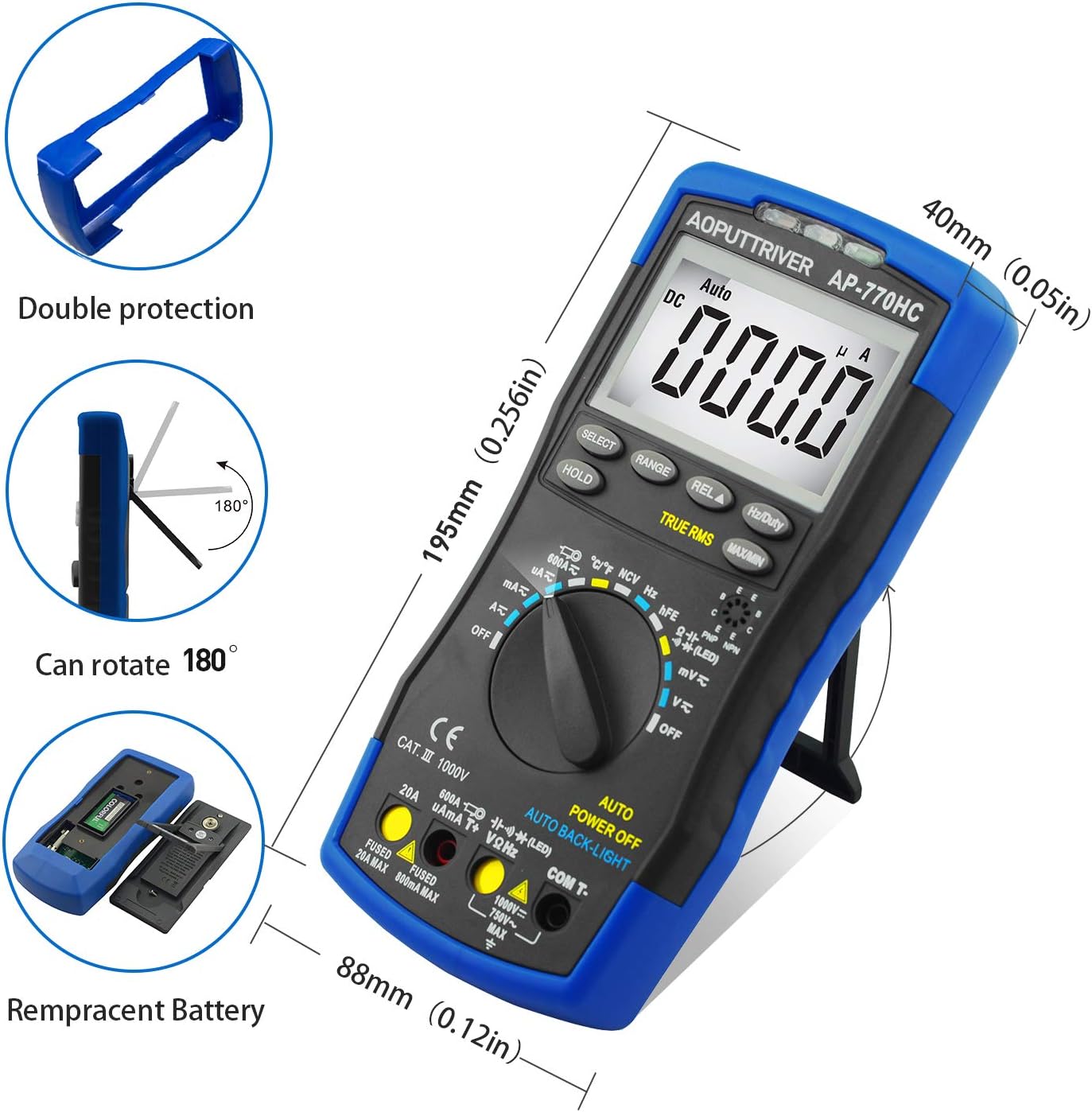
Image: Illustrations of the multimeter's physical attributes, including its dimensions, protective casing, and battery access.
5. Setélan
5.1 Pamasangan batré
The AP-770HC requires one 9V (6F22) battery for operation. To install or replace the battery:
- Pastikeun multimeter dina kaayaan OFF.
- Teangan tempat panutup kompartemen batré dina tonggong méter.
- Use the provided small screwdriver to loosen the screw securing the battery cover.
- Remove the cover and connect the 9V battery to the battery clip, observing correct polarity.
- Teundeun batréna kana kompartemen jeung ngaganti panutup, securing eta kalawan screw nu.
6. Parentah Operasi
6.1 Operasi Umum
To begin using the multimeter:
- Insert the test leads into the appropriate input jacks. The black lead typically connects to the COM jack. The red lead connects to the VΩHz jack for voltage, resistance, and other measurements, or to the μA/mA or 20A jack for current measurements.
- Rotate the function switch to the desired measurement mode. The mechanical blocking system will guide you to the correct input jacks for the selected function.
- The meter will automatically select the appropriate range (auto-ranging). For some functions, you can press the jajaran button to manually select a range.
6.2 Fungsi Pangukuran
Below are instructions for common measurement types:
DC Voltage Measurement (V∓)
- Set the rotary switch to the V∓ position.
- Sambungkeun kabel tés beureum kana jack VΩHz sareng kabel tés hideung kana jack COM.
- Sambungkeun kabel uji sacara paralel dina tegangan DCtagsumber atawa komponén anu rék diukur.
- Baca voltage nilai dina tampilan LCD.
AC Voltage Pangukuran (V∼)
- Set the rotary switch to the V∼ position.
- Sambungkeun kabel tés beureum kana jack VΩHz sareng kabel tés hideung kana jack COM.
- Sambungkeun kabel uji sacara paralel dina voltase ACtage sumber atawa komponén.
- Baca voltage nilai dina tampilan LCD.
DC/AC Current Measurement (μA, mA, A)
- PENTING: Disconnect power to the circuit before measuring current.
- Set the rotary switch to the appropriate current range (μA, mA, or A). Use the PILIH button to switch between AC and DC current.
- Connect the red test lead to the μA/mA or 20A jack, and the black test lead to the COM jack.
- Insert the multimeter in series with the circuit where current is to be measured.
- Pasangkeun daya kana sirkuit sareng baca nilai ayeuna.
Ukur Résistansi (Ω)
- Setel saklar puteran ka posisi Ω.
- Sambungkeun kabel tés beureum kana jack VΩHz sareng kabel tés hideung kana jack COM.
- Ensure the component to be measured is de-energized.
- Sambungkeun kabel uji kana komponén.
- Baca nilai résistansi.
Uji Kontinuitas
- Set the rotary switch to the continuity/diode position. Press PILIH until the continuity symbol (🔊) is displayed.
- Sambungkeun kabel tés beureum kana jack VΩHz sareng kabel tés hideung kana jack COM.
- Sambungkeun lead test dina sirkuit atawa komponén.
- If resistance is below approximately 50Ω, the buzzer will sound, indicating continuity.
Diode Tés
- Set the rotary switch to the continuity/diode position. Press PILIH until the diode symbol (→|∣) is displayed.
- Sambungkeun kabel tés beureum kana jack VΩHz sareng kabel tés hideung kana jack COM.
- Sambungkeun kabel beureum ka anoda sareng kabel hideung ka katoda dioda.
- Layar bakal némbongkeun voltase majutage drop. Reverse the leads; an open circuit (OL) indicates a good diode.
Pangukuran Kapasitansi
- Set the rotary switch to the capacitance position.
- Sambungkeun kabel tés beureum kana jack VΩHz sareng kabel tés hideung kana jack COM.
- Pastikeun kapasitor geus kosong sapinuhna sateuacan diukur.
- Sambungkeun test lead sakuliah kapasitor nu.
- Maca nilai kapasitansi dina tampilan.
Frequency/Duty Cycle Measurement (Hz/%)
- Set the rotary switch to the Hz/Duty position.
- Sambungkeun kabel tés beureum kana jack VΩHz sareng kabel tés hideung kana jack COM.
- Sambungkeun lead test dina sumber sinyal.
- Pencét éta Hz / Kawajiban button to toggle between frequency and duty cycle measurements.
Temperature Measurement (℃/℉)
- Set the rotary switch to the temperature position.
- Connect the temperature probe to the VΩHz and COM jacks, observing polarity.
- Tempatkeun tungtung probe suhu kana atanapi caket objék anu suhuna badé diukur.
- Read the temperature on the display. Press the PILIH tombol pikeun ngaganti antara Celsius (℃) sareng Fahrenheit (℉).

Image: The multimeter connected to a temperature probe, demonstrating its use to measure the temperature of a liquid.
Non-Kontak Voltage (NCV) Deteksi
- Setel saklar puteran ka posisi NCV.
- Move the NCV detection area (top of the meter) close to a live conductor.
- Lamun voltage greater than 90V (RMS) is detected, the NCV red light will illuminate, and the meter will emit an audible beep.
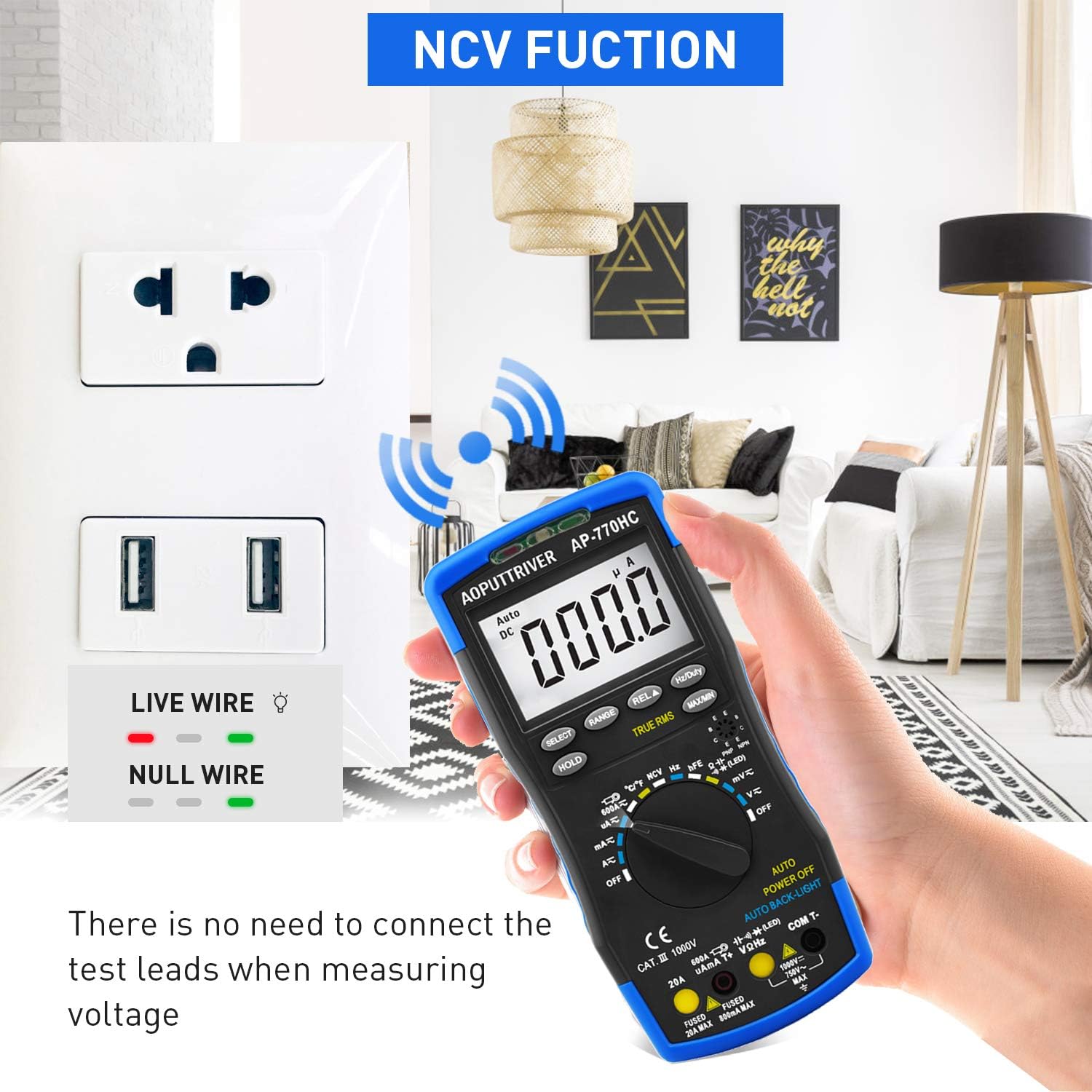
Image: The multimeter's NCV function in use, detecting voltage near an electrical outlet without physical contact.
6.3 Fungsi Husus
- Tahan Data (HOLD): Pencét éta TAHAN tombol pikeun ngabekukeun bacaan ayeuna dina tampilan. Pencét deui pikeun ngaleupaskeun.
- MAX / Mnt: Pencét éta MAX/MIN button to record the maximum and minimum values during a measurement session. Press again to cycle through MAX, MIN, and current readings.
- RMS leres: The AP-770HC features True RMS measurement for accurate readings of non-sinusoidal AC waveforms.
- Otomatis Pareum: Méter bakal otomatis pareum saatos sakitar 15 menit teu aktip pikeun ngahémat umur batré.
- Lampu tukang: The display backlight automatically activates in low-light conditions via the CDS sensor.
7. Pangropéa
7.1 beberesih
Pikeun ngabersihkeun multimeter, usap wadahna ku adamp lawon sareng deterjen anu hampang. Entong nganggo bahan abrasif atanapi pangleyur. Pastikeun méterna garing pisan sateuacan dianggo.
7.2 Ngagantian batré
When the low battery indicator appears on the display, replace the 9V battery as described in Section 5.1. Always use a fresh 9V (6F22) battery.
8. Cara ngungkulan
If you encounter issues with your AP-770HC multimeter, refer to the following common problems and solutions:
| Masalah | Mungkin Cukang lantaranana | Solusi |
|---|---|---|
| Taya tampilan atawa taram tampilan | Dead or low battery; Incorrect battery installation | Replace the 9V battery; Ensure correct polarity during installation. |
| "OL" (Overload) ditampilkeun | Measurement exceeds the selected range; Open circuit | Switch to a higher range (if not in auto-ranging); Check for breaks in the circuit or faulty component. |
| Bacaan teu akurat | Low battery; Incorrect function/range selection; Damaged test leads; External interference | Replace battery; Verify function and range; Inspect and replace test leads if damaged; Move away from strong electromagnetic fields. |
| Taya bip continuity | Open circuit; Resistance too high | Check the circuit for breaks; Ensure resistance is below the continuity threshold. |
9. Spésifikasi
Technical specifications for the AOPUTTRIVER AP-770HC Digital Multimeter:
| Parameter | Spésifikasi |
|---|---|
| tampilan | 6000 cacah |
| Pilihan Range | Otomatis Ranging |
| DC Voltage | 60mV/600mV/6V/60V/600V ±(0.5%+2dgt) / 1000V ±(0.8%+2dgt) |
| AC Voltage | 60mV/600mV/6V/60V/600V ±(1.0%+10dgt) / 750V ±(1.5%+3dgt) |
| DC Ayeuna | 600μA/6000μA/60mA/600mA ±(1.5%+2dgt); 6A/20A ±(2.5%+5dgt) |
| AC Ayeuna | 600μA/6000μA/60mA/600mA ±(1.5%+3dgt); 6A/20A ±(2.5%+5dgt) |
| Résistansi | 600Ω~60MΩ |
| Kapasitansi | 9.999nF ~ 99.99mF |
| Frékuénsi | 5.12Hz~5.12MHz (0.1%+5dgt) |
| Siklus tugas | 0.1%~99.9% |
| Suhu | -20 ℃ ~ 1000 ℃ (-4 ℉ ~ 1832 ℉) |
| RMS leres | Sumuhun |
| Fungsi NCV | Sumuhun |
| Data Tahan | Sumuhun |
| MAX/MIN Value | Sumuhun |
| Otomatis Pareum | Sumuhun |
| Tampilan Lampu Latar | Sumuhun |
| Sumber Daya | 9V (6F22) Battery |
| Bahan | ABS |
| Item Beurat | 1.3 pon |
| Diménsi | 9 x 5.2 x 2.4 inci (Pakét) |
10. Garansi jeung Rojongan
AOPUTTRIVER provides a 2-Taun Garansi for the AP-770HC Digital Multimeter, along with lifetime technical support.
If you encounter any issues or have questions regarding your product, please do not hesitate to contact AOPUTTRIVER customer support. We are committed to resolving any problems within 24 hours.
For support, please refer to the contact information provided with your purchase or visit the official AOPUTTRIVER websitus.


