1. Bubuka
Welcome to the Xtrfy M42 RGB Ultra-Light Gaming Mouse user manual. The Xtrfy M42 is engineered for high performance and comfort, featuring an ultra-light design, state-of-the-art components, and an adjustable symmetrical shape. This manual will guide you through the setup, operation, customization, and maintenance of your new gaming mouse.

Figure 1.1: Xtrfy M42 RGB Ultra-Light Gaming Mouse (Miami Blue edition)
2. Eusi Paket
Pastikeun yén sadaya item aya dina pakét produk anjeun:
- Xtrfy M42 RGB Ultra-Light Gaming Mouse
- Two sizes of interchangeable mouse shells
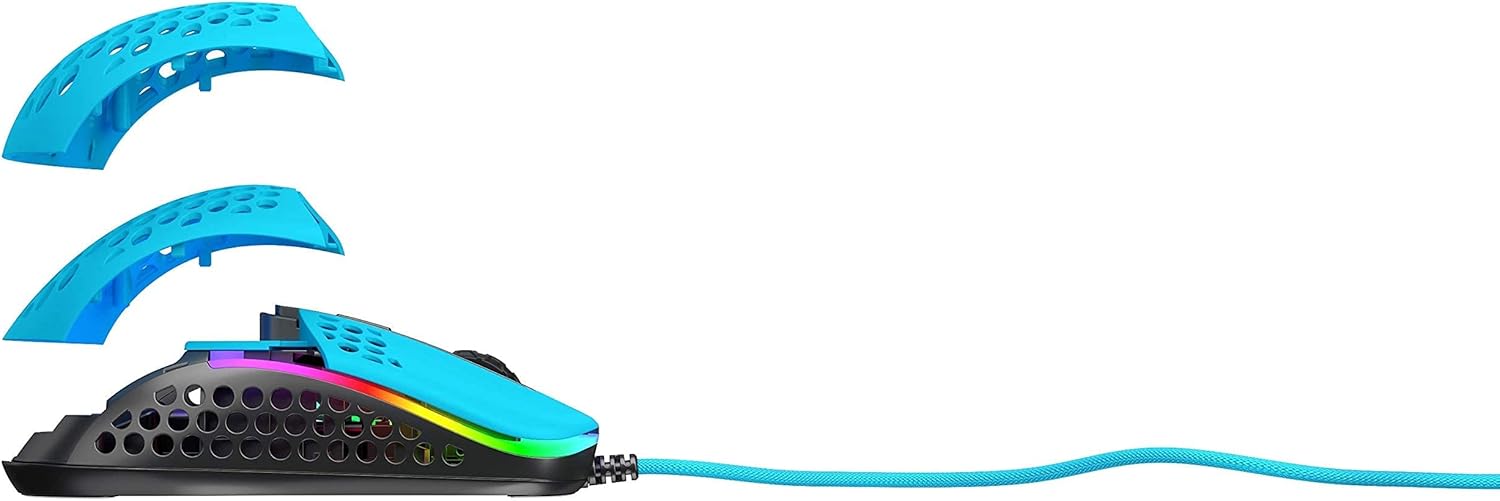
Figure 2.1: Xtrfy M42 with interchangeable top shells
3. Setélan
Follow these steps to set up your Xtrfy M42 gaming mouse:
- Sambungkeun Mouse: Plug the USB connector of the Xtrfy M42 mouse into an available USB port on your computer.
- Pamasangan supir: The mouse is plug-and-play and typically does not require additional driver software. Your operating system will automatically detect and install the necessary drivers.
- Tés awal: Move the mouse and click the buttons to ensure it is functioning correctly.

Figure 3.1: Xtrfy M42 connected via USB cable
4. Parentah Operasi
The Xtrfy M42 offers various functions for an optimized gaming experience.
4.1 Fungsi Dasar
- Klik Kénca: Tombol aksi primér.
- Klik katuhu: Tombol aksi sekundér.
- Gulung kabayang: Scrolls content up or down. Can also be clicked for a middle-click function.
- Kancing samping: Typically used for forward/backward navigation or custom in-game commands.
4.2 DPI adjustment
The Xtrfy M42 features a Pixart 3389 sensor, allowing for precise DPI (Dots Per Inch) adjustments. The DPI button, usually located behind the scroll wheel, cycles through preset DPI levels. Refer to the Xtrfy website for specific DPI steps and corresponding LED indicators.
4.3 RGB Illumination
The mouse features customizable RGB lighting. All settings for LED effects, brightness, and color selection are controlled directly on the mouse, without the need for software. Consult the Xtrfy website or product packaging for specific button combinations to adjust RGB settings.
4.4 Laju Polling
The polling rate, which determines how often the mouse reports its position to the computer, can typically be adjusted on gaming mice. Information on adjusting the polling rate for the M42 can be found on the official Xtrfy support page.
5. Kustomisasi
The Xtrfy M42 is designed with an adjustable symmetrical shape to accommodate various grip styles (palm, claw, fingertip) and hand sizes. This is achieved through interchangeable parts.
5.1 Changing Mouse Shells
The mouse comes with two different sized top shells. To change the shell:
- Gently detach the currently installed top shell from the mouse body.
- Align the desired new top shell with the mouse body and press it firmly until it clicks into place.
This allows you to modify the mouse's hump height and overall feel for optimal comfort and control.
Figure 5.1: Illustration of interchangeable mouse shells
6. Pangropéa
Proper maintenance ensures the longevity and performance of your Xtrfy M42 gaming mouse.
6.1 Ngabersihan Beurit
- Pegatkeun sambungan beurit tina komputer sateuacan beberesih.
- Paké lawon lemes, garing, lint-haratis pikeun ngusap beungeut beurit.
- Keur kokotor bandel, rada dampen lawon ku cai atawa solusi beberesih hampang. Hindarkeun bahan kimia anu kasar.
- Use compressed air to clear dust from the holes in the shell and around buttons.
6.2 Caring for PTFE Skates
The M42 features 100% PTFE skates for smooth glide. Keep the mouse pad and the underside of the mouse clean to prevent debris from accumulating on the skates, which can affect glide performance. Avoid scratching or damaging the skates.

Figure 6.1: Underside of the Xtrfy M42 mouse, highlighting the PTFE skates
7. Cara ngungkulan
If you encounter issues with your Xtrfy M42 mouse, try the following solutions:
- Beurit Teu Ngabales:
- Pastikeun kabel USB disambungkeun aman ka komputer Anjeun.
- Coba colokkeun beurit ka port USB anu béda.
- Balikan deui komputer anjeun.
- Tracking Issues (Jittery or No Movement):
- Bersihkeun sénsor optik di handapeun beurit nganggo lawon anu lemes sareng garing.
- Pastikeun anjeun nganggo beurit dina permukaan anu cocog (contona, alas beurit). Hindarkeun permukaan anu mantul pisan atanapi transparan.
- RGB Illumination Not Working:
- Check if the RGB lighting has been turned off via the on-mouse controls.
- Pastikeun beurit disambungkeun leres sareng nampi kakuatan.
For further assistance, refer to the Xtrfy official support resources.
8. Spésifikasi
| Fitur | Rincian |
|---|---|
| Nomer modél | M42 |
| Sénsor | Pixart 3389 Optical |
| Saklar | Pro player-optimized, rated for 20 million clicks |
| Beurat | Kira-kira 2.08 ons (59 gram) |
| Ukuran (L x W x H) | 4.65 x 2.48 x 1.5 inci (11.8 x 6.3 x 3.8 cm) |
| Konektipitas | USB |
| Skates | 100% PTFE with rounded edges |
| Paneangan | RGB anu tiasa disaluyukeun |
| Wangun | Adjustable Symmetrical (with interchangeable parts) |
9. Garansi jeung Rojongan
The Xtrfy M42 RGB Ultra-Light Gaming Mouse is covered by a manufacturer's warranty. For detailed warranty information, including terms and conditions, please refer to the warranty card included with your product or visit the official Xtrfy websitus.
For technical support, frequently asked questions, or to download the latest firmware (if applicable), please visit the Xtrfy support page:


