1. Bubuka jeung Leuwihview
This manual provides comprehensive instructions for the installation, operation, and maintenance of your ASUS TUF Gaming AMD Radeon RX 6800 XT OC Edition Graphics Card. Designed for robust performance and durability, this graphics card incorporates advanced features for an optimal computing experience.
fitur konci ngawengku:
- Desain Kipas Axial-tech: Enhanced with more fan blades and a new rotation scheme for improved cooling.
- Bantalan Kipas Bola Ganda: Offers up to twice the lifespan of traditional sleeve bearing designs.
- All-Aluminum Shroud and Reinforced Frame: Provides enhanced structural durability.
- MaxContact Heat Spreader: Features a super flat surface for superior thermal transfer.
- Téhnologi Otomatis-Ékstrim: An automated manufacturing process ensuring high reliability.
- Mémori 16GB GDDR6: High-speed memory for demanding applications and games.
- PCIe 4.0 Interface: High-bandwidth connectivity for modern systems.

Image 1.1: The ASUS TUF Gaming AMD Radeon RX 6800 XT OC Edition Graphics Card, showcasing its triple-fan design and robust build.
2. Naon dina Box
Carefully unpack the contents of your graphics card package. The following items should be included:
- ASUS TUF-RX6800XT-O16G-GAMING Graphics Card
- Sertipikat Kaandalan TUF
- ASUS Ruler
- Kartu Koleksi
- Speedsetup Manual (this document)
If any items are missing or damaged, please contact your retailer or ASUS support immediately.
3. Setup jeung Instalasi
Sateuacan ngamimitian pamasangan, pastikeun komputer anjeun dipareuman sareng dicabut tina stop kontak témbok. Disarankeun ngagem tali pigeulang anti statik pikeun nyegah karuksakan éléktrostatik (ESD) komponén.
3.1 Sarat Sistim
- motherboard PCI Express-patuh jeung hiji slot grafik x16.
- Catu daya 750W minimum sareng dua konektor kakuatan PCIe 8-pin.
- Operating System: Windows 10 (64-bit) or later, Linux (64-bit).
- Memori sistem minimum 8GB (disarankeun 16GB).
3.2 Pamasangan parangkat keras
- Buka wadah komputer anjeun.
- Pilari slot PCI Express x16 anu sayogi dina motherboard anjeun.
- Remove any expansion slot covers that obstruct the installation.
- Sacara saksama sajajarkeun kartu grafis sareng slot PCIe teras pencét pageuh dugi ka dipasang kalayan pageuh. Pastikeun klip panahan dina slot PCIe konci kana tempatna.
- Secure the graphics card to the chassis with the appropriate screws.
- Sambungkeun dua konektor daya PCIe 8-pin tina catu daya anjeun ka port anu saluyu dina kartu grafis.
- Tutup bisi komputer anjeun.

Gambar 3.1: Tukangeun view of the graphics card showing the display output ports, including one HDMI 2.1 and three DisplayPort 1.4a connectors.
3.3 Pamasangan Supir
- Connect your monitor to one of the graphics card's display outputs (HDMI or DisplayPort).
- Daya dina komputer Anjeun.
- Once the operating system loads, download the latest drivers from the official ASUS support websitus (www.asus.com/support/) or AMD's official websitus (www.amd.com/support/).
- Turutan pitunjuk dina layar pikeun ngalengkepan pamasangan supir. Sistem tiasa waé kedah dibalikan deui.
4. Parentah Operasi
After successful installation, your graphics card is ready for use. Ensure your display cables are securely connected to the card's output ports.
4.1 Nyambungkeun Pintonan
The ASUS TUF Gaming RX 6800 XT features one HDMI 2.1 port and three DisplayPort 1.4a ports. Connect your monitor(s) using compatible cables. For optimal performance, especially with high refresh rates or resolutions, use certified cables.
4.2 Software Utilities (GPU Tweak II)
ASUS GPU Tweak II is a utility that allows you to monitor and fine-tune your graphics card's performance. You can adjust clock speeds, voltage, fan performance, and more. Download GPU Tweak II from the ASUS support websitus.
4.3 Sistim cooling
The card features an Axial-tech fan design with three fans and a 2.9-slot heatsink for efficient heat dissipation. The dual ball fan bearings contribute to the longevity of the cooling system.
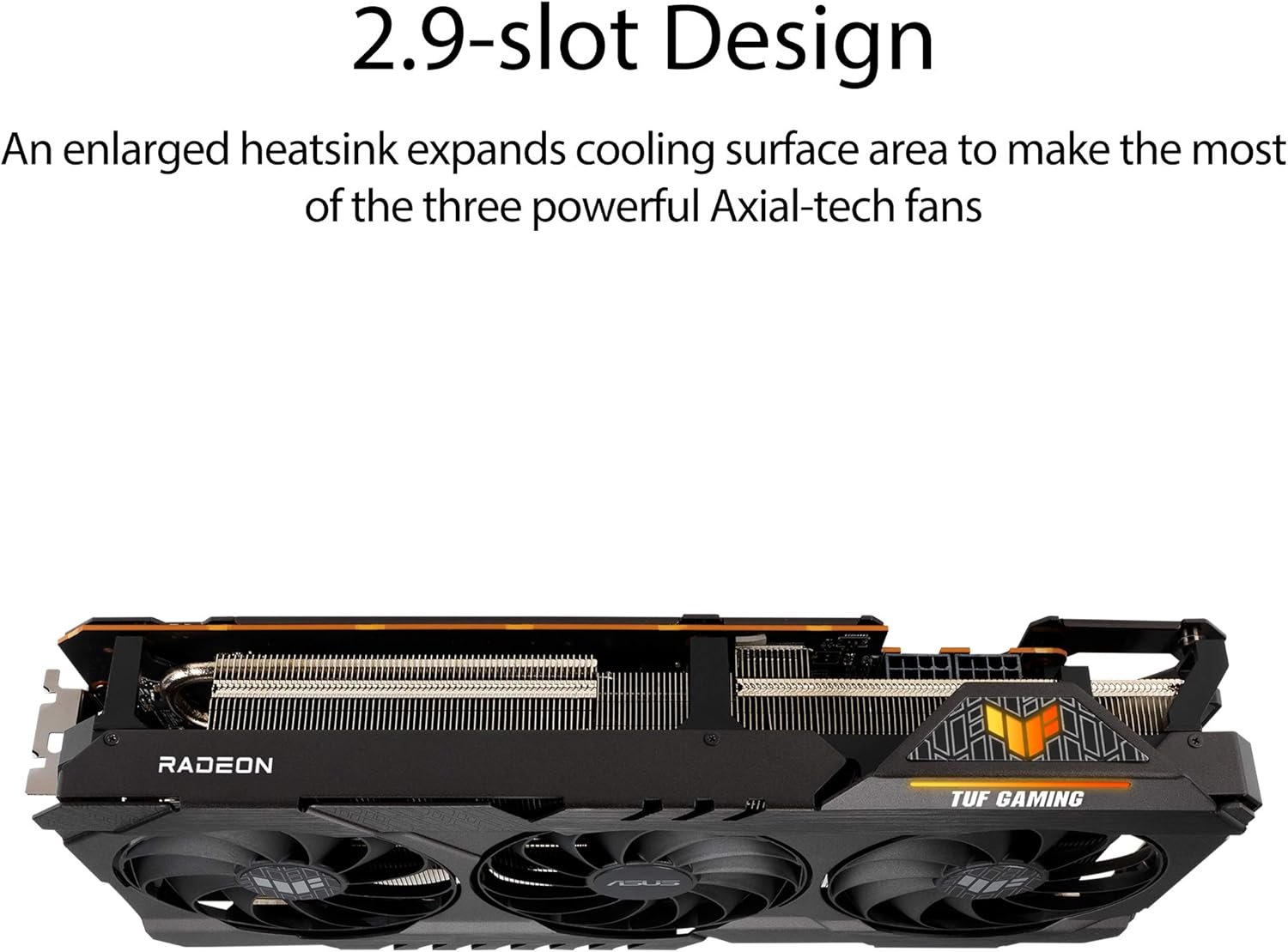
Image 4.1: Close-up of the Axial-tech fan design, highlighting the enhanced fan blades for improved airflow.

Gambar 4.2: Sisi view illustrating the 2.9-slot heatsink design, which maximizes cooling surface area.

Image 4.3: Detail showing the location of the dual ball fan bearings, which provide increased durability.
5. Pangropéa
Pangropéa anu leres mastikeun umur panjang sareng kinerja optimal tina kartu grafik anjeun.
5.1 beberesih
- Bersihkeun lebu tina kipas sareng heatsink sacara rutin nganggo udara anu dikomprés. Pastikeun komputer dipareuman sareng dicabut tina colokan sateuacan dibersihkeun.
- Cekel bilah kipas lalaunan supados henteu muter gancang nalika beberesih, anu tiasa ngaruksak bantalan.
- Hindarkeun nganggo pembersih cair atanapi bahan abrasive.
5.2 Pembaruan Pembaruan
Periodically check the ASUS or AMD websites for updated graphics drivers. Keeping your drivers current can improve performance, stability, and compatibility with new games and applications.
5.3 Manajemén termal
Ensure adequate airflow within your computer case. Poor case ventilation can lead to higher operating temperatures for the graphics card, potentially affecting performance and lifespan.

Gambar 5.1: Internal view of the graphics card's PCB, showing military-grade TUF components designed for durability.
6. Cara ngungkulan
Bagian ieu ngabahas masalah umum anu anjeun tiasa pendak sareng kartu grafis anjeun.
6.1 Taya Kaluaran Témbongkeun
- Pariksa Kabel: Ensure all display cables (HDMI/DisplayPort) are securely connected to both the graphics card and the monitor.
- Sambungan Kakuatan: Verify that the two 8-pin PCIe power connectors are firmly seated in the graphics card.
- Input Monitor: Pastikeun monitor anjeun disetel ka sumber input anu bener.
- Kartu Reseat: Power off your PC, unplug it, and reseat the graphics card in its PCIe slot.
- Test with another monitor/cable: If possible, test with a different monitor or display cable to rule out external issues.
6.2 Masalah Supir
- Pasang deui Supir: If you experience crashes or graphical anomalies, perform a clean installation of the latest graphics drivers. Use a utility like Display Driver Uninstaller (DDU) in Safe Mode to remove old drivers before installing new ones.
- Kasaluyuan: Ensure your operating system is up-to-date and compatible with the latest drivers.
6.3 Overheating
- Monitor Suhu: Use GPU Tweak II or other monitoring software to check the card's temperature during operation.
- Ningkatkeun Aliran Udara: Ensure your PC case has adequate ventilation and that case fans are properly configured.
- Lebu Bersih: Refer to the cleaning instructions in the Maintenance section to remove dust from the heatsink and fans.
Kanggo bantosan salajengna, mangga buka dukungan ASUS websitus atanapi ngahubungan layanan palanggan maranéhna.
7. Spésifikasi
| Fitur | Spésifikasi |
|---|---|
| Grafik Coprocessor | AMD Radeon RX 6800 XT |
| Mémori Video | 16 GB GDDR6 |
| Laju mémori | 16000 MHz |
| Panganteur | PCIe 4.0 |
| Resolusi layar Max | 3840x2160 (4K) |
| Panganteur Kaluaran Video | 1 x HDMI 2.1, 3 x DisplayPort 1.4a |
| Nomer Modél Item | TUF-RX6800XT-O16G-GAMING |
| Item Beurat | 3.74 pon (1.7 kg) |
| Ukuran produk (L x W x H) | 12.6 x 5.52 x 2.3 inci (32.0 x 14.0 x 5.8 cm) |
8. Garansi jeung Rojongan
8.1 Émbaran jaminan
Your ASUS TUF Gaming AMD Radeon RX 6800 XT OC Edition Graphics Card comes with a manufacturer's warranty. Please refer to the warranty card included in your product packaging or visit the official ASUS website for detailed warranty terms and conditions specific to your region. The "TUF Certificate of Reliability" included with your product signifies ASUS's commitment to quality and durability.
8.2 Rojongan Téknis
For technical assistance, driver downloads, FAQs, and further product information, please visit the official ASUS support websitus:
Anjeun ogé tiasa mendakan inpormasi kontak pikeun layanan palanggan ASUS di wilayah anjeun dina portal dukunganana.