1. Bubuka
This manual provides detailed instructions for the installation, operation, and maintenance of the SINOTIMER TM919A-2 LCD Digital Programmable Timer Switch. This device is designed for automatic control of electrical appliances based on programmed time schedules, offering daily and weekly programming options.
2. Fitur Produk
- Weekly 7-day programmable digital time switch.
- Sababaraha voltage options (5V, 12V, 24V, 110V, 220V, 85-265V). This specific model is 220V.
- Detachable battery design for backup power.
- 35mm DIN rail mounting for easy installation.
- LCD display for clear time and program viewing.
- 16 ON/OFF programs per day or week.
- Manual override function.
- High capacity 16A switching contact.
3. Émbaran Kasalametan
WARNING: Risk of electric shock. Installation should only be performed by a qualified electrician or competent person.
- Pastikeun kakuatan dipegatkeun saméméh instalasi atawa perawatan.
- Do not exceed the maximum load capacity of 16A.
- Pariksa bener voltage supply for the specific model (220V for TM919A-2).
- Jauhkeun alat ieu tina kalembaban sareng suhu anu ekstrim.
4. Produk Langkungview jeung Komponén
The SINOTIMER TM919A-2 features an LCD display, control buttons, and wiring terminals for power input and load control.

Gambar 4.1: Hareupeun view of the SINOTIMER TM919A-2 Digital Timer Switch, showing the LCD display, control buttons (P, D+, H+, M+, RESET, MANUAL), and wiring terminals.

Gambar 4.2: The timer switch with its transparent protective cover opened, revealing the control buttons for programming and manual operation.
Tombol kontrol:
- P (Program): Lebet kana modeu setélan program.
- D+ (Day): Adjusts day of the week or program day.
- H+ (Hour): Adjusts hour or program hour.
- M+ (Minute): Adjusts minute or program minute.
- ResET: Reset sadaya setelan kana standar pabrik.
- MANUAL: Toggles output ON/AUTO/OFF.
5. Setup jeung Instalasi
5.1 Diagram Wiring
Refer to the wiring diagram on the side of the device and the illustration below for correct connection. Ensure all connections are secure.

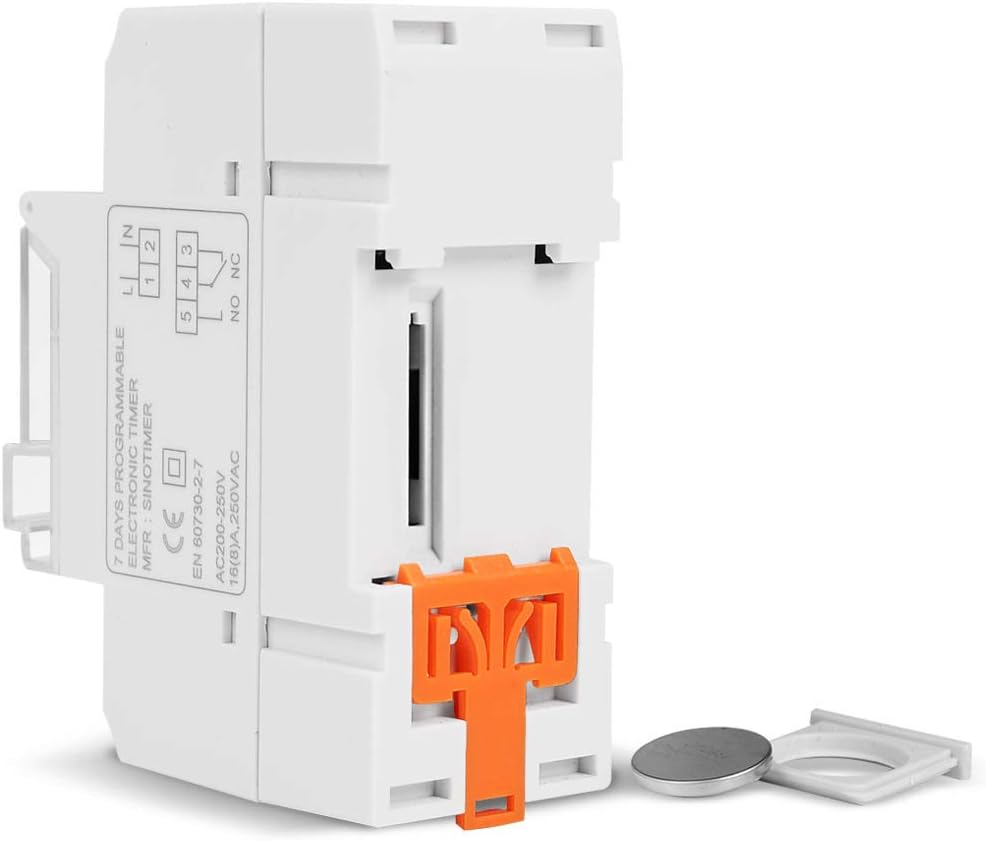
Gambar 5.1: Samping view of the timer switch displaying the wiring diagram. Terminals 1 and 2 are for power input (L and N). Terminals 3, 4, and 5 are for the relay output (Common, Normally Open, Normally Closed).
- Terminals 1 & 2 (L, N): Connect to the main power supply (220V AC for this model).
- Terminal 3 (NO - Normally Open): Connects to the load when the timer is ON.
- Terminal 4 (COM - Common): Connects to one side of the load and the power supply.
- Terminal 5 (NC - Normally Closed): Connects to the load when the timer is OFF (less common for typical applications).
5.2 Initial Power-up and Reset
Upon first power-up or after a long period without power, the LCD display may be blank. The internal battery provides backup for settings. If the display is unresponsive or shows garbled characters, press the RESET button using a pointed object (e.g., a pen tip). This will clear all settings and restore the timer to its default state.
5.3 Nyetél Waktos sareng Dinten Ayeuna
- Pencét éta P button once. The display will show the current time setting.
- Pencét D+ pikeun ngeset dinten ayeuna dina saminggu.
- Pencét H+ pikeun ngeset jam ayeuna.
- Pencét M+ pikeun nyetél menit ayeuna.
- Pencét éta P button again to exit time setting mode and return to normal operation.
6. Parentah Operasi
6.1 Ngaprogram Siklus ON/OFF
The timer supports up to 16 ON/OFF programs. Each program consists of an ON time and an OFF time.
- Pencét éta P button repeatedly until "1 ON" appears on the display. This is the first ON program.
- Pencét D+ pikeun milih dinten kanggo program ieu. Pilihan kalebet dinten-dinten individu, dinten kerja, akhir pekan, atanapi sadaya 7 dinten.
- Pencét H+ to set the desired hour for the "ON" event.
- Pencét M+ to set the desired minute for the "ON" event.
- Pencét P again. "1 OFF" will appear. This is the first OFF program.
- Repeat steps 2-4 to set the day(s), hour, and minute for the "OFF" event.
- Terus pencét P to cycle through "2 ON", "2 OFF", up to "16 ON", "16 OFF". If you do not need all 16 programs, simply press P dugi ka tampilan balik deui ka waktos ayeuna.
- To save and exit programming mode, press the P button until the current time is displayed.
6.2 Manual Override
The MANUAL button allows you to override the programmed settings temporarily or permanently.
- Pencét MANUAL once: Toggles between ON/AUTO/OFF modes.
- ON: The output is continuously ON, ignoring programs.
- Pareuman: The output is continuously OFF, ignoring programs.
- Otomatis: The timer operates according to the programmed ON/OFF cycles. This is the standard operating mode.
7. Pangropéa
7.1 Ngagantian batré
The timer includes a detachable CR2032 lithium battery to maintain time and program settings during power outages. If the display becomes dim or resets frequently, the battery may need replacement.

Gambar 7.1: The timer switch shown with its battery compartment open and a CR2032 lithium battery, indicating the detachable battery design.
- Disconnect power to the timer before attempting battery replacement.
- Locate the battery compartment, typically on the side or back of the unit.
- Cabut batré CR2032 anu lami kalayan ati-ati.
- Insert a new CR2032 battery, ensuring correct polarity (+ side up).
- Tutup kompartemen batré.
- Reconnect power and reset the current time and day if necessary.
8. Cara ngungkulan
- Tampilan kosong:
- Check power supply connections (Terminals 1 & 2).
- Ensure the internal battery is charged or replaced if old.
- Pencét éta RESET kancing.
- Programs are not running:
- Pastikeun timer aya dina OTOMATIS mode (check the display for "AUTO"). Press MANUAL ka modeu siklus.
- Verify that the current time and day are set correctly.
- Check that the ON/OFF programs are correctly entered and enabled for the desired days.
- Confirm wiring to the load (Terminals 3, 4, 5) is correct.
- Timer resets unexpectedly:
- The internal battery may be low or depleted. Replace the CR2032 battery.
- Ensure stable power supply to the unit.
9. Spésifikasi
| Fitur | Spésifikasi |
|---|---|
| Modél | TM919A-2 |
| Sasayogian tanaga | 220V AC (as per model) |
| Konsumsi Daya | 4.5 VA (MAX) |
| Rentang Suhu | -20°C nepi ka +50°C |
| tampilan | LCD |
| Ngalihkeun Kontak | 1 saklar changeover |
| Program | 16 ON/OFF per day or week |
| Histeresis | 2 sec/day (at 25°C) |
| Kapasitas | 16A |
| Jangkauan Timer | 1 menit nepi ka 168 jam |
| Interval Minimum | 1 menit |
| Black-out Memory | 60 days (with internal battery) |
| Item Beurat | 0.15 kg (5.3 ons) |
| Pamasangan | 35mm DIN Rail |
| Ukuran layar | 1.2 inci |
Gambar 9.1: Dimensional drawing of the SINOTIMER TM919A-2, showing measurements in centimeters for height, width, and depth.
10. Garansi jeung Rojongan
Specific warranty information for the SINOTIMER TM919A-2 is not provided in the product details. For warranty claims or technical support, please contact your retailer or the manufacturer directly. Keep your purchase receipt as proof of purchase.


