1. Bubuka
Thank you for choosing the Cecotec Ready Warm 1200 Thermal Connected Electric Heater. This advanced heating solution is designed to provide efficient and comfortable warmth for rooms up to 10 m². Featuring 6 heating elements and 900 W of power, it ensures rapid heating. With its intuitive LED display, programmable timer, and convenient Wi-Fi control via your smartphone, managing your home's temperature has never been easier. This manual provides essential information for safe operation, installation, maintenance, and troubleshooting.
2. Parentah Kasalametan penting
Please read all safety warnings and instructions carefully before using this appliance to prevent electric shock, fire, injury, or property damage. Keep this manual for future reference.
- Always ensure the heater is placed on a stable, level surface or securely mounted to a wall.
- Do not cover the heater or block any air vents. Overheating can occur if the heater is covered.
- Keep combustible materials such as furniture, curtains, and paper at least 1 meter (3 feet) away from the front and sides of the heater.
- Ulah make manaskeun di kamar mandi, wewengkon laundry, atawa lokasi indoor sarupa dimana aya cai.
- Cabut pamanas nalika henteu dianggo atanapi sateuacan beberesih.
- This appliance is equipped with an overheating protection system to ensure safety.
- Activate the child lock function to prevent accidental changes to settings by children.
- Ulah ngoperasikeun manaskeun mana wae ku kabel ruksak atawa colokan, atawa sanggeus manaskeun malfunctions atawa geus turun atawa ruksak ku cara naon baé.
- Entong nyelapkeun atanapi ngantepkeun barang asing asup kana ventilasi atanapi bukaan knalpot sabab ieu tiasa nyababkeun shock listrik atanapi seuneu, atanapi ngaruksak manaskeun.
3. Komponén produk
The Cecotec Ready Warm 1200 heater consists of the main unit and detachable feet for floor standing.

Gambar 3.1: Hareupeun view of the Cecotec Ready Warm 1200 Thermal Connected Electric Heater, showcasing its slim design and control panel on the right side.
- Unsur pemanasan: 6 internal elements for efficient heat distribution.
- Panél kontrol: Integrated LED display and touch buttons for operation.
- Saklar kakuatan: Located on the side or bottom for main power control.
- Kabel listrik: Pikeun nyambungkeun kana stop kontak listrik.
- Feet (optional): Two detachable feet for stable floor placement.
- Wall Mounting Brackets (optional): Pikeun pamasangan témbok anu aman.
4. Setup jeung Instalasi
The Ready Warm 1200 heater offers flexible installation options: it can be used as a freestanding unit with its feet or securely mounted to a wall.

Gambar 4.1: Pahareup-hareup view of the sturdy feet attached to the base of the heater, providing stability for floor standing.

Gambar 4.2: The Cecotec Ready Warm 1200 heater positioned in a living room setting, demonstrating its compact size and aesthetic integration into a home environment.
4.1. Pamasangan Lantai Nangtung
- Cabut bungkus pemanas sareng sadaya asesorisna kalayan ati-ati.
- Attach the two provided feet to the base of the heater using the screws. Ensure they are securely fastened.
- Place the heater on a firm, level surface, ensuring adequate clearance from walls and furniture as per safety instructions.
- Colokkeun kabel listrik kana stop kontak listrik anu cocog.
4.2. Pamasangan Tembok
(Note: Wall mounting hardware and specific instructions may vary. Refer to the separate wall mounting kit instructions if included.)
- Identify a suitable wall location, ensuring it is clear of electrical wiring, plumbing, and combustible materials.
- Mark the drilling points on the wall according to the provided wall mounting bracket template.
- Bor liang teras pasangkeun colokan témbok anu cocog.
- Secure the wall mounting brackets to the wall.
- Carefully hang the heater onto the wall mounting brackets, ensuring it is securely locked in place.
- Colokkeun kabel listrik kana stop kontak listrik anu cocog.
5. Parentah Operasi
5.1. Control Panel Leuwihview
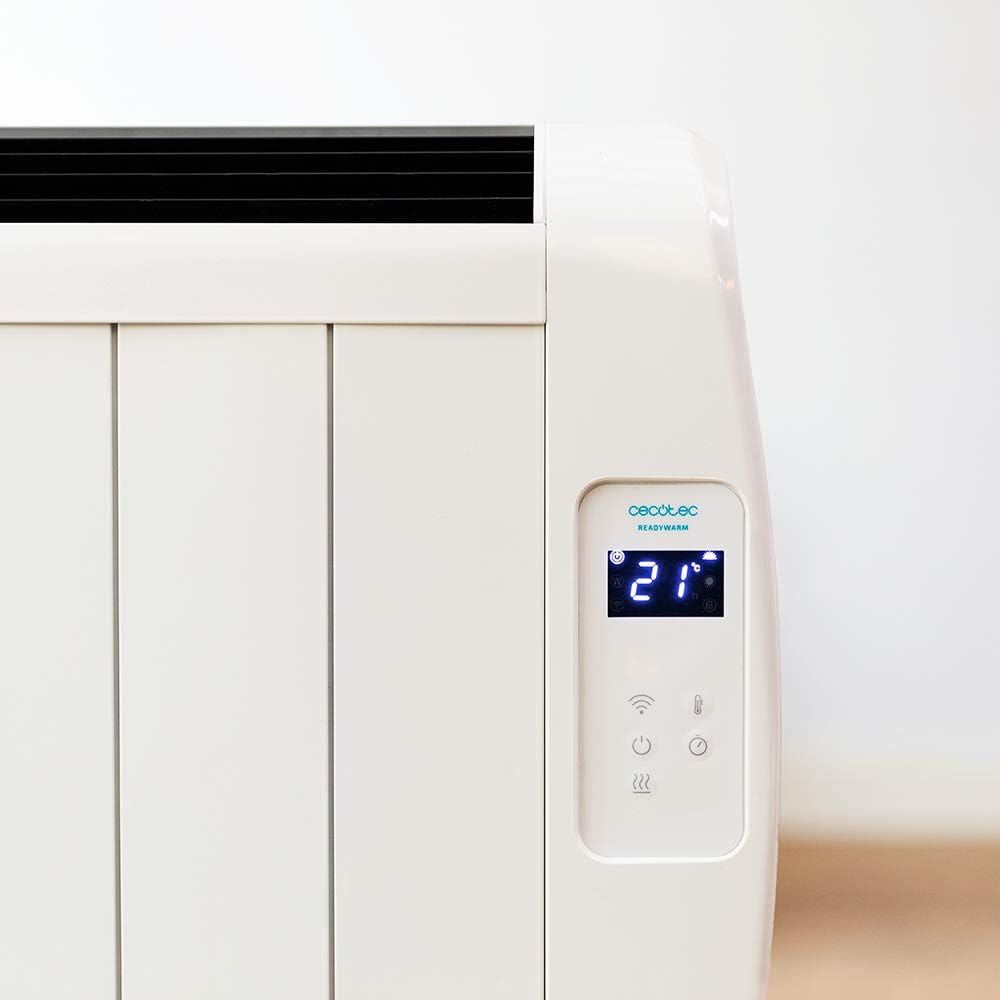
Gambar 5.1: Diwincik view of the heater's LED display, showing the current room temperature (21°C) and various control icons.

Gambar 5.2: Diwincik view of the heater's LED display, showing the timer function set to 4 hours, along with power and Wi-Fi indicators.
The control panel features an LED display and touch-sensitive buttons for easy operation.
- Tombol Daya (⏻): Hurungkeun manaskeun ON / OFF.
- Tombol Mode (M): Cycles through available heating modes.
- Temperature/Timer Adjustment Buttons (+/-): Nyaluyukeun setélan suhu atanapi timer anu dipikahoyong.
- Indikator Wi-Fi: Nembongkeun status sambungan Wi-Fi.
- Tombol Konci Budak: Ngaktipkeun/nonaktipkeun konci anak.
5.2. Operasi dasar
- Ensure the heater is plugged in and the main power switch (if present, usually on the side/bottom) is ON.
- Pencét éta Tombol Daya (⏻) on the control panel to turn on the heater. The LED display will illuminate.
- Pintonan bakal nunjukkeun suhu kamar ayeuna.
5.3. Setélan Suhu
- While the heater is ON, use the + or - tombol pikeun nyaluyukeun suhu nu dipikahoyong.
- Suhu tiasa diatur antara 5 ° C sareng 40 ° C.
- The heater will automatically maintain the set temperature, turning on and off as needed.
5.4. Pilihan Modeu
The heater features 3 operating modes. Press the Tombol Mode (M) to cycle through them. Specific mode details are typically found in the full product manual, but common modes include:
- Modeu kanyamanan: Ngajaga suhu anu nyaman sareng ditangtukeun ku pangguna.
- Modeu Eco: Operates at a lower power setting to save energy while still providing warmth.
- Modeu Anti-beku: Maintains a minimum temperature (e.g., 5°C) to prevent pipes from freezing.
5.5. Fungsi Timer
The programmable timer allows you to set specific times for the heater to turn ON or OFF.
- Pencét éta Tombol Timer (often integrated with mode or a dedicated icon).
- Ngagunakeun éta + or - buttons to set the desired operating duration or delay.
- Confirm the setting. The heater will operate according to the programmed schedule.
5.6. Wi-Fi Control (Smartphone App)
Control your heater remotely using the dedicated smartphone application.

Gambar 5.3: A hand holding a smartphone displaying the Cecotec ReadyWarm app interface, showing temperature control and other settings for the heater.
- Download the official Cecotec ReadyWarm app from your smartphone's app store (iOS or Android).
- Ngadaptar akun tur asup.
- Follow the in-app instructions to add your Ready Warm 1200 heater. This typically involves putting the heater into pairing mode (refer to the heater's display or specific app instructions).
- Once connected, you can control all functions, including power, temperature, modes, and timer, from your smartphone.
6. Pangropéa sarta perawatan
Beberesih rutin sareng perawatan anu leres bakal mastikeun umur panjang sareng operasi anu efisien tina pemanas anjeun.
- Sateuacan beberesih: Salawasna cabut manaskeun tina stop kontak listrik sarta ngidinan pikeun niiskeun lengkep saméméh beberesih.
- Bersihan Luar: Ngusap permukaan luar kalayan lemes, damp cloth. Do not use abrasive cleaners, waxes, or polishes as they may damage the finish.
- Ngaleungitkeun lebu: Use a vacuum cleaner with a brush attachment to remove dust from the air intake and exhaust vents.
- Panyimpenan: Upami nyimpen pemanas kanggo waktos anu lami, cabut colokanna, bersihan tuntas, teras simpen di tempat anu tiis sareng garing, langkung saé dina bungkus aslina.
- Ulah neuleumkeun manaskeun dina cai atawa cairan séjén.
7. Cara ngungkulan
If you encounter any issues with your Cecotec Ready Warm 1200 heater, please refer to the table below for common problems and solutions.
| Masalah | Mungkin Cukang lantaranana | Solusi |
|---|---|---|
| Pemanas teu hurung. | Not plugged in; main power switch OFF; power outage. | Pastikeun kabel listrik dicolokkeun sacara aman. Pariksa saklar daya utama. Pariksa catu daya. |
| Pemanas eureun jalan sacara teu disangka-sangka. | Overheating protection activated; timer expired. | Unplug, allow to cool for 30 minutes, remove any obstructions. Check timer settings. |
| Pemanas teu manaskeun sacara efektif. | Temperature setting too low; room too large; vents blocked. | Increase desired temperature. Ensure heater is appropriate for room size. Clear any obstructions from vents. |
| Masalah sambungan Wi-Fi. | Sandi Wi-Fi salah; router jauh teuing; aplikasi teu diropéa. | Re-enter Wi-Fi password. Move heater closer to router. Update app to latest version. Restart router and heater. |
| Pintonan nunjukkeun kode kasalahan. | Gangguan internal. | Note the error code and contact customer support. Do not attempt to repair. |
8. Spésifikasi
Technical specifications for the Cecotec Ready Warm 1200 Thermal Connected Electric Heater (Model: 05373).
| Fitur | Rincian |
|---|---|
| Nomer modél | 05373 |
| merek | Cecotec |
| Kakuatan | 900 W |
| Unsur pemanasan | 6 |
| Disarankeun Ukuran Kamar | Nepi ka 10 m² |
| Ukuran (L x W x H) | 62.5 x 11 x 67.5 cm |
| Beurat | 4.3 kg |
| Kontrol | LED Display, Touch Buttons, Wi-Fi App Control, Wireless Remote Control |
| Rentang Suhu | 5°C - 40°C |
| Fitur Kasalametan | Overheating Protection, Konci Child |
| Pilihan Instalasi | Wall-mounted or Floor-standing (with included feet) |
9. Garansi jeung Rojongan
For information regarding warranty coverage, technical support, or service, please refer to the warranty card included with your product or visit the official Cecotec websitus. Ulah nyobian ngalereskeun alat sorangan.
Pikeun pitulung salajengna, mangga ngahubungan layanan palanggan Cecotec.


