
Bubuka
The FLAMMA FS05 Multi Modulation Pedal is a versatile stereo effects pedal designed for electric guitar. It offers 11 distinct modulation effects and 7 storable preset slots, providing a wide range of tonal possibilities for musicians.
Émbaran Kasalametan
Always ensure proper power supply connections and use the pedal in a dry environment. Avoid exposing the unit to extreme temperatures or humidity. Disconnect power when not in use or during cleaning.
Eusi pakét
- FLAMMA FS05 Multi Modulation Pedal
- Manual Pitunjuk (dokumén ieu)
- (Power supply teu kaasup)
Produk Leuwihview
The FS05 pedal features a compact design with intuitive controls for easy operation and sound shaping.

Figure 1: FLAMMA FS05 Multi Modulation Pedal front view.
Kontrol sareng Sambungan
Gambar 2: Detil view of the FS05 control knobs.
- Knob RATE: Saluyukeun laju pangaruh modulasi.
- TYPE kenop: Selects one of the 11 modulation effects.
- Kenop JERONA: Controls the intensity or depth of the modulation.
- CTRL 1 Kenop: Adjusts a primary parameter specific to the selected effect (e.g., Mix, Duty, Pitch).
- CTRL 2 Kenop: Adjusts a secondary parameter specific to the selected effect (e.g., Tone, Feedback, Smooth, Bit Rate).
- SAVE/SELECT Button: Used to save presets or select between them.
- LED Indicators (1-7): Show the currently selected preset slot.
- Saklar suku: Activates/deactivates the pedal.
- Input L (Mono) / Input R: Audio input jacks.
- Output L (Mono) / Output R: Audio output jacks.
- DC IN: Power input (9V DC, center negative).
Video 1: Produk resmi réngséview of the FLAMMA FS05 Multi Modulation Pedal, demonstrating its features and 11 modulation effects.
Disetél
Sasayogian tanaga
The FLAMMA FS05 pedal requires a 9V DC power supply with a minimum current of 302mA (center negative). The power supply is NOT INCLUDED with the pedal. Insufficient current may cause operational issues.
Nyambungkeun Pedal
The FS05 supports both mono and stereo connections, offering flexibility for various setups.

Figure 3: Diagram illustrating stereo and mono to stereo connection setups for the FS05 pedal.
- Mono Setup: Connect your guitar to Input L (Mono) and your amplifier to Output L (Mono).
- Setup stereo: Connect your guitar to Input L (Mono) and Input R. Connect Output L (Mono) and Output R to your stereo amplifier atanapi panganteur audio.
Parentah Operasi
Selecting Modulation Effects
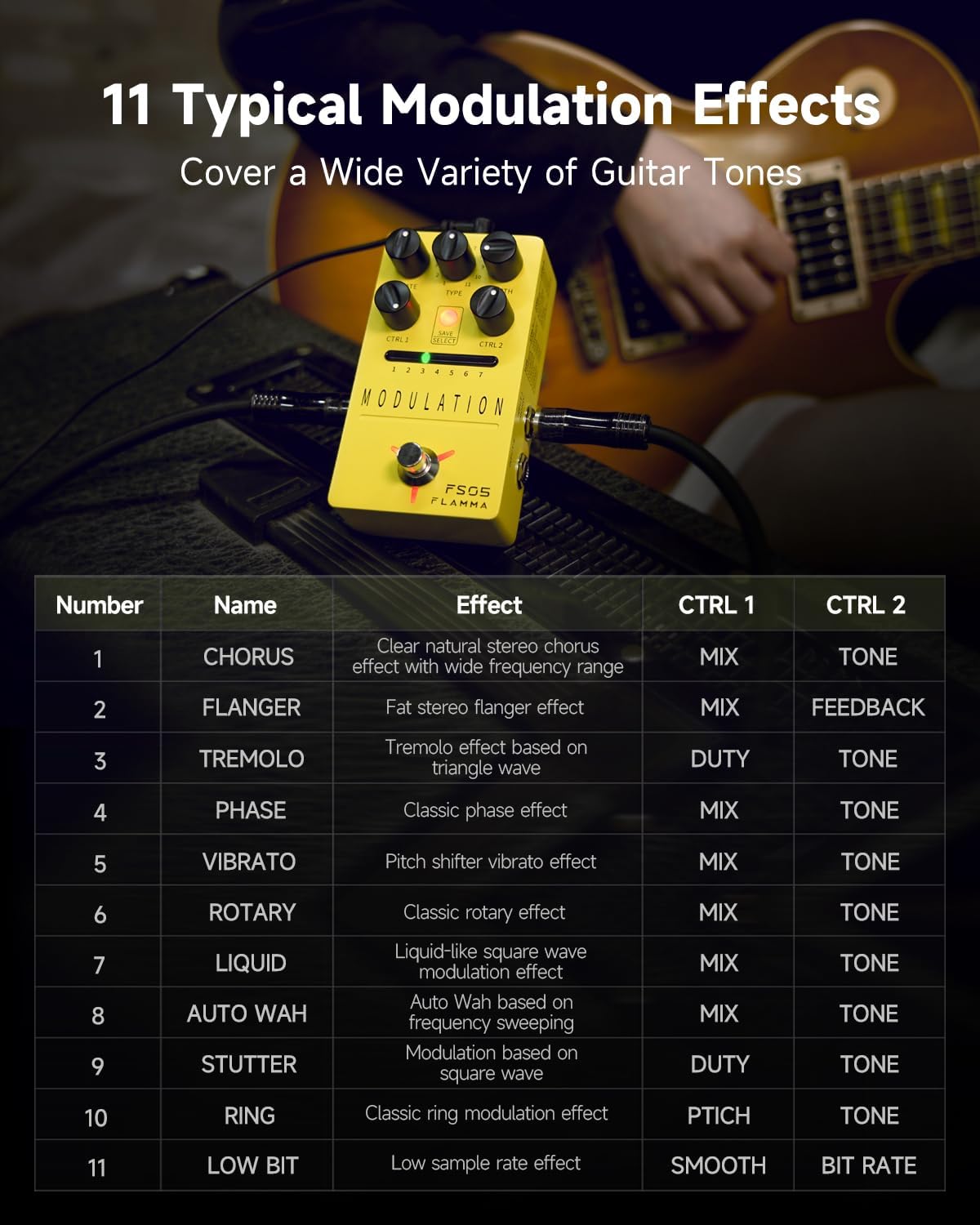
The FS05 offers 11 distinct modulation effects, ranging from classic to experimental tones. Use the TYPE knob to cycle through the available effects.
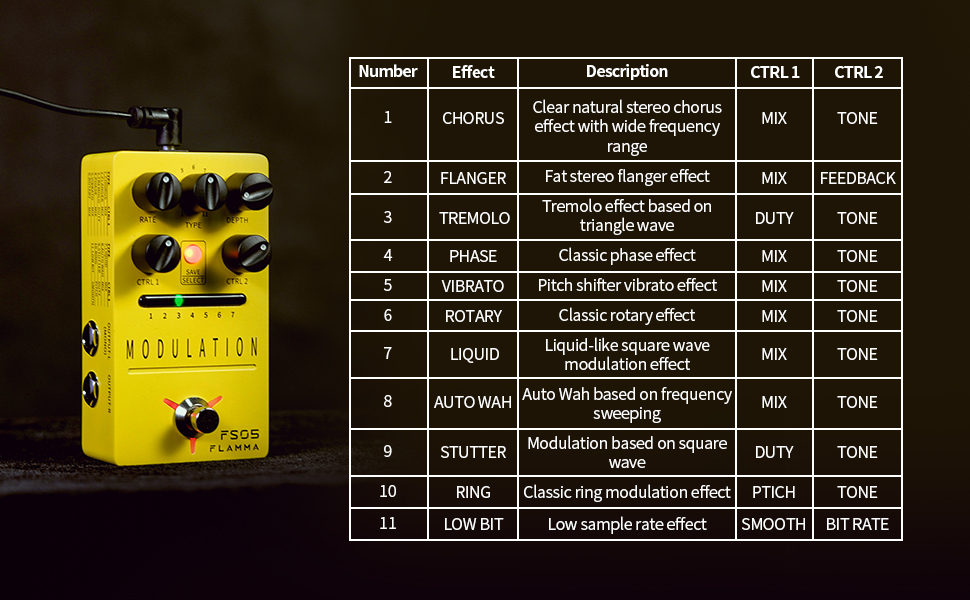
Figure 4: List of 11 modulation effects and their corresponding CTRL 1 and CTRL 2 parameters.
The available effects include Chorus, Flanger, Tremolo, Phase, Vibrato, Rotary, Liquid, Auto Wah, Stutter, Ring, and Low Bit.
Adjusting Effect Parameters
Each effect has adjustable parameters via the RATE, DEPTH, CTRL 1, and CTRL 2 knobs. Refer to Figure 4 for specific parameter functions per effect.

Figure 5: The FS05 pedal highlighting its versatile control knobs.
Nyimpen sareng Nginget deui Preset
The pedal features 7 preset slots to save your customized settings. Use the SAVE/SELECT button and LED indicators to manage your presets.

Figure 6: The FS05 pedal showing the 7 preset slots and SAVE/SELECT button.
- Pikeun Simpen: Adjust the parameters to your desired settings. Press and hold the SAVE/SELECT button until the LED for the current slot flashes, indicating the preset is saved.
- Ngelingan: Briefly press the SAVE/SELECT button to cycle through the 7 preset slots. The corresponding LED will illuminate.
True Bypass / Buffer Bypass
The FS05 features True Bypass to minimize signal loss when the pedal is disengaged. Some videos also mention a low-noise buffer bypass, which helps maintain signal integrity over long cable runs.
Video 2: Demonstration of the FLAMMA FS05 Multi Modulation Pedal's features, including its true bypass functionality and various effects.
Pangropéa
Clean the pedal's exterior with a soft, dry cloth. Do not use abrasive cleaners or solvents. Ensure all connections are secure before and after use.
Pamérésan masalah
- Henteu aya kakuatan: Ensure the 9V DC power supply is correctly connected and provides sufficient current (minimum 302mA).
- Henteu aya sora: Check all audio cables and connections. Verify the pedal is engaged (footswitch LED illuminated).
- Noise nu teu dihoyongkeun: Ensure proper grounding and use a high-quality, isolated power supply.
spésifikasi
- model: FS05
- Beurat barang: 10.5 ons (0.3 Kilogram)
- Ukuran produk: 2.75 "L x 1.97" W x 4.78" H
- Voltage: 9 volt DC
- Undian ayeuna: >302mA (Power Supply NOT INCLUDED)
- Tipe Panyambung: 2.1mm DC power jack
- Format Sinyal: Digital
- Antarmuka Hardware: USB (for potential firmware updates, not for audio)
- Balukar: 11 Modulation Effects (Chorus, Flanger, Tremolo, Phase, Vibrato, Rotary, Liquid, Auto Wah, Stutter, Ring, Low Bit)
- Prasetél: 7 Storable Slots
- Bypass: Bypass leres
Garansi & Rojongan
Kanggo inpormasi garansi sareng dukungan téknis, mangga tingal resmi produsén websitus atanapi hubungi dealer lokal anjeun. Simpen resi pameseran anjeun salaku bukti pameseran.