
1. Produk Langkungview
The EVGA GeForce RTX 3070 FTW3 Ultra Gaming is a high-performance graphics card designed for advanced gaming and creative applications. It features 8GB of GDDR6 memory and is built with NVIDIA's Ampere architecture, offering real-time ray tracing and AI-powered DLSS for enhanced visual fidelity and performance.
This model incorporates EVGA's iCX3 Technology for superior cooling and quieter operation, along with an adjustable ARGB LED lighting system and a durable metal backplate.
Fitur konci
- Real Boost Clock: 1815 MHz; Memory Detail: 8192 MB GDDR6.
- Real-time ray tracing in games for cutting-edge, hyper-realistic graphics.
- Triple HDB Fans with iCX3 Technology offer higher performance cooling and much quieter acoustic noise.
- All-metal backplate & adjustable ARGB.

Figure 1: EVGA GeForce RTX 3070 FTW3 Ultra Gaming Graphics Card and its retail packaging.

Figure 2: The included EVGA GeForce GTX/RTX Installation Guide.
2. Setup jeung Instalasi
This section provides instructions for physically installing your EVGA GeForce RTX 3070 FTW3 Ultra Gaming graphics card and installing the necessary drivers.
2.1 Sarat Sistim
- Motherboard patuh PCI Express sareng slot grafik x16 dual-lebar.
- Minimum 650W or greater power supply with two 8-pin PCIe power connectors.
- Memori sistem minimum 8GB (disarankeun 16GB).
- Microsoft Windows 10 64-bit (April 2018 Update or later) or Linux 64-bit.
- Internet connection for driver installation and updates.
2.2 Instalasi fisik
Turutan léngkah ieu pikeun masang kartu grafik anjeun:
- Step 1: Prepare Your System
Turn off your computer and disconnect the power cable. Open your computer case. It is recommended to ground yourself to prevent electrostatic discharge (ESD) damage. - Step 2: Install the Graphics Card
Locate an available PCI Express x16 slot on your motherboard. Remove any expansion slot covers that obstruct the installation. Carefully align the graphics card with the PCIe slot and press down firmly until it is securely seated. Ensure the retention clip on the PCIe slot locks into place. - Lengkah 3: Sambungkeun Daya
Sambungkeun dua kabel kakuatan PCIe 8-pin tina catu daya anjeun ka panyambung kakuatan anu aya dina ujung luhur kartu grafik. Pastikeun sambungan aman.

Gambar 3: Hareupeun view tina kartu grafis, nunjukkeunasing the triple fan design.
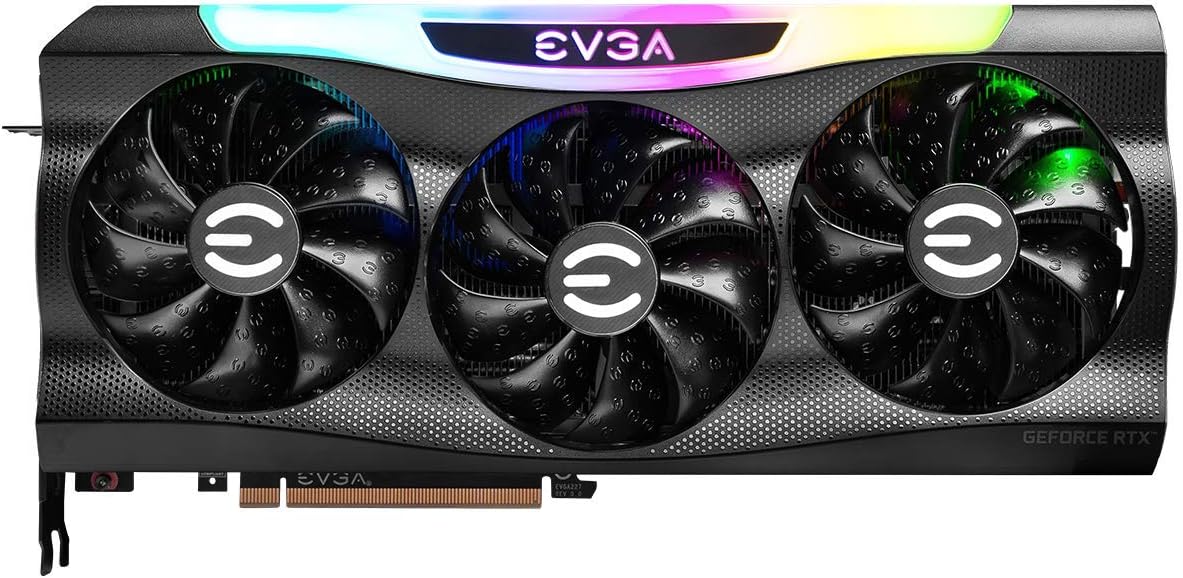
Gambar 4: Hareupeun view with the customizable ARGB lighting illuminated.

Gambar 5: Angled view highlighting the card's profile and cooling fins.

Gambar 6: Angled view with the ARGB lighting active, showing the illuminated EVGA logo.
2.3 Pamasangan Supir
After physical installation, close your computer case, reconnect the power cable, and turn on your computer. You will need to install the latest NVIDIA drivers for optimal performance.
- Lengkah 1: Unduh Supir
Kunjungi NVIDIA resmi websitus (www.nvidia.com/drivers) or the EVGA support page (www.evga.com/support/download/). Select your product (GeForce RTX 3070) and operating system to download the latest Game Ready Driver. - Lengkah 2: Pasang Supir
Run the downloaded driver installer and follow the on-screen prompts. A custom installation is recommended to ensure all necessary components are installed. Restart your computer when prompted to complete the installation.
3. Ngoperasikeun Kartu Grafis Anjeun
Once installed and drivers are up-to-date, your EVGA GeForce RTX 3070 FTW3 Ultra Gaming graphics card is ready for use. It is optimized for high-resolution gaming and demanding creative workloads.
3.1 iCX3 Technology
The iCX3 Technology features multiple thermal sensors and asynchronous fans to deliver precise cooling where it's needed most. This intelligent cooling system helps maintain optimal temperatures and reduces fan noise during operation.
3.2 ARGB LED Customization
The adjustable ARGB LED lighting on your graphics card can be customized using EVGA's Precision X1 software. This software allows you to control lighting effects, colors, and synchronize them with other compatible components in your system. Download Precision X1 from the EVGA websitus.
4. Pangropéa sarta perawatan
Pangropéa anu leres mastikeun umur panjang sareng kinerja optimal tina kartu grafik anjeun.
4.1 beberesih
- Bersihkeun lebu tina kipas sareng heatsink sacara rutin nganggo udara anu dikomprés. Pastikeun komputer dipareuman sareng dicabut tina colokan sateuacan dibersihkeun.
- Cekel bilah kipas lalaunan supados henteu muter gancang nalika beberesih, anu tiasa ngaruksak bantalan.
- Avoid using liquid cleaners directly on the card.
4.2 Pembaruan Pembaruan
Keep your graphics drivers updated to benefit from performance improvements, bug fixes, and compatibility with new games and applications. Check the NVIDIA website regularly for the latest driver releases.
5. Cara ngungkulan
Bagian ieu ngabahas masalah umum anu anjeun tingali.
5.1 Taya Kaluaran Témbongkeun
- Pastikeun kabel monitor disambungkeun aman ka kartu grafik jeung monitor.
- Pariksa yén kartu grafis dipasang sapinuhna dina slot PCIe.
- Check that all PCIe power connectors are securely attached to the graphics card.
- Uji nganggo kabel tampilan atanapi monitor anu béda upami mungkin.
5.2 Poor Performance in Games/Applications
- Ensure you have the latest NVIDIA Game Ready Drivers installed.
- Pariksa setélan grafik dina kaulinan; turunkeun setélan upami kinerjana henteu nyugemakeun.
- Monitor GPU temperature to ensure it's not overheating, which can lead to throttling.
- Pastikeun catu daya anjeun nyumponan wat minimumtage requirement for the card.
5.3 Overheating
- Pastikeun aliran hawa nyukupan dina wadah komputer anjeun.
- Bersihkeun lebu tina kipas kartu grafis sareng heatsink.
- Verify that the fans on the graphics card are spinning correctly.
6. Spésifikasi Téknis
| Fitur | Spésifikasi |
|---|---|
| Nomer modél | 08G-P5-3767-KR |
| Grafik Coprocessor | NVIDIA GeForce RTX 3070 |
| Ukuran mémori | 8 GB GDDR6 |
| Laju mémori | 14000 MHz |
| Naekeun Jam | 1815 MHz |
| Resolusi layar Max | 7680x4320 |
| Panganteur Kaluaran Video | DisplayPort (x3), HDMI (x1) |
| Item Beurat | 3.96 pon |
| Ukuran produk (L x W x H) | 11.81 x 2.19 x 5.48 inci |
| PCI Express | Gen 4 |
| Dukungan DirectX | DirectX 12 pamungkas |

Gambar 7: Tukangeun view of the graphics card, showing the metal backplate.

Figure 8: Display output ports, including three DisplayPort and one HDMI connector.
7. Garansi jeung Rojongan
7.1 Émbaran jaminan
EVGA products are covered by a limited warranty. The specific terms and duration of your warranty may vary based on your region and the product purchase date. Please retain your proof of purchase for warranty claims.
7.2 Rojongan kontak
For technical assistance, warranty claims, or product inquiries, please visit the official EVGA support websitus atanapi ngahubungan layanan palanggan maranéhna:
- Dukungan EVGA Websitus: www.evga.com/support/
- Unduh supir: www.evga.com/support/download/