1. Bubuka
This manual provides essential information for the safe and efficient use of your MEDION P14371 (MD 30044) Full HD 43 inch Android Smart TV. Please read these instructions carefully before operating the device and retain them for future reference.
The MEDION P14371 is a 43-inch Full HD (1920x1080) Smart TV featuring Android TV, HDR support, PVR readiness, and integrated Google Chromecast and Assistant. It offers access to popular streaming services like Netflix and Amazon Prime Video, along with a triple HD tuner for DVB-T2 HD, cable, and satellite reception.
2. Émbaran Kasalametan
Salawasna perhatikeun pancegahan kaamanan di handap ieu pikeun nyegah kejutan listrik, seuneu, atanapi tatu:
- Ulah ngalaan TV ka hujan atawa beueus.
- Mastikeun ventilasi ditangtoskeun; ulah ngahalangan bukaan ventilasi.
- Only use the power cord supplied with the TV.
- Ulah muka TV casing; ngarujuk sadaya jasa ka tanaga anu mumpuni.
- Jauhkeun accu ti barudak jeung buang aranjeunna leres.
3. Eusi Paket
Pastikeun yén sadaya barang aya dina bungkusan:
- MEDION LIFE Smart TV P14371 (MD 30044)
- Suku nganggo sekrup pikeun perakitan penyangga
- Kadali jauh sareng batré AAA
- Buku pituduh
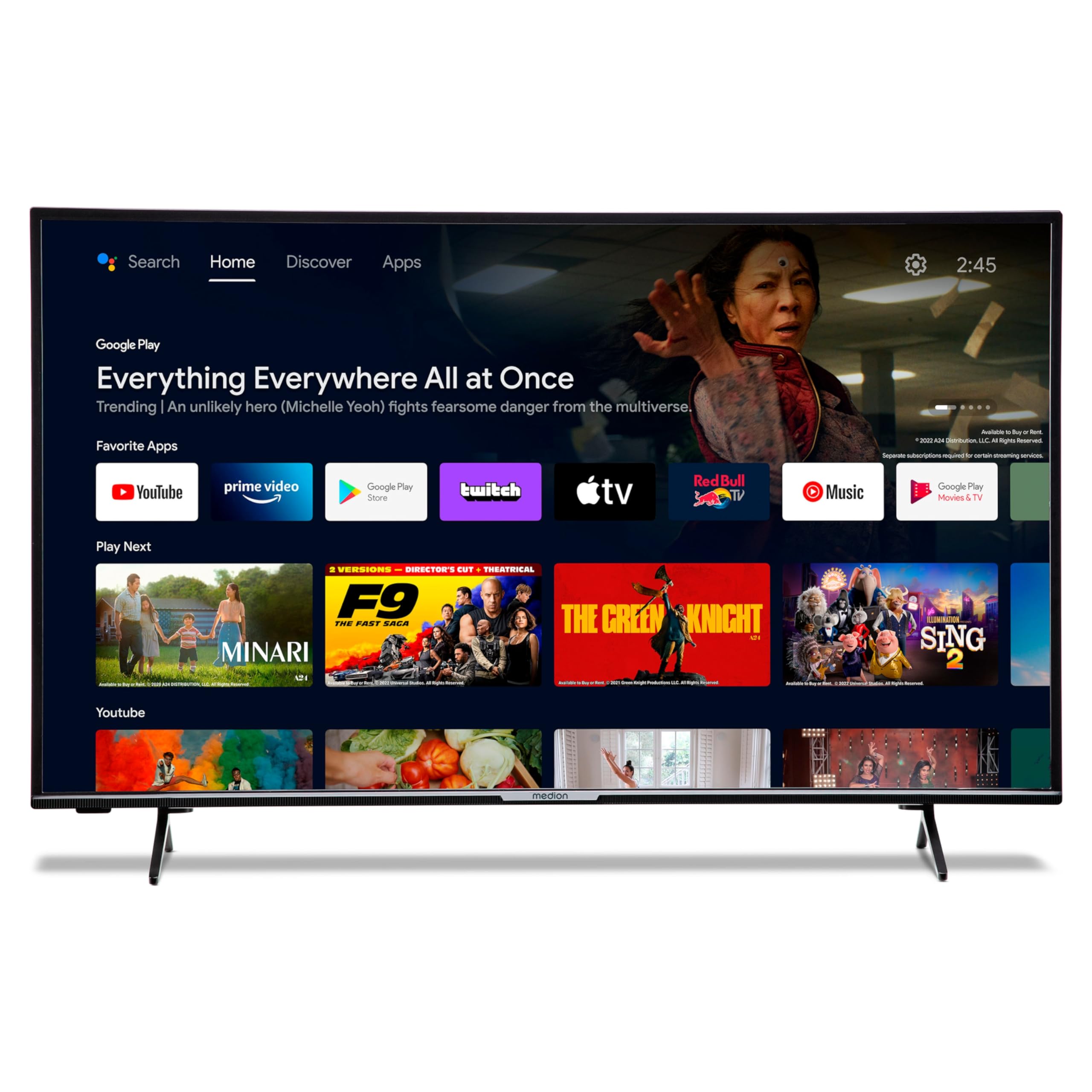
Image: The MEDION P14371 Smart TV with its remote control, illustrating the main components included in the package.
4. Setélan
4.1. Instalasi fisik
Ngalampirkeun Stand:
- Teundeun layar TV sacara saksama dina tempat anu lemes sareng datar pikeun nyegah karuksakan.
- Align the TV feet with the corresponding screw holes on the bottom of the TV.
- Ngamankeun suku ngagunakeun screws disadiakeun.

Image: The MEDION P14371 television securely placed on its stand, ready for use.
Pamasangan témbok: If wall mounting, ensure you use a VESA compatible bracket (100 x 100 mm) and follow the bracket manufacturer's instructions. Remove the stand feet before mounting.
4.2. Panyambungan
Sambungkeun alat éksternal anjeun ka port TV. Tingali gambar di handap pikeun lokasi palabuhan:
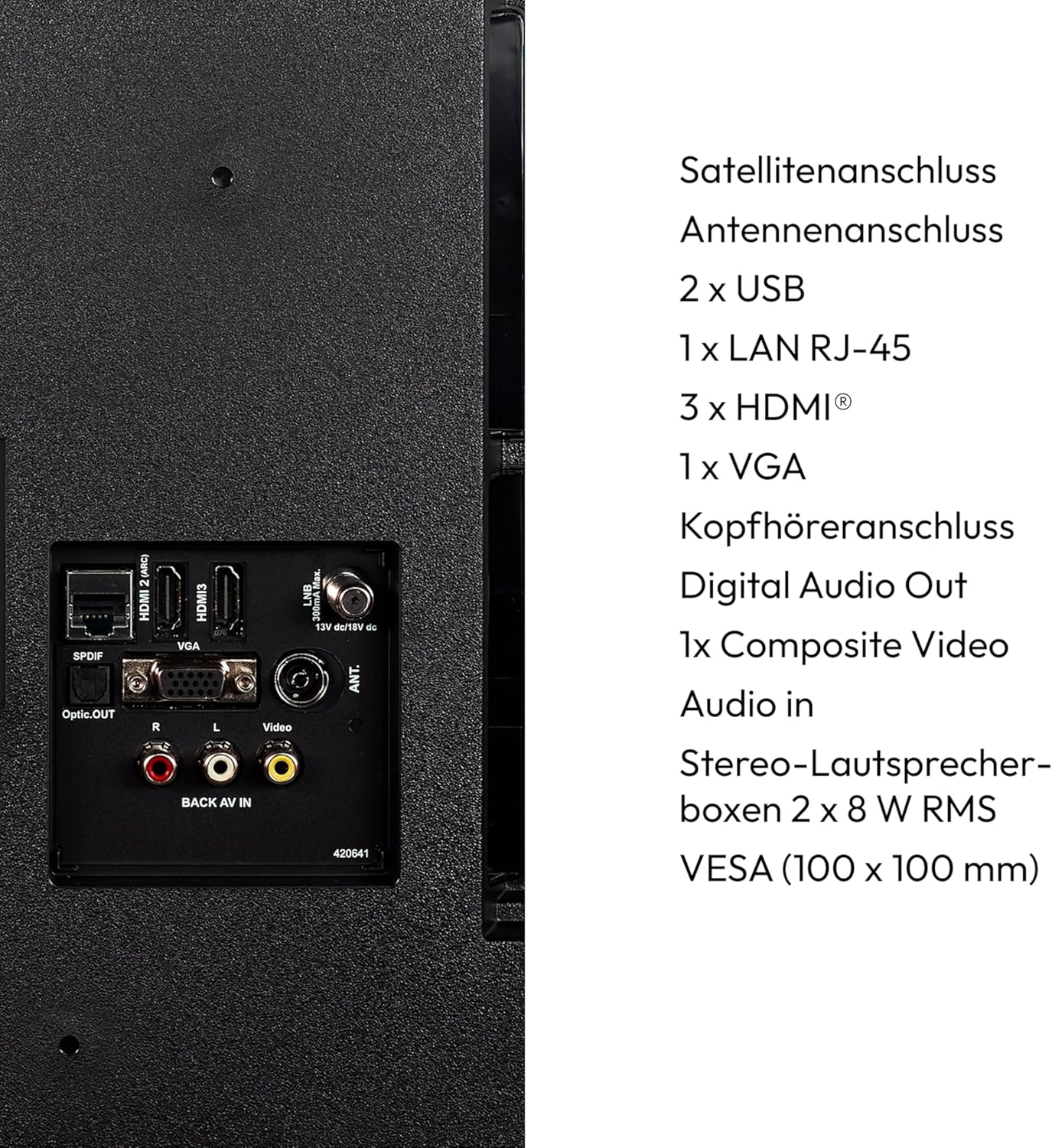
Gambar: A lengkep view of the rear panel of the MEDION P14371 TV, showing various input and output ports including Satellite, Antenna, USB, LAN, HDMI, VGA, Headphone, Digital Audio Out, Composite Video, and Audio In.
- Sambungan Satelit: Connect your satellite dish cable.
- Sambungan Antenna: Connect your terrestrial antenna cable.
- 2 x USB: For connecting USB storage devices for media playback or PVR functionality.
- 1 x LAN RJ-45: Pikeun sambungan internét kabel.
- 3 x HDMI®: Pikeun nyambungkeun alat-alat definisi luhur sapertos pamuter Blu-ray, konsol game, atanapi set-top box.
- 1 x VGA: Pikeun nyambungkeun komputer.
- Jack headphone: Pikeun nyambungkeun headphone.
- Digital Audio Out (Optik): Pikeun nyambungkeun ka sistem audio éksternal.
- 1 x Composite Video (AV In): Pikeun nyambungkeun alat heubeul.
4.3. Daya Awal Hurung
- Saatos sadaya sambungan parantos dilakukeun, colokkeun kabel listrik kana stop kontak témbok.
- Pencét tombol daya dina kadali jauh atanapi dina TV.
- Turutan parentah dina-layar pikeun setelan awal, kaasup pilihan basa, sambungan jaringan, sarta scanning saluran.
5. Ngoperasikeun TV
5.1. Kadali jauh
Kadali jauh anu kalebet nyayogikeun aksés ka sadaya pungsi TV. Selapkeun dua batré AAA sakumaha dituduhkeun dina kompartemen batré.
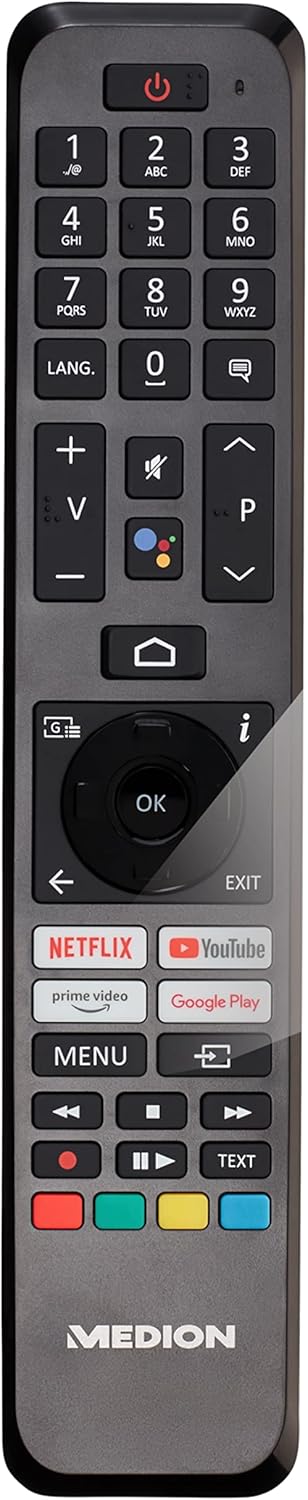
Image: The remote control for the MEDION P14371 TV, showing buttons for power, volume, channel, navigation, Netflix, Prime Video, Google Play, and Google Assistant.
- Tombol Daya: Hurungkeun/pareuman TV atawa keur sayaga.
- Tombol Jumlah (0-9): Pikeun pilihan saluran langsung.
- Volume (+/-): Saluyukeun tingkat polumeu.
- Channel (P+/P-): Robah saluran.
- Tombol Napigasi (Kaluhur/Turun/Kénca/Katuhu/OK): Pikeun menu navigasi jeung pilihan.
- Tombol imah: Ngaksés layar utama Android TV.
- Tombol Balik: Mulih ka layar saméméhna.
- Tombol Asisten Google: Activates voice control (Hey Google).
- Netflix, Amazon Prime Video, Google Play Buttons: Aksés langsung ka layanan streaming ieu.
5.2. Fitur Smart TV (Android TV)
Your TV runs on Android TV, providing access to a wide range of apps and services.

Image: The MEDION P14371 TV displaying the Google Play interface with various apps and games, highlighting its Smart TV capabilities.
- Google Play Store: Download and install your favorite apps, games, and streaming services.
- Chromecast Diwangun-di: Matak eusi tina smartphone, tablet, atawa komputer anjeun langsung ka TV.
- Asisten Google: Anggo paréntah sora liwat kadali jauh pikeun milarian eusi, ngontrol alat home pinter, sareng kéngingkeun inpormasi.
- HDR (Rentang Dinamis Tinggi): Enjoy enhanced contrast and color detail with compatible content.
5.3. Triple HD Tuner
The integrated triple tuner allows reception of digital television signals without an external receiver:
- DVB-T2 HD: Terrestrial digital television.
- DVB-C: Télévisi kabel digital.
- DVB-S2: Digital satellite television.
Perform a channel scan during initial setup or via the TV menu to find available channels.
5.4. PVR (Personal Video Recorder)
Connect a USB storage device to record TV programs. Access the PVR function through the TV menu to schedule recordings or record live TV.
5.5. Konéktipitas Wireless
- Wifi: Sambungkeun ka jaringan nirkabel asal anjeun pikeun aksés internét sareng fitur Smart TV.
- Bluetooth: Sambungkeun headphone nirkabel, bar sora, atawa alat Bluetooth-diaktipkeun séjén.
6. Pangropéa
6.1. beberesih
- Sok cabut TV samemeh beberesih.
- Anggo lawon anu garing sareng lemes pikeun ngusap layar sareng kabinet.
- Pikeun tanda nekad, make rada damp cloth with a mild, non-abrasive cleaner. Do not spray cleaner directly onto the screen.
6.2. Apdet parangkat lunak
The TV may receive software updates to improve performance and add new features. Ensure your TV is connected to the internet to receive these updates. You can check for updates manually in the TV's settings menu.
7. Cara ngungkulan
Upami anjeun ngalaman masalah sareng TV anjeun, tingal solusi umum ieu:
| Masalah | Solusi anu mungkin |
|---|---|
| Taya kakuatan | Pariksa naha kabel listrik dicolokkeun aman kana TV sareng stop kontak témbok. Coba outlet béda. |
| Henteu aya gambar, tapi aya sora | Check the input source. Ensure all video cables are securely connected. |
| Henteu aya sora, tapi aya gambar | Check the volume level and mute settings. Ensure audio cables are connected correctly. |
| Kadali jauh teu jalan | Ganti batréna. Pastikeun teu aya halangan antara jauh sareng sénsor IR TV. |
| Smart TV features are slow or unresponsive | Check your internet connection. Restart the TV by unplugging it for a few minutes and plugging it back in. Clear app caches in settings. |
| Teu bisa nyambung ka Wi-Fi | Ensure your router is on and working. Re-enter the Wi-Fi password. Try restarting your router and the TV. |
8. Spésifikasi
Detailed technical specifications for the MEDION P14371 (MD 30044) TV:
| Fitur | Spésifikasi |
|---|---|
| merek | Mediasi |
| Nomer modél | P14371 (MD 30044) |
| Ukuran layar | 43 inci (108 cm) |
| Téknologi tampilan | LCD LED |
| Resolusi | 1080p HD lengkep (1920 x 1080 piksel) |
| Rasio Aspék | 1.77:1 (16:9) |
| Refresh Laju | 60 Hz |
| Sistem operasi | Android TV |
| Téhnologi konektipitas | Bluetooth, HDMI, USB, WLAN (Wi-Fi) |
| Total palabuhan USB | 2 |
| Fitur husus | Bluetooth, USB Recording (PVR), HDR, Smart/Internet TV, Wi-Fi, Google Chromecast, Google Assistant |
| Dirojong jasa Internét | Netflix, Amazon Prime Video |
| Kelas Éfisiensi Énergi (SDR) | E |
| Konsumsi Daya (SDR) | 42.0 W / 1000h |
| Kelas Éfisiensi Énergi (HDR) | G |
| Konsumsi Daya (HDR) | 62.0 W / 1000h |
| Produsén | Mediasi |
| Komponén Kaasup | Smart TV (MD30044) |
Kanggo inpormasi énergi anu langkung lengkep, mangga tingali database EU EPREL: https://eprel.ec.europa.eu/qr/1587496

Image: Diagram showing the physical dimensions of the MEDION P14371 TV, including width (973 mm), height (570 mm without stand, 627 mm with stand), and depth (92 mm without stand, 250 mm with stand).
9. Garansi jeung Rojongan
MEDION is committed to providing excellent customer service and product support.
- Garansi Umum: A minimum general warranty of 2 years is offered by the supplier.
- Rojongan produk: Guaranteed product support for up to 10 years.
- Kasadiaan suku cadang: Guaranteed availability of spare parts for up to 7 years from the date of market withdrawal.
- Apdet parangkat lunak: Guaranteed software and firmware updates for up to 8 years from the date of market withdrawal.
Our competent customer service team is available 365 days a year. Our customer relationship does not end with the purchase. If an issue cannot be resolved through direct communication, our repair service will handle it quickly and efficiently.
For support, please visit the official MEDION websitus atanapi ngahubungan layanan palanggan maranéhanana langsung.


