
1. Bubuka jeung Leuwihview
This manual provides comprehensive instructions for the installation, operation, and maintenance of your Sharkoon RGB Slider Mid-Tower PC Case. Please read this manual carefully before proceeding with assembly to ensure proper functionality and longevity of your components.
The Sharkoon RGB Slider is a compact Midi-ATX case designed for PC enthusiasts seeking a balance of aesthetics and functionality. It features a tempered glass side panel, an integrated RGB LED strip on the front panel, and support for various cooling and storage configurations.

Gambar 1: Angled hareup view of the Sharkoon RGB Slider PC case, showcasing the RGB LED strip and tempered glass side panel.
2. Eusi Paket
Pastikeun yén sadaya komponén aya dina bungkusan:
- Sharkoon RGB Slider Mid-Tower PC Case
- 1x 120mm Fan (pre-installed in rear)
- Accessory box (screws, cable ties, standoffs)
- Manual pangguna (dokumén ieu)
3. Case Components and Features
Familiarize yourself with the various parts of the PC case.

Gambar 2: Top-handap view highlighting the I/O panel with USB ports and audio jacks, along with the magnetic dust filter on the top panel.
- Panel hareup: Features an integrated RGB LED strip and front ventilation.
- Panel I/O: Located on the top, includes power button, reset button, 2x USB 3.0 ports, 1x USB 2.0 port, and audio jacks.
- Panel Sisi Kaca Tempered: Nyadiakeun jelas view of internal components. Secured with screws at the rear.
- Panel Pungkur: Includes motherboard I/O cutout, expansion slots, and pre-installed 120mm fan mount.
- Interior Layout: Supports ATX, Micro-ATX, and Mini-ITX motherboards. Features a PSU shroud for clean cable management and dedicated drive bays.

Gambar 3: Internal view of the PC case, showing the motherboard tray, PSU shroud, and fan mounting points.
4. Setup jeung Instalasi
Follow these steps for installing your PC components into the Sharkoon RGB Slider case.
4.1 Nyiapkeun Pasualan
- Teundeun wadahna dina permukaan datar anu stabil.
- Remove the tempered glass side panel by unscrewing the two thumb screws at the rear and carefully sliding the panel off.
- Remove the right-side metal panel by unscrewing the two thumb screws at the rear.
4.2 Pamasangan motherboard
- Install the I/O shield into the cutout on the rear of the case.
- Align your motherboard with the pre-installed standoffs. Ensure the standoffs match your motherboard's form factor (ATX, Micro-ATX, Mini-ITX). Additional standoffs may be required and can be installed using the provided tool.
- Ngamankeun motherboard jeung screws luyu ti kotak aksésori.
4.3 Pamasangan Power Supply Unit (PSU).
- Position the PSU into the dedicated compartment at the bottom rear of the case, under the shroud.
- Ensure the PSU fan faces downwards (if the case has a bottom vent) or upwards (if no bottom vent).
- Secure the PSU to the rear of the case with screws.
4.4 Pamasangan Girang Panyimpenan
Casing ieu ngadukung sababaraha konfigurasi panyimpenan:
- SSD 2.5 inci: Three compact SSDs can be mounted on the motherboard tray or on top of the power supply tunnel.
- HDD 3.5 inci: Two 3.5-inch HDDs can be installed in the hard drive cage located under the PSU shroud. This cage can also accommodate 2.5-inch SSDs.
- For 3.5-inch HDDs, slide the drive into the drive cage and secure with screws.
- For 2.5-inch SSDs, mount them to the designated spots using screws.
4.5 Pamasangan Kartu Ékspansi (GPU, jsb.)
- Leupaskeun panutup slot ékspansi perlu ti pungkur kasus.
- Insert your expansion card into the appropriate PCIe slot on the motherboard.
- Secure the card with a screw to the case chassis.
4.6 Fan and Cooling Installation
The case comes with one 120mm fan pre-installed at the rear. Additional fans can be installed:
- Hareup: Up to three 120mm fans.
- luhur: Two 120mm or two 140mm fans.
- Mount fans to the designated positions using fan screws.
- Connect fan power cables to your motherboard or a fan controller.

Gambar 4: Internal view of the case with the tempered glass panel removed, showing the spacious interior for component installation.
4.7 Manajemén kabel
Utilize the cutouts and tie-down points behind the motherboard tray to route cables cleanly. This improves airflow and aesthetics.

Gambar 5: View behind the motherboard tray, illustrating the space available for cable routing and mounting points for SSDs.
4.8 Majelis ahir
- Once all components are installed and cables are managed, reattach the right-side metal panel.
- Pasangkeun deui panel sisi kaca tempered kalayan ati-ati teras amankeun nganggo sekrup jempol.
5. Operating the RGB LED Strip
The integrated RGB LED strip on the front panel offers customizable lighting effects.
5.1 Kontrol Manual
The case features an integrated control button (usually part of the I/O panel or a dedicated button) to cycle through 14 preset lighting modes. Press the button repeatedly to change modes.
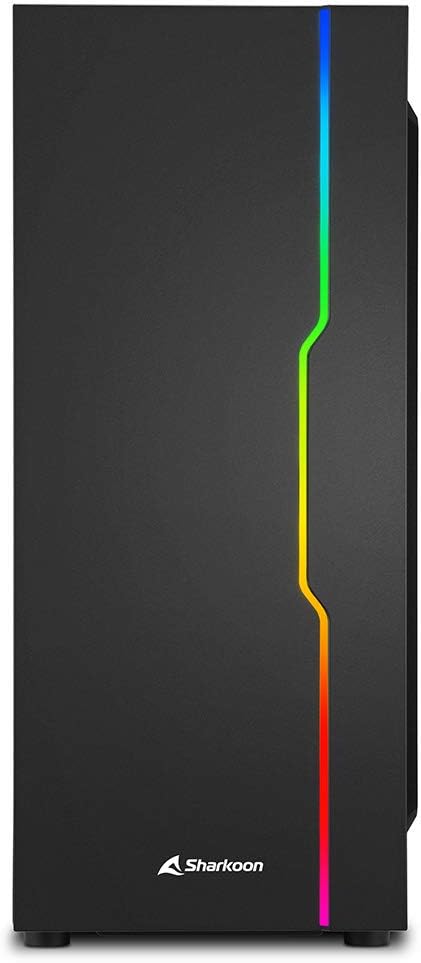
Gambar 6: Hareupeun view of the PC case, showcasing the illuminated RGB LED strip.
5.2 Sinkronisasi Motherboard
The RGB LED strip can be synchronized with compatible motherboards using software such as:
- Asus Aura Sync
- MSI Mystic Light Sync
- Gigabyte Fusion
- ASRock Polychrome SYNC
Connect the RGB cable from the case to the appropriate 5V-D-Coded-G or 5V-D-G pin header on your motherboard. Refer to your motherboard manual for specific header locations and software instructions.
6. Pangropéa
Pangropéa rutin ngabantosan mastikeun kinerja optimal sareng umur panjang komponén PC anjeun.
6.1 Lebu Filter beberesih
The case features removable dust filters (e.g., on the top and bottom). Periodically remove and clean these filters with compressed air or by washing them with water and allowing them to dry completely before reinstallation.
6.2 beberesih exterior
Lap permukaan luar wadahna ku kaén anu lemes,amp lawon. Hindarkeun pembersih atanapi pangleyur anu abrasif anu tiasa ngaruksak lapisan atanapi kaca tempered.
6.3 beberesih interior
Occasionally, open the case and use compressed air to remove dust buildup from internal components and fan blades. Ensure the system is powered off and unplugged before performing interior cleaning.
7. Cara ngungkulan
Bagian ieu ngabahas masalah umum anu anjeun tingali.
7.1 PC Does Not Power On
- Pastikeun catu daya dihurungkeun sareng disambungkeun kalayan leres kana stop kontak témbok.
- Verify all power cables (24-pin ATX, 8-pin CPU, PCIe, SATA) are securely connected to the motherboard and components.
- Pariksa yén kabel switch kakuatan panel hareup disambungkeun neuleu kana header panel hareup motherboard urang.
7.2 RGB LED Strip Not Lighting Up
- Ensure the RGB power cable is connected to a SATA power connector from your PSU.
- If using motherboard synchronization, verify the RGB data cable is correctly connected to a compatible 5V addressable RGB header on your motherboard.
- If using manual control, press the dedicated RGB button to cycle through modes.
7.3 Port USB Teu Fungsional
- Check that the USB 3.0 and USB 2.0 cables from the front panel are securely connected to the corresponding headers on your motherboard.
- Pastikeun driver motherboard tos diénggalan.
8. Spésifikasi
Detailed technical specifications for the Sharkoon RGB Slider PC Case.
| Fitur | Spésifikasi |
|---|---|
| merek | Sharkoon |
| Ngaran modél | Sharkoon RGB Slider |
| Nomer Modél Item | 4044951029846 |
| Jenis Kasus | Pertengahan Menara |
| Motherboard kasaluyuan | ATX, Micro ATX, Mini ITX |
| Bahan | Kaca Tempered, Baja |
| Warna | Hideung |
| Ukuran produk (L x W x H) | 15.75 x 7.48 x 17.95 inci (40 x 19 x 45.6 cm) |
| Item Beurat | 10.56 pon (4.79 kg) |
| Jumlah USB 3.0 palabuhan | 2 |
| Jumlah USB 2.0 palabuhan | 1 |
| Kipas anu tos dipasang | 1x 120mm (rear) |
| Rojongan Kipas (Harepan) | 3 x 120 mm |
| Rojongan Kipas (Top) | 2x 120mm atawa 2x140mm |
| CPU cooler Jangkungna Clearance | Nepi ka 15.7 cm |
| Graphics Card Length Clearance | Nepi ka 33.5 cm |
| Drive Bays (3.5" HDD) | 2 |
| Tempat Drive (SSD 2.5") | 3 (or 2x 3.5" + 1x 2.5") |
| Métode Cooling | Hawa |
| Power Supply ningkatna Tipe | Rear Mount (bottom) |
9. Garansi jeung Rojongan
For warranty information and technical support, please refer to the official Sharkoon websitus atanapi ngahubungan pangecér lokal Anjeun. Simpen bukti pameseran anjeun pikeun klaim garansi.
Official Sharkoon Websitus: www.sharkoon.com