Bubuka
Thank you for choosing the DiamondBoxx 40TWS Portable Bluetooth Speaker. This manual provides essential information for setting up, operating, and maintaining your speaker. Please read it thoroughly before use to ensure optimal performance and longevity of your device.
Émbaran Kasalametan
- Ulah ngalaan speaker ka suhu ekstrim atawa sinar panonpoé langsung pikeun période nambahan.
- Hindarkeun lungsur atanapi nahan panyatur kana tabrakan anu kuat.
- Jauhkeun speaker tina alat médis, sabab ngandung magnét.
- Ulah nyobian ngabongkar atanapi ngarobih speaker. Ieu bakal ngabatalkeun garansi.
- Ensure charging ports are dry before connecting the charging cable.
- Buang batré nurutkeun peraturan lokal.
Eusi pakét
Pastikeun yén sadaya item aya dina pakét anjeun:
- DiamondBoxx 40TWS Portable Bluetooth Speaker
- Kabel Ngecas USB-C
- Manual pangguna (dokumén ieu)
Produk Leuwihview
Biasakeun diri sareng fitur sareng kadali speaker.

Gambar: Hareupeun view of the DiamondBoxx 40TWS speaker, highlighting its dimensions (8.5" length, 3" height, 3.5" depth), IP54 weather resistance, Bluetooth 5.0 connectivity, LED power/charging status indicator, and a frequency response range of 50Hz-18KHz.
Gambar: luhur-handap view of the DiamondBoxx 40TWS speaker, illustrating its support for Bluetooth, NFC, and AUX connections. It also shows compatibility with voice assistants like Siri and S-Voice, and a built-in phone capability for answering or declining calls.

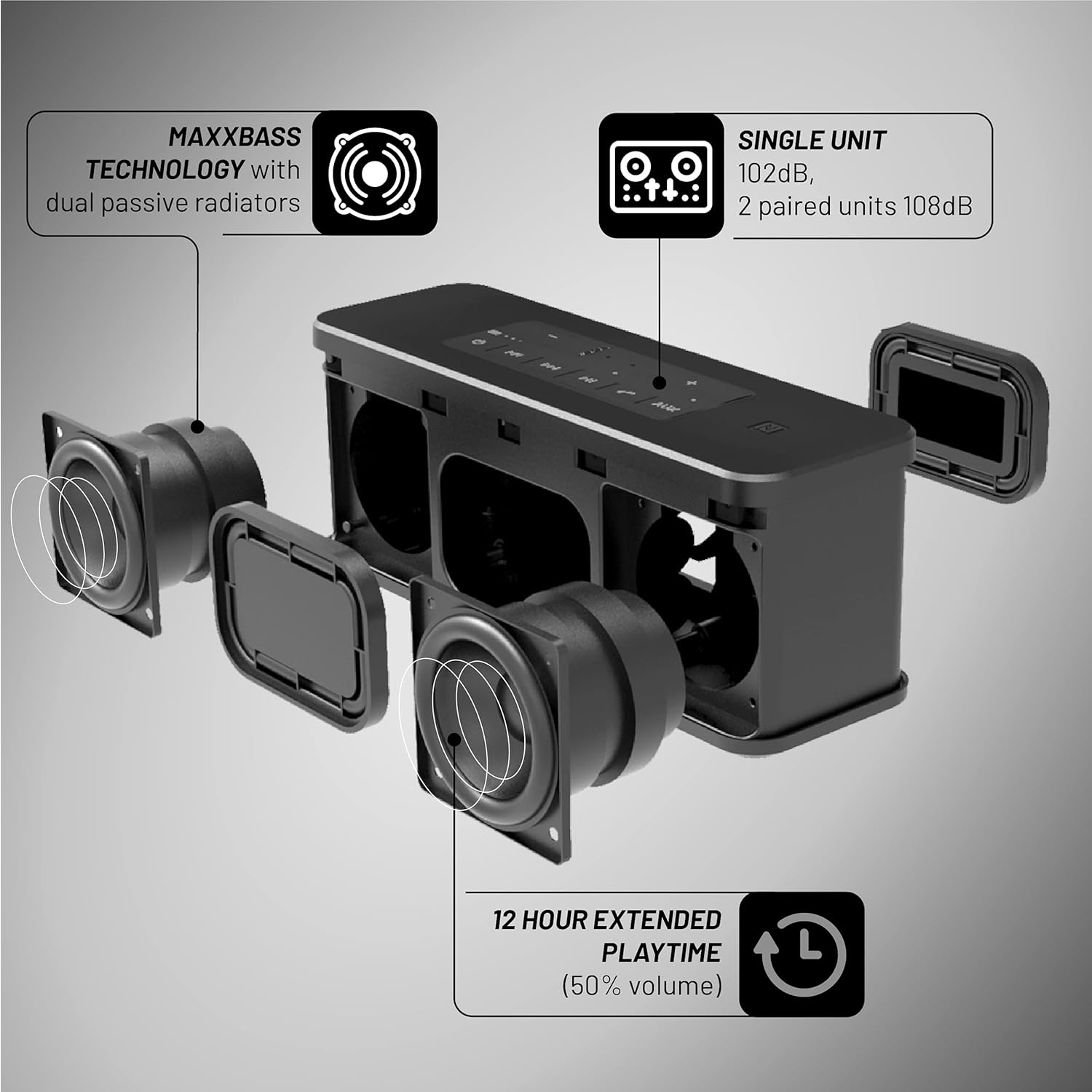
Gambar: Ngabeledug view of the DiamondBoxx 40TWS speaker, detailing its MaxxBass technology with dual passive radiators. It also indicates an extended playtime of 12 hours at 50% volume, a single unit output of 102dB, and 108dB when two units are paired.
Kontrol sareng palabuhan:
- Tombol Daya: Ngahurungkeun atanapi mareuman speaker.
- Tombol Volume (+/-): Saluyukeun volume playback.
- Tombol Puter/Reureuh: Ngadalikeun playback musik sareng ngajawab / mungkas telepon.
- Tombol Ngalangkungan Lagu: Luncat ka lagu salajengna atanapi sateuacanna.
- Tombol Nyapasangkeun Bluetooth: Mimitian mode papasangan Bluetooth.
- Wewengkon NFC: Pikeun masangkeun gancang sareng alat anu nganggo NFC.
- Input AUX: Pikeun sambungan audio kabel.
- Port ngecas USB-C: Pikeun ngecas speaker.
- Standard USB Port: Can be used as a portable charger for other devices.
Disetél
1. Ngecas Speaker
Before first use, fully charge your DiamondBoxx 40TWS speaker.
- Sambungkeun kabel ngecas USB-C kana port USB-C speaker.
- Sambungkeun tungtung kabel anu sanés ka adaptor kakuatan USB anu cocog (teu kalebet) atanapi port USB komputer.
- The LED power/charging status indicator will show the charging progress. It will typically turn off or change color when fully charged.
2. Daya Hurung / Pareum
- Pikeun Ngahurungkeun: Pencét jeung tahan tombol Daya nepi ka indikator LED hurung.
- Pikeun mareuman: Pencét terus tahan tombol Daya deui nepi ka indikator LED pareum.
3. Papasangan Bluetooth
Connect your speaker wirelessly to a Bluetooth-enabled device.
- Ensure the speaker is powered on and within range of your device (up to 33 feet or 10 meters).
- The speaker will automatically enter Bluetooth pairing mode when first turned on, or you can press the Bluetooth pairing button. The LED indicator will flash to show it's ready to pair.
- On your device, go to Bluetooth settings and select "DiamondBoxx 40TWS" from the list of available devices.
- Sakali dipasangkeun, indikator LED bakal eureun kedip-kedip sareng tetep hurung.
4. Pamasangan NFC (Komunikasi Medan Deukeut)
For quick pairing with NFC-enabled smartphones:
- Pastikeun NFC diaktipkeun dina smartphone Anjeun.
- Tap your smartphone gently against the NFC area on the speaker.
- Konfirmasi pamundut papasangan dina smartphone Anjeun.
5. Sambungan AUX
Pikeun muter audio kabel:
- Sambungkeun kabel audio 3.5mm (teu kaasup) ti sumber audio Anjeun ka port input AUX on spéker.
- Spéker bakal otomatis pindah ka modeu AUX.
6. Leres Wireless Stereo (TWS) papasangan
Pair two DiamondBoxx 40TWS speakers for a stereo sound experience.
- Ensure both 40TWS speakers are powered on and not connected to any other Bluetooth device.
- On one speaker, press and hold the Bluetooth pairing button until you hear a confirmation tone, indicating TWS pairing mode.
- Balikan deui léngkah anu sami dina spiker kadua.
- Speaker bakal otomatis nyambung ka unggal lianna. Sakali disambungkeun, hiji spiker bakal meta salaku master (saluran kénca) jeung lianna salaku budak (saluran katuhu).
- Now, connect your device to the master speaker via Bluetooth as described in step 3.
Parentah Operasi
Puterkeun Musik
- Puter / Reureuh: Pencét tombol Puter / Reureuh.
- Volume Kaluhur/Turun: Pencét polumeu + atanapi polumeu - tombol.
- Lagu salajengna: Pencét tombol Next Track.
- Lagu Sateuacanna: Pencét tombol Lagu saméméhna.
Nanganan Telepon
When connected to a smartphone via Bluetooth, the speaker can manage calls.
- Ngajawab Telepon: Pencét tombol Play / Reureuh sakali.
- Tungtung Telepon: Pencét tombol Puter / Reureuh sakali nalika nelepon.
- Nolak Telepon: Pencét jeung tahan tombol Play / Reureuh.
Asisten sora
The speaker supports voice assistants like Siri and S-Voice.
- Aktipkeun Asisten Sora: Press the dedicated Voice Assistant button (if available, or a specific combination as per product design).
Tahan cai (IP54)
The DiamondBoxx 40TWS is IP54 rated, meaning it is protected against dust ingress sufficient to prevent the product from operating normally and against splashing water from any angle. This makes it suitable for outdoor use and protection against light rain or splashes. Éta henteu dirancang pikeun dicelupkeun kana cai. Ensure all port covers are securely closed before exposure to water.
Fungsi Carger Portabel
The standard USB port on the speaker can be used to charge other devices, such as your smartphone.
- Connect your device's charging cable to the standard USB port on the speaker.
- Ngecas bakal otomatis dimimitian.
Pangropéa
beberesih
- Ngusap spéker ku hipu, damp lawon.
- Ulah make cleaners abrasive, alkohol, atawa pangleyur kimiawi.
- Ensure the speaker is completely dry before charging or using.
Panyimpenan
- Simpen speaker di tempat anu tiis sareng garing, jauh tina sinar panonpoé langsung.
- Upami nyimpen kanggo waktos anu panjang, ngeusi batre sakitar 50% unggal sababaraha bulan pikeun ngajaga kasehatan batre.
Pamérésan masalah
| Masalah | Mungkin Cukang lantaranana | Solusi |
|---|---|---|
| Speaker teu hurung. | batré lemah. | Ngecas spéker nganggo kabel USB-C anu disayogikeun. |
| Teu bisa masangkeun via Bluetooth. | Speaker henteu dina mode papasangan; alat Bluetooth pareum; jauh teuing ti speaker. | Ensure speaker is in pairing mode (flashing LED). Turn Bluetooth off/on on your device. Move device closer to speaker. Forget previous pairings on your device. |
| Taya sora. | Volume low teuing; modeu input salah; alat teu diputer. | Increase speaker and device volume. Check if the correct input (Bluetooth/AUX) is selected. Ensure audio is playing on your source device. |
| Distorsi sora. | Volume too high; low battery; poor Bluetooth connection. | Reduce volume on both speaker and device. Charge the speaker. Move device closer to speaker to improve connection. |
| Papasangan TWS gagal. | Speakers already paired to another device; incorrect pairing procedure. | Pastikeun kadua spiker dipegatkeun tina alat anu sanés. Turutan léngkah-léngkah masangkeun TWS kalayan saksama. |
spésifikasi
| Ngaran modél | 40 TWS |
| merek | IntenBoxx |
| Tipe Speaker | Speaker outdoor portabel |
| Téhnologi konektipitas | Bluetooth 5.0, NFC, AUX |
| Komunikasi Nirkabel | Bluetooth |
| Mode Kaluaran Audio | Stereo (saluran 2.0) |
| Speaker Maksimum Kaluaran Power | 40 Watt |
| Réspon Frékuénsi | 50Hz - 18KHz |
| Tingkat Tekanan Sora (SPL) | 102dB (single unit), 108dB (2 paired units) |
| Tingkat Résistansi Cai | IP54 (Tahan Cai) |
| Sumber Daya | Batré Powered |
| Batré Playtime | Nepi ka 12 jam (dina volume 50%) |
| Métode kontrol | Toél |
| Dimensi produk | 8.6 x 2.9 x 3.3 inci (21.8 x 7.4 x 8.4 cm) |
| Item Beurat | 3.23 pon (1.46 kg) |
| UPC | 686091727530 |
Garansi sareng Rojongan
For warranty information and customer support, please refer to the official DiamondBoxx websitus atanapi ngahubungi layanan palangganna sacara langsung. Sarat garansi khusus tiasa bénten-bénten dumasar kana daérah sareng tanggal pameseran.
Dukungan Online: Nganjang ka DiamondBoxx official websitus pikeun FAQ, pendaptaran produk, sareng inpormasi kontak.
Sumberdaya Video
Currently, there are no official seller-created product videos available for embedding in this manual. Please check the manufacturer's website or official channels for any available video tutorials or demonstrations.


