This instruction manual provides essential information for setting up, operating, maintaining, and troubleshooting your new CyberpowerPC Gamer Master Gaming PC, model GMA2130CC. Please read this manual thoroughly before using your computer to ensure proper function and longevity. The Gamer Master series is designed for high-performance computing, featuring an AMD Ryzen 5 3600 processor and NVIDIA GeForce RTX 2060 graphics for an optimal gaming experience.
Naon dina Box
Pastikeun yén sadaya item anu didaptarkeun di handap kalebet kana pakét anjeun:
Desktop PC (CyberpowerPC Gamer Master GMA2130CC)
kibor
Beurit
Kabel listrik
Image: The CyberpowerPC Gamer Master Gaming PC tower, accompanied by the included keyboard and mouse, ready for setup.
Guide Setup
Unpacking sarta panempatan
Carefully remove the PC and all accessories from the packaging. Place the PC on a stable, flat surface with adequate ventilation. Ensure there is enough space around the PC for airflow, especially at the rear and top vents.
Nyambungkeun Periferal
Monitor: Connect your monitor to the graphics card (NVIDIA GeForce RTX 2060) ports located at the lower rear of the PC. Use either the HDMI or DisplayPort connection.
Keyboard sareng Mouse: Connect the included keyboard and mouse to any available USB ports on the rear or top of the PC.
kakuatan: Connect the power cord to the power supply unit (PSU) at the rear of the PC, then plug the other end into a wall outlet or surge protector.
Jaringan (Opsional): For a wired internet connection, connect an Ethernet cable to the RJ-45 network port on the rear of the PC.
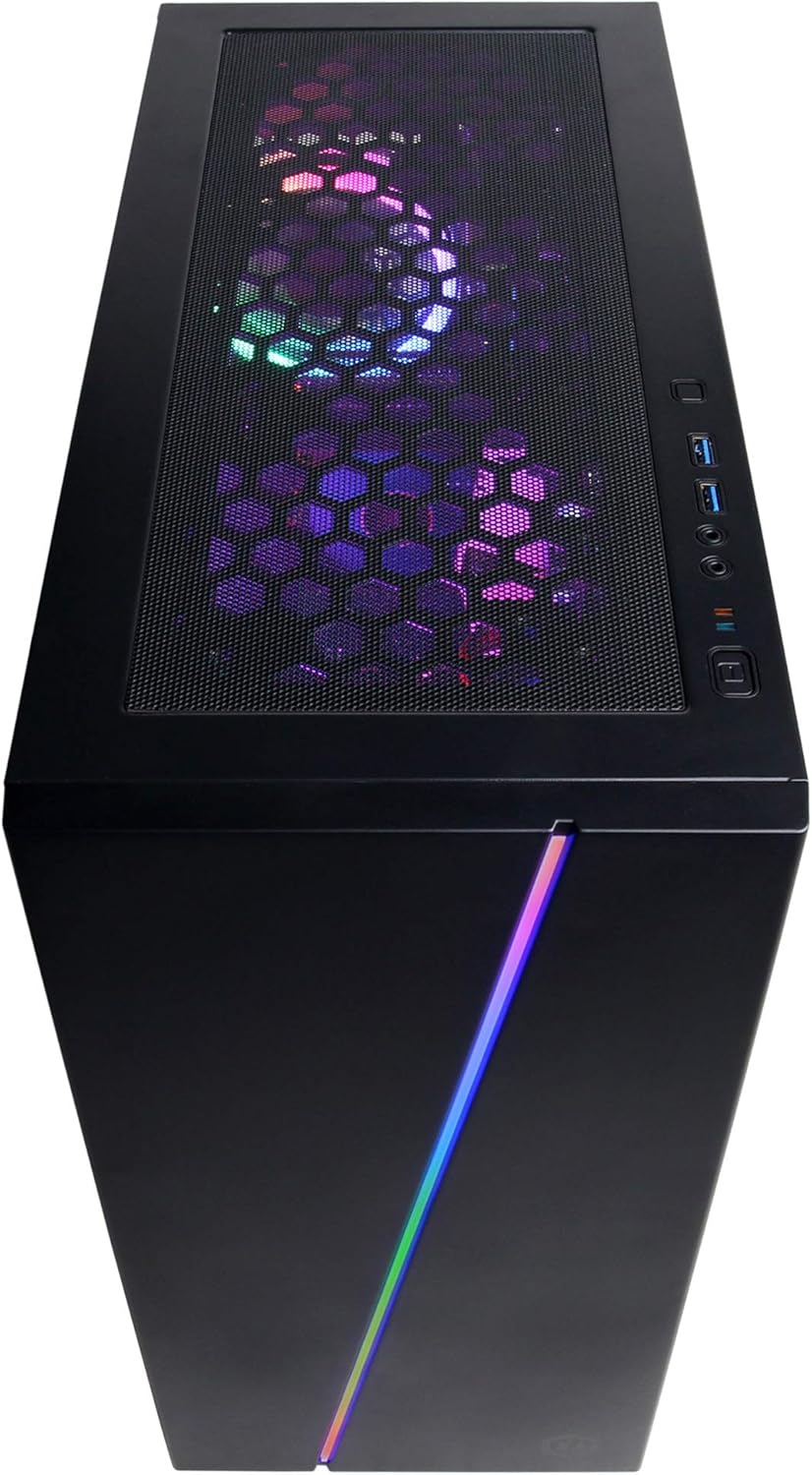
Gambar: A close-up view of the top panel ports, including USB and audio jacks, for convenient peripheral connection.
Gambar: Hiji overhead view of the PC case, showing the top mesh panel for ventilation and accessible front I/O ports.
Daya Awal Hurung
Press the power button located on the top front of the PC. The system will boot up, and you should see the CyberpowerPC logo on your monitor.
Setup Sistem Operasi
Follow the on-screen instructions to complete the Windows 10 Home setup process. This typically involves selecting your region, language, creating a user account, and accepting the license agreement.
Ngoperasikeun PC Anjeun
Windows 10 Imah
Your CyberpowerPC comes pre-installed with genuine Windows 10 Home 64-bit. Familiarize yourself with the Windows interface, Start Menu, and taskbar for efficient navigation.
Connecting to the Internet (Wi-Fi)
Pikeun nyambung ka jaringan nirkabel:
Klik ikon Wi-Fi dina baki sistem (handap katuhu layar).
Pilih jaringan anu dipikahoyong tina daptar.
Klik "Connect" teras lebetkeun konci kaamanan jaringan (sandi) upami dipenta.
Setup Audio
Connect your speakers or headphones to the appropriate audio jacks on the rear or top of the PC. Windows 10 will typically detect and configure the audio device automatically. You can adjust volume and sound settings via the sound icon in the system tray.
Kontrol Lampu RGB
Your PC features custom RGB case lighting and RGB fans. Control software for these features may be pre-installed or available for download from the CyberpowerPC website. Refer to the software's documentation for specific instructions on customizing lighting effects.
Image: The sleek front panel of the PC case, featuring a vibrant RGB light strip that can be customized.
Gambar: Hiji internal view tina PC, nunjukkeunasing the illuminated RGB cooling fans and the neatly arranged internal components.
Pangropéa
beberesih umum
Luar: Ngagunakeun lemes, damp lawon pikeun ngusap bagian luar wadahna. Hindarkeun pembersih anu abrasif.
Saringan debu: Periodically clean the dust filters (if present) on the case to maintain optimal airflow. These are typically located on the top, front, or bottom of the case and can be removed for cleaning.
Komponén internal: For internal cleaning, power off and unplug the PC. Use compressed air to gently remove dust from fans, heatsinks, and other components. Exercise caution to avoid damaging sensitive parts.
Software Apdet
Regularly update your Windows operating system, graphics drivers (NVIDIA GeForce), and other software to ensure system stability, security, and optimal performance. Windows Update can be accessed via Settings > Update & Security.
Pamérésan masalah
This section addresses common issues you might encounter. For more complex problems, refer to the CyberpowerPC support websitus.
Henteu aya kakuatan:
Pastikeun kabel daya disambungkeun pageuh kana PC sareng stop kontak dina témbok.
Check if the power switch on the back of the PSU is in the 'ON' position.
Pariksa stop kontak témbok fungsina ku cara nyolok kana alat sejen.
Henteu aya tampilan dina Monitor:
Pastikeun kabel daya monitor parantos nyambung sareng monitor parantos dihurungkeun.
Ensure the video cable (HDMI/DisplayPort) is securely connected to the graphics card ports on the PC and the monitor.
Verify the monitor input source is correctly selected (e.g., HDMI 1, DisplayPort).
Sistemna Leungit atanapi Henteu Ngarespon:
Tutup program anu teu perlu jalan di latar tukang.
Pariksa malware atanapi virus nganggo parangkat lunak antivirus.
Pastikeun Windows sareng supirna parantos diropéa.
Monitor system temperatures to prevent overheating.
Peripherals (Keyboard/Mouse) Not Working:
Coba sambungkeun periferal ka port USB anu béda.
Balikan deui PC.
Check device drivers in Windows Device Manager.
Spésifikasi teknis
komponén
Spésifikasi
Prosesor
AMD Ryzen 5 3600 3.6GHz (6-core)
Kartu Grafis
NVIDIA GeForce RTX 2060 6GB
Ram
8GB DDR4
Panyimpenan
240GB SSD, 1TB HDD
Sistem operasi
Windows 10 Home 64-bit
Chipset
AMD B450
Konektipitas
802.11ac Wi-Fi, 10/100/1000 Ethernet
palabuhan USB
6x USB 3.1, 2x USB 2.0
Audio
7.1 Saluran Audio
Ukuran (L x W x H)
17.91 x 8.5 x 19.29 inci
Beurat
36 pon
Gambar: Hiji sisi view of the PC case, highlighting the mesh panel design for enhanced airflow and cooling.
Garansi sareng Rojongan
Your CyberpowerPC Gamer Master Gaming PC (GMA2130CC) includes a Garansi 1 taun kanggo suku cadang sareng tenaga kerja. Additionally, CyberpowerPC provides dukungan téknis gratis salami hirup pikeun produk ieu.
For technical assistance, warranty claims, or further inquiries, please visit the official CyberpowerPC support website or contact their customer service. Keep your purchase receipt and product serial number readily available when contacting support.
Note: Opening the PC case may void the warranty if not performed by authorized personnel or according to specific instructions. Consult CyberpowerPC support before attempting internal modifications.