1. Bubuka
The Metrel MI 3394 MultiTesterXA is a portable instrument designed for electrical safety testing and CE certification of electrical appliances, machines, and switchboards. It features an intuitive touch screen display for easy test selection and execution. The instrument supports PASS/FAIL evaluation based on defined test limits and allows for storage of test results.
2. Émbaran Kasalametan
Always observe general safety precautions when working with electrical equipment. Failure to follow these guidelines may result in injury or damage to the instrument.
- Pastikeun alatna aya dina kaayaan anu saé sateuacan dianggo.
- Do not operate the device in wet conditions or explosive atmospheres.
- Use only original Metrel accessories and test leads.
- Follow all local and national electrical safety regulations.
- Disconnect power to the device under test before connecting or disconnecting test leads, unless specifically instructed otherwise for a particular test.
- Vol luhurtage tests can be dangerous. Exercise extreme caution and ensure proper isolation and grounding.
- Refer to the full instruction manual (provided on CD) for detailed safety guidelines.
3. Eusi Paket
Verify that all items listed below are present in your package.
- Instrument MI 3394 CE MultiTesterXA
- HV test lead 5m, without pistols, 2 pcs, S 2073
- Continuity test lead, 2.5 m, 2 pcs
- Continuity test lead, red, 1.5 m
- Insulation test lead, red, 2.5 m
- Insulation test lead, black, 2.5 m
- Klip buaya, hideung, 3 pcs
- Klip buaya, beureum, 2 PCS
- Discharge time cable
- Kabel listrik
- Kantong pikeun asesoris
- Sertipikat kalibrasi
- Kabel RS 232
- kabel USB
- CD with instruction manual (full version)
- Metrel ES Manager BASIC license
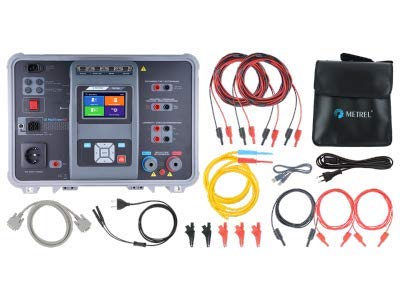
Image: The Metrel MI 3394 MultiTesterXA shown with all standard included accessories, including various test leads, crocodile clips, cables, and a carrying bag.
4. Produk Langkungview
The MI 3394 MultiTesterXA is housed in a robust case, designed for portability and protection. The main unit features a central touch screen display and various connection ports for different tests.
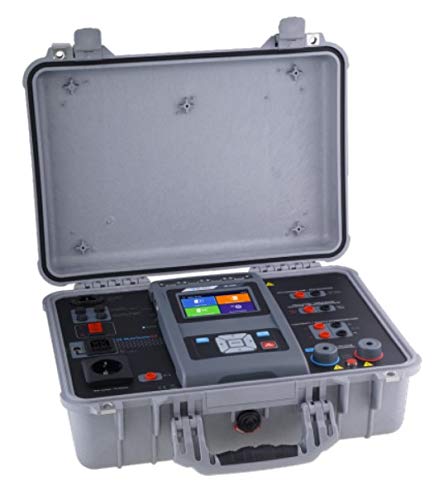
Image: The Metrel MI 3394 MultiTesterXA instrument opened in its protective carrying case, showing the main unit and various connection points.
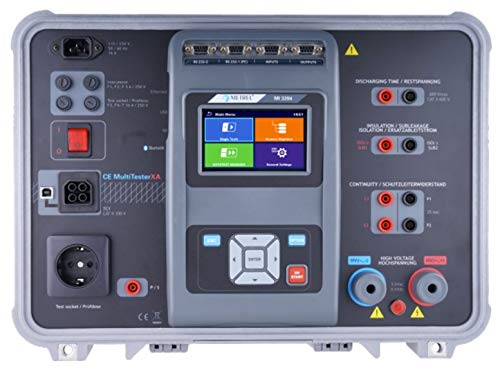
Gambar: rinci luhur-handap view of the Metrel MI 3394 MultiTesterXA's control panel, highlighting the touch screen, navigation buttons, and various input/output terminals for different test functions.

Gambar: Hiji leuwihview of the Metrel MI 3394 MultiTesterXA's key features, measuring functions, and compliance standards.
Komponén konci
- Tampilan layar toél: Central interface for test selection, parameter setting, and result display.
- Tombol Napigasi: Pikeun menu navigasi jeung pilihan.
- Test Socket / Probbene: For connecting devices under test.
- Discharging Time / Restspannung: Terminals for discharge time measurements.
- Insulation / Isolationswiderstand: Terminals for insulation resistance tests.
- Continuity / Schutzleiterwiderstand: Terminals for continuity tests.
- Luhur Voltage / Hochspannung: Terminals for high voltage tés.
- Palabuhan Komunikasi: RS 232, USB for PC connection and data transfer.
Fitur konci
- Manajemén Data: User-friendly data management facility and state-of-the-art memory organizer.
- Multiple Test Terminals: Enables choice between single tests or auto-sequences.
- Support for Test Adapter: A 1460 XA CE ADAPTER enables execution of auto tests from a single test terminal.
- MicroSD: Supports MicroSD memory card (8 GB supplied) up to 32 GB.
- Programmable High Voltage (AC + DC) test.
- 4-wire continuity test.
- PASS/FAIL evaluation of test results.
- Creation of structure with dedicated tests.
5. Setélan
Mimiti Power-Up
- Connect the mains cable to the instrument and a suitable power outlet.
- Pencét tombol daya pikeun ngaktipkeun alat.
- The instrument will boot up and display the main menu on the touch screen.
- Follow on-screen prompts for initial language and date/time settings if required.
Nyambungkeun Tes Ngarah
Connect the appropriate test leads for the desired measurement function to the corresponding terminals on the instrument. Ensure all connections are secure.
- Pikeun Luhur Voltage tests, use the dedicated HV test leads.
- Pikeun Kasaluyuan tests, use the continuity test leads.
- Pikeun Résistansi insulasi tests, use the insulation test leads.
6. Parentah Operasi
The MI 3394 MultiTesterXA offers a range of testing functions accessible via the touch screen interface.
Napigasi Menu
Use the touch screen to select desired test functions. The main menu typically presents options such as:
- Single Tests
- Tés Otomatis
- Mémori
- Setélan
Ngalakukeun Tés
- From the main menu, select the desired test function (e.g., "High Voltage", "Continuity", "Insulation").
- Connect the device under test (DUT) to the appropriate terminals using the correct test leads.
- Set the test parameters (e.g., voltage, current, time) as required for the specific test and standard.
- Initiate the test by pressing the "START" button on the screen or physical button.
- Observe the test results on the display. The instrument will typically provide a PASS/FAIL indication.
- Disconnect the DUT after the test is complete.
- Save the test results to memory if desired.
Fungsi Pangukuran
The MI 3394 MultiTesterXA is capable of performing the following measurements:
- Luhur Voltage: Programmed (AC/DC) and burn test (optional A 1560).
- Uji Kontinuitas: Including 4-wire continuity test.
- Ukur Résistansi Insulasi.
- Arus bocor: Substitute, Differential, Touch, and PE-leakage current.
- Discharge Time.
- Uji Fungsional: Measures power (P/S/Q), voltage, current, cos fi, frequency, ThdU, ThdI, PF.
7. Pangropéa
beberesih
Bersihkeun alatnaasing and display with a soft, damp lawon. Ulah make cleaners abrasive atawa pangleyur.
Kalibrasi
Regular calibration is essential to ensure the accuracy of measurements. Refer to the calibration certificate for recommended intervals. Contact an authorized Metrel service center for calibration.
Perawatan batré
If the instrument is battery-powered, ensure proper charging and storage to prolong battery life. Avoid deep discharge.
8. Cara ngungkulan
This section addresses common issues you might encounter. For more complex problems, refer to the full instruction manual or contact Metrel support.
- Alatna teu hurung:
- Check if the mains cable is securely connected.
- Pastikeun stop kontak listrik fungsina.
- If battery-powered, check battery charge level.
- Test fails unexpectedly:
- Verify that the DUT is correctly connected.
- Check test lead integrity.
- Review test parameters and limits.
- Ensure the DUT is in a safe state for testing.
- Bacaan teu akurat:
- Check if the instrument is due for calibration.
- Ensure test leads are not damaged or improperly connected.
- Verify environmental conditions are within specified operating ranges.
9. Spésifikasi Téknis
The following table outlines the key technical specifications of the Metrel MI 3394 MultiTesterXA.

Image: A detailed table presenting the technical specifications of the Metrel MI 3394 MultiTesterXA, including measuring ranges, resolutions, and accuracies for various functions like HV, continuity, insulation, and leakage current tests.
| Fitur | Nilai |
|---|---|
| merek | Metrel |
| Modél | MI 3394 ST CE MultiTesterXA |
| Sumber Daya | Batré Powered |
| Spesifikasi Met | CE, CSA |
| tampilan | 4.3" colour LCD display with touch screen |
| Komunikasi | RS232, USB and Bluetooth |
| Mémori | 32 GB (internal), MicroSD support (up to 8 GB supplied) |
For detailed measurement ranges, resolutions, and accuracies, please refer to the technical specification sheet provided with the instrument or the image above.
10. Garansi jeung Rojongan
Émbaran jaminan
The Metrel MI 3394 MultiTesterXA comes with a 2-year (24-month) warranty ti produsén. Punten tahan bukti pameseran anjeun pikeun klaim garansi.
Rojongan Palanggan
For technical assistance, service, or calibration, please contact your authorized Metrel distributor or visit the official Metrel websitus.
Pabrikan: Metrel
Websitus: www.metrel.si
11. Asesoris Pilihan
Enhance the functionality of your MI 3394 MultiTesterXA with these optional accessories.

Image: A table listing various optional accessories available for the Metrel MI 3394 MultiTesterXA, including their order numbers and descriptions, such as adapters, test leads, and remote controls.
- A 1428: SanDisk MicroSD card reader
- A 1060: Two way mains adapter
- A 1460: XA CE adapter supports Auto tests
- S 1058: Continuity test lead, 50 m, 2 pcs
- A 1495: Remote control pedal
- S 1072: Continuity test lead with 2 wire adaptor clip, 2.5 m, set of 2 pcs
- A 1496: Awas lamp / 2 LED's signal tower with buzzer
- A 1497: Awas lamp / 4 LED's signal tower with buzzer
- P 1101: Lizenzschluessel fuer Advanced Metrel ES Manager


