1. Bubuka
The UNIWA E1801 is a user-friendly mobile phone designed with large buttons and a clear display, making it ideal for seniors. It features essential functions such as calling, messaging, FM radio, MP3/MP4 playback, and a built-in flashlight. This manual provides comprehensive instructions for setting up, operating, and maintaining your device.
2. Émbaran Kasalametan
- Ulah ngabongkar atawa ngaropéa alat.
- Use only original or approved batteries and chargers.
- Ulah ngantep telepon kakeunaan suhu anu ekstrim, sinar panonpoé langsung, atanapi kalembaban.
- Keep the phone away from medical devices to prevent interference.
- Miceun telepon sareng batréna sacara tanggung jawab numutkeun peraturan lokal.
3. Eusi Paket
Mangga parios eusi pakét nalika unboxing. Upami aya barang anu leungit atanapi rusak, hubungi pangecér anjeun.
- UNIWA E1801 Mobile Phone
- BL-5C 800mAh Battery
- Charger
- Manual pangguna (dokumén ieu)
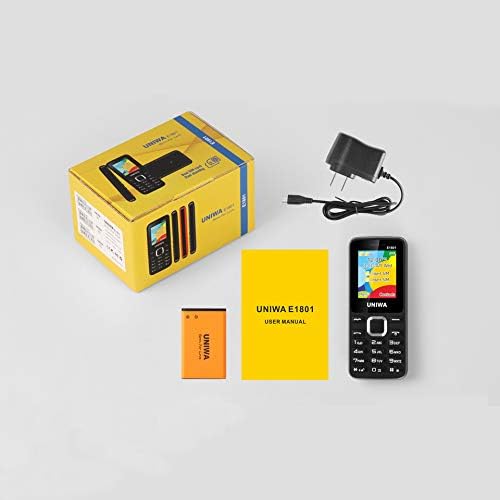
Image: Contents of the UNIWA E1801 package, showing the phone, battery, charger, and user manual neatly arranged next to the product box.
4. Produk Langkungview
Familiarize yourself with the physical components of your UNIWA E1801 phone.

Image: The UNIWA E1801 mobile phone held in a hand, showcasing its compact size, large keypad, and clear color display with the UNIWA logo.
- tampilan: 1.77-inch QQVGA screen (160 x 128 pixels) for clear visibility.
- Papan tombol: Large, ergonomic buttons with clear numbering for easy dialing and navigation.
- Tombol Napigasi: Plated navigation keys for intuitive menu control.
- Kaméra tukang: 0.08 MP camera for basic photo capture.
- Speaker: Integrated 2030 box speaker for loud and clear audio.
- Senter: Built-in LED flashlight for convenience.
- Non-slip Frame: Textured frame design for a secure grip.

Gambar: A close-up view of the UNIWA E1801's keypad, highlighting the ergonomic design and the metallic finish of the central navigation keys.

Image: The UNIWA E1801 phone with an inset showing the detailed texture of its non-slip frame, designed for a secure grip.

Image: The rear of the UNIWA E1801 phone, with an overlay illustrating the powerful 2030 box speaker and its sound projection.
5. Setélan
5.1. Installing SIM Cards
The UNIWA E1801 supports dual SIM cards, allowing you to use two different numbers simultaneously.
- Cabut panutup tukang telepon.
- Locate the SIM card slots.
- Carefully insert your SIM cards into the designated slots with the gold contacts facing down.
- Ensure the SIM cards are securely seated.

Image: The back of the UNIWA E1801 phone with the cover removed, clearly showing the two SIM card slots and an illustration of two SIM cards.
5.2. Masang Batré
- After inserting the SIM cards, place the BL-5C 800mAh battery into the battery compartment, aligning the gold contacts.
- Gently press down until the battery is securely in place.
- Pasang deui panutup tukang, pastikeun éta ngaklik kana tempatna.
5.3. Ngecas Telepon
Sateuacan dianggo anu munggaran, eusian heula batré telepon sacara pinuh.
- Connect the charger to the charging port on the phone.
- Colokkeun carjer ka colokan listrik.
- Indikator batré dina layar bakal némbongkeun status ngecas.
- Sanggeus dicas pinuh, pegatkeun sambungan carjer.
6. Parentah Operasi
6.1. Daya Hurung / Pareum
- Pikeun Ngahurungkeun: Pencét jeung tahan tombol Daya/Tungtung Telepon nepi ka layar hurung.
- Pikeun mareuman: Press and hold the Power/End Call button until the power off options appear, then select "Power off".
6.2. Nelepon
- From the idle screen, enter the phone number using the keypad.
- Pencét tombol Telepon Héjo pikeun ngamimitian telepon.
- Pikeun mungkas telepon, pencét tombol Réngsékeun telepon nu warnana beureum.
6.3. Ngirim Pesen
- Go to "Menu" > "Messages" > "Write message".
- Lebetkeun pesen anjeun nganggo keypad.
- Asupkeun nomer telepon panarima atawa pilih tina kontak.
- Pencét "Kirim".
6.4. Ngagunakeun Radio FM
The phone features a wireless FM radio.
- Go to "Menu" > "FM Radio".
- Select "Auto search" to find available stations.
- Use the navigation keys to switch between stations.

Image: The UNIWA E1801 phone displaying its FM radio interface, showing a frequency of 142.2 MHz, with musical notes and a classic radio in the background, indicating its wireless FM capability.
6.5. Ngagunakeun Senter
The built-in flashlight can be easily activated.
- Typically, a dedicated button or a long press on a specific key (refer to your phone's quick guide) activates the flashlight.
- Alternatively, access it via "Menu" > "Tools" > "Flashlight".

Image: The UNIWA E1801 phone with a bright beam of light emanating from its top, illustrating the built-in flashlight function.
6.6. Fitur séjén
- MP3/MP4 Playback: Supports multimedia playback. Transfer files to a TF card (up to 16GB, not included) and access them via the "Multimedia" menu.
- Buku telepon: Store up to 300 contacts.
- Pakakas: Includes games, calendar, alarm clock, calculator, world clock, and recorder.
7. Pangropéa
- beberesih: Anggo lawon anu lemes sareng garing pikeun ngabersihkeun permukaan telepon. Entong nganggo pembersih cair atanapi aerosol.
- Panyimpenan: Simpen telepon dina tempat anu tiis sareng garing jauh tina sinar panonpoé langsung sareng suhu anu ekstrim.
- Perawatan batré: Avoid fully discharging the battery frequently. Charge it regularly to prolong its lifespan.
8. Cara ngungkulan
| Masalah | Mungkin Cukang lantaranana | Solusi |
|---|---|---|
| Telepon teu hurung. | Batré lemah atawa teu dipasang bener. | Cas batréna. Pastikeun batréna dipasang kalayan leres. |
| Teu tiasa nelepon atanapi nampi telepon. | Teu aya kartu SIM, kartu SIM teu dipasangkeun kalawan bener, atanapi teu aya sinyal jaringan. | Ensure SIM card is inserted. Check network signal strength. Contact your service provider. |
| Kualitas audio goréng. | Low volume, poor network signal, or speaker/microphone obstruction. | Adjust volume. Move to an area with better signal. Clean speaker/microphone openings. |
| Batré gancang boros. | Frequent use, background applications, or old battery. | Kurangan kacaangan layar. Tutup aplikasi anu teu dianggo. Pertimbangkeun pikeun ngaganti batréna upami parantos lami. |
9. Spésifikasi
| Fitur | Rincian |
|---|---|
| Nomer modél | E1801 |
| Diménsi | 108 x 45 x 14 mm |
| Beurat | 68 g |
| CPU | SC6531E |
| Network band | 2G: GSM850/900/1800/1900 MHz, GPRS |
| Kartu SIM | Dual SIM, Dual Standby |
| Kapasitas Buku Telepon | 300 éntri |
| tampilan | 1.77 inch QQVGA, 160 x 128 pixels |
| Kaméra | 0.08 MP Rear Camera, 640 x 480 pixels |
| Multimédia | MP3, MP4 |
| Mémori | Supports TF card up to 16 GB (max) |
| Bluetooth | V2.1 |
| Batré | BL-5C 800mAh |
| Waktu Ngobrol | Nepi ka 240 menit |
| Waktu sayaga | Nepi ka 200 jam |
| Basa | English, Russian, Hebrew, Arabic, French, Spanish, Polish, German, Italian, Portuguese, Chinese |
| Fitur | Games, Calendar, Alarm Clock, Calculator, World Clock, Flashlight, E-book, WAP, Recorder |
10. Garansi jeung Rojongan
Your UNIWA E1801 mobile phone comes with a standard manufacturer's warranty. Please refer to the warranty card included in your package for specific terms and conditions.
For technical support, troubleshooting assistance, or warranty claims, please contact your point of purchase or the official UNIWA customer service. Keep your purchase receipt as proof of purchase.
For more information, visit the official UNIWA websitus atawa ngahubungan saluran rojongan maranéhanana.


